Refresh rate is one of the easiest specs to overpay for. Jumping from 60Hz to 144Hz is a night-and-day upgrade that almost every gamer feels instantly. Going from 144Hz to 240Hz is a different story: the improvement is real, but it is subtle, and it usually costs 30-60% more for the same panel size and resolution. Whether that premium is smart money depends entirely on what you play and how fast your GPU actually is.
As an Amazon Associate we earn from qualifying purchases at no extra cost to you.



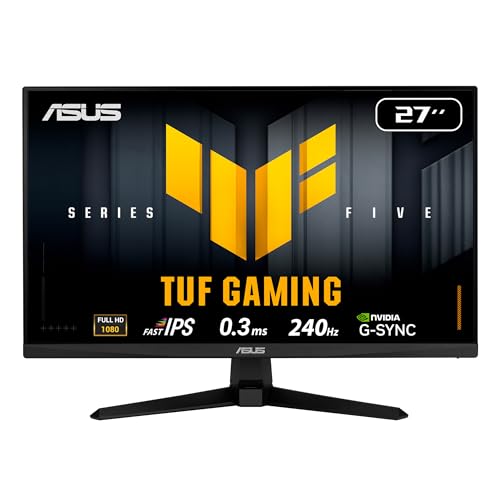
Our Top Picks
 AOC 27" Gaming Monitor QHD 260Hz Overclocked IPS27" 240Hz IPS7.46 x 24.17 x 17.7 inchesCheck on Amazon
 Alienware 34 240Hz QD-OLED Curved Gaming Monitor34.2" QD-OLED31.71 x 9.13 x 21.84 inches20.04 poundsCheck on Amazon
 Alienware AW2725DF OLED Gaming Monitor27.0 OLED9.59 x 23.98 x 15.99 inches13.89 poundsCheck on Amazon
Top 3 picks at a glance
What you are actually paying for
Higher refresh rate shortens the time between frames. At 144Hz a new frame arrives every 6.9ms; at 240Hz it is 4.2ms. That 2.7ms difference reduces motion blur and shaves a sliver off input-to-photon latency. In fast first-person shooters and fighting games, trained players can notice smoother tracking. In slower single-player titles, most people cannot tell the two apart in a blind test.
The GPU has to keep up
A 240Hz panel only pays off if your graphics card can push frame rates near 240 in the games you care about. A mid-range GPU that lands around 130-160 fps in a competitive shooter will spend most of its time below the panel’s ceiling, so you are buying headroom you never touch. Pair a 240Hz screen with a card that comfortably clears 200 fps at your resolution, or the extra Hz is decoration.
Price and value at a glance
| Panel | Typical price (1080p) | Best for | GPU needed |
|---|---|---|---|
| 1080p 144Hz | $130-190 | All-round value | Mid-range, ~150 fps |
| 1080p 240Hz | $200-300 | Competitive FPS | Upper-mid, ~200+ fps |
| 1440p 144Hz | $220-330 | Sharper all-round | Upper-mid |
| 1440p 240Hz | $350-500 | Enthusiast esports | High-end, ~200+ fps |
Diminishing returns are real
Perceived smoothness scales with the percentage change in frame time, not the raw number. The 60-to-144 jump cuts frame time by more than half. The 144-to-240 jump cuts it by roughly 40%, and 240-to-360 barely moves the needle for most eyes. If your budget is fixed, spending the difference on a better GPU, a higher resolution, or a better panel type usually delivers more visible value than the last 96Hz.
When 240Hz is worth it
Buy 240Hz if you mainly play competitive shooters, you already own a GPU that clears 200 fps, and reaction time is central to how you play or rank. In that narrow lane the smoother motion and lower latency genuinely help. Buy it also if the price gap in a sale drops to 10-15%, because at that point the upgrade is nearly free.
When to save the money
Stick with 144Hz if you play a mix of genres, run a mid-range GPU, or game at 1440p where frame rates naturally sit lower. The cash you save covers a mechanical keyboard, an extra SSD, or the jump from 24 to 27 inches, all of which you will notice more day to day.
What about 360Hz and beyond?
If 144-to-240 already shows diminishing returns, 240-to-360 and higher is deep into the territory of paying more for less. The frame-time difference between 240Hz and 360Hz is under 1.5ms, a gap only a small number of elite players can consciously use, and only in the twitchiest titles. Those panels also demand a very fast GPU to feed them, since a screen refreshing 360 times a second does nothing extra if your card produces 180 frames. For virtually everyone, spending on a higher resolution, a better panel type, or simply a stronger GPU returns more visible value than chasing the top of the refresh-rate chart. Treat 240Hz as the practical ceiling for competitive value and 144Hz as the all-round sweet spot.
FAQ
Do I need a special cable for 240Hz?
At 1080p, a DisplayPort 1.2 cable or a good HDMI 2.0 cable handles 240Hz fine. At 1440p 240Hz you want DisplayPort 1.4 or HDMI 2.1 to carry the bandwidth without dropping color depth. Always use the DisplayPort input on the monitor for the highest refresh rate.
Will 240Hz make me a better player?
It removes a small barrier rather than adding skill. The smoother motion can help you track fast targets and react a few milliseconds sooner, but consistent aim, game sense, and practice matter far more than the last chunk of refresh rate.
Bottom line
A 240Hz monitor is worth it for dedicated competitive players with a fast GPU, or when a sale erases most of the price gap. For everyone else, 144Hz remains the value sweet spot, and the money saved buys upgrades you will feel more clearly. Match the panel to the frame rates your GPU actually produces, and you will never overpay for Hz you cannot use.
Related guides
More from Amazon
Programs that pair well with the guide above. Offers and eligibility are set by Amazon and may change.
Free shipping on eligible items, Prime Video and more. Eligible new members can start with a free trial.
Start a Prime free trialAd-free music streaming. Eligible new subscribers can start with a free trial.
Try Music Unlimited freeA Prime membership for ages 18-24 with a trial period. Eligibility is set by Amazon.
See Prime for Young AdultsAudiobooks and podcasts to listen to on the go. Eligible new members can start with a free trial.
Try Audible freeAs an Amazon Associate we earn from qualifying purchases.