
For most buyers, the best affordable gaming PC is an RTX 5060-class system with a six-core modern CPU, 16 GB of DDR5 or fast DDR4, a 1 TB NVMe drive and a branded 650 W 80 Plus power supply; it handles 1080p at high settings and 1440p with upscaling. Reviewers at Tom’s Hardware and Newegg both name RTX 5060 prebuilts as the sensible entry point, while a DIY build around a Ryzen 5 9600X offers more upgrade headroom for builders willing to assemble it.
As an Amazon Associate we earn from qualifying purchases at no extra cost to you.

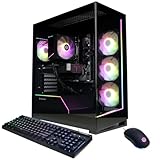


Our Top Picks




Top 3 picks at a glance
At a Glance: Affordable Gaming PC Routes
| Option | Best for | Key stated specs | Limits |
|---|---|---|---|
| CyberPowerPC Gamer Xtreme | Tom’s Hardware’s best budget pick | RTX 5060-class graphics, suited to 1080p play per the outlet | Check the exact configuration; RAM and PSU quality vary |
| ABS Cyclone Aqua | Tightest budget | Newegg lists RTX 5060-tier graphics targeting high-frame-rate 1080p | Entry-level cooling and storage |
| iBUYPOWER RTX 5060 series | General buyers | Named by Everyday Tech Reviews for most people | Model lineups change often; compare parts lists |
| MSI Aegis R2 | High-refresh esports | Named by Everyday Tech Reviews for esports | Proprietary parts in some configurations |
| NZXT Player One | Build quality | NvidiaReview lists a Ryzen 5 configuration | Higher tier for the same GPU |
| DIY Ryzen 5 9600X + RTX 5060 | Upgrade path on AM5 | Build PC Guide calls the 9600X the best budget gaming CPU | You assemble it; total spend may exceed a prebuilt |
What “Affordable” Should Mean in 2026
An affordable gaming PC is not the cheapest box on a shelf. It is the system that delivers smooth 1080p play today, can run 1440p with upscaling, and does not need an immediate part swap. Several 2026 guides note that 16 GB of memory is now the floor rather than a comfortable amount, and that the GPU is where most of the budget should go.
The NVIDIA GeForce RTX 5060 is the usual centrepiece. The maker lists 8 GB of GDDR7 memory, support for DLSS 4 with multi frame generation, and a PCIe 5.0 interface. Eight gigabytes limits the highest texture settings in some newer games, so expect to lower textures at 1440p. AMD’s Radeon RX 9060 XT is the competing option; the maker offers it with 8 GB and 16 GB variants, and the 16 GB version is worth considering if you plan to keep the card for several years.
The Parts That Matter Most
Graphics Card
Choose the GPU first. An RTX 5060 or Radeon RX 9060 XT is the practical starting point for new builds. Older cards sold in discounted prebuilts can look cheap, but they lack current upscaling and frame generation features. Reviewers also advise checking the exact card name, since lower-tier models can have similar branding.
Processor
A six-core processor is enough for mid-range graphics. The Ryzen 5 9600X on the AM5 socket gives you a DDR5 platform and a future upgrade route to faster Ryzen chips. Some prebuilts use Intel Core i5 chips from earlier generations, such as the i5-14400F in one configuration PCBuildHelper lists. These are still capable at 1080p, though the platform offers a less certain upgrade path.
Memory
16 GB is the minimum. Two sticks of memory in dual-channel mode matter more for performance than a single larger stick. If you can afford it, 32 GB provides headroom for streaming and background apps.
Storage
A 1 TB NVMe SSD is a reasonable baseline; modern game installs are large, and 500 GB fills quickly. Prebuilts occasionally use slower QLC drives, which are fine for storage but slower for sustained writes.
Power Supply and Case
A 650 W unit from a known brand with an 80 Plus Bronze or Gold rating is typical for RTX 5060-class systems. Unbranded power supplies are the most common cut corner in cheap prebuilts. Look for a case with a mesh front panel for airflow.
Prebuilt vs Build It Yourself
| Factor | Prebuilt | DIY |
|---|---|---|
| Convenience | Ready to plug in, one warranty contact | You assemble and troubleshoot |
| Parts control | Maker chooses motherboard, PSU, RAM | You select every part |
| Upgrade path | Varies; proprietary parts can limit it | Standard parts, choose AM5 for longevity |
| Value | Often competitive at the entry level | Better at mid-range and above |
Tom’s Hardware found its pick suitable for 1080p play, which matches the cautious expectation for RTX 5060 prebuilts. Budget-tier prebuilts often win on price when GPU and component costs are volatile, while DIY builds win when you want specific parts like a quality PSU or room for a later GPU upgrade.
Compatibility and Fit Notes
- PSU connectors: RTX 5060-class cards typically use a standard 8-pin PCIe connector, but check the card’s listing; higher RTX 50-series models may use the 12V-2×6 connector.
- Case size: Check the maximum GPU length and CPU cooler height if you plan to upgrade.
- Motherboard: A B650-class board for AM5 gives you PCIe 5.0 support on the main slot and room for an upgrade.
- Monitor: A 1080p 144 Hz or a 1440p 165 Hz monitor suits this class of PC.
- Wi-Fi: Check whether the board includes Wi-Fi; if not, plan for Ethernet or a PCIe or USB adapter.
Budget Tier Trade-offs
| Tier | Typical spec | Expect |
|---|---|---|
| Budget | RTX 5060-class GPU, six-core CPU, 16 GB RAM, 500 GB to 1 TB SSD | 1080p high, 1440p with upscaling |
| Mid-range | RTX 5060 Ti or RX 9060 XT 16 GB, Ryzen 5 9600X or better, 32 GB RAM, 1 TB to 2 TB SSD | 1440p high with fewer compromises |
| Premium | RTX 5070-class or above, Ryzen 7 9800X3D | High-refresh 1440p, entry 4K |
Pick X If …
| Pick this | If you |
|---|---|
| CyberPowerPC Gamer Xtreme | want a reviewed budget prebuilt for 1080p play |
| ABS Cyclone Aqua | have the tightest budget and accept entry-level parts |
| iBUYPOWER RTX 5060 series | want a mainstream prebuilt and compare configurations |
| MSI Aegis R2 | play esports titles at high refresh |
| DIY Ryzen 5 9600X build | want an AM5 upgrade path and can assemble it |
Warnings About Budget Prebuilts
Listicles disagree on specs and some contain errors, such as one that lists the RTX 5060 with the wrong amount of memory. Always read the manufacturer’s parts list for the exact CPU, RAM capacity and speed, SSD size and PSU rating before buying. Watch for single-channel memory, unbranded power supplies and tiny SSDs, which are the most common cost cuts.
Alternatives to Consider
- Radeon RX 9060 XT systems: Competes with the RTX 5060; the 16 GB variant offers more VRAM headroom.
- Previous-generation prebuilts: Discounted older systems can offer value, but they lack current upscaling features.
- Used or refurbished PCs: Can be good value with a warranty from the seller, but check the PSU and parts condition.
What to Expect in Games
An RTX 5060-class system targets 1080p at high settings with comfortable frame rates in most current titles, and many reviewers note it can reach 1440p when upscaling such as DLSS or FSR is enabled. Competitive shooters and esports games run at very high frame rates, making the system a good match for a 144 Hz or 165 Hz monitor. The most demanding new releases with ray tracing may need medium settings or frame generation.
The most practical way to judge performance is to look at independent benchmark charts for the specific GPU and CPU in the system you are considering, then compare them with the games you play. Outlets like Tom’s Hardware publish frame-rate results across a standard game suite, which makes comparison easier than relying on a seller’s claims.
Warranty and Support
Check the length of the system warranty and what it covers, including parts, labour and shipping. Some makers cover the complete system for a year or more, while others pass individual parts to their own manufacturer warranties. Read the return policy too, since a dead-on-arrival graphics card is rare but not unheard of.
First-Week Checklist
- Update Windows and install the latest graphics driver from NVIDIA or AMD.
- Enable XMP or EXPO in the BIOS if the memory is not running at its rated speed.
- Uninstall bloatware that the seller preloaded.
- Check temperatures under load with a monitoring tool to confirm the cooling is working.
- Back up the recovery files provided by the maker.
Upgrading Later
The easiest upgrades are adding a second pair of memory sticks, a larger NVMe drive and eventually a new graphics card. Before planning a GPU upgrade, check the PSU wattage and connectors, the case clearance and whether the motherboard has a standard layout.
Frequently Asked Questions
Is an RTX 5060 enough for gaming in 2026?
Yes, for 1080p at high settings and 1440p with upscaling. Its 8 GB of memory may require lower texture settings in the newest games.
How much RAM do I need?
16 GB is the minimum for gaming now. 32 GB gives headroom for streaming, multitasking and future games.
Is a prebuilt or a custom build better?
Prebuilts are convenient and can be competitive at entry level, while a custom build gives you better control over the PSU, motherboard and upgrade path. Compare actual parts lists rather than marketing names.
Which CPU should I look for?
A modern six-core such as the Ryzen 5 9600X is enough. It offers DDR5 and an AM5 upgrade path, which prebuilts with older Intel chips may lack.
What power supply does an affordable gaming PC need?
Around 650 W from a recognised brand with an 80 Plus rating suits RTX 5060-class systems. Always follow the graphics card maker’s recommended wattage.
Should I wait for newer parts?
Hardware cycles are continuous and prices move. If your current PC cannot play the games you want, buying a balanced system now is more practical than waiting for a future release.
Related guides
More from Amazon
Programs that pair well with the guide above. Offers and eligibility are set by Amazon and may change.
Free shipping on eligible items, Prime Video and more. Eligible new members can start with a free trial.
Start a Prime free trialAd-free music streaming. Eligible new subscribers can start with a free trial.
Try Music Unlimited freeA Prime membership for ages 18-24 with a trial period. Eligibility is set by Amazon.
See Prime for Young AdultsAudiobooks and podcasts to listen to on the go. Eligible new members can start with a free trial.
Try Audible freeAs an Amazon Associate we earn from qualifying purchases.


