A gaming desk collects USB devices faster than most motherboards can keep up with. A keyboard, mouse, headset receiver, controller dongle, webcam, capture device, external drive, and a phone cable can fill every rear port on a PC, and reaching behind the case each time something needs swapping gets old quickly. A powered USB hub moves those connections onto the desk, within easy reach, and brings its own power supply so bus-powered devices are not all drawing from one motherboard port.
Not every hub suits a gaming desk equally well, though. The headline port count matters less than the mix of data and charging ports, the strength of the included power adapter, the USB generation, and whether individual ports can be switched off. This guide explains how to choose, then compares five powered hubs covering the main layouts a gaming desk is likely to need.
As an Amazon Associate, we earn from qualifying purchases.
Our Top Picks
Top 3 picks at a glance
Quick answer
Choose a powered hub with enough data ports for the peripherals that must talk to your PC, a port mix that matches how many devices only need charging, and an adapter strong enough to run everything at once. Gamers with many always-connected devices should favor 10-port models with individual switches, while smaller desks can use a hub with seven data ports plus dedicated charging ports.
SABRENT 10-Port 60W USB 3.0 Hub with Individual Power Switches and LEDs (HB-BU10)

The HB-BU10 is the straightforward choice for a desk where every port needs to carry data. All ten of its ports are USB 3.0 data ports, so a keyboard, mouse, headset receiver, controller dongle, webcam, and external drives can all stay connected at once, with no port reserved for charging only. That makes it a good fit for streamers and players whose device count keeps growing.
Each port has its own power switch with an LED, which is genuinely useful on a gaming desk: a device used only occasionally, such as a capture card or backup drive, can be switched off instead of unplugged, and the LEDs show at a glance which ports are live. The hub includes a 60W adapter rated at 12V/5A, giving it its own power budget rather than relying on the PC’s USB port to feed ten devices.
| Specification | Detail |
|---|---|
| Model | HB-BU10 |
| Total ports | 10 |
| Data ports | 10 USB 3.0 ports |
| Charging-only ports | None stated |
| Power adapter | 60W, 12V/5A, included |
| Per-port switches | Yes, with LEDs |
| Housing material | Not stated |


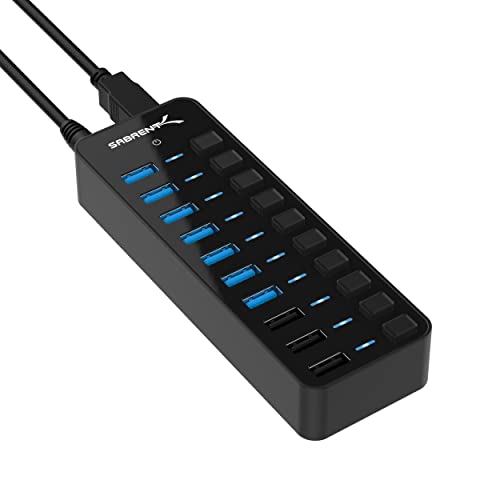
SABRENT 10-Port USB 3.0 Hub with Smart Charging Ports (HB-B7C3)
The HB-B7C3 keeps the same ten-port footprint as its sibling above but splits the ports differently: seven USB 3.0 data ports for peripherals, plus three smart charging ports for devices that only need power. That layout suits a desk where a phone, headset case, or controller regularly needs charging alongside the wired gear.
It also carries individual power switches and LEDs and a 60W power adapter, so the day-to-day experience is similar to the HB-BU10. The listing names compatibility with PC, Mac, Xbox, PS5, laptops, and desktops, which makes it a reasonable pick for a desk shared between a gaming PC and a console. The important thing is not to confuse the two Sabrent models: they share a brand and port count, but the port mix and ASIN differ, so check the model number before ordering.
| Specification | Detail |
|---|---|
| Model | HB-B7C3 |
| Total ports | 10 |
| Data ports | 7 USB 3.0 ports |
| Charging ports | 3 smart charging ports |
| Power adapter | 60W, included |
| Per-port switches | Yes, with LEDs |
| Listed compatibility | PC, Mac, Xbox, PS5, laptop, desktop |
TP-Link Powered USB Hub 3.0 with 7 Data Ports and 2 Smart Charging Ports (UH720)
The UH720 is the slightly smaller option in this group, with nine ports in total: seven USB 3.0 data ports and two smart charging ports. For many gaming desks that is enough, covering the core peripherals with data connections while a phone and one other device charge beside them. It suits a single-monitor setup that does not need ten connections.
Power comes from a 12V/4A adapter, and the hub has a single power on/off button rather than per-port switches, so devices are turned off together instead of individually. The listing states compatibility with Windows, Mac, Chrome OS, and Linux, which suits a desk that pairs a gaming PC with a work laptop. Buyers who like to isolate one device at a time should look at the switched models above.
| Specification | Detail |
|---|---|
| Model | UH720 |
| Total ports | 9 |
| Data ports | 7 USB 3.0 ports |
| Charging ports | 2 smart charging ports |
| Power adapter | 12V/4A, included |
| Power control | Single on/off button |
| Listed compatibility | Windows, Mac, Chrome OS, Linux |
Anker 10-Port 60W Data Hub with PowerIQ Charging Ports
Anker’s entry in this group is a 10-port, 60W hub with seven USB 3.0 data ports and three PowerIQ charging ports. The layout mirrors the HB-B7C3 above, so the same logic applies: peripherals that exchange data with the PC go on the data ports, while phones and tablets charge from the PowerIQ ports. The listing names compatibility with MacBook, iMac, Dell XPS, Surface Pro, iPhone, iPad Air, Galaxy series devices, and mobile hard drives.
One naming caution matters here. This listing is the A7515 family, with item model number AK-A7515111. It is not the older AH231 SKU, so shoppers comparing listings should match the model number rather than going by the port count alone. The listing does not state individual per-port switches, so buyers who want to toggle single devices should weigh the switched hubs in this guide instead.
| Specification | Detail |
|---|---|
| Model | AK-A7515111 (A7515 family) |
| Total ports | 10 |
| Data ports | 7 USB 3.0 ports |
| Charging ports | 3 PowerIQ charging ports |
| Power | 60W |
| Per-port switches | Not stated |
| Listed compatibility | MacBook, iMac, Dell XPS, Surface Pro, iPhone, iPad Air, Galaxy series, mobile HDD |
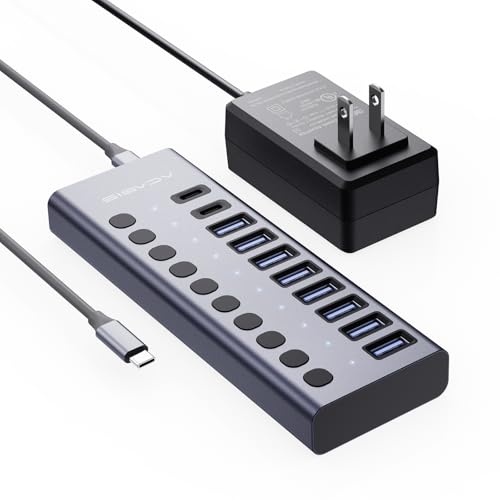
ACASIS 10-Port 60W USB-C 3.2 Hub with Individual On/Off Switches
The ACASIS hub is the pick for players who move large files often, such as recorded gameplay or game installs on external drives. It is a USB-C 3.2 hub rated by the listing at up to 10Gbps, and its ten ports split into two Type-C and eight Type-A, so newer USB-C devices and older USB-A peripherals can share one hub.
Power comes from a 60W adapter rated at 20V/3A, and each port has an individual on/off switch, which pairs well with external drives that only need to be live during transfers. Players whose devices are all USB-A and who rarely move big files will not gain much from the faster standard, but for a desk built around fast external storage this is the most forward-looking layout here.
| Specification | Detail |
|---|---|
| Model | Not stated |
| Total ports | 10 (2 Type-C + 8 Type-A) |
| Data standard | USB 3.2, up to 10Gbps as listed |
| Power adapter | 60W, 20V/3A, included |
| Per-port switches | Yes, individual on/off |
| Housing material | Aluminum |
| Listed uses | PC, computer, laptop, mobile HDD, flash drive |
How to choose
Start by counting devices, not ports on a box. List everything that must exchange data with the PC — keyboard, mouse, headset receiver, controller dongle, webcam, drives — and give each one a data port. Then count devices that only need power, such as a phone or a charging headset case, and check whether the hub’s charging ports cover them. A ten-port hub is the wrong buy if three ports are charging-only and you need nine data connections.
Next, look at the adapter: a powered hub shares its adapter’s output across everything plugged in, so a 60W adapter gives more headroom for drives and charging than a weaker supply. Then consider the USB generation — USB 3.0 is fine for peripherals, while USB 3.2 matters mainly for fast external storage. Finally, decide on switches: individual switches suit devices that stay plugged in but not always on, while a single power button is simpler but controls the whole hub at once.
Who should skip
Skip a large powered hub if your motherboard and case already give you enough reachable ports, since a hub adds a cable and an adapter to the desk for no benefit. Skip these models if you only need two or three extra connections for a laptop, where a small unpowered hub or a docking station is a better match. Also skip every hub here if what you really need is a display connection: none of these listings names video output, because they carry USB data and power only. Players wanting a single-cable laptop docking setup should shop for a dock instead.
FAQ
Will a USB hub slow down my mouse or keyboard?
The listings here do not state latency figures, and ordinary peripherals such as keyboards and mice use very little bandwidth. Many competitive players still plug a primary mouse straight into the motherboard as a matter of habit and use the hub for everything else, which is a reasonable approach.
Can I charge my phone from a data port?
Data ports are for devices that communicate with the PC, while charging ports are the ones designed for power delivery to phones and tablets. For regular charging, use a charging port where provided, and keep data ports free for peripherals.
Why does the adapter wattage matter?
The adapter is the hub’s total power budget. External hard drives, charging phones, and several bus-powered devices together can draw more than a weak supply can give, which can cause dropouts. A 60W adapter, as included with most hubs in this guide, gives the hub room to run a full set of devices.
Is a USB 3.2 hub worth it over USB 3.0 for gaming?
For keyboards, mice, headsets, and controllers, USB 3.0 is already more than enough. The faster USB 3.2 standard mainly helps when you regularly transfer large files to or from an external SSD, which is why the ACASIS hub targets storage-heavy desks rather than lower input delay.
Final verdict
For most gaming desks, the HB-BU10 is the safest default because all ten ports carry data and each one can be switched individually. Desks that also charge a phone and accessories every day are better served by the HB-B7C3 or the Anker hub, which trade three data ports for dedicated charging. The TP-Link UH720 covers smaller setups with a simpler single-button design, and the ACASIS hub is the one to pick when fast external storage and USB-C connections matter. Match the port mix to your device list and any of the five will clean up a crowded desk.
Related guides
More from Amazon
Programs that pair well with the guide above. Offers and eligibility are set by Amazon and may change.
Free shipping on eligible items, Prime Video and more. Eligible new members can start with a free trial.
Start a Prime free trialAd-free music streaming. Eligible new subscribers can start with a free trial.
Try Music Unlimited freeA Prime membership for ages 18-24 with a trial period. Eligibility is set by Amazon.
See Prime for Young AdultsAudiobooks and podcasts to listen to on the go. Eligible new members can start with a free trial.
Try Audible freeAs an Amazon Associate we earn from qualifying purchases.