- Top Pick: TP-Link Archer TX55E, WiFi 6 AX3000 PCIe Card
- Runner-up: TP-Link Archer TX55E, WiFi 6 AX3000 PCIe Card
- Also consider: TP-Link Archer TX55E, WiFi 6 AX3000 PCIe Card
Not every gaming room sits next to the router, and running a long Ethernet cable is not always practical. A desktop PC that needs wireless has two form factors to choose from: a PCIe card inside the case, or a USB adapter in a port. Both can deliver fast WiFi 6 or WiFi 6E connections, but they differ in antenna design, stability under load, extras such as Bluetooth, and installation effort.
This guide compares three PCIe cards — two TP-Link Archer models and an ASUS card, in the AX3000 to AXE5400 classes — against two USB adapters, a NETGEAR Nighthawk and an EDUP dongle, both WiFi 6E AXE3000 models.
As an Amazon Associate, we earn from qualifying purchases.
Top 3 picks at a glance
Quick answer
Choose a PCIe WiFi card if your gaming PC stays in one place: cards such as the TP-Link Archer TX55E and TXE75E use full-size antennas, hold a steadier connection, and add Bluetooth for controllers and headsets. Choose a USB adapter such as the NETGEAR Nighthawk A8000 or EDUP AXE3000 for a quick, tool-free install, portability between machines, or a case you cannot open.
TP-Link Archer TX55E, WiFi 6 AX3000 PCIe Card
The TP-Link Archer TX55E is the mainstream PCIe pick: a WiFi 6 card in the AX3000 speed class, built on the 802.11ax standard with dual-band operation across 2.4GHz and 5GHz. For gaming, the listing’s MU-MIMO support and ultra-low latency positioning matter most, keeping ping steadier when other devices share the network. It also carries WPA3 security.
Bluetooth 5.2 is built in, a genuine advantage of the card format: one install covers networking plus controllers, headsets, and other Bluetooth peripherals. Installation means seating the card in a free PCIe slot and connecting the Bluetooth lead to an internal USB header, so confirm your board has a spare header before buying. The listing limits support to 64-bit Windows 11 and 10. Rear-bracket antennas can be angled for a better signal path, an advantage a small USB dongle cannot match. For most Windows desktops on a WiFi 6 router, this is the balanced default choice here.
| Spec | Detail |
|---|---|
| Form factor | PCIe card |
| WiFi standard | WiFi 6 (802.11ax) |
| Speed class | AX3000 |
| Bands | Dual band (2.4GHz and 5GHz) |
| Bluetooth | 5.2 (as listed) |
| Security | WPA3 |
| OS support | Windows 11 and 10, 64-bit only (as listed) |
| Antennas | External, bracket-mounted |



TP-Link Archer TXE75E, WiFi 6E AXE5400 PCIe Card
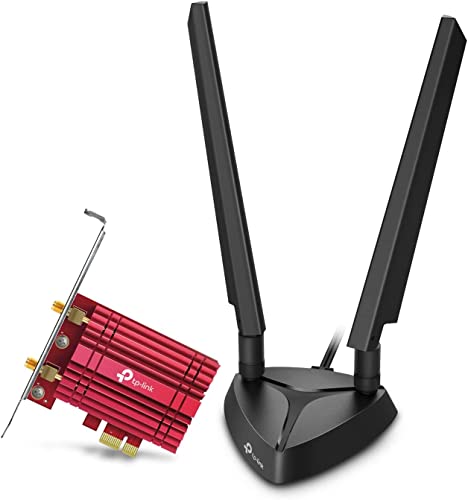
The TP-Link Archer TXE75E steps up to WiFi 6E and the AXE5400 speed class, adding the 6GHz band to the usual 2.4GHz and 5GHz for a tri-band connection. The 6GHz band is the main reason to pay more: it is far less crowded than the older bands, which helps latency and consistency in busy households, provided your router is also WiFi 6E. The listing names an Intel AX210 chipset, OFDMA and MU-MIMO support, and WPA3 security.
A detail that separates this card from the TX55E is the magnetic base with dual antennas. Instead of bracket-fixed antennas, its antenna unit sits on a magnetic base that can be placed on top of the case, making it easier to find a strong signal position. Bluetooth is version 5.3 as listed, connecting through a USB port header as with most PCIe cards. This is the card for gamers with a WiFi 6E router who want the cleanest wireless path a desktop can get.
| Spec | Detail |
|---|---|
| Form factor | PCIe card |
| WiFi standard | WiFi 6E (802.11ax) |
| Speed class | AXE5400 |
| Bands | Tri-band (6GHz, 5GHz, 2.4GHz) |
| Bluetooth | 5.3 (as listed) |
| Security | WPA3 |
| Antennas | Dual antennas on a magnetic base |
| Chipset | Intel AX210 (as listed) |
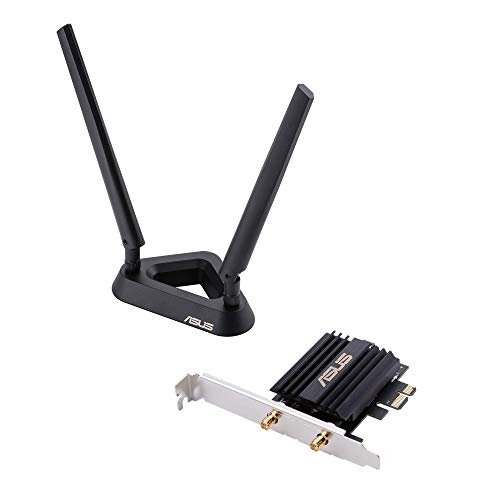
ASUS PCE-AX58BT, WiFi 6 AX3000 PCIe Card
The ASUS PCE-AX58BT is the second WiFi 6 AX3000 PCIe option here, in the same class as the TX55E. Its listing names dual-band 802.11ax operation with 2×2 MU-MIMO and OFDMA support, WPA3 security, and an ultra-low latency focus for gaming traffic competing with streaming and downloads at home.
Bluetooth here is version 5.0 as listed, slightly older than the TP-Link cards, but still fine for controllers, headsets, and keyboards. As with the other PCIe cards, plan on a free PCIe slot and an internal USB header for the Bluetooth connection. The listing states support for Windows 11 and Windows 10 in 64-bit versions only, and notes TAA compliance. It closely matches the TX55E on class and features, so brand preference and antenna style decide between them. Availability note: listings and offers for this model change over time, so confirm current availability on the product page before ordering.
| Spec | Detail |
|---|---|
| Form factor | PCIe card |
| WiFi standard | WiFi 6 (802.11ax) |
| Speed class | AX3000 |
| Bands | Dual band (2.4GHz and 5GHz) |
| Bluetooth | 5.0 (as listed) |
| Security | WPA3 |
| OS support | Windows 11 and 10, 64-bit only (as listed) |
| MU-MIMO | 2×2 (as listed) |
NETGEAR Nighthawk A8000, WiFi 6E AXE3000 USB Adapter
The NETGEAR Nighthawk A8000 leads the USB side as a WiFi 6E adapter in the AXE3000 class, with tri-band support including the 6GHz band and a listed top speed of up to 3Gbps. It connects over USB 3.0, which matters: a USB 2.0 port would bottleneck it, so use a USB 3.0 port, ideally at the front of the case for a clearer signal path.
NETGEAR states the adapter works with any WiFi 6 or WiFi 6E router or mesh system, and it is made for Windows PCs. The listing name states no Bluetooth version, so treat it as networking only. What you give up versus a PCIe card is antenna size and placement freedom; what you gain is a quick, tool-free install and the freedom to move it between machines. For gamers who rent, share PCs, or do not want to open the case, that trade is often worth it. It is the strongest USB option here for a stationary gaming desk.
| Spec | Detail |
|---|---|
| Form factor | USB adapter |
| WiFi standard | WiFi 6E |
| Speed class | AXE3000 |
| Bands | Tri-band, including 6GHz |
| Interface | USB 3.0 |
| Bluetooth | Not stated |
| OS support | Windows PC (as listed) |
| Router compatibility | Any WiFi 6 or 6E router or mesh system (as listed) |
EDUP AXE3000 USB WiFi 6E Adapter, EP-AX1672
The EDUP adapter is the budget-friendly USB option, with one clarification up front: the verified model is the AXE3000 version, model EP-AX1672, not an AX5400 version. Within that class it offers WiFi 6E tri-band operation across 6GHz, 5GHz, and 2.4GHz, an 802.11ax radio built on the MT7921AU chipset as listed, and a USB 3.0 connection in a compact dongle format.
OS handling differs from the NETGEAR: the listing states Windows 11 and 10 need a driver install, while Linux is plug and play, making this one of the few picks here that suits a Linux gaming setup. The listing name states no Bluetooth version, so, like the A8000, treat it as networking only. As a small dongle it has the least antenna presence of the five products, so placement near the router or in line of sight matters more. For a secondary PC or a first step into WiFi 6E without opening the case, it covers the essentials at the simpler end of the range.
| Spec | Detail |
|---|---|
| Form factor | USB adapter (dongle) |
| WiFi standard | WiFi 6E (802.11ax) |
| Speed class | AXE3000 |
| Model | EP-AX1672 (as listed) |
| Bands | Tri-band (6GHz, 5GHz, 2.4GHz) |
| Interface | USB 3.0 |
| Bluetooth | Not stated |
| OS support | Windows 11 and 10 with driver install; Linux plug and play (as listed) |
How to choose
Decide the format first. A PCIe card is the better long-term answer for a fixed gaming desk: bigger antennas, a connection that does not depend on port placement, and Bluetooth included. A USB adapter wins on convenience and portability. Next, match the WiFi generation to your router. A WiFi 6E card or adapter only uses its 6GHz band with a WiFi 6E router; with a WiFi 6 router, an AX3000 card like the TX55E or PCE-AX58BT already covers what the network can offer.
Then check the practical requirements. PCIe cards need a free PCIe slot and, for Bluetooth, a spare internal USB header. USB adapters need a USB 3.0 port to reach their listed speeds. Confirm OS support before buying: the PCIe cards here are Windows-only, while the EDUP adapter adds Linux. Finally, consider antennas: a magnetic base like the TXE75E’s helps when the PC sits under a desk or against a wall.
Who should skip
Skip both formats if your desk can take an Ethernet cable, because wired networking still beats any adapter here for latency and stability. Skip the PCIe cards if your motherboard has no free slot or spare internal USB header, if you run an OS the listings do not support, or if your PC is a laptop. Skip the USB dongles if you also need Bluetooth, since neither USB listing here states Bluetooth support, and skip WiFi 6E models if your router is WiFi 5 or older with no upgrade planned.
FAQ
Is a PCIe WiFi card faster than a USB adapter?
Both formats include models in the same speed classes, so headline numbers can match. In practice, PCIe cards tend to hold a steadier connection thanks to larger external antennas and better placement options, while compact USB dongles are more sensitive to where they sit. For gaming, stability usually matters more than peak rated speed.
Do PCIe WiFi cards need anything besides a free slot?
Usually an internal USB header as well, because the Bluetooth part of most PCIe cards connects through it; the WiFi side works through the slot alone. Check your motherboard manual for a spare header.
Will a WiFi 6E adapter help if my router is WiFi 6?
It will connect on the 2.4GHz and 5GHz bands, but the 6GHz band stays unused until the router supports WiFi 6E. Buying 6E hardware now makes sense if a router upgrade is planned soon; otherwise a WiFi 6 model covers your current network.
Can I use a USB WiFi adapter for competitive gaming?
Yes, with realistic expectations. A WiFi 6E USB adapter on the 6GHz band, placed with a clear path to the router, can game comfortably. Keep the router close and prefer 5GHz or 6GHz; congested 2.4GHz networks, distance, and walls hurt any wireless format.
Final verdict
For a permanent gaming PC, the TP-Link Archer TX55E is the sensible default, and the TXE75E is the upgrade pick when a WiFi 6E router is in place. The ASUS PCE-AX58BT is a close alternative in the same AX3000 class. On the USB side, the NETGEAR Nighthawk A8000 is the stronger stationary choice, while the EDUP AXE3000 EP-AX1672 suits secondary machines and Linux setups. Format first, router match second.
Related guides
More from Amazon
Programs that pair well with the guide above. Offers and eligibility are set by Amazon and may change.
Free shipping on eligible items, Prime Video and more. Eligible new members can start with a free trial.
Start a Prime free trialAd-free music streaming. Eligible new subscribers can start with a free trial.
Try Music Unlimited freeA Prime membership for ages 18-24 with a trial period. Eligibility is set by Amazon.
See Prime for Young AdultsAudiobooks and podcasts to listen to on the go. Eligible new members can start with a free trial.
Try Audible freeAs an Amazon Associate we earn from qualifying purchases.