A gaming tower usually ends up in one of two bad spots: on the desk, where it crowds out monitor arms and desk pads, or on the floor, where it collects dust, blocks airflow at the intakes and sits exactly where feet and vacuum cleaners find it. An under-desk PC mount solves both problems by suspending the case under the desktop, off the floor and out of the way, while keeping it close enough for short cable runs.
Choosing one is mostly a measuring exercise: towers vary a lot in width, depth and weight, and every mount states a fit range and capacity. This guide compares five mounts covering the main approaches: screw-in steel holders, a wide-fit adjustable mount, a clamp-on design that needs no drilling, and two simpler holders. Match the numbers to your case first, then worry about extras like swivel access.
As an Amazon Associate, we earn from qualifying purchases.
Top 3 picks at a glance
Quick answer
Start by measuring your tower’s width, depth and weight, then match those numbers to a mount’s stated fit range and capacity. The Mount-It! MI-7170N suits most mid-towers with its swivel and wall option, the PUTORSEN covers wider cases, and the clamp-on design avoids drilling entirely for renters or glass-free setups.
Mount-It! Under Desk PC Mount and Wall Mount (MI-7170N)

The Mount-It! MI-7170N is the most fully specified pick in this roundup, and it is the natural starting point for a standard mid-tower build. It fits computer towers 6.1 to 9.3 inches wide and 8.2 to 10.1 inches deep, with a stated capacity of 44 lbs, which covers most gaming PCs that are not loaded with oversized cooling hardware. The alloy steel frame includes anti-scratch pads where it contacts the case, a small detail that matters once the tower is hanging and shifting slightly against the holder.
The headline feature is the 360° swivel. Reaching the rear I/O panel of a desk-mounted PC is normally an exercise in blind cable fumbling; a swiveling holder lets the case rotate so ports, fan filters and cable connections face you, which suits anyone who swaps peripherals or cleans filters often. It also works as a wall mount, which suits setups where the underside of the desk is blocked by drawers or cable trays.
Specs
- Model: MI-7170N
- Fit range: towers 6.1–9.3 inches wide, 8.2–10.1 inches deep
- Capacity: 44 lbs
- Material: alloy steel
- Swivel: 360°
- Extras: anti-scratch pads; mounts under a desk or on a wall
One caution: the depth range tops out at 10.1 inches, which is shallow for long full-tower cases. Measure your case depth before ordering, not just its width.
PUTORSEN Under Desk PC Mount
The PUTORSEN mount is the wide-fit option. Its width adjusts from 7.9 to 13.4 inches, noticeably broader than the Mount-It! range, so it accommodates chunky mid-towers and wider mini-tower cases that narrower holders cannot grip. The listing rates it at up to 77 lbs, a figure well above what most gaming towers weigh, and protective mats are included to cushion the contact points.
That width-first design makes it a sensible pick for builders whose cases fall outside standard dimensions, or for anyone planning a case upgrade and wanting a mount with room to grow. Because the width range starts at 7.9 inches, however, slim towers may sit below its minimum grip, so narrow cases should look at the other picks instead.
Specs
- Fit range: width adjustable 7.9–13.4 inches
- Capacity: up to 77 lbs (listing figure)
- Case types: mid-tower and mini-tower
- Extras: protective mats included
- Depth and height range: not stated
Treat the 77 lb rating as a listing figure, and remember the desk is part of the system: a particleboard desktop with short screws is the weak link long before a steel mount is. Check the underside structure of your desk before hanging a heavy build.
Adjustable Clamp Mount on Desk for PC Tower

This unbranded mount takes a different approach: instead of screws, it clamps to the edge of the desk, so there is no drilling at all. That makes it the obvious choice for renters, for desks you do not want to mark, and for anyone who rearranges their setup often enough that permanent holes are a commitment they would rather avoid.
The clamp design adjusts in height from 13.2 to 21.6 inches and in width from 5.5 to 9.8 inches, which covers a broad band of tower sizes, including taller cases that fixed holders struggle with. Because it hangs from the desk edge, the tower sits at the side of the desk rather than centered beneath it, which can help legroom and make the case easier to reach.
Specs
- Mounting: clamp-on, no drilling
- Fit range: height adjustable 13.2–21.6 inches, width adjustable 5.5–9.8 inches
- Capacity: not stated
- Brand: unbranded listing, described by function
Two honest caveats. The listing does not state a weight capacity, so very heavy builds are a gamble here, and as an unbranded product there is no manufacturer spec sheet to fall back on. Check that your desk edge is thick and strong enough for a clamp carrying a tower’s full weight, and re-check clamp tightness after the first week of use.
Penn Elcom Under-Desk Computer Mount, PC Tower Holder (CPU-42BN)

Penn Elcom is a name more familiar from rack and flight-case hardware than from gaming desks, and its under-desk computer mount follows that trade-catalog style. The listing is a parent listing, meaning several variants sit under the one product page and the specific configuration is selected at purchase, so read the variant options carefully before ordering.
Beyond the listing name and the model number, CPU-42BN, the retrieved product page does not state dimensions, fit range or weight capacity. That suits buyers comfortable confirming specifications with the seller, or who already know the Penn Elcom range from other hardware work.
Specs
- Model: CPU-42BN
- Listing type: parent listing, variant selected at purchase
- Fit range: not stated
- Capacity: not stated
The practical guidance is the same as for any under-desk mount: measure your tower’s width, depth and weight, leave clearance underneath for cables dropping from the rear panel, and confirm the variant you select matches those measurements before the order ships. If you need published numbers to decide, the Mount-It! and PUTORSEN picks above state theirs openly.
Stand Up Desk Store Adjustable CPU Desktop Computer Tower Holder
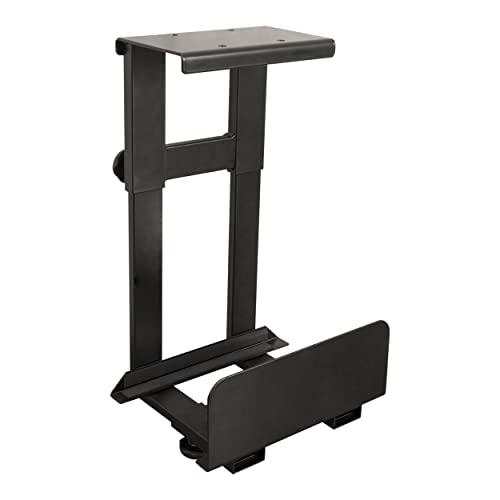
The final pick comes from Stand Up Desk Store, a retailer built around desk setups, and it is exactly what its listing name describes: an adjustable CPU and desktop tower holder that mounts under a desk. For standing-desk users, a desk-mounted tower travels with the desktop instead of straining cables every time the desk rises.
The retrieved listing page does not state a weight capacity or dimensions, so this section stays with listing-name facts only: it is adjustable, it holds a desktop computer tower, and it mounts under a desk. No figures are invented here, and buyers should treat that missing data as a step in the process rather than a detail to guess at.
Specs
- Type: adjustable CPU/tower holder, under-desk mount
- Seller: Stand Up Desk Store
- Fit range: not stated
- Capacity: not stated
Before ordering, measure your tower and compare it against the measurements on the product page at the time of purchase, and think through cable slack for a height-adjustable desk: mounted PCs still need enough cable length to reach monitors and peripherals at full desk height.
How to choose
Start with three measurements of your tower: width, depth and height, plus its weight if you know it. Every mount in this guide states at least part of that picture, and the right pick is the one whose stated range contains your case with a little room to spare. A mount at the very edge of its range has no adjustment left for padding or error.
Next, decide how the mount attaches. Screw-in steel holders are the most secure and the best choice for heavy builds, but they need a solid desktop underside and leave holes. A clamp mount avoids drilling and moves easily, at the cost of an unstated capacity on this listing. A wall-mount option, like the Mount-It! offers, works when the desk underside is crowded.
Then think about access. If you regularly reach the rear panel, a swivel earns its keep. If the PC will be installed once and left alone, a simple fixed holder is fine. Finally, plan cables and airflow: leave space behind the case for cable bends, and keep intake fans clear of the holder’s frame.
Who should skip
Skip under-desk mounting if your tower is a large full-tower that exceeds every fit range here, or if it is heavily water-cooled and simply too heavy to hang from a desktop. Owners of glass desks should skip both screw-in and clamp mounts, since neither attachment method belongs on glass. If your desk underside is filled with drawers, crossbars or a modesty panel, there may be no flat mounting surface at all, and a floor stand or a wider desk is the better answer. Mini PC and laptop users gain little from a tower holder; a small shelf does the same job.
FAQ
Will an under-desk mount fit my tower?
Only if your tower’s width, depth and height fall inside the mount’s stated fit range. Measure the case itself rather than trusting the product category name, since two mid-towers can differ by several inches. Where a listing does not state a range, confirm the measurements before ordering.
Is a clamp-on mount strong enough for a gaming PC?
A clamp mount removes the need for screws, but the clamp design in this guide does not state a weight capacity, so it suits light to mid-weight towers better than heavy builds. The desk edge also has to be solid. For a heavy PC, a screw-in steel holder with a stated capacity is the safer route.
Does hanging a PC under the desk hurt airflow?
It does not have to. Keep the case intakes and exhausts clear of the mount frame and the desk underside, and leave a gap so hot air can escape rather than pooling under the desktop. A swivel mount makes dust filters easier to clean, which helps airflow over time.
Can I wall-mount my PC instead of using the desk?
Yes, one pick here supports it. The Mount-It! MI-7170N works as both an under-desk mount and a wall mount, which helps when the desk underside has no room. Make sure the wall fixings suit your wall type and that the tower’s width and depth still fall inside its stated fit range.
Final verdict
For most gaming PCs, the Mount-It! MI-7170N is the easiest recommendation: published fit numbers, a 44 lb capacity, anti-scratch pads and a swivel that makes rear-panel access painless, plus a wall-mount fallback. Builders with wider cases should look at the PUTORSEN and its 13.4-inch maximum width, while renters and the drill-averse get a genuine alternative in the clamp-on mount. The Penn Elcom and Stand Up Desk Store holders are simpler listings with unstated specifications, so they suit buyers willing to verify measurements first. Whichever route you take, measure the tower, check the desk underside, and the mount will do the rest.
Related guides
More from Amazon
Programs that pair well with the guide above. Offers and eligibility are set by Amazon and may change.
Free shipping on eligible items, Prime Video and more. Eligible new members can start with a free trial.
Start a Prime free trialAd-free music streaming. Eligible new subscribers can start with a free trial.
Try Music Unlimited freeA Prime membership for ages 18-24 with a trial period. Eligibility is set by Amazon.
See Prime for Young AdultsAudiobooks and podcasts to listen to on the go. Eligible new members can start with a free trial.
Try Audible freeAs an Amazon Associate we earn from qualifying purchases.