- Top Pick: Kasa Smart WiFi Plug by TP-Link (HS100)
- Runner-up: Kasa Smart WiFi Plug with Energy Monitoring by TP-Link (HS110)
- Also consider: Kasa Smart Plug Mini 15A (EP10, 4-Pack EP10P4)
A gaming desk accumulates things that need power on a schedule: a monitor that can sleep with the room, desk lighting, speakers, a headset charger, and a router that occasionally needs a clean reboot. A smart plug puts each of those loads on a timer or an app switch, and the right model can also show how much power the setup draws while it runs.
One boundary matters before the picks. These plugs are for peripherals, monitors, desk lighting, speakers and networking gear. Cutting power at the plug is not a way to shut down a running PC, and each plug’s amp rating is a ceiling to respect, not a target to fill. Within those limits, the five plugs below split into two camps: straightforward scheduling plugs, and models whose listings state energy monitoring.
As an Amazon Associate, we earn from qualifying purchases.
Top 3 picks at a glance
Quick answer
For simple scheduling, the Kasa HS100 covers the basics through the Kasa app, and the Kasa EP10 mini leaves the second outlet free. If tracking power use matters, the Kasa HS110 and the meross Matter plug state energy monitoring in their listings. The meross Mini is the compact HomeKit-friendly option, with app control and timers and no hub needed.
Kasa Smart WiFi Plug by TP-Link (HS100)
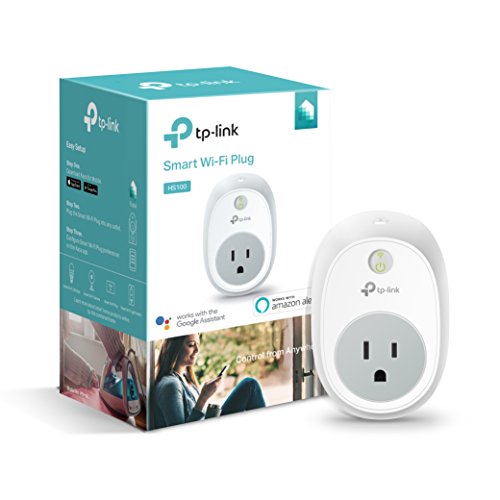
The Kasa HS100 is the straightforward scheduling plug in this guide. It is a Wi-Fi smart plug that needs no hub, and the listing states it works with Alexa, Google Assistant and Microsoft Cortana. Schedules and timers are set in the Kasa app, which is the pattern that suits desk gear: monitors and lighting that power down overnight and wake before a session, or a router set to reboot itself in the early hours while nobody is playing.
The model number is HS100. What this listing does not state is energy monitoring. That feature belongs to the HS110 below, which is a separate listing in the same Kasa line, and it should not be assumed for this plug when comparing the two side by side.
For a single peripheral or a lighting run, the HS100 covers the core job: remote switching, voice control through the assistants named above, and timed schedules, without extra hub hardware.
Specs
- Model: HS100
- Connection: Wi-Fi
- Hub: not required
- Voice control: Alexa, Google Assistant and Microsoft Cortana, per the listing
- Control: Kasa app, with schedules and timers
- Energy monitoring: not stated
Kasa Smart WiFi Plug with Energy Monitoring by TP-Link (HS110)

The Kasa HS110 is the energy-monitoring model in the Kasa plug line, and it is a separate listing from the HS100 above. Its listing states that it tracks the connected device’s power use in the Kasa app, which is the feature that makes it interesting for a gaming desk: connect a monitor, a speaker set or the desk lighting, and the app shows what that load draws over time.
It also offers schedules, and works with Alexa and Google Assistant per the listing, so the scheduling habits from the HS100 carry over. The model number is HS110.
Keep the two Kasa plugs separate when ordering. The HS100 is the scheduling plug, and this HS110 is the one whose listing states monitoring. The feature belongs to this listing alone and is not shared with the HS100 or with the EP10 mini that follows.
Specs
- Model: HS110
- Energy monitoring: yes, tracks the connected device’s power use in the Kasa app, per the listing
- Control: Kasa app, with schedules
- Voice control: Alexa and Google Assistant, per the listing
- Hub requirement: not stated
Kasa Smart Plug Mini 15A (EP10, 4-Pack EP10P4)

The Kasa EP10 is the mini option. The listing describes a mini-format plug that leaves the second outlet free, which matters at a crowded wall outlet or a desk setup where a monitor plug already takes the top socket. It is sold as a 4-pack under the EP10P4 name, so one purchase covers several peripherals at once.
Ratings and radio details are stated plainly in the listing: a 15 A maximum load, UL certification, and 2.4 GHz Wi-Fi only, so it will not join a 5 GHz network. It works with Alexa, Google Home and IFTTT, and no hub is required to run it.
Energy monitoring is not stated for this listing, so treat the EP10 as a switching and scheduling plug. With four plugs in the pack, it suits a desk where lighting, speakers and a monitor each get their own schedule.
Specs
- Model: EP10 (4-pack EP10P4)
- Format: mini, leaves the second outlet free, per the listing
- Maximum load: 15 A
- Certification: UL certified
- Wi-Fi: 2.4 GHz only
- Voice and automation: Alexa, Google Home and IFTTT, per the listing
- Hub: not required
- Energy monitoring: not stated
meross Matter Smart Plug with Energy Monitoring (4-Pack)

The meross Matter plug is the cross-platform pick. It runs Matter over Wi-Fi, and the listing states it works across Alexa, Apple Home, Google Home, SmartThings and Home Assistant, so it fits desks where the smart-home platform is already chosen and the plug has to join that platform rather than dictate one.
Energy monitoring is stated in the listing, with real-time and historical data shown in the Meross app. The rating is 15 A / 1800 W, and schedules and timers are included. The housing is polycarbonate, and the dimensions are 1.5 x 2.3 x 2.68 in, which keeps it close to mini-plug territory despite the extra platform support.
The requirements deserve attention. The listing states it needs a 2.4 GHz network with IPv6 and a Matter-compatible hub for the chosen platform, plus a phone running iOS 16.1 or later, or Android 8.1 or later. Buyers without a Matter hub should weigh the no-hub Kasa and meross Mini picks instead.
Specs
- Protocol: Matter over Wi-Fi
- Platforms: Alexa, Apple Home, Google Home, SmartThings and Home Assistant, per the listing
- Energy monitoring: yes, real-time and historical data in the Meross app, per the listing
- Rating: 15 A / 1800 W
- Control: schedules and timers
- Requirements: 2.4 GHz network with IPv6; Matter-compatible hub for the chosen platform; iOS 16.1+ or Android 8.1+, per the listing
- Dimensions: 1.5 x 2.3 x 2.68 in
- Housing: polycarbonate
meross Smart Plug Mini, 15A (4-Pack)
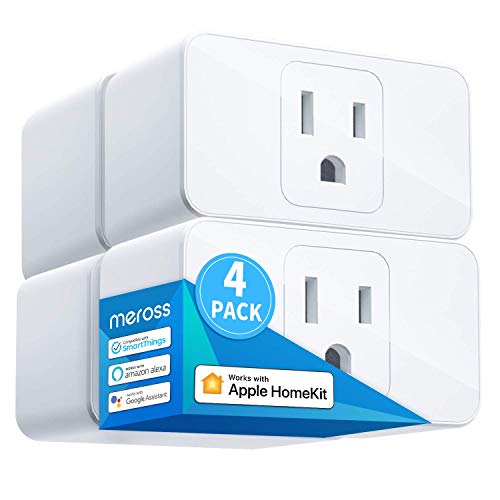
The meross Smart Plug Mini is the compact Apple-friendly option, sold as a 4-pack. The listing states support for Apple HomeKit, Siri, Alexa, Echo, Google Assistant and Nest Hub, with app control and a timer, and no hub needed to run it. It connects on 2.4 GHz Wi-Fi only, like most of the plugs in this guide.
The rating is a 15 A load, the housing is PC flame-retardant material, and the listing records ETL and FCC certification. The model family is MSS110, which is the name to check when comparing against the maker’s other mini plugs.
Energy monitoring is not stated for this listing. That feature is stated for the meross Matter plug above, which is a different model, so the Mini’s job here is switching and scheduling in a small body for desks already invested in HomeKit or the other assistants it names.
Stock and offers change, so confirm availability on the Amazon product page before ordering.
Specs
- Model family: MSS110
- Pack: 4-pack
- Load rating: 15 A
- Platforms: Apple HomeKit, Siri, Alexa, Echo, Google Assistant and Nest Hub, per the listing
- Control: app control and timer
- Hub: not needed
- Wi-Fi: 2.4 GHz only
- Certification: ETL and FCC certified
- Housing: PC flame-retardant material
- Energy monitoring: not stated
How to choose
Decide first whether you need energy data or just switching. Only two listings here state energy monitoring: the Kasa HS110 and the meross Matter plug. If seeing a monitor’s or a whole peripheral stack’s power draw matters to you, choose between those two; the HS100, EP10 and meross Mini listings do not state the feature, so do not buy them expecting it.
Next, match the plug to your platform. The Kasa plugs live in the Kasa app, with the voice assistants named on each listing. The meross Matter plug spreads across Alexa, Apple Home, Google Home, SmartThings and Home Assistant, while the meross Mini is the one that names HomeKit and Siri. Hub needs differ too: the HS100, EP10 and meross Mini listings state no hub is required, while the meross Matter plug requires a Matter-compatible hub and a 2.4 GHz network with IPv6.
Form factor matters at crowded outlets. The EP10’s mini format is stated to leave the second outlet free, and the meross Matter plug’s dimensions are documented. Finally, respect the ratings: the 15 A figures on these listings are ceilings for the connected load, and the plug should serve peripherals, lighting and networking gear, never serve as a power switch for a running PC.
Who should skip
Anyone planning to cut power to a running gaming PC should skip this entire category and use the PC’s own shutdown instead; these plugs are for peripherals, monitors, lighting and networking gear. Households whose desks sit beyond 2.4 GHz Wi-Fi coverage should also skip the plugs whose listings state 2.4 GHz only, which is most of this guide. Buyers who need energy figures from every plug should skip the HS100, EP10 and meross Mini, since their listings do not state monitoring. And shoppers without a Matter hub should skip the meross Matter plug until their platform has one.
FAQ
Can I use a smart plug to turn my gaming PC off?
No. Shutting a running PC down by cutting its power at the wall is not what these plugs are for, and it risks the machine’s file system and your game saves. Use smart plugs for monitors, desk lighting, speakers and for rebooting a router or modem, and shut the PC itself down normally through its operating system.
Which of these plugs monitor energy use?
Two of them, per their listings: the Kasa HS110 and the meross Matter Smart Plug with Energy Monitoring. The Kasa HS100, Kasa EP10 and meross Smart Plug Mini listings do not state energy monitoring, so that feature should not be expected from them.
Do I need a hub for any of these plugs?
For the Kasa HS100, Kasa EP10 and meross Smart Plug Mini, the listings state no hub is required. The meross Matter plug is the exception: its listing requires a Matter-compatible hub for the chosen platform, along with a 2.4 GHz network running IPv6.
Will a mini plug block the other outlet?
The EP10’s listing states that its mini format leaves the second outlet free, which is the documented answer for that model. Dimensions for the meross Smart Plug Mini are not stated in the recorded facts, so if outlet space is tight, check the product page measurements before ordering a pack.
Final verdict
The Kasa HS110 is the pick for gamers who want to see what their desk actually draws, and the meross Matter plug matches that monitoring with the widest platform support for homes already running a Matter setup. The Kasa HS100 remains the simple scheduling plug, the EP10 mini is the space-saver that keeps the second outlet usable, and the meross Mini serves HomeKit households wanting compact plugs with no hub. Choose by platform and monitoring needs first.
Related guides
More from Amazon
Programs that pair well with the guide above. Offers and eligibility are set by Amazon and may change.
Free shipping on eligible items, Prime Video and more. Eligible new members can start with a free trial.
Start a Prime free trialAd-free music streaming. Eligible new subscribers can start with a free trial.
Try Music Unlimited freeA Prime membership for ages 18-24 with a trial period. Eligibility is set by Amazon.
See Prime for Young AdultsAudiobooks and podcasts to listen to on the go. Eligible new members can start with a free trial.
Try Audible freeAs an Amazon Associate we earn from qualifying purchases.