- Top Pick: CalDigit TS4 Thunderbolt 4 Dock
- Runner-up: Plugable 16-in-1 Thunderbolt 4 Dock (TBT4-UDZ)
- Also consider: Razer Thunderbolt 4 Dock Chroma
A gaming laptop that lives on a desk spends half its life plugged into the same things: one or two external monitors, wired Ethernet, a keyboard and mouse, a headset and external storage. A Thunderbolt dock turns that daily plug-in ritual into a single cable — the laptop connects once, and the dock carries the displays, the network and the peripherals while also feeding power back to the machine.
This guide is deliberately narrower than a general USB-C dock roundup. Every pick here is a Thunderbolt dock chosen with gaming laptops in mind: strong host charging that keeps a power-hungry machine fed, external display support over that single connection, and wired networking. Four are Thunderbolt 4 docks; the fifth is a compact Thunderbolt 3 model included honestly as the small, lower-power exception. Display counts are always host-dependent, so each pick’s display claims are stated with the host conditions attached, exactly as the makers state them, and charging wattages belong to their own listings and are never interchangeable.
As an Amazon Associate, we earn from qualifying purchases.
Top 3 picks at a glance
Quick answer
The CalDigit TS4 is the fullest desk dock here, with 18 ports, 98W host charging and 2.5GbE. The Plugable TBT4-UDZ matches it on 100W charging and adds four display outputs on qualifying Windows hosts. The Razer Chroma dock suits RGB desk setups, the Plugable TBT4-UD5 is the leaner 100W option, and the Kensington SD2500T is a compact 60W Thunderbolt 3 exception.
1. CalDigit TS4 Thunderbolt 4 Dock
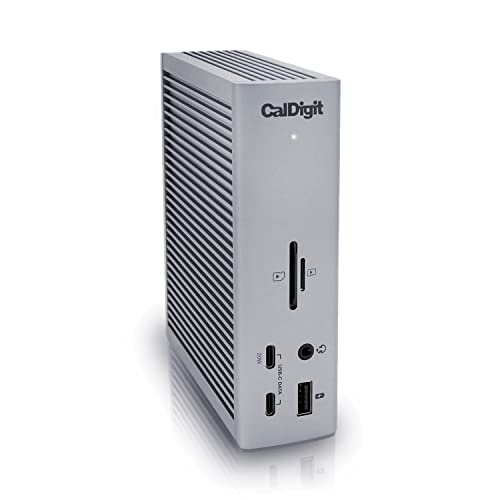
The TS4 is the maximalist pick: 18 ports on one dock. Host charging runs up to 98W, which is the level a gaming laptop needs to stay fed while it works, and the port layout mixes 3 Thunderbolt 4 ports with 5 USB-A ports and 3 USB-C ports running at 10 Gb/s, over a Thunderbolt 4 connection at 40 Gb/s. Wired networking is 2.5GbE, a step above the gigabit ports on lesser docks.
For displays, the listing states a single 8K display at 30 Hz or dual 6K displays at 60 Hz, and a 0.8 m cable is included in the box. This is the dock for a gaming laptop desk that also runs capture gear, external drives and several monitors’ worth of accessories without anything being unplugged to make room. Model TS4-US 500971.
Specs
- Ports: 18 in total
- Host charging: up to 98W
- Connection: Thunderbolt 4, 40 Gb/s
- Port mix: 3 Thunderbolt 4, 5 USB-A, 3 USB-C at 10 Gb/s
- Ethernet: 2.5GbE
- Displays: single 8K at 30 Hz or dual 6K at 60 Hz, per the listing
- Included cable: 0.8 m
- Model: TS4-US 500971
2. Plugable 16-in-1 Thunderbolt 4 Dock (TBT4-UDZ)

The TBT4-UDZ is Plugable’s larger dock in this guide, and it must not be confused with the smaller Plugable model further down. It offers 100W charging for the host laptop and the widest display layout here: 2 HDMI outputs and 2 DisplayPort outputs. Maker coverage states up to four 4K displays on qualifying Windows Thunderbolt 4 and USB4 hosts — that ceiling belongs to hosts that support it, not to every laptop, and the dock is listed as Windows and USB4 compatible.
Around the displays sit 2.5G Ethernet, 7 USB ports and a card reader covering microSD and SD cards, with UHS-II speed per maker coverage. For a gaming laptop desk built around multiple monitors on a Windows machine, this is the pick organised around screen count first and everything else second.
Specs
- Design: 16-in-1
- Host charging: 100W
- Display outputs: 2 HDMI and 2 DisplayPort
- Displays: up to four 4K on qualifying Windows Thunderbolt 4 / USB4 hosts, per maker coverage
- Ethernet: 2.5G
- USB ports: 7
- Card reader: microSD and SD, UHS-II per maker coverage
- Compatibility: Windows and USB4
3. Razer Thunderbolt 4 Dock Chroma

Razer’s dock is the style-led pick: 10 ports in one unit, Thunderbolt 4 certified, with Chroma RGB lighting that matches the rest of a Razer desk setup. Video output is stated as dual 4K or a single 8K display, and the hub side mixes USB-A and USB-C ports. It provides passthrough charging for the host laptop; the retrieved listing material did not cleanly state the charging wattage, so that figure is recorded here as not stated rather than guessed, and the same applies to its Ethernet speed, which is likewise not stated.
Those two gaps matter for a gaming laptop: a buyer whose machine needs a known 90W-plus feed, or who wants a stated Ethernet speed, should weigh the picks where those figures are on the record. For a Razer-centred desk that values the lighting ecosystem and the dual-4K layout, it remains the natural fit. Model RC21-01690100-R3U1, released in August 2021.
Specs
- Ports: 10 in total
- Displays: dual 4K or single 8K
- Ports mix: USB-A and USB-C hub ports
- Certification: Thunderbolt 4 certified
- Host charging: passthrough charging; wattage not stated
- Ethernet speed: not stated
- Lighting: Chroma RGB
- Model: RC21-01690100-R3U1
4. Plugable Thunderbolt 4 Dock (TBT4-UD5)
The TBT4-UD5 is the second Plugable dock in this guide and a different product from pick 2, with its own port layout and networking. It carries 13 ports and 100W host charging (96W certified), with display output over 2 HDMI ports: dual 4K at 60 Hz, or a single 8K display. The remaining connections are 1 downstream Thunderbolt 4 port, 4 USB ports, 1 USB-C port, SD and microSD slots, an audio combo jack and a K-lock slot.
The clearest separation from its bigger sibling is the network port: this dock’s Ethernet is Gigabit, not 2.5G, and the display ceiling is two screens rather than four. In exchange it keeps the same headline charging figure in a leaner layout, which suits a gaming laptop desk with two monitors and a moderate set of peripherals.
Specs
- Ports: 13 in total
- Host charging: 100W (96W certified)
- Displays: dual 4K at 60 Hz over HDMI, or single 8K
- Display outputs: 2 HDMI
- Other ports: 1 downstream Thunderbolt 4, 4 USB, 1 USB-C
- Card slots: SD and microSD
- Audio: combo jack
- Ethernet: Gigabit
- Security: K-lock slot
5. Kensington SD2500T Thunderbolt 3 and USB-C Docking Station
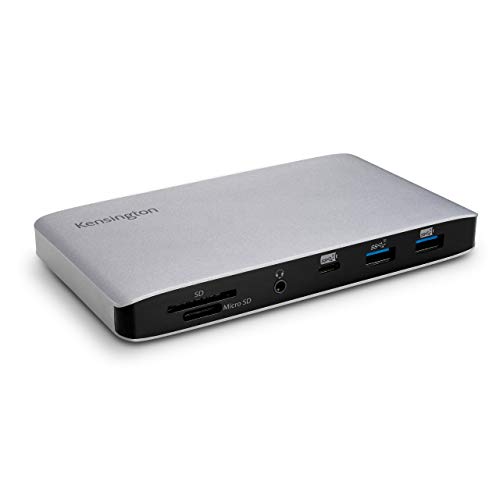
The SD2500T is included as the honest exception, and it should be read that way: it is a Thunderbolt 3 dock, not a Thunderbolt 4 model, and its host charging is 60W Power Delivery — well below the 98W and 100W figures of the docks above. For a power-hungry gaming laptop under load, that lower feed is a real limitation, and this is not the pick to run a demanding machine as its only supply.
What it offers instead is size. This is a compact nano dock for Windows, MacBooks and Surface hosts, with a single 8K or dual 4K video output, UHS-II SD 4.0 card readers and Kensington’s free DockWorks software. As a travel dock or a second desk connection for lighter work, the format makes sense; as the heart of a gaming laptop battlestation, the charging figure rules it out. Model K36400NA.
Specs
- Design: compact nano dock
- Connection: Thunderbolt 3 and USB-C host compatibility
- Hosts: Windows, MacBooks and Surface
- Host charging: 60W Power Delivery
- Displays: single 8K or dual 4K
- Card readers: UHS-II SD 4.0
- Software: Kensington DockWorks, free
- Model: K36400NA
How to choose
Start with host charging, because it decides whether the dock can be the laptop’s only plug. The TS4’s 98W and the two Plugable docks’ 100W are the figures aimed at gaming laptops; the Kensington’s 60W is not, and the Razer’s wattage is not stated, so treat it as an unknown rather than assuming it matches the others.
Next, count displays against your host, not against the dock alone. Every multi-screen figure in this guide is host-dependent: the TBT4-UDZ’s four-4K ceiling applies to qualifying Windows Thunderbolt 4 and USB4 hosts, and the other docks state their own single and dual display layouts. Then check the network port — 2.5G Ethernet on the TS4 and TBT4-UDZ, Gigabit on the TBT4-UD5, not stated on the Razer — and finally the everyday details: total port count, card readers for content work, and whether the dock’s size suits a fixed desk or a bag.
Who should skip
Skip this category entirely if your main machine is a desktop PC, which gains nothing from a laptop dock. Skip the Kensington if the dock must be a gaming laptop’s sole power source — its 60W feed is the limiting factor — and skip any Thunderbolt dock if your laptop’s port is plain USB-C without Thunderbolt, since the display and charging behaviour these docks are built around depends on the host connection. Skip the Razer if a stated charging wattage or Ethernet speed is a requirement rather than a nice-to-have.
FAQ
Can one of these docks run four monitors from a gaming laptop?
Only the Plugable TBT4-UDZ claims that ceiling, and only on qualifying Windows Thunderbolt 4 and USB4 hosts, per maker coverage. The other docks state dual-display layouts at most, so the host laptop decides the real screen count in every case.
Is 60W charging enough for a gaming laptop?
The Kensington SD2500T’s 60W is the lowest figure in this guide and well under the 98W and 100W of the Thunderbolt 4 picks. It suits lighter duties and travel, but a demanding gaming laptop under load belongs on one of the higher-wattage docks listed here.
What separates the two Plugable docks?
Port count, displays and networking. The TBT4-UDZ is a 16-in-1 dock with four display outputs and 2.5G Ethernet; the TBT4-UD5 has 13 ports, two HDMI outputs and Gigabit Ethernet. Both charge the host at 100W, but they are different models with different layouts and should not be treated as interchangeable.
Does the dock charge the laptop through the same cable as the displays?
Yes — that is the point of this category. The Thunderbolt connection carries the display signals, the peripherals and the host charging together, at up to 98W on the TS4 and 100W on the two Plugable docks. The Razer offers passthrough charging, but its wattage is not stated in the listing material.
Final verdict
For a gaming laptop that anchors a full desk, the CalDigit TS4 is the most complete dock here, pairing 98W charging with 18 ports and 2.5GbE. The Plugable TBT4-UDZ is the multi-monitor pick for qualifying Windows hosts, the TBT4-UD5 trims that formula down while keeping 100W charging, and the Razer Chroma serves desks built around its lighting ecosystem. The Kensington SD2500T earns its place only as the compact travel exception — useful, small, and honestly outmatched on charging by the Thunderbolt 4 docks above it.
Related guides
More from Amazon
Programs that pair well with the guide above. Offers and eligibility are set by Amazon and may change.
Free shipping on eligible items, Prime Video and more. Eligible new members can start with a free trial.
Start a Prime free trialAd-free music streaming. Eligible new subscribers can start with a free trial.
Try Music Unlimited freeA Prime membership for ages 18-24 with a trial period. Eligibility is set by Amazon.
See Prime for Young AdultsAudiobooks and podcasts to listen to on the go. Eligible new members can start with a free trial.
Try Audible freeAs an Amazon Associate we earn from qualifying purchases.