A tablet earns its place on a gaming desk when it does a job the main monitor should not have to do. Streamers park chat, alerts, and stream controls on a tablet so the game stays full screen, while other players use one as a compact second display for guides, maps, voice chat, or music. In every case the tablet only works well when a stand holds it at the right height and angle, keeps it steady when you tap the screen, and leaves room for a charging cable during long sessions.
The five stands below cover the main ways gamers and streamers mount a tablet. Some are simple aluminum cradles that sit beside a keyboard, some fold flat for travel between setups, and one rotates on its base so you can swing the screen toward a camera or a teammate. Each pick supports the common tablet sizes used for chat and control apps, and each one keeps the screen off the desk surface and out of the way of your mouse and keyboard.
As an Amazon Associate, we earn from qualifying purchases.
Top 3 picks at a glance

What to look for in a tablet stand for a gaming desk
Start with size and weight support. A stand rated for small phones may flex under a large tablet, so match the stand to your device range, including the case you actually use. Thick protective cases need deeper hooks or an adjustable cradle, and a heavier tablet needs a wider, heavier base so tapping the top corner does not rock the whole stand during a stream.
Angle and height adjustment matter more on a streaming desk than on a reading desk. Chat needs to sit where a quick glance finds it without turning your head away from the game, and a control deck app needs to sit flat enough to tap accurately. Look for hinges that hold their position under repeated touches, and consider a rotating base if you share the screen with someone beside you or turn the tablet toward a camera for product shots and unboxings.
Stability and desk footprint come next. A compact base saves room for a mousepad and stream deck, but it should still resist sliding on a smooth desk. Rubber padding on the base and in the cradle protects both the desk and the tablet, and it reduces vibration when you type hard or bump the desk. Silicone contact points also stop the slow creep that can misalign a tablet you rely on for touch controls.
Finally, think about cables. A good stand leaves the charging port clear and gives the cable a path that does not pull the tablet sideways, which matters when the tablet runs chat for an entire evening.
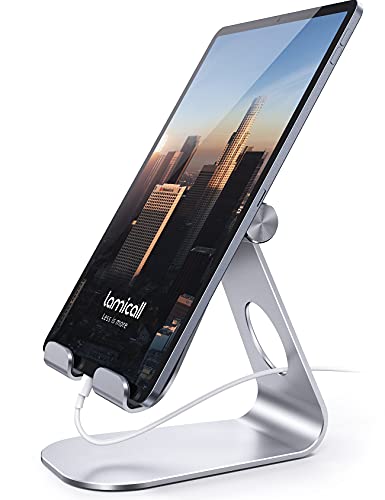
1. Lamicall Tablet Stand, Adjustable Tablet Holder
The Lamicall Tablet Stand is the classic aluminum cradle that fits almost any gaming desk. Its two-hinge design tilts the tablet through a wide range of angles, so you can set a steep view for reading chat or a shallower angle for tapping stream controls. The cradle fits devices from small e-readers up to large tablets, and the hooks are deep enough to hold many tablets in slim cases without forcing you to strip the case off before every session.
For streamers, the appeal is predictability. The aluminum body feels rigid, the base sits flat, and the rubber pads keep the tablet from sliding when you reach across and tap an alert. It holds the screen high enough to clear most keyboards while staying low enough that it does not block the bottom edge of a monitor on a typical desk. Portrait and landscape orientations both work, which helps when chat runs vertically beside a widescreen display.
It also folds flat for storage and needs no assembly. If you want one dependable stand for a chat tablet that stays in place night after night, this long-running Lamicall design is the safe starting point for the whole list.
Specs
| Item | Detail |
|---|---|
| Brand | Lamicall |
| Device range | 4 to 13 inch tablets and phones |
| Material | Aluminum alloy |
| Adjustment | Multi-angle tilt hinge |
| Orientation | Portrait and landscape |
| Padding | Rubber pads on hooks and base |
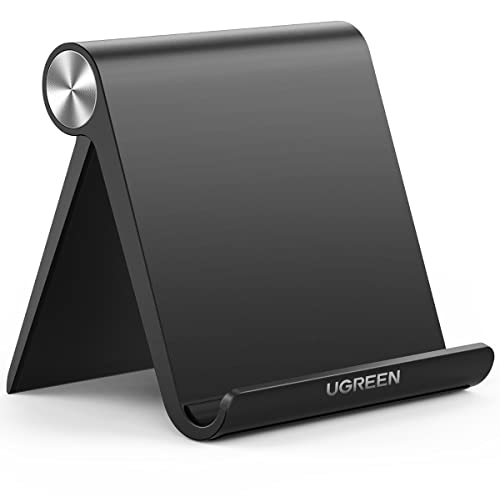
2. UGREEN Tablet Stand Holder Adjustable
The UGREEN Tablet Stand Holder takes the same desktop cradle idea and makes it more portable. It folds flat into a slim shape that slips into a laptop bag or a desk drawer, which suits streamers who move between a home setup and another location. When open, the back support adjusts through preset angles, giving you repeatable positions for chat, video calls, and control apps without fiddling with a friction hinge every time.
On a gaming desk, this stand works best for mid-size tablets used as a companion screen. The base is compact, so it tucks beside a monitor arm where a larger stand would crowd your mouse space, and the padded contact points keep lighter tablets steady during normal tapping. The same stand can hold a phone running a remote camera app one night and a tablet running chat the next, so choose it when portability and a small footprint matter more than maximum height.
Specs
| Item | Detail |
|---|---|
| Brand | UGREEN |
| Device range | 4.7 to 12.9 inch tablets and phones |
| Material | Aluminum and silicone padding |
| Adjustment | Multi-position back support |
| Design | Foldable flat for travel |
| Orientation | Portrait and landscape |
3. OMOTON T5 Upgraded Adjustable Tablet Stand
The OMOTON T5 is the heavy-duty option in this group, built around a thicker aluminum frame and a solid base. It was designed for larger tablets and even portable monitors, so it handles a big chat screen or a tablet in a chunky case with less flex than lighter stands. The hinge adjusts smoothly and holds its angle when you tap near the top of the screen, which is exactly where moderation buttons and alert controls tend to sit.
Streamers who run a tablet as a fixed part of the desk will appreciate the planted feel. The wide base resists tipping when you reach over a keyboard, and the padded cradle keeps the device from rattling against bare metal. Because it supports bigger screens, it also doubles as a stand for a portable monitor during LAN events or travel, giving the purchase a second job outside streaming nights.
The trade-off is size. The T5 takes more desk room than the folding UGREEN, and it is the stand you set up once rather than pack daily. For a permanent streaming desk where the tablet never moves, that weight is a benefit rather than a drawback, and it makes the T5 the stability pick of this guide.
Specs
| Item | Detail |
|---|---|
| Brand | OMOTON |
| Model | T5 |
| Device range | 4.7 to 13 inch tablets and portable monitors |
| Material | Aluminum alloy |
| Adjustment | Adjustable tilt hinge |
| Base | Wide heavy-duty desktop base |
4. LISEN Tablet Stand for iPad Holder, Foldable

The LISEN Tablet Stand stands out for its wide device range, covering small phones through very large tablets and even small portable monitors. Its foldable body opens into a low, stable cradle with an adjustable back, and the extended hooks help it grip bigger devices that overwhelm basic phone stands. On a streaming desk, that range means one stand can serve a phone, a chat tablet, and a larger display across different stream formats.
The low profile suits desks where the tablet sits in front of a monitor rather than beside it. Chat stays below your main sightline, close to the keyboard, and easy to tap without reaching, and the stand folds down quickly when you need the full desk for a wheel or a drawing tablet. Padding protects device backs and desk finishes, so if your setup changes often, the LISEN design is the flexible choice here.
Specs
| Item | Detail |
|---|---|
| Brand | LISEN |
| Device range | 4 to 15.9 inch tablets, phones, and portable monitors |
| Material | Metal and silicone padding |
| Adjustment | Adjustable folding back support |
| Design | Folds flat for storage |
| Orientation | Portrait and landscape |
5. UGREEN iPad Stand Tablet Holder with Swivel Rotating Base

The second UGREEN pick solves a different problem: sharing and re-aiming the screen. Its base rotates a full circle, so you can swing a tablet from facing you to facing a camera, a couch, or a teammate without lifting the stand. Combined with folding joints that adjust height and tilt, it behaves like a small presentation mount as much as a desk cradle, which streamers can use for showing products, cards, or a second camera angle.
For gaming desks, the rotation makes a chat tablet more social. Turn the screen toward the room during a co-op stream, then spin it back for solo play. The aluminum build and weighted base keep the rotation smooth rather than loose, and the stand folds down when you need to pack it away. It supports the usual spread of tablets and phones, including large models that streamers favor for readable chat.
This is the pick for creators whose tablet changes roles during a single session: chat screen one moment, camera-facing display the next, and video call screen after that. If a fixed cradle feels limiting and you often reposition your gear on stream, the swivel base earns its place on the desk.
Specs
| Item | Detail |
|---|---|
| Brand | UGREEN |
| Device range | Tablets and phones up to 13 inches |
| Material | Aluminum |
| Adjustment | Rotating base with folding joints |
| Rotation | Full circle swivel base |
| Design | Foldable for travel and storage |
FAQ
Can a tablet stand hold a tablet in a thick case?
Many stands can, but the cradle depth decides it. Look for deep hooks or an adjustable cradle, and check the device range against your tablet with the case on. The heavier picks in this guide, such as the OMOTON T5 and the wide-range LISEN stand, tend to handle chunky cases more comfortably than slim phone-first designs.
Is a tablet good enough as a second screen for streaming?
Yes, for the jobs streamers actually give it. Chat, alerts, stream controls, music, and voice apps do not need a full monitor, and a tablet on a stand keeps them visible without shrinking the game window. A stand matters because it holds the screen at a glanceable angle and keeps touch controls steady during a live session.
Should I choose a rotating stand or a fixed stand?
Choose a fixed stand when the tablet never moves, since simple cradles are compact and stable. Choose a rotating stand when you turn the screen toward a camera or another person, or when the tablet switches between chat, calls, and presenting. The extra joints add flexibility that fixed desks rarely need but active creators use constantly.
How do I stop a tablet stand from sliding on my desk?
Pick a stand with rubber or silicone padding on the base and place it on a clean, flat surface away from the edge of a mousepad. Heavier bases slide less, and routing the charging cable so it does not pull sideways removes the most common cause of slow movement during long streams and gaming sessions.
Final verdict
For most gaming and streaming desks, the Lamicall Tablet Stand is the dependable default, while the OMOTON T5 is the better choice for large tablets that need maximum stability. The folding UGREEN and LISEN stands suit smaller desks and setups that change often, and the UGREEN swivel model fits creators who re-aim the screen on camera. Match the stand to your tablet size, your case, and how often the screen moves, and your chat display will stay put through every session.
Product and ASIN Reference
| Product | ASIN |
|---|---|
| Lamicall Tablet Stand, Adjustable Tablet Holder | B01DBV1OKY |
| UGREEN Tablet Stand Holder Adjustable | B07CG71KQ1 |
| OMOTON T5 Upgraded Adjustable Tablet Stand | B08LDRR8D7 |
| LISEN Tablet Stand for iPad Holder, Foldable | B0BTDHQJ6X |
| UGREEN iPad Stand Tablet Holder with Swivel Rotating Base | B0CMHTFHSM |
Related guides
More from Amazon
Programs that pair well with the guide above. Offers and eligibility are set by Amazon and may change.
Free shipping on eligible items, Prime Video and more. Eligible new members can start with a free trial.
Start a Prime free trialAd-free music streaming. Eligible new subscribers can start with a free trial.
Try Music Unlimited freeA Prime membership for ages 18-24 with a trial period. Eligibility is set by Amazon.
See Prime for Young AdultsAudiobooks and podcasts to listen to on the go. Eligible new members can start with a free trial.
Try Audible freeAs an Amazon Associate we earn from qualifying purchases.