A gaming setup rarely has just one HDMI device. A PS5, an Xbox, a gaming PC, and a streaming stick can quickly outnumber the HDMI ports on a TV or monitor, and swapping cables every time you change devices wears out ports and patience. An HDMI switch connects several sources to one display and lets you change between them with a button press or a remote, so every device stays plugged in.
This guide compares five HDMI switches that cover the main ways gamers connect: a high-bandwidth 8K switch for next-gen consoles, a five-port hub for crowded setups, a three-port switch with app control and ARC support, a simple 4K switch for everyday use, and a bidirectional switch that also works as a splitter. Each pick is described from its published listing details, so you can match port count, resolution, and switching style to your setup.
As an Amazon Associate, we earn from qualifying purchases.
Top 3 picks at a glance

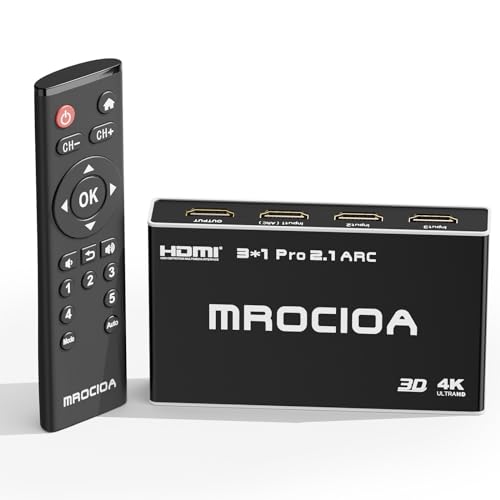
Table of Contents
- Quick Answer
- 1. AVIDGRAM 8K HDMI Switch 3 in 1 Out
- 2. UGREEN HDMI Switch 5 in 1 Out 4K
- 3. 3-Port 8K HDMI 2.1 Switch with App Control
- 4. UGREEN HDMI Switch 3 in 1 Out 4K
- 5. UGREEN Bidirectional HDMI Switch 2 in 1 Out
- How to Choose
- Who Should Skip It
- Frequently Asked Questions
- Conclusion
- Product and ASIN Reference
Quick Answer
For gamers, start with the AVIDGRAM 8K switch: three HDMI 2.1 inputs, 8K at 60Hz and 4K at 120Hz, an IR remote, and automatic switching. Choose the UGREEN 5-in-1 for five devices, the app-controlled 3-port switch for ARC soundbar setups, the UGREEN 3-in-1 for simple 4K switching, and the UGREEN bidirectional switch when you also need to share one source between two displays.
1. AVIDGRAM 8K HDMI Switch 3 in 1 Out

The AVIDGRAM switch is the best pick for next-gen console gaming, because it is built around HDMI 2.1 with the bandwidth modern consoles need. It supports 8K at 60Hz and 4K at 120Hz, with 48Gbps of bandwidth, so a PS5 or Xbox Series X can run at high refresh rates without the switch becoming the bottleneck. It also supports HDR formats, including Dolby Vision, and audio formats such as Dolby Atmos, which keeps both picture and sound at the quality the console produces.
Three HDMI inputs connect to one display, which covers the most common gaming setup: two consoles and a PC, or a console, a PC, and a streaming device. Switching happens through the included IR remote or automatically when a device powers on, so you can change sources from the couch or let the switch follow the device you just turned on. The automatic switching is the detail that makes daily use easy, because you stop thinking about which input is active and just play.
The switch is compact and designed to sit behind or beside a TV without drawing attention, and it draws power over USB, so setup is a matter of plugging in the sources, the display, and the power cable. The listing states compatibility with Xbox Series X, PS4 Pro, PS5, UHD TVs, and monitors, which covers the devices most gamers actually own. An IR remote is included, and the switch supports CEC, so it can work with the control signals your TV already sends.
One thing to check is cables: to reach 8K at 60Hz or 4K at 120Hz, you need HDMI 2.1 cables rated for 48Gbps, and the cable runs should stay short. Older cables will still work, but they limit the switch to lower resolutions and refresh rates. If your display is a 4K 120Hz TV or monitor and your consoles are current-generation, this is the switch to buy first. It gives you the full bandwidth of HDMI 2.1, three inputs, and switching that stays out of the way.
Specs
- Inputs: 3 HDMI in, 1 HDMI out
- HDMI version: HDMI 2.1
- Resolution: 8K at 60Hz, 4K at 120Hz, 48Gbps
- Switching: IR remote, automatic
- Audio: Dolby Atmos, Dolby Vision, HDR support
- Power: USB powered
- Model: AG5SW31X
2. UGREEN HDMI Switch 5 in 1 Out 4K
The UGREEN 5-in-1 switch is the pick for crowded setups, because it connects five HDMI sources to a single display. That covers a full entertainment stack: a PS5, an Xbox, a Nintendo Switch, a streaming stick, and a laptop or Blu-ray player, all plugged in at once. When your TV has only two or three HDMI ports and you own five devices, this is the switch that ends cable swapping for good.
Resolution tops out at 4K at 60Hz, with backward compatibility down to 4K at 30Hz, 1440p at 120Hz, and 1080p at 240Hz, over HDMI 2.0 with 18Gbps of bandwidth. That is the right level for a 4K 60Hz TV, which is still the most common display in a living room, and it supports HDR, 3D, Dolby Vision, and Atmos, plus HDCP 2.2 and CEC. Variable refresh rate support helps keep fast games smooth, and the switch handles the formats most consoles and streaming devices actually output.
Switching works two ways: an IR remote with a range of up to 33 feet, and a manual button on the unit itself, with five LED indicators showing which port is active. The remote matters when the switch sits behind a wall-mounted TV or inside a cabinet, since you can change sources without reaching for the box. Automatic switching is not supported on this model, so you choose the input deliberately each time, which avoids the switch jumping to a device you did not mean to use.
The unit is USB powered, which keeps the power setup simple, and the package includes the switch, the remote, a USB power cable, and a manual. Cables are not included, so plan for one HDMI cable per device plus one to the TV, and keep each run within 3 meters for the best 4K at 60Hz signal. If your display is 4K at 60Hz and your problem is port count rather than refresh rate, the UGREEN 5-in-1 is the most practical hub in this guide.
Specs
- Inputs: 5 HDMI in, 1 HDMI out
- HDMI version: HDMI 2.0
- Resolution: 4K at 60Hz, 18Gbps
- Switching: IR remote up to 33 feet, manual button, 5 LED indicators
- Features: HDR, VRR, 3D, Dolby Vision, Atmos, HDCP 2.2, CEC
- Power: USB powered
- Compatibility: PS5, PS4, Xbox, Switch, Roku, Fire Stick, laptop, TV
3. 3-Port 8K HDMI 2.1 Switch with App Control
This 3-port HDMI 2.1 switch is the pick for gamers who want the most control over switching, because it adds app control and ARC support to the usual remote and automatic switching. It supports 8K at 60Hz and 4K at 120Hz with 48Gbps of bandwidth, plus Dolby Vision, HDR10 Plus, Dolby Atmos, and DTS:X, which covers the video and audio formats a modern console and a good sound system produce. HDCP 2.3 keeps protected content playing without handshake errors.
Three inputs connect to one output, and switching works four ways: the included IR remote, automatic switching when a device powers on, a manual button, and an iOS app that names each port, shows device icons, and controls playback and soundbar volume. The app is the feature that sets this switch apart: instead of remembering that port two is the Xbox, you label it once and tap it by name. That matters in a shared living room, where anyone in the family should be able to switch sources without a cheat sheet.
ARC and eARC support is the other reason to choose this model. If your TV sends audio back to a soundbar, the switch passes that audio through, so you do not lose surround sound when you add a switch between your devices and the display. ALLM and VRR support keeps gaming responsive, with low latency mode engaging automatically when a console starts a game. The switch also supports CEC, so a single remote can control several devices at once.
The package includes the switch, a remote, a power supply, a USB cable, a manual, and sticky labels for the ports. The unit measures 118 by 63 by 22 millimeters, so it fits behind a TV or on a small shelf. One thing to note is the cable guidance in the listing: keep the combined input and output HDMI 2.1 cable length under 12 feet for the best 8K and 4K 120Hz signal. If you want app control, ARC audio, and full HDMI 2.1 bandwidth in one box, this is the most flexible switch here.
Specs
- Inputs: 3 HDMI in, 1 HDMI out
- HDMI version: HDMI 2.1
- Resolution: 8K at 60Hz, 4K at 120Hz, 48Gbps
- Switching: IR remote, automatic, manual, iOS app
- Audio: ARC, eARC, Dolby Atmos, DTS:X, Dolby Vision, HDR10 Plus
- Features: ALLM, VRR, CEC, HDCP 2.3
- Size: 118 by 63 by 22 millimeters
- Model: D321ARC
4. UGREEN HDMI Switch 3 in 1 Out 4K
The UGREEN 3-in-1 switch is the simplest pick in this guide, and it suits gamers who want reliable 4K switching without paying for 8K bandwidth they do not need. It connects three HDMI devices to one display at 4K at 30Hz, with 2K at 60Hz and 1080p at 120Hz also supported, over an HDMI 1.4 connection. That covers a PS5, a PS4, an Xbox, a Switch, a Fire Stick, a Roku, or a PC on a 4K 30Hz TV or a 1080p high-refresh monitor.
Switching works three ways: automatically to the device you just turned on, manually with a button on the unit, or with the included remote through an IR receiver. The automatic mode is the most convenient for everyday use, since the switch follows the console you power up, while the remote is useful when the switch sits out of reach. The built-in chip keeps switching fast and the signal clean, with no distortion when you change sources.
The switch is small at 0.94 by 5.94 by 5.94 inches and weighs 3.87 ounces, so it tucks behind a TV or sits on a shelf without taking space. Power comes over a micro USB cable, which is included, though a power adapter is not; the switch draws its power from the USB connection. The package also includes an infrared receiver, a remote controller, and a manual. One thing to keep in mind is the cable guidance: use HDMI 1.4 cables under 8 meters for the best 4K at 30Hz signal, and note that this model does not support HDMI 2.0, so it will not pass 4K at 60Hz.
For a second TV, a bedroom setup, or a gaming monitor that runs at 1080p, this is the right level of switch. It does the core job, connecting three devices to one display, with three switching modes and a remote, at the simplest end of the range. If your display and consoles are all 4K at 60Hz or faster, step up to one of the HDMI 2.1 picks above; if they are not, this switch covers your setup without extra cost or complexity.
Specs
- Inputs: 3 HDMI in, 1 HDMI out
- HDMI version: HDMI 1.4
- Resolution: 4K at 30Hz, 2K at 60Hz, 1080p at 120Hz
- Switching: Automatic, manual button, IR remote
- Features: HDR, CEC, 3D, HDCP 1.4
- Power: Micro USB cable included, adapter not included
- Size: 0.94 by 5.94 by 5.94 inches, 3.87 ounces
- Model: 80125
5. UGREEN Bidirectional HDMI Switch 2 in 1 Out

The UGREEN bidirectional switch is the most flexible pick here, because it works in two directions. In one direction it connects two HDMI sources to one display, and in the other it connects one source to two displays, switching between them with a button press. That makes it useful in setups where a single switch has to do two jobs: two consoles sharing one TV, or one console shared between a TV and a monitor.
Resolution reaches 4K at 60Hz over HDMI 2.0, with 1080p at 120Hz and 3D also supported, and each channel carries 3.4Gbps for a stable signal with no lag or picture loss. The switch supports HDR and HDCP, and it works with the devices gamers own: Switch, PS4 Pro, PS4, PS3, Blu-ray players, TV boxes, laptops, monitors, and projectors. A blue indicator light shows which channel is active, so you always know which input or output is selected.
Setup needs no extra power supply: the switch is passive and plug-and-play, which keeps the cable clutter down. Two things to keep in mind: only one display works at a time in splitter mode, and the switch has no memory function, so it defaults to input one when powered on. Switching takes a few seconds while the signal adapts, which is normal for a passive switch. HDMI cables are not included, and the distance between the two HDMI interfaces is small, so short cables work best.
This is the pick for a two-device setup, for a desk where one PC shares a monitor and a TV, or for anyone who wants a switch that can also act as a splitter. It does not have a remote or automatic switching, and it tops out at two inputs, so it suits smaller setups. For a simple, no-power, two-way switch that just works, the UGREEN bidirectional model is the easiest choice in this guide.
Specs
- Ports: 2 HDMI, bidirectional (2 in 1 out or 1 in 2 out)
- HDMI version: HDMI 2.0
- Resolution: 4K at 60Hz, 1080p at 120Hz, 3D
- Bandwidth: 3.4Gbps per channel
- Switching: Manual button, blue indicator light
- Power: No extra power supply needed
- Features: HDR, HDCP, plug and play
- Model: 80126
How to Choose
Start with resolution and refresh rate, because they decide whether the switch keeps up with your display. If your TV or monitor runs 4K at 120Hz or 8K, you need an HDMI 2.1 switch with 48Gbps of bandwidth, such as the AVIDGRAM or the app-controlled 3-port pick. If your display is 4K at 60Hz, an HDMI 2.0 switch with 18Gbps is enough, and if it is 4K at 30Hz or 1080p, an HDMI 1.4 switch covers it. Matching the switch to the display avoids paying for bandwidth you cannot use, and avoids a switch that caps your console below what it can do.
Next, count your devices. Three inputs cover two consoles and a PC or streamer, five inputs cover a full entertainment stack, and two inputs suit a simple desk or bedroom setup. Then look at switching style: automatic switching follows the device you power on, a remote lets you switch from the couch, and app control lets you label ports by name. ARC and eARC matter only if your TV sends audio back to a soundbar; if it does, choose a switch that passes ARC through. Finally, check cables: use HDMI 2.1 cables rated for 48Gbps for 8K and 4K 120Hz, keep runs short, and confirm the switch includes the power cable or adapter it needs.
Who Should Skip It
Skip an 8K HDMI 2.1 switch if your TV and consoles are all 4K at 60Hz or slower, because the extra bandwidth buys nothing your display can show. Skip a five-port hub if you only own two devices, since a smaller switch costs less and takes less space. Skip a switch without a remote if it will sit behind a wall-mounted TV, because you will need to reach it every time you change sources. Skip any switch whose listed resolution is below your display, since it will cap your console at the lower rate. And skip a passive bidirectional switch if you need automatic switching or more than two inputs; a powered multi-port switch is the better fit. If your TV already has enough HDMI ports for every device you own, you do not need a switch at all.
Frequently Asked Questions
Does an HDMI switch reduce picture quality?
A switch that matches your display’s resolution and bandwidth should pass the signal through without visible loss, as long as you use cables rated for that bandwidth. An HDMI 2.1 switch with 48Gbps handles 8K at 60Hz and 4K at 120Hz, while an older switch caps the signal at its own limit. Keep cable runs short and use certified cables for the best result.
Do I need an HDMI 2.1 switch for a PS5 or Xbox Series X?
You need one only if your display supports 4K at 120Hz or 8K and you want the console to run at those rates. On a 4K 60Hz TV, an HDMI 2.0 switch with 18Gbps is enough, and the console will play normally. Check your TV’s refresh rate first, then match the switch to it.
How many devices can one HDMI switch connect?
It depends on the model: two-input switches cover a console and a PC, three-input switches cover the most common gaming setup, and five-input switches cover a full entertainment stack. Count every device you want plugged in at once, then choose a switch with at least that many inputs, plus one spare if you plan to add a device later.
What is the difference between an HDMI switch and a splitter?
A switch connects several sources to one display and lets you choose which source shows on screen. A splitter connects one source to several displays and shows the same picture on all of them. A bidirectional switch can do either job, but only one display works at a time in splitter mode.
Conclusion
The right HDMI switch matches your display, your device count, and the way you like to switch. The AVIDGRAM 8K switch is the best all-round choice for next-gen consoles, with full HDMI 2.1 bandwidth, three inputs, and automatic switching. The UGREEN 5-in-1 is the best hub for crowded setups, the app-controlled 3-port switch is the most flexible, the UGREEN 3-in-1 is the simplest 4K option, and the UGREEN bidirectional switch covers two-device and dual-display setups. Count your devices, check your display’s refresh rate, and pick the switch that fits your setup.
Product and ASIN Reference
| Product | ASIN |
|---|---|
| AVIDGRAM 8K HDMI Switch 3 in 1 Out | B0C2Z1NF7F |
| UGREEN HDMI Switch 5 in 1 Out 4K | B09Y14JSFH |
| 3-Port 8K HDMI 2.1 Switch with App Control | B0CQT879XN |
| UGREEN HDMI Switch 3 in 1 Out 4K | B0865JJLHD |
| UGREEN Bidirectional HDMI Switch 2 in 1 Out | B07JQH1L83 |
Related guides
More from Amazon
Programs that pair well with the guide above. Offers and eligibility are set by Amazon and may change.
Free shipping on eligible items, Prime Video and more. Eligible new members can start with a free trial.
Start a Prime free trialAd-free music streaming. Eligible new subscribers can start with a free trial.
Try Music Unlimited freeA Prime membership for ages 18-24 with a trial period. Eligibility is set by Amazon.
See Prime for Young AdultsAudiobooks and podcasts to listen to on the go. Eligible new members can start with a free trial.
Try Audible freeAs an Amazon Associate we earn from qualifying purchases.