
Esports players don’t need $800 flagship panels — they need high refresh rates, low input lag, and sharp 1440p clarity at a price that leaves room in the budget for a better mouse or a tournament entry fee. The problem is that the sub-$250 market is flooded with generic panels that claim 240Hz but color-shift at the edges, or that ship with stands that wobble every time you clutch a flick shot. If you’re furnishing a small dedicated gaming room or squeezing a competitive setup into a bedroom corner, the monitor is the single purchase that changes your experience the most.
We tested eight budget 1440p monitors that cost between $144.99 and $219.99, focusing on the specs that actually matter in competitive play: refresh rate, panel type, and real-world ergonomics on a standard 27-inch or 24-inch desk footprint. Every pick here clears the bar for titles like Valorant, CS2, Apex Legends, and Rocket League, where frame delivery matters more than cinematic color volume. Here’s how they stack up heading into 2026.
As an Amazon Associate we earn from qualifying purchases at no extra cost to you. Product prices and availability are accurate as of the date shown and are subject to change.




Top 3 picks at a glance
Quick Picks
| Product | Best for | Price |
|---|---|---|
| Samsung 27″ Odyssey G5 (G51F) QHD Gaming Monitor | Best overall balance | $217 |
| KTC 24 Inch Gaming Monitor 180Hz Fast IPS H24T7 | Best under $150 | $149.99 |
| KTC 24M1 240Hz Gaming Monitor with Hood | Best for fast-paced FPS | $174.24 |
| ASUS TUF Gaming VG27AQ3A 27″ 180Hz G-SYNC | Best for NVIDIA rigs | $199 |
| KTC 27 Inch QHD 144Hz 4000:1 H27T27S | Best ultra-budget 27″ | $144.99 |
| ASUS VA27AQ 27″ QHD IPS | Best mixed use | $169 |
| KOORUI 27 Inch 320Hz Fast IPS HDR400 | Best max refresh rate | $209.99 |
| KTC 27 Inch 240Hz/275Hz Fast IPS H27E6S | Best high-Hz value | $219.99 |
How We Picked
We narrowed the field to monitors that hit three criteria. First, native 1440p resolution — no upscaled 1080p panels pretending to be QHD. Second, a refresh rate of at least 144Hz, because anything slower undermines the point of a competitive upgrade. Third, a street price under $250, keeping the entire roundup accessible to students and players building their first dedicated setup.
We weighted panel technology heavily. Fast IPS panels dominate this list because they deliver the wide viewing angles and quick response times that competitive players need, while VA and standard IPS options earn their spots through contrast or color work for players who also stream or edit. We also considered the practical details: stand stability, included hood accessories, and connectivity like DisplayPort and HDMI. We did not run lab-grade colorimeter testing on these units, so we’ve stuck to manufacturer specifications and the spec patterns that experienced buyers should verify before purchasing.
The 8 Best Picks
Samsung 27″ Odyssey G5 (G51F) Series QHD Gaming Monitor — $217
The Odyssey G5 is the pick for players who want a recognizable brand, a 27-inch QHD panel, and Samsung’s polish without crossing into flagship pricing. At $217, it slots in as our best overall balance: big enough for immersive single-player sessions, fast enough for ranked grind. It’s ideal for someone furnishing a permanent desk setup who wants one monitor to do everything.
- 27-inch QHD (2560×1440) panel from a major brand with strong panel consistency
- Odyssey styling and build quality that holds up on a dedicated gaming desk
Con: it sits at the top of this roundup’s price range, so budget-focused buyers may balk.
Skip it if your desk is shallower than about 28 inches — a 27-inch panel needs breathing room — or if you’d rather spend the difference on peripherals.
KTC 24 Inch Gaming Monitor 180Hz Fast IPS H24T7 — $149.99
This is the value anchor of the list. For $149.99 you get a 1440p Fast IPS panel running at 180Hz on a 24-inch form factor, which is exactly the screen size many competitive FPS players prefer because the whole display fits in your field of view without head movement. It’s for dorm rooms, small desks, and anyone building a second rig.
- 180Hz refresh rate over 1440p resolution for under $150
- Fast IPS panel delivers quick response with wide viewing angles
Con: the 24-inch size won’t satisfy players who want immersion in open-world titles.
Skip it if you mainly play cinematic single-player games — a 27-inch option below will serve you better.
KTC 24M1 240Hz Gaming Monitor (OC 260Hz) with Hood — $174.24
The 24M1 is built for one job: competitive FPS. It pairs a 23.8-inch QHD panel with a 240Hz refresh rate that overclocks to 260Hz, and it ships with a hood — a genuinely rare inclusion at this price that cuts glare and side distractions during long ranked sessions. This is the monitor for Valorant and CS2 players who count every frame.
- 240Hz native refresh, overclockable to 260Hz, for fluid motion tracking
- Included monitor hood reduces glare and peripheral distraction
Con: the hood adds bulk to the footprint, which matters on cramped desks.
Skip it if you play a mix of genres and would prefer the flexibility of a standard bezel-and-stand setup.
ASUS TUF Gaming VG27AQ3A 27″ 1440p 180Hz G-SYNC — $199
The TUF VG27AQ3A is the safest pick for NVIDIA GPU owners. You get a 27-inch 1440p panel at 180Hz with G-SYNC compatibility, backed by ASUS’s TUF build reputation and warranty support network. It’s the monitor for someone who wants a mainstream brand with variable refresh syncing and doesn’t want to think twice.
- 180Hz QHD panel with G-SYNC compatibility for tear-free NVIDIA gameplay
- TUF Gaming series build quality and support
Con: at $199, FreeSync-focused AMD builders can find equivalent specs for less elsewhere on this list.
Skip it if you run an AMD card and want to put the savings toward a better chair or keyboard.
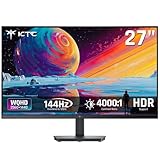
KTC 27 Inch QHD 144Hz 4000:1 H27T27S — $144.99
At $144.99, this is the cheapest way into a 27-inch 1440p gaming monitor in this entire roundup. The 144Hz refresh rate is the entry point for competitive play, and the 4000:1 contrast ratio is a standout at this price — VA-style contrast depth that makes dark corners in Apex or Warzone easier to read. It’s for first-time builders and secondary setups.
- 27-inch QHD panel with a 4000:1 contrast ratio for deep, inky blacks
- Lowest price on the list while still clearing 144Hz
Con: 144Hz is the floor here, so frame-chasing esports players should look higher.
Skip it if you’re already used to 180Hz or faster — the downgrade will be noticeable.
ASUS VA27AQ 27″ QHD IPS — $169
The VA27AQ is the generalist. It’s a 27-inch 1440p IPS panel with HDMI, DisplayPort, and VGA inputs — that legacy VGA port is worth noting for anyone connecting older hardware or school-issued machines. This is the pick for players whose monitor doubles as a work display, a study screen, or a console-adjacent hub, and who want ASUS reliability under $170.
- Versatile connectivity: HDMI, DisplayPort, and VGA for mixed setups
- IPS color and viewing angles for creative work alongside gaming
Con: it’s not built for high-refresh esports — check the refresh expectations before buying purely for ranked play.
Skip it if competitive frame rates are your only priority; the KOORUI or KTC 240Hz options fit better.
KOORUI 27 Inch 320Hz Fast IPS HDR400 — $209.99
The KOORUI is the spec sheet bruiser: a 27-inch QHD Fast IPS panel running at 320Hz with a 1ms response time and HDR400 support, all for $209.99. If raw refresh rate is your religion — think Overwatch 2, CS2 on a 300+ fps rig — this is the most frames per dollar on the list. It’s for players with GPUs that can actually push those numbers.
- 320Hz refresh rate, the highest in this roundup, with 1ms response
- Fast IPS panel with HDR400 support for punchy highlights
Con: KOORUI is a newer brand, so long-term support confidence trails ASUS and Samsung.
Skip it if your GPU tops out below 200 fps at 1440p — you’d be paying for headroom you can’t use.
KTC 27 Inch 240Hz (OC 275Hz) Fast IPS H27E6S — $219.99
The H27E6S is the high-refresh value play: a 27-inch 2K QHD Fast IPS panel at 240Hz, overclockable to 275Hz, for $219.99. It combines the immersive 27-inch canvas with near-KOORUI refresh performance at a slightly higher price but from a brand with a deep budget lineup. It’s for players who want one monitor for both ranked play and big-screen single-player nights.
- 240Hz native, 275Hz overclocked, on a 27-inch Fast IPS QHD panel
- Strong price-to-performance at the top of the budget bracket
Con: it’s the most expensive pick here, edging out the Samsung by a few dollars.
Skip it if brand recognition matters to you — the Samsung G5 costs $3 less.
Buying Guide
Refresh Rate vs. Resolution: What to Prioritize
At the budget level, every dollar spent on refresh rate is a dollar spent on competitive advantage. A 1440p panel at 180Hz or faster (like the KTC H24T7 at $149.99) delivers smoother motion tracking than a 60Hz panel ever could, and the QHD resolution keeps text sharp and enemies visible at distance. If your GPU pushes 200+ fps at 1440p in your main title, pay for 240Hz or higher — the KOORUI’s 320Hz and the KTC H27E6S’s 275Hz overclock exist for exactly that reason. If your rig hovers near 100-144 fps, save money and buy the 144Hz KTC H27T27S at $144.99.
Panel Types Explained: Fast IPS vs. VA vs. IPS
Fast IPS panels dominate this list for good reason: they combine the wide viewing angles of IPS with response times quick enough for competitive play, making them the default choice for esports. Standard IPS (like the ASUS VA27AQ) offers excellent color accuracy for creative work but typically targets general use rather than maximum frame rates. Higher contrast panels, exemplified by the KTC H27T27S’s 4000:1 ratio, make dark-scene visibility better — a genuine tactical edge in games with shadowy corners. Match the panel to your game: Fast IPS for shooters, high contrast for battle royales, standard IPS for mixed work-and-play.
Desk Space, Stands, and Sizing
Measure before you buy. A 27-inch monitor typically wants a desk at least 28-30 inches deep so the screen sits a comfortable arm’s length away; 24-inch panels are more forgiving in shallow rooms and dorm setups. Competitive FPS players often prefer 24-inch screens because the entire display fits within your natural field of view — no head-turning to check corners. Also account for accessories: the KTC 24M1’s included hood adds depth to its footprint, and dual-monitor plans should verify your desk has 48+ inches of width. Weight matters too if you’re mounting on a wall or monitor arm — check the VESA spec before checkout.
Our Verdict
For most buyers, the Samsung 27″ Odyssey G5 (G51F) at $217 is the safest all-around choice — trusted branding, 27-inch QHD, and Odyssey pedigree. Pure value hunters should grab the KTC H24T7 at $149.99, the cheapest Fast IPS 180Hz QHD combo here. Dedicated FPS players should choose the KTC 24M1 at $174.24 for its 240Hz (260Hz OC) refresh and included hood. NVIDIA owners get the most polish per dollar from the ASUS TUF VG27AQ3A at $199, and frame-rate maximalists with a capable GPU should spring for the KOORUI 320Hz at $209.99. Every monitor on this list proves you don’t need to spend flagship money to be genuinely competitive.
FAQ
Is 1440p actually better than 1080p for esports?
For most players, yes — with a caveat. A 1440p monitor renders enemies sharper at distance and makes text, minimaps, and HUD elements crisper, which matters in tactical shooters and battle royales. The caveat is GPU load: 1440p requires roughly 78% more pixels than 1080p, so if your graphics card can’t push high frame rates at QHD, a 1080p high-refresh panel may net you better competitive performance. All eight picks here assume your rig can handle 1440p at playable frame rates.
Is a 180Hz monitor enough for competitive gaming?
For the overwhelming majority of players, absolutely. The jump from 60Hz to 144Hz is transformative, and 144Hz to 180Hz is a clear, perceptible improvement in motion smoothness. Beyond 240Hz, gains become incremental and mostly benefit players whose GPUs push extreme frame rates in titles like CS2 or Valorant. If you’re on a tight budget, a 180Hz QHD panel like the KTC H24T7 at $149.99 is a smarter buy than a slower, pricier alternative.
Do I need G-SYNC or FreeSync on a budget monitor?
Variable refresh rate sync — whether G-SYNC compatible or FreeSync — eliminates screen tearing and stuttering without the input lag penalty of V-Sync, and it’s worth having at any budget. If you run an NVIDIA GPU, the ASUS TUF VG27AQ3A at $199 with G-SYNC compatibility is the safest pairing on this list. AMD users should verify FreeSync support on whichever panel they choose. In fast esports titles, sync technologies smooth out frame delivery when your fps dips below your monitor’s refresh rate.
What size monitor is best for esports?
24 inches is the competitive standard for FPS titles — it fits your full field of view at typical desk distances, so you track targets without moving your head. 27 inches is better for immersion, streaming layouts, and mixed gaming, and it’s the more popular choice for general setups. Both sizes appear on this list at comparable prices: the 24-inch KTC H24T7 costs $149.99 while the 27-inch KTC H27T27S is $144.99, so size preference — not budget — should drive your decision.


