A gaming monitor rarely shows colours exactly as a game intends straight out of the box. Factory settings favour a bright, punchy picture, which can push reds too hard, crush shadow detail, and leave two screens side by side looking noticeably different. A hardware calibration tool fixes that at the source: a small sensor sits on the panel, measures what the screen actually produces, and builds a corrected colour profile your operating system applies every time you play.
The five tools below are all hardware colorimeters built for this job. Two are current Calibrite HL models rated, in the listings’ own wording, for very bright HDR panels; two are Datacolor’s current Spyder generations; and the last is an older Spyder5PRO that works as a budget route for a single, less demanding screen. They differ in brightness range, software depth, and how well they will age alongside your next monitor upgrade.
As an Amazon Associate, we earn from qualifying purchases.
Quick answer
A monitor calibration tool is a small hardware sensor that hangs over your screen, measures its actual colours and brightness, and builds a corrected profile for your PC. For gaming displays, the Calibrite Display Pro HL and Display Plus HL cover the brightest HDR panels, Datacolor’s current Spyder and Spyder X2 Elite suit most LCD and OLED screens, and the older Spyder5PRO is the budget route.
How to choose
Start with panel type and brightness. Every pick here covers standard LCD screens, but OLED and mini-LED monitors benefit from a sensor whose measurement range comfortably exceeds the panel’s peak brightness, especially for HDR. The brightness ceilings in the listings are maker figures, so treat them as listing wording rather than laboratory guarantees: the Display Pro HL is listed at up to 3,000 nits and the Display Plus HL at up to 10,000 nits, while the Datacolor models carry no such headline ceiling.
Next, think about software. The Calibrite pair runs Calibrite PROFILER, covering white point and gamma settings plus profile validation and a uniformity check, so you can confirm the correction took hold evenly across the panel. Datacolor splits its range by tier: the current Spyder is the straightforward route, while the Spyder X2 Elite is the advanced tier with expert controls. If you run two monitors, or edit photos and video on the same desk, the deeper tiers earn their place.
Finally, check the practical details. The current Spyder is a USB-C device, and the Display Plus HL connects over USB-C with a USB-A adapter supplied, which helps with older PCs. And be honest about generation: a legacy tool like the Spyder5PRO can profile a basic screen, but never buy one expecting current-generation software support.
datacolor Spyder – Monitor Calibrator for Graphic Designers, Photographers, and Content Creators, Shows You True Colors, Works on OLED Monitors & LED Screens, Easy-to-Use Color Calibration Tool
Datacolor’s current Spyder, model SP2024, is the simplest starting point in this roundup. It is the 2024 generation of the line, built to calibrate the panel types most gaming desks actually use: LCD, OLED, and mini-LED screens, along with Apple Liquid Retina XDR displays. The listing positions it as an easy-to-use tool, which suits a gamer who wants a corrected profile without a long setup ritual.
The feature that matters most day to day is ambient-light tracking: a profile built in a dark room can look wrong at noon, and a sensor that accounts for room light helps the correction hold up across every session. As a USB-C device, it plugs neatly into current laptops and desktops. For a single modern gaming monitor, this is the low-friction pick.
Specs
- Model: SP2024 (2024 generation)
- Panel types: LCD, OLED, mini-LED, Apple Liquid Retina XDR
- Ambient light: ambient-light tracking
- Connection: USB-C
- Brightness ceiling: not stated
- Projector calibration: not stated
Calibrite Display Pro HL (CCDIS3HL)
The Display Pro HL is Calibrite’s step up for brighter panels. Its HL sensor is listed as measuring up to 3,000 nits, a maker figure that puts it ahead of mainstream colorimeters when an HDR monitor pushes high peak brightness. The listing says it calibrates and profiles LCD, mini-LED, and OLED panels as well as Apple XDR displays, covering every gaming screen category in one device.
The software is the other half of the appeal. Calibrite PROFILER handles white point and gamma, and adds profile validation and a uniformity check, genuinely useful on large gaming monitors where brightness varies from centre to edge. With Mac and Windows support, this is the balanced pick for a high-brightness monitor and a user who wants verification tools, not just a one-click profile.
Specs
- Model: CCDIS3HL
- Sensor: HL sensor, measures up to 3,000 nits (listing wording)
- Panel types: LCD, mini-LED, OLED, Apple XDR
- Software: Calibrite PROFILER (white point, gamma, profile validation, uniformity check)
- Projector calibration: yes, per listing
- Compatibility: Mac and Windows
Calibrite Display Plus HL (CCDIS3PLHL)
The Display Plus HL is the top of Calibrite’s line here. The listing describes its HL sensor as measuring up to 10,000 nits, the line’s highest ceiling, aimed at super-bright displays alongside the usual LCD, mini-LED, OLED, and Apple XDR coverage. That headroom is the reason to choose it: if you own one of the brightest HDR gaming monitors, a sensor that measures well beyond the panel’s output keeps the profile trustworthy at the top end.
It runs the same Calibrite PROFILER software as the Pro HL, with the same validation and uniformity feature set, so you give up nothing by stepping up. Connection is USB-C with a USB-A adapter supplied, and a travel pouch is included. It is the pick for the brightest panels and for keeping one tool across several monitor upgrades.
Specs
- Model: CCDIS3PLHL
- Sensor: HL sensor, measures up to 10,000 nits (listing wording)
- Panel types: LCD, mini-LED, OLED, Apple XDR, super-bright displays
- Software: Calibrite PROFILER (white point, gamma, profile validation, uniformity check)
- Connection: USB-C, USB-A adapter supplied
- Included extras: travel pouch
Datacolor Spyder X2 Elite – Monitor Color Calibrator for Photographic, Video and Digital Design Work. Ensures Color Accuracy and Consistency for Monitors
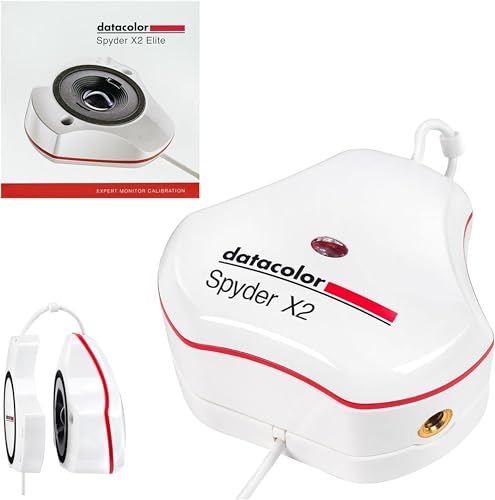
The Spyder X2 Elite is Datacolor’s advanced-tier entry, built around an X2-generation lens-based sensor. Where the standard Spyder is the straightforward route, the Elite tier is positioned with advanced and expert controls for users who want to dig into the calibration rather than accept a guided result. The listing frames it around photographic, video, and design work, which also fits a gamer who streams or edits footage and wants two monitors to agree.
That makes it the natural pick for a mixed desk: play on the panel, then trust the same panel for colour-sensitive side work. The recorded listing detail for this model is thinner than for the Calibrite pair, so buyers who want every specification confirmed should read the product page closely. What the record supports is clear: a current-generation lens-based sensor and the Elite software tier.
Specs
- Sensor: X2-generation lens-based sensor
- Software tier: Elite (advanced and expert controls, per the line’s positioning)
- Panel types: not stated
- Brightness ceiling: not stated
- Connection: not stated
- Projector calibration: not stated
Datacolor Spyder5PRO – Designed for Serious Photographers and Designers (S5P100)
The Spyder5PRO needs an honest label up front: it is a legacy model, two hardware generations old, included here only as the budget route for a basic setup. It should never be presented, or bought, as a current-generation tool, and nobody should expect current-generation software support from it. Within those limits, the recorded features are respectable. Its integrated room-light sensor measures three ambient levels, and its Display Analysis feature compares colour, brightness, contrast, gamut, tone response, and white point across monitors.
That analysis feature is handy if you run two older screens and want them closer for everyday play. But the limits are real: this tool comes from an earlier era of panels, and a bright modern HDR or OLED gaming monitor deserves one of the current sensors above. Choose it only when the budget is firm, the screen is modest, and the older generation is a trade-off you accept with eyes open.
Specs
- Model: S5P100
- Generation: legacy (Spyder5 line, two hardware generations old)
- Ambient light: integrated room-light sensor, three ambient levels
- Analysis: Display Analysis (colour, brightness, contrast, gamut, tone response, white point across monitors)
- Panel types: not stated
- Connection: not stated
Who should skip
Skip calibration tools entirely if you only play competitive titles and prefer your monitor’s oversaturated gaming preset; a corrected profile looks flatter by design, and that trade-off is the point, not a flaw. Skip the Spyder5PRO if your monitor is a recent HDR or OLED model; a legacy sensor is the wrong partner for a current panel. Skip the Display Plus HL if your screen is a mainstream monitor you plan to replace soon; its headroom is wasted there. And skip every pick if your real problem is a failing backlight or dead pixels, which no profile can repair.
FAQ
Does calibration change how games look?
Yes, usually by making them look less exaggerated rather than more dramatic. A profile corrects white point, gamma, and colour so scenes render closer to how they were mastered. Shadow detail often improves because the gamma curve is set properly, while oversaturated colours calm down. You can switch the profile off for any title where you prefer the factory look.
How often should a gaming monitor be recalibrated?
Panels drift slowly as they age, so a fresh profile every few months is a sensible rhythm for most players. Recalibrate sooner after a major lighting change in the room, a firmware update, or a GPU driver change that resets your colour settings. The process is short once the software is installed, so it folds easily into routine desk maintenance.
Can one tool calibrate two different monitors?
Yes. A colorimeter profiles each screen separately and stores a profile per display, so a dual-monitor desk can be matched screen by screen. The Display Analysis feature on the older Spyder5PRO and the validation tools in Calibrite PROFILER both exist to compare results across panels. Perfect matching of two different panel types is not always possible, but a good tool gets them visibly closer.
Will a calibration tool fix HDR on my monitor?
It helps the parts calibration can reach: an accurate profile improves colour and tone handling, and a sensor with a high brightness ceiling, as listed for the Calibrite HL models, can measure bright HDR panels properly. It cannot add HDR capability a panel lacks, fix poor local dimming, or raise real peak brightness. Treat it as accuracy tooling, not a hardware upgrade.
Final verdict
For most gaming desks, the Calibrite Display Pro HL is the strongest all-round choice: a high listed brightness ceiling, PROFILER validation tools, and coverage of every mainstream panel type. The Display Plus HL is the step up for the brightest HDR monitors. Datacolor’s current Spyder is the simplest route for a single modern screen, the Spyder X2 Elite suits a mixed gaming and content desk, and the Spyder5PRO remains only a knowingly budget, legacy option.
Product and ASIN Reference
| Product | ASIN |
|---|---|
| datacolor Spyder – Monitor Calibrator for Graphic Designers, Photographers, and Content Creators, Shows You True Colors, Works on OLED Monitors & LED Screens, Easy-to-Use Color Calibration Tool | B0DDYDLPJ4 |
| Calibrite Display Pro HL (CCDIS3HL) | B0C836NB5X |
| Calibrite Display Plus HL (CCDIS3PLHL) | B0C82LKJHY |
| Datacolor Spyder X2 Elite – Monitor Color Calibrator for Photographic, Video and Digital Design Work. Ensures Color Accuracy and Consistency for Monitors | B0C1LKYPTT |
| Datacolor Spyder5PRO – Designed for Serious Photographers and Designers (S5P100) | B00UBSL31Q |
Related guides
More from Amazon
Programs that pair well with the guide above. Offers and eligibility are set by Amazon and may change.
Free shipping on eligible items, Prime Video and more. Eligible new members can start with a free trial.
Start a Prime free trialAd-free music streaming. Eligible new subscribers can start with a free trial.
Try Music Unlimited freeA Prime membership for ages 18-24 with a trial period. Eligibility is set by Amazon.
See Prime for Young AdultsAudiobooks and podcasts to listen to on the go. Eligible new members can start with a free trial.
Try Audible freeAs an Amazon Associate we earn from qualifying purchases.