Buying a refurbished gaming machine sounds like the smart, budget-conscious move—and it can be. But most shoppers get it wrong in the first ten minutes. They compare screen sizes when they should compare graphics cards, chase RGB lighting as if it affects frame rates, and assume the word “renewed” means the machine has been thoroughly tested when it often means it was wiped, boxed, and shipped.
The biggest mistake is category confusion. The keyword question—refurbished gaming laptop vs desktop value—gets treated like a preference issue, when it’s really a math problem. Desktops at the same price deliver two to three times the graphics performance of laptops, but laptops give you portability and an included screen, keyboard, and battery. The second mistake is buying on CPU badges alone. An i7 from 2015 is not better than an i5 from 2017 for gaming; the GPU matters more, and six-year-old i7s are six-year-old CPUs no matter the number on the sticker.
As an Amazon Associate we earn from qualifying purchases at no extra cost to you. Product prices and availability are accurate as of the date shown and are subject to change.


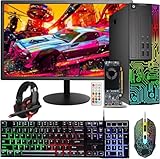
Third, people under-buy the GPU and then wonder why new games stutter. A GeForce GT 1030 or GTX 1050 Ti can handle esports titles like Valorant, Rocket League, and CS2 at 1080p on medium settings, but it will struggle with AAA releases even at low settings. Know what you actually play before you spend a dollar.
Top 3 picks at a glance
Decide These 3 Things First
1. Where will it live? A desktop needs a dedicated spot roughly 18 inches wide, 16 inches deep, and 15 inches tall for a typical refurbished tower (most Dell OptiPlex-based builds run about 14 x 4 x 12 inches in small form factor, or 15 x 7 x 14 inches in mini-tower form). Add 2 to 3 inches of rear clearance for airflow and cables. If you game at a shared desk, in a dorm, or on a couch, a laptop changes the math entirely.
2. What resolution and frame rate do you target? Be honest. If it’s 1080p at 60 fps in esports games, a $370–$415 refurbished desktop with a GTX 1050 Ti or RX 550 gets you there. If you want 1440p or high-refresh AAA gaming, refurbished budget desktops won’t cut it—you’ll need to look at $700+ machines with a GTX 1660 Super or better, or accept lower settings.
3. What’s your real ceiling? Set a number that includes the stuff the listing doesn’t include. Many refurbished desktops ship without a monitor, keyboard, or mouse. Budget $90–$130 for a 24-inch 1080p monitor and $30–$50 for peripherals if they’re not bundled. A $399 tower is a $530 setup by the time you’re playing.
Graphics Performance Per Dollar Is the Whole Ballgame
This is where refurbished desktops crush refurbished laptops. A $399 desktop like a renewed Dell tower with a GTX 1050 Ti 4GB delivers roughly twice the GPU horsepower of any laptop you’ll find under $450, because laptop versions of the same chip are power-capped and the desktop card isn’t sharing thermal headroom with a thin chassis.
Concrete guidance: at the $350–$450 price band, look for a GTX 1050 Ti (4GB), RX 550 (4GB), or GTX 1650 if you’re lucky. Avoid the GT 1030 (2GB) for anything beyond esports and older AAA titles—it’s roughly 40–50% slower than a 1050 Ti. If a listing pairs a GT 1030 with a bundle of monitor, keyboard, mouse, and headset (common around $415), you’re partly paying for the peripherals, and that’s fine—if you need them. If you already own peripherals, the bare tower with the better GPU is the better value.
On laptops, a refurbished unit under $500 will typically carry integrated graphics or an entry MX-series chip, which means 720p-to-low-1080p gaming at best. If a genuine gaming experience on the go is non-negotiable, you should be shopping the $550–$800 refurbished tier for a GTX 1650 or RTX 3050 laptop, not the sub-$450 tier.
CPU Generation Matters More Than the Badge
Refurbished desktops in this price class overwhelmingly use 6th- and 7th-generation Intel chips—think i5-6500 (quad-core, up to 3.6GHz) or 6th-gen i7 quad-cores. These are fine for gaming today, especially since the GPU is the bottleneck anyway, but know the limits: a quad-core CPU from that era will hitch in heavily multithreaded titles and can’t be upgraded to a modern generation without replacing the motherboard.
Rules of thumb: an i5-6500 with a GTX 1050 Ti is a better gaming buy than a 6th-gen i7 with a GT 1030 at the same price. Prefer 16GB of RAM over 8GB—even used DDR4 is cheap, and 16GB is the practical floor for modern games. Check that the SSD is a genuine NVMe or SATA drive of at least 512GB; some refurbishers install small, no-name drives to hit a price point. And confirm Windows 11 support: 6th-gen and 7th-gen Intel chips are officially on Microsoft’s compatibility list for Windows 11, but 4th-gen and older are not—matters a lot as we move into 2026.
Size, Weight, and the Space You’re Actually Buying
A refurbished small-form-factor desktop weighs 12–15 pounds and fits in a footprint smaller than many gaming laptops’ power bricks would suggest. Mini-tower refurb builds run 17–20 pounds. A gaming laptop weighs 4.5–6 pounds plus a 1–1.5 pound charger. If you move your setup monthly—a student, military, frequent relocations—that difference compounds fast.
Also count the hidden footprint: a desktop setup needs the tower plus a monitor (a 24-inch panel adds roughly 21 x 8 inches of desk depth and 8–10 pounds). A laptop’s whole rig fits in one 15 x 11 x 1 inch slab. If desk real estate is under about 36 inches wide, the laptop’s case gets stronger.
Power, Heat, and Noise
Refurbished office-tower conversions (the Dell OptiPlex style builds) draw remarkably little power: the whole system under gaming load runs about 150–220W, versus 45–120W for the wall adapter alone on a gaming laptop plus the laptop’s own battery heat. Expect your electricity cost for heavy evening gaming to be $3–$6 a month with the desktop.
Thermals matter more in refurbished machines than new ones because the thermal paste may be original. Look for listings that explicitly mention new thermal paste or a thermal test—good refurbishers do this. Fans in old office towers are also tuned for quiet office loads, not gaming; expect noticeably more fan noise during sustained play, and plan a case with at least one intake and one exhaust fan.
Price Tiers: What Your Money Buys Refurbished
$300–$420 (the sweet spot for desktops): 6th/7th-gen quad-core i5 or i7, 16GB DDR4, 512GB SSD, GTX 1050 Ti or RX 550. This is where the listings in the $370–$415 range live. Best value per frame in the entire refurbished market, but 1080p-medium gaming only.
$450–$650: This tier is where refurbished laptops with GTX 1650/RTX 3050 start appearing, and where desktops pick up GTX 1660-class cards and 6-core CPUs. If portability is your priority, this is your entry point. If it isn’t, desktops in this band still beat laptops on raw performance.
$700–$1,000: RTX 3060/4060-class machines on both sides. At this tier the desktop advantage narrows but doesn’t disappear—expect 30–40% more GPU performance per dollar on desktops, plus cheaper future upgrades.
Peripherals math: bundles that include a 24-inch monitor, keyboard, mouse, and headset typically add $60–$90 of real value versus buying the tower alone. If you need everything, bundles win. If you own a monitor, buy the tower and put the savings toward the GPU tier above.
Warranty and Refurbisher Reputation
Refurbished means different things by seller. Look for: a minimum 90-day warranty (Amazon Renewed standard), 30-day no-questions returns, and a stated grade (A/B/C cosmetically). Prefer refurbishers who list a 20+ point functional test, replaced thermal paste, and battery health guarantees on laptops (80%+ capacity minimum—laptop batteries degrade whether or not the machine was used hard, and a replacement battery costs $50–$90).
For desktops, ask whether the PSU and GPU were tested under load—office towers were never stress-tested with discrete graphics before conversion, and a marginal power supply is the most common failure point in these builds. Desktops in this class use 180–260W PSUs, which is adequate for a 1050 Ti but leaves little headroom for a future GPU upgrade.
Delivery, Assembly, and First-Hour Checklist
Desktops arrive mostly assembled—install the GPU if it shipped separately (one screw and one PCIe slot), connect two cables, and you’re done in 15 minutes. Laptops need nothing but charging. Either way, do this in the first hour: verify the advertised RAM and SSD in Windows (Settings → System → About), run a stress-free game you own for 20 minutes and watch temperatures (free tools like HWiNFO work), test all USB ports, and confirm the Windows license is activated. If anything is off, day one is the time to start a return—not week six.
Spec Checklist
| Spec | Budget ($300–$450) | Mid ($450–$700) | Premium ($700–$1,000) |
|---|---|---|---|
| GPU (desktop) | GTX 1050 Ti 4GB / RX 550 4GB | GTX 1650 / 1660 | RTX 3060 / 4060 |
| GPU (laptop) | Integrated / MX450 | GTX 1650 / RTX 3050 | RTX 3060+ |
| CPU | Quad-core i5-6500 class | 6-core i5-9400 class | i7-10700 / Ryzen 5 5600 class |
| RAM | 16GB DDR4 | 16GB DDR4 | 16–32GB DDR4 |
| Storage | 512GB SSD | 512GB–1TB SSD | 1TB SSD |
| Target gameplay | 1080p medium, esports at 60–120 fps | 1080p high / 1440p medium | 1440p high, 100+ fps |
| Warranty minimum | 90 days | 90–180 days | 1 year |
Red Flags
– Listings that hide the GPU model behind words like “gaming graphics” or don’t name the card at all.
– “8GB RAM” at any price—16GB is cheap even refurbished.
– GT 710 or GT 730 cards marketed as gaming GPUs; they’re display-output chips, roughly 70% slower than a GT 1030.
– No warranty period stated, or a 14/30-day window only.
– Stock photos from the original manufacturer instead of actual unit photos with visible ports and condition.
– Laptops with no battery health claim—assume the worst.
– Windows listed as “not activated” or unlicensed.
– Desktop bundles priced above the sum of a bare tower plus retail peripherals.
FAQ
Is a refurbished desktop really better value than a refurbished laptop?
For pure gaming performance per dollar, yes—typically 2x the GPU power at the same price, because desktop cards aren’t power-limited. A laptop wins only if you genuinely need portability, and in that case budget roughly $150–$300 more for comparable gaming performance.
How long will a $400 refurbished gaming desktop last?
Expect 2–3 years of comfortable 1080p esports and older-title gaming from a 6th-gen i5/1050 Ti build, longer if you stick to the games you already play. The CPU and RAM will outlast the GPU’s relevance; a future GPU upgrade is possible but limited by the small PSU in converted office towers.
Do refurbished computers come with Windows licensed?
Reputable refurbishers (Microsoft Authorized Refurbishers, Amazon Renewed sellers) include a legitimate Windows 10/11 Pro license. Confirm the listing says “Windows 11 Pro” or “genuine license included”—not “activation ready.”
What should I upgrade first in a refurbished machine?
RAM to 16GB if it shipped with 8GB ($25–$40 used), then storage to a 1TB SSD ($50–$70). GPU upgrades last and only if the PSU has headroom—most office-tower refurb builds with 180–260W supplies top out around a GTX 1650 without a PSU swap.