A compact gaming keyboard and mouse combo makes one linked decision: how much desk you give back to your mouse. Dropping the number pad frees a wide sweep area for low-sensitivity aiming, yet the wrong small layout can cost you arrow keys, media controls, or a function row you rely on every match. Connection style, battery size, and switch feel all change what a small set is actually like to live with.
This guide is for players on small desks, laptop users building a portable station, and anyone replacing a full-size board that crowds the mouse pad. Every set below is sold as one listing, every keyboard is a compact layout, and the picks were chosen from the names and specifications published on the Amazon product pages.
Top 3 picks at a glance

Quick Picks
As an Amazon Associate we earn from qualifying purchases.
| Product | Best for | Key spec from title |
|---|---|---|
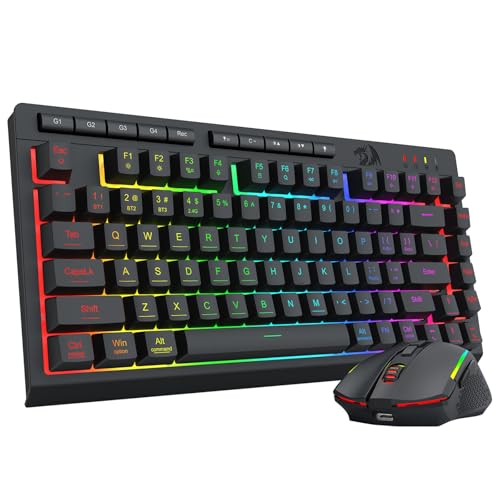
| Redragon S155-PRO Wireless Gaming Keyboard and Mouse Combo | Players switching one set between PC, Mac, and console | 75 percent portable keyboard, tri-mode connection, 12800 DPI mouse |
| RedThunder K84 Wireless Keyboard and Mouse Combo | Small desks that still need arrow and media keys | 75 percent layout, 84 keys, 3200 DPI honeycomb mouse |
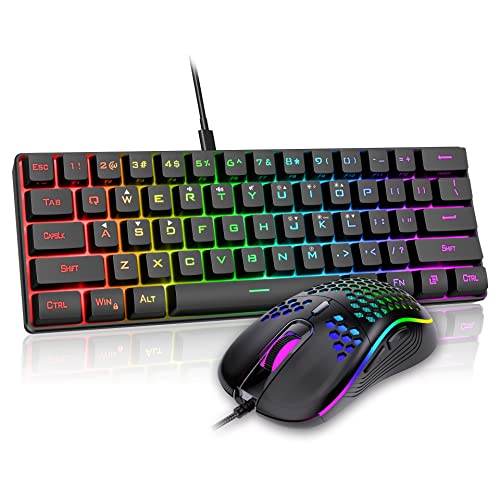
| RedThunder K62 60 percent Gaming Keyboard and Mouse Combo | Maximum mouse room on the smallest desks | 60 percent layout, 61 keys, 7200 DPI honeycomb mouse |
| ZIYOU LANG Wireless Gaming Keyboard and Mouse Combo | Tenkeyless comfort with a full function row | 87-key tenkeyless keyboard, 3800mAh combined battery, 2400 DPI mouse |
How to Choose
Layout Size and the Keys You Keep
Compact is not one size, and the layout decides which keys survive the shrink. A 60 percent board keeps only the main typing block, so arrows and function keys hide behind a modifier layer. A 75 percent design squeezes arrows and a few navigation keys back in, while tenkeyless keeps the full function row and a separate arrow cluster. Check the key count in the title, then look for dedicated arrows if you play menu-heavy games. Players who use number-pad binds in simulation or strategy titles should confirm those keys exist before choosing the smallest option.
One Receiver, Cable, or Three Modes
Combos connect in three broad ways, and each suits a different desk. A shared 2.4GHz receiver runs both devices through a single USB port, which suits laptops with few sockets. Wired sets remove charging from the routine entirely and keep the connection simple for a fixed battlestation. Tri-mode sets add Bluetooth and a USB-C cable, so one combo can move between a gaming PC, a work laptop, and a tablet. Count your free ports, decide whether the set ever travels, and check whether the receiver is shared or separate, because that detail decides how tidy the setup stays.
Battery Capacity and Charging Habits
Wireless freedom ends at the charger, so battery figures deserve a close read before anything else. Listings state keyboard and mouse capacities separately, and the smaller mouse cell usually runs out first. Larger keyboard batteries pair with longer claimed runtimes, especially with the backlight switched off, while lighting-heavy play shortens every estimate. Note how each device charges, whether a cable is included, and whether the set can keep working while plugged in. If your desk lacks a spare port for charging, a wired combo or a big-battery tri-mode set avoids midweek top-ups interrupting evening sessions.
Mouse Sensor Range and Shell Weight
The mouse half of a combo is easy to overlook, yet it decides how the set feels in fast games. Listings give a DPI range, and some sets raise the ceiling through driver software, so check both numbers rather than the headline alone. Button counts vary from basic three-button shells to six-button designs with side keys for abilities or push-to-talk. Shell weight matters on a small desk too: lightweight honeycomb bodies around sixty-five grams move quickly during wide sweeps, while solid shells feel steadier for slow, deliberate tracking. Match the mouse to your grip and sensitivity, not just the keyboard.
The 4 Best Options
Redragon S155-PRO Wireless Gaming Keyboard and Mouse Combo
This Redragon set suits players who split time between machines, because both halves connect three ways instead of tying you to one receiver. The keyboard is a quiet membrane design in a portable 75 percent layout, so it keeps a compact footprint without dropping into a stripped 60 percent board. Four onboard macro keys add game binds without opening software, and the mouse covers everyday sensitivity needs on its preset steps while the driver unlocks far finer adjustment. It is the most flexible pick here for mixed gaming and everyday typing across several devices.
Specs
- Brand: Redragon
- Model: S155-PRO
- Keyboard layout: 75 percent portable, macro membrane keyboard
- Connection: Bluetooth 5.0, 2.4G wireless, and USB-C wired
- Keyboard battery: 4000mAh rechargeable
- Mouse battery: 700mAh rechargeable
- Mouse DPI: 5 preset levels from 400 to 3200, adjustable from 100 to 12800 in driver software
- Backlight: RGB with 8 dynamic effects and 6 custom modes
- Item weight: 1.13 pounds
Best for: Multi-device players who want one combo for a gaming PC, a laptop, and a tablet.
Watch out for: The keys are membrane rather than mechanical, so confirm that feel suits you before ordering.
RedThunder K84 Wireless Keyboard and Mouse Combo
The K84 keeps the keys many compact boards sacrifice. Its 84-key tenkeyless layout holds on to dedicated arrow keys and media controls, which makes it a comfortable step down from a full-size board for players who navigate menus, chat, and replays all evening. Both devices share a single receiver, so a laptop loses only one port, and the perforated honeycomb mouse stays light during long sweeps across a small pad. Rainbow backlighting with several modes rounds out a set aimed at tidy desks that still see daily work as well as play.
Specs
- Brand: RedThunder
- Model: K84
- Keyboard layout: 75 percent TKL ultra compact, 84 keys
- Connection: 2.4G wireless through one shared USB receiver
- Keyboard battery: 1850mAh rechargeable
- Mouse battery: 500mAh rechargeable
- Mouse: 3200 DPI honeycomb optical mouse, about 65 grams
- Backlight: Rainbow effects with 3 brightness levels
- Key life: 10,000,000 keystrokes
- Item weight: 1.43 pounds
Best for: Players shrinking a full-size setup who refuse to give up arrow and media keys.
Watch out for: There is no Bluetooth or wired mode listed, so the shared receiver must stay plugged in.
RedThunder K62 60 percent Gaming Keyboard and Mouse Combo
This is the smallest set in the guide, built for players who would trade every extra key for mouse space. The 61-key board covers the essential typing block and nothing more, leaving a broad open area where a full-size keyboard would block your arm. The wired connection keeps things simple at a fixed desk, with no batteries to manage before a session. Its honeycomb mouse is light and quick to redirect, which pairs well with the low-sensitivity, wide-sweep aiming this layout is designed to enable in shooters and fast-paced arena games.
Specs
- Brand: RedThunder
- Model: K62
- Keyboard layout: 60 percent ultra-compact mini keyboard, 61 keys
- Connection: Wired USB and USB-C
- Mouse: 7200 DPI honeycomb optical mouse, about 65 grams
- Backlight: RGB backlit keyboard
- Keyboard protection: Water-resistant design with gold-plated USB connector and braided cable
- Compatibility listed: PC, Mac, PS5, and Xbox
Best for: Shooter players on small desks who want the widest possible mouse sweep area.
Watch out for: Arrows and function keys sit behind modifier combinations, so check the layout diagram against your bindings.
ZIYOU LANG Wireless Gaming Keyboard and Mouse Combo

Players who want compact without learning a new layout should start here. The 87-key tenkeyless board keeps the function row, arrow cluster, and navigation keys in their familiar places, simply removing the number pad that crowds the mouse. A dual-head receiver with both USB-A and Type-C ends connects to older desktops and slim modern laptops alike, which is handy in shared households. The six-button mouse offers three sensitivity steps for switching between browsing and play, and the rainbow backlight has three brightness levels for evening sessions in shared rooms.
Specs
- Brand: ZIYOU LANG
- Keyboard layout: 87-key tenkeyless, compact design
- Connection: 2.4GHz wireless through a dual-head USB-A and Type-C receiver
- Keyboard battery: 3000mAh rechargeable
- Mouse battery: 800mAh rechargeable
- Mouse: 6 buttons, 3 DPI levels at 800, 1600, and 2400
- Backlight: Rainbow LED with 3 brightness levels
- Extras: Anti-ghosting, removable keycaps, and 12 multimedia keys through Fn combinations
Best for: Players who want a familiar full function row in a narrower, desk-friendly footprint.
Watch out for: The mouse tops out at 2400 DPI, so very high-sensitivity players should compare the other sets first.
Which One Fits Your Situation
You Play at a Small Desk or in a Dorm Room
Start with the RedThunder K62 60 percent Gaming Keyboard and Mouse Combo, because its 61-key board returns the most surface to your mouse arm. If giving up dedicated arrows feels like too big a jump, the RedThunder K84 keeps them inside a 75 percent layout instead. Either way, measure your desk depth first and picture where the mouse pad sits, since the whole point of these sets is the space they hand back.
One Combo Has to Serve Work and Play
Choose the Redragon S155-PRO Wireless Gaming Keyboard and Mouse Combo. Its Bluetooth, 2.4G, and USB-C modes let the same set follow you from a gaming PC to a work laptop without swapping hardware, and the quiet membrane keys suit shared rooms and late calls. The onboard macro keys still give you game binds at home, so the set earns its place on a desk that changes jobs during the day.
You Hate Charging and Cable Clutter Equally
The wired RedThunder K62 removes batteries from the routine entirely, which suits a fixed battlestation that never moves. If cables bother you more than charging, the Redragon S155-PRO carries the largest keyboard battery in this guide and stretches its runtime furthest with the lighting off. The ZIYOU LANG set sits between those poles, pairing a shared receiver with a combined battery capacity that covers long stretches between top-ups.
You Are Replacing a Full-Size Board for the First Time
The ZIYOU LANG Wireless Gaming Keyboard and Mouse Combo is the gentlest step down, because its tenkeyless layout keeps every key except the number pad exactly where your fingers expect it. Players ready to go smaller can pick the RedThunder K84, which preserves arrows and media keys in a tighter frame. Move one size at a time and your existing bindings, chat habits, and menu navigation mostly survive the change.
Common Mistakes
- Buying a 60 percent board without checking where the arrow keys went, then discovering your game menus and bindings rely on them.
- Assuming every wireless combo includes Bluetooth, when many sets connect only through a 2.4GHz receiver that must stay plugged in.
- Judging a combo by keyboard size alone and ignoring the mouse, even though its DPI range, button count, and weight shape every session.
- Forgetting that the keyboard and mouse batteries differ, so the mouse can run flat days before the keyboard needs a charge.
- Choosing the smallest layout while still needing number-pad binds for simulation, strategy, or streaming software shortcuts.
Frequently Asked Questions
Do compact gaming keyboards work for everyday typing?
Yes, and the adjustment is mostly about layout. Tenkeyless and 75 percent boards keep letters, numbers, and arrows in familiar places, so normal typing feels unchanged. A 60 percent board asks more of you, because function and navigation keys sit behind a modifier layer. If you write long documents daily, start with a tenkeyless or 75 percent set and move smaller only if you want the extra desk space.
Is a keyboard and mouse combo better than buying separately?
A combo guarantees the two devices match in connection style and design, and wireless sets often share one receiver, which saves a USB port. Buying separately gives you a wider choice of switches, sensors, and shapes. Choose a combo when you value a tidy, matched setup and simple setup steps; choose separates when one specific keyboard switch or mouse shape matters more than coordination.
How much desk space does a compact combo actually save?
The saving comes from width. Removing the number pad frees the strip of desk where your mouse hand travels, and a 60 percent board frees more again by dropping the function row and arrow cluster. On a shallow desk that reclaimed width often decides whether your forearm rests comfortably or hangs off the edge. Measure your current keyboard, compare the layout widths, and picture your mouse pad beside each option.
Can these combos connect to consoles and laptops?
It depends on the connection each set lists. The RedThunder K62 names PC, Mac, PS5, and Xbox in its compatibility, while the Redragon S155-PRO lists PC, Mac, tablets, phones, and consoles across its three modes. Receiver-based sets need a free USB port, which slim laptops may only offer in Type-C form, so check the receiver type against your machine before ordering any wireless combo.
Related guides
More from Amazon
Programs that pair well with the guide above. Offers and eligibility are set by Amazon and may change.
Free shipping on eligible items, Prime Video and more. Eligible new members can start with a free trial.
Start a Prime free trialAd-free music streaming. Eligible new subscribers can start with a free trial.
Try Music Unlimited freeA Prime membership for ages 18-24 with a trial period. Eligibility is set by Amazon.
See Prime for Young AdultsAudiobooks and podcasts to listen to on the go. Eligible new members can start with a free trial.
Try Audible freeAs an Amazon Associate we earn from qualifying purchases.