
The best gaming keyboard and mouse combos give you a full-size or compact board, an optical mouse with adjustable DPI and a single USB plug-in setup at a fraction of the cost of buying two separate peripherals. They are the sensible choice for a first gaming desk, a second PC or a gift. The trade-off is that you accept the maker’s pairing, so this guide groups seven sets by the kind of desk you have.
Quick answer: start with the Redragon S101-3 PRO for a wired full-size set with macro keys, the Redragon S107 for a cheaper wired set, and the Logitech MK270 if you want a quiet wireless combo for mixed gaming and work.
Our Top Picks
 Logitech MK270 Full Size Wireless Keyboard and Mouse1 Pack20.08 x 6.22 x 1.81 inches1.05 poundsCheck on Amazon


Top 3 picks at a glance
Gaming Keyboard and Mouse Combos at a Glance
| Combo | Connection | Keyboard size | Mouse DPI (listed) | Best desk |
|---|---|---|---|---|
| Redragon S101-3 PRO | Wired | Full size, macro keys | Not stated | Main gaming desk |
| Redragon S107 | Wired | Full size, 25-key anti-ghosting | 10,000 | Budget starter desk |
| AULA Metal Combo | Wired | 104-key, metal | Not stated | Durable everyday desk |
| MSI Forge GK110 | Wired | 26-key anti-ghosting | 12,800 | Brand-minded buyers |
| RedThunder K10 | Wired | Full size, mechanical feel | 7,200 | Long sessions with wrist rest |
| Wired 60% Combo (Guiheng) | Wired | 61-key compact | 3,200 | Small desks |
| Logitech MK270 | Wireless receiver | Full size, spill-resistant | Not stated | Mixed work and play |
All figures come from the product listings. A figure marked “not stated” means the listing title does not give it, so check the maker before you buy.
What Does a Gaming Keyboard and Mouse Combo Actually Include?
A gaming keyboard and mouse combo is a matched keyboard and mouse sold in one box, usually with RGB lighting, anti-ghosting keys and a mouse with adjustable DPI. Most are wired. They are built for value, not for the best possible switch or sensor.
Understanding what you give up helps. A standalone gaming keyboard often has true mechanical switches, a detachable cable and better keycaps. A combo usually uses a membrane or a “mechanical feel” board. The mouse in a combo tends to be a basic optical design, fine for casual and many competitive games, but behind a dedicated gaming mouse for precision work.
Pick the Combo by Desk Type
Instead of ranking from first to last, the seven sets below are arranged by the desk they suit. Jump to the type that matches your setup.
Main Gaming Desk: Redragon S101-3 PRO Gaming Keyboard and Mouse
As an Amazon Associate we earn from qualifying purchases at no extra cost to you.

The S101-3 PRO is the set to pick if the combo is your primary gaming setup. The listing describes an RGB backlit programmable keyboard and mouse with software, independent macro record keys and a value combo set in an updated version. The dedicated macro keys are the reason to choose it over plainer sets, because you can record a sequence without needing a separate macro pad. The listing does not name a DPI value, so check the maker.
- Connection: wired
- Keyboard: full size, RGB backlit, programmable
- Extras: independent macro record keys, software
- Mouse DPI: not stated in the listing
Best for: Players who bind actions to keys in MMOs and strategy games.
Skip if: You want a compact board or true mechanical switches.
Pros: Macro keys; software included; RGB; wired reliability.
Cons: Mouse specs not stated; full-size board takes desk space; membrane-style feel is typical for the tier.
Budget Starter Desk: Redragon S107 Gaming Keyboard and Mouse

The S107 is the cheaper wired option in the same family. The listing gives an RGB gaming keyboard with 25-key anti-ghosting and a 10,000 DPI mouse with a 1,000Hz programmable setup, supported by software, and says it is plug and play on PC and laptop. Anti-ghosting means several keys pressed at once register correctly, which matters for fast movement and combos. It is a good fit when you want a gaming feel for the lowest spend.
- Connection: wired, plug and play
- Keyboard: RGB, 25-key anti-ghosting
- Mouse: 10,000 DPI, 1,000Hz, programmable
- Software: available
Best for: First gaming desks, student rooms and secondary PCs.
Skip if: You need dedicated macro keys or a wireless setup.
Pros: Low cost; plug and play; 1,000Hz mouse listed; software included.
Cons: Basic keyboard feel; high DPI claim is mostly marketing; plastic build.
Durable Everyday Desk: AULA Wired 104-Key Metal Combo

The AULA set is the pick for a desk that sees heavy daily use. The listing describes a wired 104-key mouse and keyboard combo with a metal, full-size keyboard that includes a number pad, RGB backlighting and anti-ghosting, in an updated version. A metal top plate adds rigidity and makes the board feel less hollow than all-plastic rivals. The number pad is useful if you also work in spreadsheets.
- Connection: wired
- Keyboard: 104-key, metal, number pad
- Lighting: RGB backlit, anti-ghosting
- Mouse specs: not stated in the listing
Best for: Players who also type or work on the same desk.
Skip if: You have a small desk or want a stated mouse DPI.
Pros: Metal construction; full-size layout; RGB; anti-ghosting.
Cons: Mouse details missing from the listing; full-size footprint; brand less known.
Brand-Minded Buyers: MSI Forge GK110 Combo

The Forge GK110 is a gaming set from a well-known PC hardware maker. The listing describes an RGB gaming keyboard and mouse set with 26-key anti-ghosting and a 12,800 DPI optical sensor. The 26-key anti-ghosting figure is the highest in this guide, so it handles chords better than the cheapest sets. Buying from a larger maker usually means clearer warranty terms, which helps if a key or button fails.
- Connection: wired
- Keyboard: RGB, 26-key anti-ghosting
- Mouse: 12,800 DPI optical sensor
- Brand: MSI
Best for: Buyers who want a known brand and clear support.
Skip if: You want macro keys or a wrist rest in the box.
Pros: Established brand; 26-key anti-ghosting; optical sensor; RGB.
Cons: Keyboard layout not described in the title; costs more than the cheapest sets; no wireless.
Long Sessions: RedThunder K10 Keyboard, Mouse and Wrist Rest
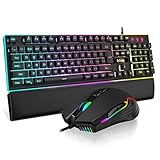
The K10 bundles a wrist rest, which makes it the comfort pick for long sessions. The listing describes a wired RGB backlit combo with a mechanical-feel, anti-ghosting keyboard, a 7D mouse with 7,200 DPI and a soft leather wrist rest, sold as a three-in-one set. A wrist rest keeps your hands level and reduces strain during hours of typing or play. Note that “mechanical feel” is not the same as mechanical switches.
- Connection: wired
- Keyboard: RGB, mechanical feel, anti-ghosting
- Mouse: 7D, 7,200 DPI
- Extra: soft leather wrist rest included
Best for: Marathon sessions and players who want comfort in one box.
Skip if: You need true mechanical switches or a compact layout.
Pros: Wrist rest included; RGB; anti-ghosting; clear DPI figure.
Cons: Mechanical feel only; leather rest can warm up; full-size footprint.
Small Desks: Wired 60% Gaming Keyboard and Mouse Combo

This compact set suits a tight desk or a travel bag. The listing describes an ultra-compact 61-key RGB backlit keyboard with a lightweight optical mouse at 3,200 DPI, wired, and says it works with Windows, PC, Mac, PS5 and Xbox. A 60% layout drops the number pad, function row and arrow cluster to save space, which leaves more room for mouse movement. You use function layers to reach the missing keys, so expect a short adjustment period.
- Connection: wired
- Keyboard: 61-key, RGB, compact
- Mouse: lightweight optical, 3,200 DPI
- Compatibility: Windows, Mac, PS5, Xbox listed
Best for: Small desks, low-sensitivity mouse players and console users.
Skip if: You need a number pad or dedicated arrow keys.
Pros: Very compact; low cost; multi-platform listed; more mouse room.
Cons: Missing keys need function layers; lower DPI ceiling; unfamiliar brand.
Mixed Work and Play: Logitech MK270 Wireless Keyboard and Mouse Combo

The MK270 is the sensible pick if the desk is half office, half play. The listing describes a full-size wireless keyboard with a spill-resistant design and a compact ambidextrous mouse, connected through one USB-A Nano receiver. It is not a gaming set in the RGB sense, but it is a clean, cable-free base for casual and strategy games and for daily work. It is the only wireless combo among the seven picks.
- Connection: wireless, single USB-A Nano receiver
- Keyboard: full size, spill-resistant
- Mouse: compact, ambidextrous
- Lighting: none listed
Best for: Casual gamers who also use the PC for work or media.
Skip if: You play fast shooters or want RGB and anti-ghosting.
Pros: One receiver; spill-resistant; ambidextrous mouse; cable-free desk.
Cons: No gaming features listed; wireless latency matters for fast play; no backlight.
Also Consider
Redragon S101M-KS Wireless Combo
The listing shows a tri-mode wireless RGB keyboard with a 4,800 DPI mouse and 10 multimedia keys. It costs more than the wired sets, so pick it if you want a cable-free gaming desk.
Logitech MK345 Wireless Combo
A full-size wireless keyboard with an integrated palm rest and a compact right-handed mouse. It suits long typing sessions better than fast gaming.
BlueFinger Combo with Headset
A wired RGB keyboard and mouse bundled with a headset and microphone. It covers everything in one box, but each piece is entry level.
Combo or Separate Parts? An Honest Comparison
A combo is the right call in some cases and the wrong one in others. Use this table to decide before you commit.
| Question | Combo | Separate keyboard and mouse |
|---|---|---|
| Total spend | Lower | Higher for the same overall quality |
| Setup effort | One box, plug and play | Two purchases and two decisions |
| Keyboard switches | Usually membrane or mechanical feel | True mechanical switches available |
| Mouse sensor | Basic optical, DPI figure only | Named sensors and lighter shapes |
| Upgrade path | Replace one half later | Upgrade either at any time |
| Best for | First desks, second PCs, gifts | Competitive or enthusiast setups |
If you already know you want a mechanical keyboard, skip the combos and read a dedicated keyboard guide. If you want to start gaming without a large outlay, a combo gets you there.
Gaming Keyboard and Mouse Combo Features Explained
Membrane, mechanical feel and mechanical
Membrane keyboards use rubber domes under each key. “Mechanical feel” boards try to mimic the tactile bump with a different dome or plate, without individual switches. True mechanical keyboards use one switch per key. At combo prices, nearly every set is membrane or mechanical feel, and the listing language such as “mechanical feel” on the RedThunder K10 is the clue.
Anti-ghosting
Ghosting happens when you press several keys at once and some do not register. Anti-ghosting fixes this for a set number of keys. The Redragon S107 lists 25 keys and the MSI Forge GK110 lists 26. For most games, covering your movement keys, jump, crouch and a few abilities is enough.
RGB backlighting
RGB lights help you find keys in a dark room and give the set a gaming look. They add no performance. If your combo offers lighting modes, set a single static colour to reduce distraction.
Macro keys and software
Macro keys let you record a sequence and play it with one press. The Redragon S101-3 PRO lists independent macro record keys. Remember that some online games restrict macro use, so check the rules of the game before relying on them.
Wrist rest
A wrist rest keeps your wrists level. It does not replace good posture, but it makes long sessions more comfortable. The RedThunder K10 includes one, and others may need a separate purchase.
Set Up Your Combo for Comfort and Performance
- Position the keyboard so your forearms are level. Your elbows should sit near a right angle, with wrists neutral.
- Put the mouse at elbow height, close to the keyboard. A compact 60% board such as the Guiheng set leaves extra room for large mouse swings.
- Install the software if it offers macros or lighting. Download it from the maker’s own page rather than third-party sites.
- Set one DPI and adjust in-game sensitivity. Avoid constant DPI changes.
- Use a mouse pad. A pad improves tracking over a bare desk and protects the mouse feet.
- Update the layout in your game. Rebind keys that sit awkwardly for your hand, especially on compact boards.
Which Combo for Which Game?
| Game type | What to prioritise | Sets that fit |
|---|---|---|
| Fast shooters | Wired, anti-ghosting, compact for mouse room | Guiheng 60% combo, MSI Forge GK110 |
| MMOs and RPGs | Macro keys, number pad | Redragon S101-3 PRO, AULA metal combo |
| Strategy and city builders | Full-size layout, comfort | RedThunder K10, AULA metal combo |
| Casual and mixed use | Wireless, quiet, spill-resistant | Logitech MK270 |
| First desk or gift | Low cost, plug and play | Redragon S107 |
Common Mistakes with Gaming Combos
- Expecting mechanical switches. Read the listing. “Mechanical feel” is not mechanical.
- Buying wireless for fast games. Wireless combos built for office use can add latency. Choose a wired set for competitive play.
- Ignoring layout. A 60% board without arrow keys can frustrate you if you rely on them in games or work.
- Overvaluing DPI. The number on the listing says little about tracking quality.
- Skipping the return policy. Combos vary, and a keyboard that feels wrong is easier to swap in the return window.
When to Upgrade from a Combo
Upgrade one half at a time. Most players feel the mouse limits first: swap in a lighter, named-sensor mouse. Then, if typing feel bothers you, move to a mechanical keyboard. Keeping the combo’s other half means you spend only where you feel a gap. The combo remains useful as a spare set for guests or a second PC.
Keyboard and Mouse Combo Terms in Plain Language
- Full size (104 keys): a standard keyboard with a number pad, function row and arrow keys.
- 60% (61 keys): a compact layout with no number pad, arrow cluster or function row. Hidden keys are reached with a function key.
- Anti-ghosting: lets several keys register at once. Listings state a number of keys, such as 25 or 26.
- Plug and play: works as soon as you connect it, with no software needed for basic use.
- Nano receiver: a tiny USB dongle that links a wireless keyboard and mouse, as the Logitech MK270 uses.
- Spill-resistant: drains small spills away from the electronics. It is not waterproof.
- Optical mouse: reads the surface with light instead of a rolling ball, and is the standard for gaming.
Quick Answers by Situation
You are building your first gaming desk
Choose the Redragon S107 for the lowest cost, or the S101-3 PRO if you want macro keys. Both are wired and plug and play.
You share the desk with work
The Logitech MK270 suits mixed use. It is quiet, spill-resistant and cable-free, and it works for light gaming and daily tasks.
Your desk is small
The wired 60% combo saves the most space. Expect a short learning curve with the function layer for arrows and function keys.
You want a known brand behind it
The MSI Forge GK110 and the Logitech MK270 come from larger makers with established warranty processes. Check the current terms on the maker’s page.
You type for hours
The RedThunder K10 includes a wrist rest, and the AULA metal combo has a rigid full-size board with a number pad for data work.
Warranty, Returns and Care for a Combo
A combo is two products in one box, so failures can hit either half. Before buying, read the maker’s warranty terms and the seller’s return window. Keep the box and receipt for the first few weeks, because a sticky key or a double-clicking mouse button usually shows up early.
Care is simple. Wipe the keycaps with a slightly damp cloth, blow dust out from between the keys, and clean the mouse sensor window and feet with a dry cloth. Avoid drinks near a non-spill-resistant board. If the software offers firmware updates, install them from the maker’s own page. A set looked after this way can serve as a main desk for years and a spare set afterwards.
If one half fails outside the warranty, you can often replace only that half with a standalone product. That is one of the quiet advantages of a combo: the other half keeps working while you upgrade the weak link.
How We Chose
This guide is research-based. We did not use these products ourselves. We compared product listing details, maker information where available, and the needs of common desk setups. We limited each brand to two main picks, skipped renewed or unavailable items and flagged every spec the listing did not state. Our order follows desk type, not a numeric score.
Gaming Keyboard and Mouse Combo Buying Guide
Wired or wireless
Wired combos avoid battery and latency concerns and suit competitive play. Wireless combos like the MK270 tidy the desk but suit casual games. If you want wireless for fast games, look for a combo that lists a 2.4GHz receiver and a stated polling rate.
Layout and size
- Full size (104 keys): best for work, spreadsheets and MMOs.
- 60% (61 keys): best for tight desks and wide mouse swings.
- Between those, such as tenkeyless, is rare in combos.
Anti-ghosting and key rollover
Look for anti-ghosting on at least the movement and action keys. A 25 or 26-key figure covers most games. Full N-key rollover is uncommon at this tier.
Switch type
Most combos use membrane or “mechanical feel” boards. If true mechanical switches matter to you, buy a standalone mechanical keyboard and a separate mouse instead.
Mouse specs worth checking
A DPI figure above a few thousand is rarely the deciding factor. Check for a stated polling rate, a named sensor and a comfortable shape. Where the listing gives none of that, read the maker’s page first.
Frequently Asked Questions
Are gaming keyboard and mouse combos worth buying?
Yes for a first setup, a second PC or a gift. They save money and are plug and play, but separate parts offer better switches and sensors.
What is the best wireless gaming keyboard and mouse combo?
Of the sets here, the Logitech MK270 is the practical choice for mixed use, and the Redragon S101M-KS is the gaming-styled wireless alternative with RGB.
Is a combo good enough for competitive shooters?
It is fine for casual and ranked play on a wired set, but competitive players usually upgrade the mouse first, then the keyboard.
What does anti-ghosting mean?
It means the keyboard registers several keys pressed together correctly. A 25 or 26-key figure covers most gaming needs.
Should I choose a 60% or full-size combo?
Choose a 60% set if desk space is tight or you want more mouse room. Choose full size if you use a number pad for work or MMO binds.
Do these combos work on consoles?
Some do. The compact Guiheng set lists PS5 and Xbox support, but check each listing and your console’s current keyboard and mouse support.
Do I need software for a gaming combo?
Not to type and click, but software helps with macros, lighting and DPI. Redragon sets list software, while others may rely on built-in key combos.
Which One Should You Buy?
- Main desk with macros: Redragon S101-3 PRO.
- Lowest cost wired start: Redragon S107.
- Rigid, everyday full-size board: AULA metal combo.
- Known brand and clear support: MSI Forge GK110.
- Comfort for long sessions: RedThunder K10.
- Small desk: wired 60% combo.
- Mixed work and play, cable-free: Logitech MK270.
Sources
- Product listings in the store (titles and feature lists)
- Redragon maker product pages
- Logitech maker product pages
- MSI maker product pages
Last updated: November 2026
Related guides
More from Amazon
Programs that pair well with the guide above. Offers and eligibility are set by Amazon and may change.
Free shipping on eligible items, Prime Video and more. Eligible new members can start with a free trial.
Start a Prime free trialAd-free music streaming. Eligible new subscribers can start with a free trial.
Try Music Unlimited freeA Prime membership for ages 18-24 with a trial period. Eligibility is set by Amazon.
See Prime for Young AdultsAudiobooks and podcasts to listen to on the go. Eligible new members can start with a free trial.
Try Audible freeAs an Amazon Associate we earn from qualifying purchases.


