Modern graphics cards are long, thick, and heavy, and all that weight hangs off one end of the PCIe slot. Over time the unsupported end droops, a problem usually called GPU sag. Sag looks untidy through a tempered glass side panel, and builders prefer to avoid the constant bending stress on the card and slot. A support bracket is the simple fix: a small brace or stand that props up the far end of the card.
The five brackets in this guide cover the main styles. Three are adjustable upHere braces with or without addressable RGB lighting, one is a Cooler Master stand with a magnetic base and an infinity mirror design, and one is an ASUS ROG holder built from zinc alloy with toolless installation. All of them aim at the same job, so the right choice comes down to your case layout, your motherboard’s lighting headers, and how visible you want the support to be.
As an Amazon Associate, we earn from qualifying purchases.
Top 3 picks at a glance
Quick answer
For most builders, an adjustable upHere brace is the straightforward pick: it adjusts for length and height, and two of the three versions add a 5V addressable RGB strip. The Cooler Master Atlas suits builders who want a magnetic stand with an infinity mirror look, while the ASUS ROG Herculx offers toolless installation and a built-in spirit level.
upHere 5V 3PIN Addressable RGB GPU Brace Support, G276ARGB
This upHere brace is the illuminated version of the brand’s adjustable support design. It is built to hold up the far end of a sagging graphics card, and it adjusts in both length and height so it can be positioned under different card sizes and case layouts. The standout feature is the built-in 5V ARGB strip, which lights the brace itself and turns a functional part into part of the build’s lighting theme.
The 5V 3PIN part of the name matters: addressable RGB accessories use a 3-pin 5V header on the motherboard, which is not interchangeable with older 12V 4-pin RGB headers. Check that your board has the right header before choosing any ARGB brace. If it does, this G276ARGB model is the upHere to pick for a black build that already runs addressable lighting.
| Spec | Detail |
|---|---|
| Brand | upHere |
| Model | G276ARGB |
| Product type | Graphics card GPU brace support |
| Lighting | Built-in 5V ARGB strip |
| Connector in product name | 5V 3PIN addressable RGB |
| Adjustment | Adjustable length and height |
| Finish | Not stated in the product name |

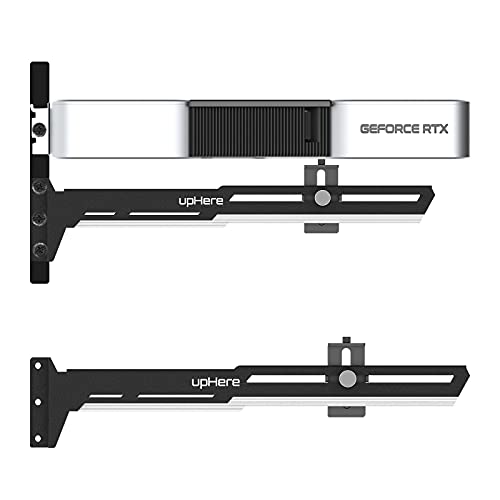

upHere Black & White GPU Brace Support Bracket, G27654
The G27654 is the non-lighted member of this upHere family, finished in a black and white color scheme. It does the same core job — supporting the end of a heavy graphics card with adjustable length and height — without any lighting strip or header requirement. That makes it the simplest install of the three upHere models: position it, set the height, and there is nothing to plug in.
Use only ASIN B08YYPSGMN for this model, as briefed for this guide. The two-tone finish suits black and white themed builds, and the plain design also works for anyone who finds lit braces distracting. If your motherboard lacks a 5V ARGB header, or your case has no window, this is the sensible upHere choice.
| Spec | Detail |
|---|---|
| Brand | upHere |
| Model | G27654 |
| Product type | Graphics card GPU brace support bracket |
| Lighting | None stated in the product name |
| Adjustment | Adjustable length and height |
| Color scheme | Black and white |
| ASIN for this guide | B08YYPSGMN |
Cooler Master Atlas ARGB GPU Support Bracket

The Atlas takes a different form from the upHere braces. It is a stand built around aluminum and magnets, designed to support the graphics card from below with a magnetic base that helps it stay planted on a metal case floor or PSU shroud. Its tempered glass section carries an infinity mirror design, so the ARGB lighting appears to repeat into the distance — a showpiece look for windowed cases.
The Atlas also supports a dual-axis mode, working in vertical or horizontal orientation, which gives it flexibility for different card positions and mounting styles. Choose it if the support itself is part of your build’s visual plan and you want a premium stand rather than a slim brace. As with any ARGB part, confirm your motherboard’s addressable header before relying on the lighting.
| Spec | Detail |
|---|---|
| Brand | Cooler Master |
| Model line | Atlas ARGB |
| Product type | GPU support bracket stand |
| Materials in product name | Aluminum, magnets, ARGB tempered glass |
| Design feature | Infinity mirror design |
| Orientation | Dual-axis, vertical and horizontal |
| Adjustment details | Not stated in the product name |
ASUS ROG Herculx Graphics Card Anti-Sag Holder Bracket
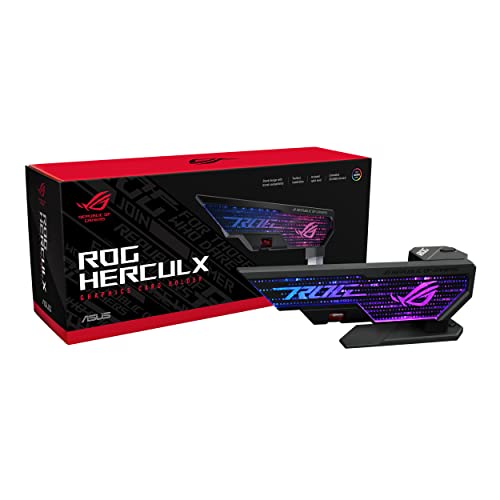
The Herculx is ASUS ROG’s entry, built with a solid zinc alloy construction that gives it a dense, premium feel compared with lighter braces. Its headline convenience feature is easy toolless installation: it goes in without tools, and the included spirit level helps you confirm the card is sitting level once the holder is in place. Height is adjustable, and ASUS states wide compatibility in the product name.
Lighting comes via Aura Sync RGB, which suits builders already in the ASUS ROG ecosystem who want the holder to match the rest of their lighting. If your build centers on ROG components, the Herculx is the natural fit; if you run another brand’s lighting software, one of the generic 5V ARGB options may integrate more simply.
| Spec | Detail |
|---|---|
| Brand | ASUS ROG |
| Model line | Herculx XH01 |
| Product type | Graphics card anti-sag holder bracket |
| Construction | Solid zinc alloy |
| Installation | Easy toolless installation |
| Included extra | Spirit level |
| Adjustment | Adjustable height |
| Lighting | Aura Sync RGB |
upHere 5V Addressable RGB White GPU Brace Support, G276WTARGB
This is the white counterpart to the first upHere brace. It combines the same formula — adjustable length and height support with a built-in 5V ARGB strip — in a white finish aimed at white and light-themed builds, where a black brace would stand out against a white case, motherboard, and card shroud.
Like the G276ARGB, it needs a 5V addressable RGB connection to light up, so the same header check applies. Between the two lit upHere models, the decision is purely cosmetic: match the brace color to your build. Functionally they are siblings, and both keep the support discreet in size while adding a lit accent line under the card.
| Spec | Detail |
|---|---|
| Brand | upHere |
| Model | G276WTARGB |
| Product type | Graphics card GPU brace support |
| Lighting | Built-in 5V ARGB strip |
| Connector in product name | 5V addressable RGB |
| Adjustment | Adjustable length and height |
| Finish | White |
How to choose
Start with fit. Measure the space under the unsupported end of your card and confirm the bracket style suits your case: slim braces like the upHere models tuck along the card, while the Cooler Master Atlas is a stand that needs floor or shroud space beneath the card. Adjustable length and height, stated on the upHere and ASUS models, make fit far easier across different card sizes.
Next, check lighting compatibility. The three ARGB products here use 5V addressable connections — the upHere models state 5V 3PIN or 5V in the name, and the Herculx uses Aura Sync — and 5V ARGB headers are not interchangeable with 12V RGB headers. If your board has no suitable header, pick the non-lighted G27654. Finally, decide how visible you want the support: the Atlas infinity mirror is a display feature, while the plain upHere brace nearly disappears.
Who should skip
Skip a support bracket if your graphics card is short and light, or if it already sits level with no visible droop — there is nothing to fix. Skip ARGB models if your motherboard lacks a 5V addressable header and you do not want an unlit strip in the case. And skip stand-style supports if your case floor is crowded with cables or fans where the stand needs to sit.
FAQ
Does GPU sag actually harm a graphics card?
Sag puts constant bending stress on the card’s circuit board and the PCIe slot, and it can worsen over time. A support bracket removes that stress and keeps the card level, which is why brackets are a common precaution with long, heavy cards.
Can I plug a 5V ARGB brace into a 12V RGB header?
No. The 5V 3-pin addressable RGB connection and the 12V 4-pin RGB connection are different standards with different pin layouts and voltages. Check your motherboard manual for a 5V addressable header before choosing a lit brace such as the upHere G276ARGB or G276WTARGB.
Which bracket suits a white build?
The upHere G276WTARGB is the white lit option, and the upHere G27654 has a black and white scheme without lighting. Match the brace finish to your case and card so the support blends in instead of standing out.
Do these brackets fit every case?
Fit depends on the space under your card and the surface below it. Adjustable length and height help most braces adapt, and the Cooler Master Atlas adds vertical and horizontal modes, but you should still measure your case and check the listing details before ordering.
Final verdict
Every bracket here solves the same problem, so choose by build and taste. The upHere G276ARGB and G276WTARGB are the adjustable lit braces for black and white builds, the G27654 is the simple non-lighted option, the Cooler Master Atlas is the display stand with an infinity mirror, and the ASUS ROG Herculx is the premium toolless holder with a spirit level for ROG builds. Any of the five will keep a heavy card level — just confirm your lighting header and under-card space first.
Related guides
More from Amazon
Programs that pair well with the guide above. Offers and eligibility are set by Amazon and may change.
Free shipping on eligible items, Prime Video and more. Eligible new members can start with a free trial.
Start a Prime free trialAd-free music streaming. Eligible new subscribers can start with a free trial.
Try Music Unlimited freeA Prime membership for ages 18-24 with a trial period. Eligibility is set by Amazon.
See Prime for Young AdultsAudiobooks and podcasts to listen to on the go. Eligible new members can start with a free trial.
Try Audible freeAs an Amazon Associate we earn from qualifying purchases.