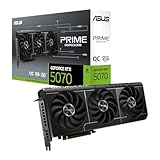
The best graphics card for 1440p gaming in 2026 is the GeForce RTX 5070 for most players, with the Radeon RX 9070 XT as the pick if you want 16GB of VRAM and the strongest raster speed below the RTX 5070 Ti. If money is tight, the Radeon RX 9060 XT 16GB and GeForce RTX 5060 Ti 16GB handle 1440p at high settings with sensible compromises. Everything below is based on manufacturer spec sheets and the pattern of published reviews, not our own benchmarking.
Graphics card prices have been unusually unsettled in 2026 because of memory costs, so this guide ranks cards by tier and spec rather than by a single price. Where we mention money, it is a general market band that moves week to week, so always compare current listings before buying.
As an Amazon Associate we earn from qualifying purchases at no extra cost to you.


Our Top Picks
- GIGABYTE GeForce RTX 5070 Ti Gaming OC 16GRTX 5070 Ti OC13.46 x 5.59 x 2.76 inches3.92 poundsCheck on Amazon
- ASUS Prime GeForce RTX 5060 Ti 8GB GDDR7RTX5060Ti|OC|8GB12 x 4.7 x 2 inches2.6 poundsCheck on Amazon
 ASUS Prime Radeon RX 9070 XT 16GB GDDR6RX9070XT|OC|16GB12.3 x 5.1 x 2 inches3.3 poundsCheck on Amazon
 GIGABYTE GeForce RTX 5060 WINDFORCE OC 8G GraphicsRTX5060|OC|8GB7.83 x 4.57 x 1.57 inchesCheck on Amazon
Top 3 picks at a glance
Quick comparison of the best 1440p graphics cards
| Pick | Best for | VRAM / bus | Board power | Typical market band |
|---|---|---|---|---|
| GeForce RTX 5070 | Best overall | 12GB GDDR7 / 192-bit | 250W | Mid-range |
| Radeon RX 9070 XT | Best AMD / raster speed | 16GB GDDR6 / 256-bit | 304W | Upper-mid |
| Radeon RX 9070 | Smart middle step | 16GB GDDR6 / 256-bit | 220W | Mid-range |
| GeForce RTX 5070 Ti | High refresh plus ray tracing | 16GB GDDR7 / 256-bit | 300W | Upper-mid |
| GeForce RTX 5060 Ti 16GB | Best value on NVIDIA | 16GB GDDR7 / 128-bit | 180W | Budget-mid |
| Radeon RX 9060 XT 16GB | Best budget, low power | 16GB GDDR6 / 128-bit | about 150-160W | Budget |
Best overall: GeForce RTX 5070
The RTX 5070 is the card most 1440p guides land on, and the reason is balance. It carries 12GB of GDDR7 on a 192-bit bus, draws 250W, and brings DLSS 4 with multi-frame generation, which matters more at 1440p than at 1080p because upscaling from a lower internal resolution holds image quality well at that pixel count. For a 165Hz or 180Hz panel, expect high to ultra settings in most modern games, with ray tracing playable when DLSS is switched on.
The trade-off is the 12GB frame buffer. It is enough for 1440p today, but a handful of recent titles with maximum texture packs and ray tracing push past it, and you will need to drop textures one notch. If you plan to keep the card for five years or move to a 4K monitor later, the 16GB cards below age better.
Best AMD pick: Radeon RX 9070 XT
The RX 9070 XT pairs 16GB of GDDR6 with a 256-bit bus and 304W of board power. In rasterised games without ray tracing it usually lands slightly ahead of the RTX 5070 and close to the RTX 5070 Ti in published reviews, which makes it excellent for 1440p ultra at 144Hz and above. FSR 4 has closed much of the image-quality gap with DLSS, and AMD cards generally work well with Linux and with Adrenalin features such as Fluid Motion Frames.
The downsides are heavier ray tracing cost in the most demanding path-traced titles and higher power draw. Check that your power supply has enough 8-pin connectors and at least 750W of headroom, and measure your case, because many partner models are three-fan designs around 300mm long.
Best middle step: Radeon RX 9070
The non-XT RX 9070 keeps the 16GB, 256-bit configuration but trims board power to 220W. That lower power target makes it easier to cool, quieter in compact cases, and gentler on a 650W power supply. You give up a modest slice of performance against the XT, usually in the single-digit to low-teens percentage range depending on the game, and you keep the same VRAM headroom. If the price gap to the XT is small, buy the XT; if the gap is large, this is the sensible compromise.
Best for high refresh and ray tracing: GeForce RTX 5070 Ti
With 16GB of GDDR7 on a 256-bit bus and 300W of board power, the RTX 5070 Ti is built for players who want 1440p ultra settings at 165Hz and above, or ray tracing without constant settings trade-offs. It also gives you a comfortable path to 4K with upscaling. It costs noticeably more than the RTX 5070, so it only makes sense if your monitor is 240Hz or you play ray-traced titles often.
Best value: GeForce RTX 5060 Ti 16GB
Make sure you buy the 16GB version, not the 8GB one. The 16GB card uses a 128-bit bus with 28Gbps-class GDDR7 and draws 180W. It is a strong 1440p card at high settings for 60 to 100 fps in demanding games, and well above that in esports titles. DLSS 4 frame generation helps it punch above its raw specs. It is the easiest recommendation for a mid-range build with a 600W to 650W power supply.
Best budget: Radeon RX 9060 XT 16GB
The RX 9060 XT 16GB is the cheapest card here that we would call a proper 1440p card. It offers 16GB of GDDR6, a 128-bit bus, and roughly 150W to 160W of board power depending on the partner model. The large frame buffer means textures stay at high even where 8GB cards stumble. Expect medium-high settings in the newest games at 1440p, or high settings with FSR upscaling, and very comfortable play in competitive titles.
How much VRAM and power do you actually need at 1440p?
A worked example shows why. A single 2560 x 1440 frame at 32 bits per pixel is about 14.7MB, so the frame itself is trivial; textures, geometry, ray-tracing structures and frame-generation buffers are what fill VRAM. Modern games at high settings commonly allocate 8GB to 11GB at 1440p, and ray tracing plus frame generation can add 1GB to 2GB. That is why 12GB is the minimum we would buy today and 16GB is the comfortable choice.
| Your situation | Suggested card class | Minimum PSU | Why |
|---|---|---|---|
| 1440p at 60-100 Hz, tight budget | RX 9060 XT 16GB or RTX 5060 Ti 16GB | 550-650W | 16GB avoids texture drops; low power |
| 1440p at 144-165 Hz, high settings | RTX 5070 or RX 9070 | 650-750W | Balanced cost and speed |
| 1440p at 165-240 Hz, ultra settings | RX 9070 XT or RTX 5070 Ti | 750-850W | Headroom for ultra and ray tracing |
| Ray tracing everywhere, may move to 4K | RTX 5070 Ti or higher | 850W | DLSS 4 plus 16GB VRAM |
For the power supply, add your CPU’s rated power to the card’s board power, add 100W for the rest of the system, then multiply by about 1.3 to leave room for transient spikes. For example, a 120W CPU plus a 304W RX 9070 XT plus 100W is 524W, and times 1.3 is about 680W, so a quality 750W unit is the sensible choice.
RTX or Radeon at 1440p: which should you pick?
Choose GeForce if you care about ray tracing, DLSS 4 support, creative software such as Blender or video encoders, or want the broadest feature support in new games. Choose Radeon if you want more VRAM per dollar, strong rasterised speed, and driver-level features without a subscription. At the same price tier the two are close, so let your monitor’s adaptive-sync support, your power supply, and the games you play make the call. Both brands’ current cards support G-Sync Compatible or FreeSync displays in practice.
What to check before you buy
- Case clearance: measure card length and thickness; many 9070 XT and 5070 Ti models are over 300mm and 2.5 slots wide.
- Power connectors: RTX 50-series cards use a 12V-2×6 connector or an included adapter; Radeon partner cards typically use two or three 8-pin plugs.
- PCIe slot: all of these run in a PCIe 4.0 or 5.0 x16 slot, and the 8-lane cards such as the 5060 Ti and 9060 XT lose a little performance on older PCIe 3.0 boards.
- CPU balance: pair a card of this class with a recent six-core CPU or better, or you may be limited at high refresh rates.
Frequently Asked Questions
Is 12GB of VRAM enough for 1440p gaming in 2026?
Yes for most games at high settings, but it is the floor. A few new releases with maximum textures and ray tracing can exceed 12GB, so you may need to lower texture quality. If you keep cards for many years, 16GB is safer.
Is the RTX 5070 or the RX 9070 XT better for 1440p?
The RX 9070 XT is usually a little faster in rasterised games and has 16GB of VRAM, while the RTX 5070 is stronger in ray tracing and DLSS 4 support. Pick by price gap and which features you will use.
Can the RTX 5060 Ti or RX 9060 XT run 1440p?
Yes, in their 16GB versions they run 1440p well at medium to high settings, especially with upscaling. Avoid 8GB variants for 1440p because textures can run out of memory in newer titles.
What power supply do I need for a 1440p graphics card?
Between 550W and 850W depending on the card. A 650W unit suits the 5060 Ti and 9060 XT, 750W suits the RTX 5070 and RX 9070, and 750W to 850W suits the RX 9070 XT and RTX 5070 Ti.
Should I buy a 1440p card now or wait?
If your current card struggles, buying a current-generation 16GB card is reasonable, because the 2026 lineup is mature and driver support is solid. Waiting makes sense only if prices in your region are clearly inflated, so track listings for a few weeks first.
Related guides
More from Amazon
Programs that pair well with the guide above. Offers and eligibility are set by Amazon and may change.
Free shipping on eligible items, Prime Video and more. Eligible new members can start with a free trial.
Start a Prime free trialAd-free music streaming. Eligible new subscribers can start with a free trial.
Try Music Unlimited freeA Prime membership for ages 18-24 with a trial period. Eligibility is set by Amazon.
See Prime for Young AdultsAudiobooks and podcasts to listen to on the go. Eligible new members can start with a free trial.
Try Audible freeAs an Amazon Associate we earn from qualifying purchases.