Couch gaming changes the question a keyboard and mouse have to answer. At a desk, any decent wireless set works, because the desk holds everything steady. On a sofa, there is no desk, so the keyboard has to sit flat on your lap without wobbling, and the mouse needs a surface that will not slide off a cushion mid-match. That is the real decision here: whether to buy a lapboard set with a built-in mouse surface, or a single keyboard with a touchpad that replaces the mouse entirely.


This guide is for living-room PC players, home theatre PC owners, and Xbox players whose games accept keyboard and mouse input. Every set below was picked from the names and specifications stated on its Amazon listing, with lap comfort, wireless reach across a room, and controls you can find without looking down given the most weight.
Top 3 picks at a glance
Quick Picks
As an Amazon Associate we earn from qualifying purchases.
| Product | Best for | Key spec from title |
|---|---|---|
| Razer Turret | Serious couch play on Xbox and PC | Wireless mechanical keyboard and mouse combo with retractable magnetic mouse mat |
| Logitech K400 Plus | Simple HTPC control from the sofa | Wireless touch TV keyboard with built-in touchpad and 33 ft range |
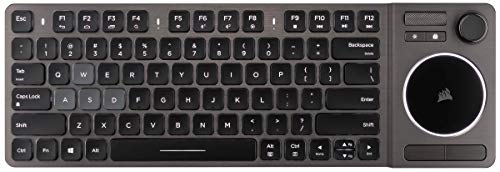
| Corsair K83 Wireless | A backlit living-room board with game controls | Wireless entertainment keyboard with touchpad, joystick, and white LED backlight |
| Logitech K830 | Typing and browsing in a dark living room | Illuminated living-room keyboard with built-in touchpad |
| Rii K18 Plus | Backlit couch control on a tight budget | Wireless 3-LED color backlit keyboard with multi-touch big size trackpad |
How to Choose
Lap stability decides everything first
A keyboard that feels fine on a desk can feel miserable on a lap, because cushions give way under its corners and every keystroke rocks the board. Look for a wide, flat base that spreads across both legs, or a lapboard with a rigid underside and a wrist rest that keeps the whole unit level. Sets with a built-in mouse surface solve the second half of the problem at the same time, since a separate mouse has nowhere to run on a sofa. Before you buy, measure the width of your usual seat and compare it with the listed dimensions, because a board that overhangs your knees will tilt every time you shift position.
Wireless reach and connection type matter more than speed
Your PC or console may sit two or three metres away, behind a TV stand, so a set that works at arm’s length on a desk can stutter from the sofa. A 2.4 GHz receiver plugged into the machine gives the most consistent link for gaming, while Bluetooth adds flexibility for smart TVs, streaming boxes, and tablets at the cost of slightly higher latency. Check whether the set needs one receiver or two, and whether that receiver is a full-size dongle or a tiny one that can stay plugged in. A single unified receiver keeps a second USB port free and means one less part to lose down the side of the sofa.
Backlighting and key feel in a dark room
Living-room gaming usually happens with the lights low, so keys you cannot see become keys you cannot find. Backlit keys solve that, but the quality varies: a single white backlight with adjustable brightness is easier on the eyes than harsh multi-colour lighting bouncing off a TV screen. Low-profile keys with short travel suit a board resting on your legs, because tall keys catch on clothing and make the board rock. Media keys and a volume roller earn their place too, since pausing a film or muting a game without reaching for a remote is the whole point of controlling a PC from the sofa.
Battery habits and charging
A couch set lives far from a charger, so how it stays powered shapes how often you think about it. Boards that run on AA batteries can last well over a year and keep working the moment you swap in fresh cells, which suits a set that only comes out for evening sessions. Rechargeable boards need a cable nearby and a habit of plugging in after play, but they spare you buying batteries and usually add backlighting that battery-powered boards skip. Check the stated battery life with lighting on and off, because backlighting can cut a rechargeable board’s runtime by more than half, and a board that dies mid-game is worse than a plain one.
The 5 Best Options
Razer Turret
The Razer Turret is the only set here built from the ground up as a couch gaming lapboard, and it shows in every detail. The tenkeyless mechanical keyboard sits on a rigid base with a retractable mouse mat that slides out to the right, so the included mouse always has a flat surface even when your lap does not. A single 2.4 GHz dongle connects both parts, and Xbox Dynamic Lighting makes it the natural pick for console players. It is heavy enough to stay put during fast play, and the magnetic mouse dock keeps the mouse from sliding off when you stand up.
Specs
- Wireless mechanical keyboard and mouse combo for PC, Xbox One, and Xbox Series X and S
- Retractable magnetic mouse mat built into the lapboard
- Mouse with 16,000 DPI 5G optical sensor
- Keyboard with 1000 Hz ultracpolling rate and 50 g actuation
- Keyboard battery up to 43 hours and mouse battery up to 50 hours with lighting disabled
- Single unified 2.4 GHz wireless USB receiver for keyboard and mouse
- Chroma RGB and Xbox Dynamic Lighting
Best for: Xbox and PC players who want a proper mechanical lapboard for serious couch sessions.
Watch out for: Check the listing before ordering, because stock of this set has been inconsistent and only some Xbox games accept keyboard and mouse input.
Logitech K400 Plus
The K400 Plus is the simplest answer to couch control. It is a full wireless keyboard with a built-in 3.5-inch touchpad, so there is no separate mouse to lose between the cushions, and the touchpad handles menus, browsing, and casual games that only need a pointer. The Unifying receiver gives it a wireless range of up to 33 feet, which covers even large living rooms, and two AA batteries keep it running for up to 18 months. Quiet keys and a slim, light body make it easy to hold on a lap for a whole film, and it works with Windows, Android, and ChromeOS machines connected to a TV.
Specs
- Wireless touch TV keyboard with built-in 3.5-inch touchpad
- 84 keys with quiet keystrokes
- Wireless range up to 33 ft with Logitech Unifying receiver
- Battery life up to 18 months on 2 AA batteries, included
- Water resistant
- Works with Windows, Android, and ChromeOS
- Media-friendly design with easy media control
Best for: HTPC owners who want one light board for films, browsing, and casual play.
Watch out for: It has no Bluetooth, so the host machine needs a free USB port for the Unifying receiver, and the touchpad is no substitute for a real mouse in fast-paced games.
Corsair K83 Wireless
The Corsair K83 is the living-room board for players who want game controls built into the keyboard itself. Alongside a precision touchpad it carries a small joystick with click buttons, a volume roller with press-to-mute, and dedicated media hotkeys, so menus and playback stay under your thumbs without reaching for another device. Its brushed aluminium body and white LED backlight look at home next to a TV, and it connects over 2.4 GHz wireless or Bluetooth to a living-room PC, smart TV, or streaming box. The rechargeable battery runs for up to 40 hours of continuous use, and the board can keep working while plugged in over USB.
Specs
- Wireless entertainment keyboard with integrated precision touchpad
- Joystick control with click buttons for games and menu browsing
- Aluminium volume roller with press-to-mute
- White LED backlighting with adjustable brightness
- 2.4 GHz wireless and Bluetooth connectivity
- USB rechargeable battery, up to 40 hours of continuous use
- 77 keys with scissor switches and 20-key rollover
- 128-bit AES wireless encryption
Best for: Living-room players who want joystick and media controls on the keyboard itself.
Watch out for: The touchpad is on the small side for long pointer sessions, and there is no dedicated Delete key, so deleting text takes a function-key combination.
Logitech K830

The K830 is the K400 Plus grown up for dark rooms, adding backlighting and Bluetooth to the same living-room formula. Its illuminated keys make typing and navigating menus easy with the lights off, while the built-in touchpad replaces a mouse for browsing, streaming apps, and casual games. It connects over Bluetooth or the included Unifying receiver, so it pairs with a PC, a smart TV, or an Android device without tying up the only USB port. The rechargeable battery charges over USB, and the board’s slim profile and quiet keys suit long evenings on the sofa. Media keys sit within easy reach for play, pause, and volume.
Specs
- Illuminated living-room keyboard with built-in touchpad
- Backlit keys for use in dark rooms
- Bluetooth and Unifying receiver connectivity
- Easy-access media keys and shortcut keys
- USB rechargeable battery
- Works with Windows and Android
- Slim, living-room design with quiet keys
Best for: Evening players and streamers who type and browse in a dark living room.
Watch out for: It charges over an older micro-USB cable rather than USB-C, so keep its cable with the board, and confirm the listed battery life on the product page before buying.
Rii K18 Plus
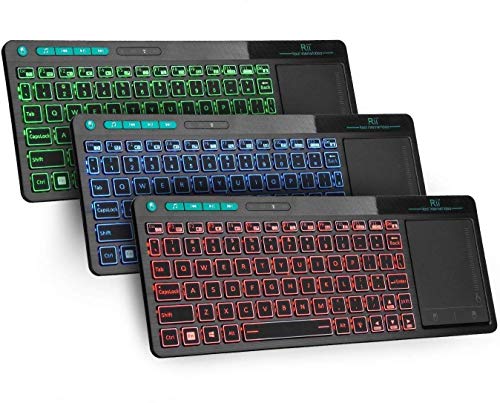
The Rii K18 Plus is the budget way into backlit couch control, and it covers the essentials without asking much in return. Its large multi-touch trackpad supports pinch-to-zoom and two-finger gestures, which makes navigating streaming menus and web pages from the sofa feel natural, and the three-colour LED backlight keeps keys visible in a dim room. A single 2.4 GHz receiver links it to a PC, smart TV, Android TV box, Xbox, or Raspberry Pi, and the rechargeable lithium-ion battery means no buying cells. It is light enough to rest on a lap for long sessions, and the full layout keeps media and navigation keys where your hands expect them.
Specs
- Wireless 3-LED colour backlit multimedia keyboard
- Large multi-touch trackpad with pinch-to-zoom gesture support
- 2.4 GHz wireless connection with USB receiver
- Rechargeable lithium-ion battery
- Listed for Android TV box, PC, smart TV, Xbox, Raspberry Pi, and HTPC
- Multimedia keys for media playback and navigation
Best for: Budget buyers who want a backlit touchpad keyboard for a TV-connected PC or console.
Watch out for: Key feel is basic compared with the name-brand boards here, and the listing does not state a battery-life figure, so charge it before a long session.
Which One Fits Your Situation
You play Xbox games from the sofa
Pick the Razer Turret. It is the only set here designed with Xbox in mind, with a dedicated Xbox button, Dynamic Lighting, and a rigid lapboard that keeps the mouse steady through long matches. Check that the games you play accept keyboard and mouse on console first, because that support varies by title, and keep the Turret’s charging cable nearby since its backlighting shortens runtime.
You run a home theatre PC for films and light games
Pick the Logitech K400 Plus. Its touchpad replaces a mouse for menus and browsing, its 33-foot range reaches across any living room, and its 18-month battery life means you can leave it on the coffee table for months without thinking about charging. The quiet keys will not distract anyone else watching, and the slim body stores easily beside the sofa when the film ends.
You want one board that handles games, media, and the TV
Pick the Corsair K83 Wireless. The joystick, volume roller, and media hotkeys put playback and menus under your thumbs, while Bluetooth lets it hop between a PC, a smart TV, and a streaming box. Its aluminium body and white backlight suit a living room, and the option to keep playing while it charges over USB means a low battery never ends the evening early.
You play late at night with the lights off
Pick the Logitech K830 or the Rii K18 Plus. The K830 gives you backlit keys, Bluetooth, and a quiet, slim body for typing and browsing after dark, while the Rii K18 Plus delivers the same basic idea for much less money. If your sessions run long, the K830 is worth the step up; if the board only comes out a few nights a week, the Rii covers the same ground.
Common Mistakes
- Buying a desk wireless combo and expecting it to work on a sofa, where the mouse has no flat surface and the keyboard rocks on cushions.
- Ignoring wireless range and then finding the link drops when the PC sits behind a TV stand three metres away.
- Choosing a board with no backlighting for a living room where the lights stay low during films and games.
- Forgetting that only some Xbox games accept keyboard and mouse, and blaming the hardware when a game ignores it.
- Picking a rechargeable board without checking how long it lasts with backlighting on, then running out of charge mid-session.
Frequently Asked Questions
Can I use a keyboard and mouse for gaming on the couch?
Yes, with the right form factor. A lapboard set like the Razer Turret gives the mouse a built-in surface, while a keyboard with an integrated touchpad, such as the Logitech K400 Plus, removes the mouse entirely. A standard desk combo struggles on a sofa because the mouse has nowhere flat to run and the keyboard rocks on cushions.
Do these keyboards work with Xbox?
The Razer Turret is built for Xbox One and Xbox Series X and S, and the Rii K18 Plus lists Xbox among its compatible devices. Other boards here connect to Xbox hardware as keyboards, but whether a game accepts keyboard and mouse input depends on the game itself, so check each title before buying a set for console play.
Is a touchpad good enough for couch gaming?
For menus, browsing, streaming apps, and slower games, a touchpad is plenty, and it removes the hardest part of couch play, which is finding a surface for a mouse. For fast shooters and strategy games that reward precise aiming, a real mouse on a lapboard surface, like the one on the Razer Turret, stays noticeably more accurate and comfortable.
What wireless range do I need for a living room?
Look for at least 10 metres, or about 33 feet, of stated range, which covers the distance from a sofa to a TV stand in most living rooms. A 2.4 GHz receiver gives the most consistent link for gaming, while Bluetooth adds flexibility for smart TVs and streaming boxes. Keep the receiver in a front USB port with a clear line to the sofa where possible.
Related guides
More from Amazon
Programs that pair well with the guide above. Offers and eligibility are set by Amazon and may change.
Free shipping on eligible items, Prime Video and more. Eligible new members can start with a free trial.
Start a Prime free trialAd-free music streaming. Eligible new subscribers can start with a free trial.
Try Music Unlimited freeA Prime membership for ages 18-24 with a trial period. Eligibility is set by Amazon.
See Prime for Young AdultsAudiobooks and podcasts to listen to on the go. Eligible new members can start with a free trial.
Try Audible freeAs an Amazon Associate we earn from qualifying purchases.