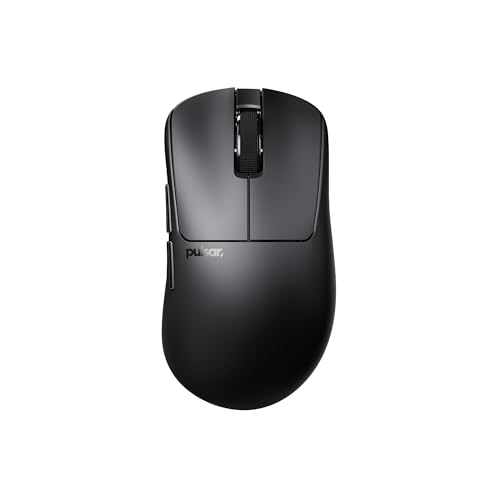
Choosing a Pulsar mouse is really three decisions stacked together. First comes the shape family: the symmetrical X2 line, built for claw and fingertip grips, or the right-handed ergonomic Xlite line, built for palm support. Then size, because most shapes come in Mini and Medium shells that suit different hands. Finally the polling path, since some listings include the 8K dongle in the box while others treat 8K as an add-on. Getting the order wrong is how players end up with a great sensor in a shell that fights their grip.
This guide is for tactical FPS players who aim with fingertip or claw grips, palm-grip players who want an ergonomic shell at the front of the weight class, smaller-handed players who need a Mini shell, and X2 owners weighing the current generation against the previous one. Every pick is a Pulsar gaming mouse sold on Amazon US, and the specs quoted come from the listing names and details for each model.
Top 3 picks at a glance

Quick Picks
As an Amazon Associate we earn from qualifying purchases
| Product | Best for | Key spec from title |
|---|---|---|
| Pulsar X2 v3 (Medium, White) | Claw and fingertip players on the current X2 shape | XS-1 sensor, 32,000 DPI, 8K compatible |
| Pulsar Xlite CrazyLight (Medium, Uyuni White) | Palm grip comfort at 44 g | 44 g ergonomic shell, 8K dongle included |
| Pulsar Xlite CrazyLight (Mini, Jet Black) | Smaller hands that want the Xlite shape | 41 g Mini shell, XS-1 sensor |
| Pulsar X2 v2 (Medium, White) | The earlier X2 generation with a PAW3395 sensor | 53 g symmetrical shell, 26,000 DPI |
How to Choose
Shape Family: Symmetrical or Ergonomic
Pulsar’s two families feel nothing alike despite sharing sensors. The X2 line uses a symmetrical shell with a low hump and wide waist, which leaves your fingers free to steer and suits claw and fingertip grips. The Xlite line uses a right-handed ergonomic shell with a taller, supportive hump shaped for palm and relaxed claw grips. Neither is better in the abstract; the wrong match shows up as a sore ring finger or a grip that keeps sliding. Decide the family from your grip before comparing any numbers.
Size: Mini or Medium
Within each family, the size in the listing title matters as much as the model name. Mini shells run shorter and narrower, which puts the side buttons and hump in the right places for smaller hands and gives fingertip players more room to pull the mouse downward. Medium shells fill the palm more and suit average to larger hands. Because every size and color combination carries its own ASIN, the size printed in the listing title is the one you are actually buying, so read it before anything else.
Polling Rate and the 8K Dongle
All four mice here run a standard 1,000 Hz polling rate, and all are described as 8K compatible, but the route to 8K differs by model. The Xlite CrazyLight listings include the 8K dongle in the box, so the higher rate works out of the box. The X2 v3 listing describes the mouse as 8K compatible, and reaching that rate needs Pulsar’s separate 8K dongle. If you play on a high-refresh monitor and care about the extra reports per second, factor the dongle into the X2 v3 decision from the start.
Sensor and Switch Generation
The current Pulsar sensor is the XS-1, listed at 32,000 DPI and 750 IPS in the X2 v3 and both Xlite CrazyLight models. The X2 v2 runs the earlier PAW3395 at 26,000 DPI, which remains a proven flagship-class sensor even though the headline figures are lower. Every mouse here uses optical main switches, which actuate with light rather than metal contacts. In practice, sensor generation is a smaller day-to-day difference than shape and size, so treat it as the tiebreaker rather than the starting point.
The 4 Best Options
Pulsar X2 v3 (Medium, White)

The X2 v3 is the current version of the shape that made Pulsar’s name: a symmetrical, low-hump shell aimed at claw and fingertip players who steer with their fingers. Its XS-1 flagship sensor is listed at 32,000 DPI with 750 IPS tracking, the main clicks use optical switches, and the mouse is described as 8K compatible for players who add the separate dongle later. This Medium White listing is the safe starting point for average-sized hands that want the newest internals in the classic outline.
Specs
- Sensor: Pulsar XS-1 flagship, up to 32,000 DPI, 750 IPS tracking
- Switches: optical
- Polling: 1,000 Hz standard, 8K compatible with the Pulsar 8K dongle
- Shape: symmetrical, Medium size
- Color: White
- Model: PX2322
Best for: Claw and fingertip players who want the current X2 shape and sensor generation.
Watch out for: Full 8K polling needs Pulsar’s separate 8K dongle, and this ASIN is the Medium White version, so check the size and color selector before ordering.
ASIN: B0DHRXFMXM
Pulsar Xlite CrazyLight (Medium, Uyuni White)
The Xlite CrazyLight Medium takes the ergonomic branch of the range and strips it down to a listed 44 g, which is remarkable for a supportive right-handed shell. It runs the same XS-1 sensor at 32,000 DPI and 750 IPS as the X2 v3, uses optical switches, and its listing copy names a TTC Golden Encoder for the scroll wheel. Unlike the X2 v3, the 8K dongle is included in the box here, so the high polling rate is available from day one without a second purchase.
Specs
- Weight: 44 g (1.55 oz)
- Sensor: XS-1, up to 32,000 DPI, 750 IPS tracking
- Switches: optical
- Polling: 8K compatible, 8K dongle included in the box
- Shape: ergonomic, right-hand, Medium size
- Color: Uyuni White
- Model: PXLCL202
Best for: Palm and relaxed claw players who want ergonomic support at the front of the weight class.
Watch out for: This ASIN is the Medium size in Uyuni White; the same model sells in a Mini size and other colors under different ASINs, so confirm the selector matches before ordering.
ASIN: B0G5XPXBXY
Pulsar Xlite CrazyLight (Mini, Jet Black)
The Mini version of the Xlite CrazyLight shrinks the ergonomic shell to a listed 41 g for players whose hands swim in a Medium. The sensor package matches its bigger sibling, an XS-1 at 32,000 DPI and 750 IPS with optical switches, and the listing data shows the box carrying the 8K dongle, a set of Pulsar Dot Skates and a USB-C cable. For smaller hands, the shorter shell keeps the hump under the palm instead of behind it, which is what makes palm and claw grips work at this size.
Specs
- Weight: 41 g (1.45 oz)
- Sensor: XS-1, up to 32,000 DPI, 750 IPS tracking
- Switches: optical
- In the box: 8K dongle, Pulsar Dot Skates (16 UHMW-PE), USB-C cable
- Shape: ergonomic, right-hand, Mini size
- Color: Jet Black
- Model: PXLCL101
Best for: Smaller hands that want the Xlite ergonomic shape without the Medium shell’s reach.
Watch out for: The 41 g headline figure is with the included dot skates fitted, and the Mini shell will feel cramped for large hands, so compare the size name in the title before ordering.
ASIN: B0FFGN4381
Pulsar X2 v2 (Medium, White)

The X2 v2 is the previous symmetrical generation, and its listing still describes a complete flagship package: a 53 g shell, optical switches, a 2.4 GHz link with 1 ms response, and the PAW3395 sensor at 26,000 DPI. The outline is the same low-hump, wide-waist shape the v3 inherited, so players who already know the X2 feel can judge this one accurately. What you give up against the v3 is the XS-1 sensor generation and the 8K polling path, not the shape or the switch type.
Specs
- Weight: 53 g (1.87 oz)
- Sensor: PAW3395, up to 26,000 DPI
- Switches: optical
- Connectivity: 2.4 GHz wireless, 1 ms response
- Shape: symmetrical, Medium size
- Color: White
- Model: PX2222
Best for: Players set on the X2 shape who do not need the newest sensor generation.
Watch out for: Stock signals for this ASIN are mixed across trackers and current availability may sit with third-party sellers, so check the seller and condition on the listing page.
ASIN: B0CH9Z587R
Which One Fits Your Situation
You Aim With Fingertip or Claw Grip in Tactical Shooters
Start with the X2 v3. The symmetrical shell, low hump and XS-1 sensor are built for exactly this style, and the Medium size suits most hands. Add the 8K dongle later if your monitor and your aim both justify chasing the highest polling rate. Its optical switches also keep rapid clicks consistent when a fight turns into a spray of inputs.
You Palm Grip and Play Long Sessions
The Xlite CrazyLight Medium is your pick. Its ergonomic shell supports the whole hand, the 44 g weight keeps long tracking movements from wearing out your arm, and the included 8K dongle means nothing else is needed to run the mouse at its full specification. The ergonomic hump fills the palm, so your fingers can stay relaxed between fights.
Your Hands Are on the Smaller Side
Choose the Xlite CrazyLight Mini. At 41 g in a shortened ergonomic shell, it keeps the hump and side buttons where smaller hands can actually reach them, instead of forcing a fingertip-only grip on a shell that is too long for your palm. It carries the same XS-1 sensor as the Medium, so nothing about tracking is cut to reach the size.
You Already Like the X2 Outline
Decide between generations. The X2 v3 brings the XS-1 sensor and the 8K option in the same familiar shape, while the X2 v2 keeps the PAW3395 and the standard wireless link. If shape is what you love, either works; pick by how much the newer sensor matters to you. Shape loyalty is a perfectly good reason to stay in the family.
Common Mistakes
- Ordering a Mini shell for a large hand because the lighter headline weight sounded faster.
- Assuming 8K polling works out of the box on every model, when the X2 v3 needs its dongle bought separately.
- Comparing weights across models without noticing that some figures are quoted with dot skates fitted and others with regular skates.
- Choosing the ergonomic Xlite for a fingertip grip, or the symmetrical X2 for a full palm grip, against what each shell was shaped for.
- Mixing up size and color variants at checkout, since each combination in this range carries its own listing and ASIN.
Frequently Asked Questions
Does the Pulsar X2 v3 Come With the 8K Dongle?
No. The X2 v3 listing describes the mouse as 8K compatible, and reaching that polling rate needs Pulsar’s separate 8K dongle. The situation differs across the range: the Xlite CrazyLight listings in this guide include the 8K dongle in the box, so those two models run at 8K without anything extra to buy.
What Is the Difference Between the X2 and Xlite Shapes?
The X2 is a symmetrical shell with a low hump and wide waist, shaped for claw and fingertip grips and used with the right hand thanks to its left-side buttons. The Xlite is a right-handed ergonomic shell with a taller, more supportive hump, shaped for palm and relaxed claw grips. Your grip style, not the spec sheet, should make this call.
Should I Choose the X2 v2 or the X2 v3?
The shape is essentially shared, so the choice comes down to internals. The v3 runs the XS-1 sensor at 32,000 DPI and 750 IPS and adds an 8K polling option with the separate dongle. The v2 runs the PAW3395 at 26,000 DPI over its standard 2.4 GHz link. Pick the v3 for the newer sensor, the v2 if that generation already covers your needs.
Can I Keep Playing While a Pulsar Mouse Charges?
Yes. These are wireless mice that also connect over a USB-C cable, and the Xlite CrazyLight listing data shows a USB-C cable in the box for exactly that. Plugging in swaps you to a wired connection while the battery refills, so a low battery mid-session means a cable for a while, not the end of the session.
Related guides
More from Amazon
Programs that pair well with the guide above. Offers and eligibility are set by Amazon and may change.
Free shipping on eligible items, Prime Video and more. Eligible new members can start with a free trial.
Start a Prime free trialAd-free music streaming. Eligible new subscribers can start with a free trial.
Try Music Unlimited freeA Prime membership for ages 18-24 with a trial period. Eligibility is set by Amazon.
See Prime for Young AdultsAudiobooks and podcasts to listen to on the go. Eligible new members can start with a free trial.
Try Audible freeAs an Amazon Associate we earn from qualifying purchases.