Our Short List of 3
All 5 Picks at a Glance
| Product | Specs | Action |
|---|---|---|
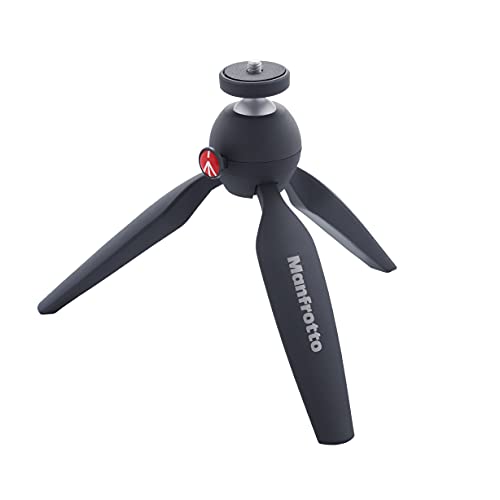 1. Manfrotto PIXI Mini Tripod | Check price on Amazon | |
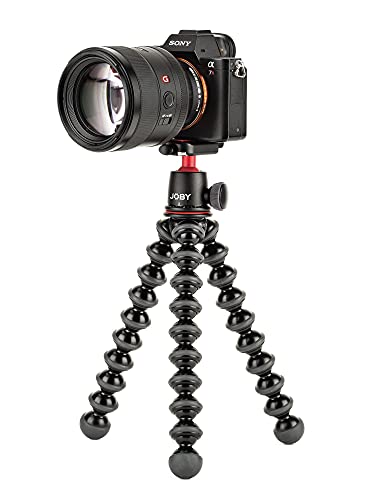 2. Joby GorillaPod 3K Kit | Check price on Amazon | |
 3. Ulanzi MT-08 Extension Pole Tripod | Check price on Amazon | |
 4. Neewer Mini Tripod with Ball Head | Check price on Amazon | |
 5. Manfrotto Befree Advanced Aluminum Tripod | Check price on Amazon |
A shaky camera undermines a stream faster than almost any other gear problem. Viewers forgive a modest webcam or an older mirrorless body, but a frame that drifts, vibrates every time you bump the desk, or slowly tilts during a long session looks unprofessional and distracts from the game. The right tripod fixes the camera in exactly the position you chose, holds that position for hours,.
This guide compares five tripods for streaming and content creators that cover both jobs. It includes a tiny rigid mini tripod for a fixed desk camera, two flexible and extendable mini tripods that adapt to shelves and uneven surfaces, a taller desktop tripod that raises a camera above desk clutter, and a full-size travel tripod for creators who also film away from their main setup.
As an Amazon Associate, we earn from qualifying purchases.
Our Top Picks
Top 3 picks at a glance
What to look for in tripods for streaming
Start with working height, because height decides what a tripod can frame. A mini tripod on the desk raises a camera only a few inches, which works when the desk itself provides the elevation. An extendable desktop tripod adds useful inches for clearing keyboards and audio interfaces. A full-size tripod stands on the floor, reaches eye level without furniture, and suits a second camera angle, a room view, or filming standing content.
Payload is the second check, and it deserves a margin. Add the camera body, the lens you actually stream with, and any cage, microphone, or light mounted on top, then choose a tripod rated comfortably above that total. Flexible legs and small ball heads suit lighter mirrorless and compact cameras, while larger heads and metal desktop tripods handle heavier bodies with less creep.
Head movement matters for framing speed. A ball head lets you level the camera, tilt for a slight downward desk angle, or switch to vertical framing for short-form clips with one locking knob. Check the plate system too: a quick release plate lets you lift the camera off for handheld filming and click it back into the same framed position.
Finally, consider stability and footprint. Wide, low leg angles and rubber feet resist small vibrations from typing and mouse movement. Flexible legs trade some rigid stability for the ability to wrap around a shelf edge when flat desk space runs out. Many creators end up owning both types.
1. Manfrotto PIXI Mini Tripod
The Manfrotto PIXI is the simplest answer to a fixed desk camera. Its three rigid legs open to a wide, low stance, the ball head locks with a push-button mechanism that releases when you press it and holds when you let go, and the whole support is small enough to sit permanently in the corner of a gaming desk without crowding a mousepad. With a compact camera, a webcam on an adapter, or a small mirrorless body and a short lens, it delivers a steady, repeatable frame that needs no attention once set.
The legs also close together to form a short handgrip for quick handheld clips. The build combines technopolymer and aluminum, with rubberized feet for grip on smooth desktops.
The limits are clear. The PIXI has a single fixed height, so framing depends on where you place it. Its payload suits lightweight cameras rather than a large body with a heavy zoom, and phones need a separate clamp because the top is a standard camera screw. For a light, set-and-forget desk camera, those trade-offs buy reliability and a tiny footprint.
2. Joby GorillaPod 3K Kit
The GorillaPod 3K Kit solves the problem the PIXI cannot: desks and rooms with no flat, convenient place to put a camera. Its legs are a chain of flexible joints that bend, straighten into a normal mini tripod stance, or wrap firmly around a shelf upright, a monitor arm, a chair back, or a railing. For streamers, that flexibility creates angles a rigid tripod cannot reach, such as a top-down view of a keyboard or a camera mounted beside a shelving unit for a room shot.
The kit pairs the flexible stand with a ball head that includes a quick release plate, so the camera can leave for handheld segments and return to the same position without re-framing from scratch. The rated payload covers mirrorless cameras and compact DSLRs with moderate lenses, making the 3K the practical step up from phone-sized flexible tripods.
Flexible legs do need occasional checking. A wrapped joint can settle slowly if the camera is front-heavy or the wrap is loose, so careful positioning matters more than with rigid legs, and the height is still desk or shelf scale rather than eye level on its own.
3. Ulanzi MT-08 Extension Pole Tripod
The Ulanzi MT-08 is built for creators whose camera changes position often. At its shortest it is a compact mini tripod and handgrip for a compact camera, an action camera, or a phone in a separate holder. Pull the center section out and it becomes a short extension pole, adding the extra height that helps a desk camera clear a monitor bezel or a microphone arm, and giving vlog-style clips more distance without a full selfie stick.
The MT-08 takes almost no storage space, travels in a backpack pocket, and moves between a desk position, a handheld grip, and a raised perch on a shelf in moments. Its ball head allows quick tilting between landscape and vertical framing.
The trade-off is payload and rigidity. The MT-08 is intended for lightweight cameras and phones, not a heavy mirrorless body with a large lens, and an extended pole is naturally less rigid than a fixed desktop tripod of similar height.
4. Neewer Mini Tripod with Ball Head
The Neewer Mini Tripod, model TP-AAM521, is the choice when a mini tripod needs to behave more like a real camera tripod. Its aluminum alloy legs adjust through several sections, raising a camera to about fifty centimeters, far above a fixed mini tripod, while the low-profile ball head pans a full circle and tilts for portrait framing. An Arca-type quick release plate is included.
For streaming, that extra height changes what one desk can do: the camera can sit behind a monitor and still see over it, or hold a product camera high enough for a clean downward angle. The rated load is the highest among the desktop picks here, covering larger bodies and heavier lenses.
It is also the largest desktop option here, with a wider footprint and more weight than the pocketable picks, so very small desks may feel crowded, and its locks take a little longer to adjust than simply opening rigid legs. For creators with one camera that must cover desk streaming, product filming, and tabletop photography, that capability is worth the space.
5. Manfrotto Befree Advanced Aluminum Tripod
The Befree Advanced is the full-size option for creators whose filming regularly leaves the desk. This aluminum travel tripod stands on the floor, extends to roughly eye level, and folds down short enough to carry in its included bag, so the same support can frame a standing presentation in a gaming room, a camera position across the room during a group stream, and location filming away from home. Lever locks open quickly, and each leg spreads independently on uneven floors.
Its ball head uses independent controls for locking, panning, and friction, giving more precise framing than a single-knob mini head. The rated payload handles systems that exceed every desktop pick here.
A full-size tripod is not a desk accessory, and that is the honest trade-off. It needs floor space beside or behind the setup and takes longer to position than a mini tripod. Creators who film room content, events, or interviews alongside desk streaming will use that capability constantly, while desk-only streamers should start with one of the smaller picks above.
FAQ
Do streamers need a full-size tripod or is a mini tripod enough?
A mini tripod is enough for the common desk setup, where the desk provides height and the camera stays in one framed position for the whole stream. A full-size tripod becomes worthwhile when you film standing content, room views, interviews, or any angle that furniture cannot provide.
How much payload do I need for a mirrorless streaming camera?
Add the camera body, the lens you stream with, and any microphone, cage, or light mounted on the camera, then choose a rating comfortably above that total. A compact mirrorless body with a small prime lens suits most mini tripods, while a larger body with a heavy zoom belongs on a higher-rated desktop tripod or a full-size model, where the ball head will hold position without slowly drooping.
Can I use these tripods with a phone or a webcam?
Yes, with the right adapter. All five picks use a standard quarter-inch camera thread, so a phone clamp with that thread turns any of them into a phone support, and many webcams include the same threaded socket on their base. Check the adapter is secure before a live session.
Where should I place a tripod for the best streaming angle?
Place the lens close to eye level, or slightly above it, for the most natural framing, far enough back that your head, shoulders, and some background stay in frame without distortion. At a desk, that usually means a mini tripod behind or beside the main monitor, clear of mouse and keyboard movement.
Final verdict
Choose by the shot you film most. The Manfrotto PIXI is the dependable fixed desk camera support, the Joby GorillaPod 3K Kit creates angles on shelves and edges that rigid legs cannot, and the Ulanzi MT-08 adds portable extension for creators who move between desk and handheld filming. The Neewer Mini Tripod brings real height and payload to the desktop itself, while the Manfrotto Befree Advanced covers every floor-standing shot beyond the desk.
Product and ASIN Reference
| Product | ASIN |
|---|---|
| Manfrotto PIXI Mini Tripod | B00D76RNLS |
| Joby GorillaPod 3K Kit | B074WC9YKL |
| Ulanzi MT-08 Extension Pole Tripod | B07ZPS47VC |
| Neewer Mini Tripod with Ball Head | B07FKDH3BC |
| Manfrotto Befree Advanced Aluminum Tripod | B0772WLSHZ |
Related guides
More from Amazon
Programs that pair well with the guide above. Offers and eligibility are set by Amazon and may change.
Free shipping on eligible items, Prime Video and more. Eligible new members can start with a free trial.
Start a Prime free trialAd-free music streaming. Eligible new subscribers can start with a free trial.
Try Music Unlimited freeA Prime membership for ages 18-24 with a trial period. Eligibility is set by Amazon.
See Prime for Young AdultsAudiobooks and podcasts to listen to on the go. Eligible new members can start with a free trial.
Try Audible freeAs an Amazon Associate we earn from qualifying purchases.