An uninterruptible power supply, or UPS, keeps your PC running for a few minutes during a power cut so you can save and shut down safely. For a gaming PC that can cost well over a thousand dollars, a $70-150 battery backup is cheap insurance, but whether it is worth it depends heavily on how reliable your local power is. Here is how to make the call.
As an Amazon Associate we earn from qualifying purchases at no extra cost to you.


Our Top Picks
 CyberPower CP1500PFCLCD PFC Sinewave UPS Battery Backup and1500VA14 x 3.9 x 11 inches24.9 poundsCheck on Amazon
 CyberPower CP1500AVRLCD3 Intelligent LCD UPS Battery Backup1500VA13.78 x 3.94 x 10.2 inches23.8 poundsCheck on Amazon
 CyberPower CP1500PFCRM2U PFC Sinewave UPS Battery Backup1500VA10.5 x 17 x 3.4 inches26.8 poundsCheck on Amazon
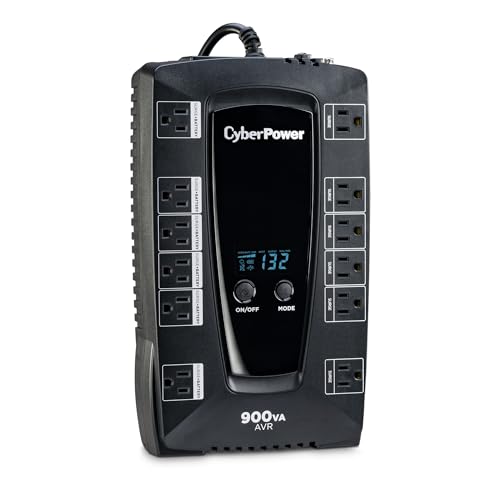 CyberPower AVRG900LCD Intelligent LCD UPS Battery Backup900VA LCD3.5 x 12.2 x 7 inches14.2 poundsCheck on Amazon
Top 3 picks at a glance
What a UPS actually protects against
A UPS does two jobs: it bridges short outages with battery power, and it conditions incoming power, smoothing out surges, sags, and brownouts that a basic surge protector cannot fully handle. For a gaming PC, the main risks it removes are sudden shutdowns that can corrupt drives or files and voltage swings that stress components over time.
The unsaved-progress and data angle
A hard power loss mid-game can corrupt save files or, worse, damage data during a drive write. A UPS gives you the minutes needed to save and shut down cleanly. If you also run a home server, NAS, or do work on the machine, that protection is even more valuable.
Sizing and cost
| UPS capacity | Typical price | Runtime for a gaming PC | Best for |
|---|---|---|---|
| 600-800VA | $70-100 | ~2-5 min | Save and shut down |
| 1000-1500VA | $120-200 | ~5-15 min | Higher-power rigs |
| 1500VA+ | $200-350 | 10-25+ min | PC + monitor + peripherals |
Match capacity to your draw
A UPS is rated to run a certain wattage for a certain time. A power-hungry gaming rig pulling 400-600W under load needs a larger unit to give useful runtime than a modest office PC. Aim for enough capacity to comfortably save and shut down, not to keep gaming through a blackout, which would require a much larger and pricier unit.
When a UPS is worth it
Buy one if your area has frequent outages, brownouts, or flickers, if you store important data or run a server on the machine, or if you have simply lost progress or a drive to a sudden cut before. In unstable-power regions, a UPS is one of the cheapest ways to protect an expensive investment.
When you can skip it
If your power is very stable and you rarely see outages, a good surge protector may be enough for the immediate risk, and you can spend the money elsewhere. Just remember a surge protector does not bridge outages or fix brownouts.
Getting the full life out of a UPS
A UPS is a multi-year investment, and a little care protects its value. The battery inside is a consumable that typically lasts three to five years before it holds noticeably less charge, so plan on a replacement battery down the line rather than a whole new unit; many models let you swap just the battery for a fraction of the full price. Keep the UPS in a cool, ventilated spot, since heat shortens battery life. Run the self-test occasionally and note when runtime starts dropping, which is the early sign the battery is aging. Do not plug a laser printer or other huge intermittent load into the battery-backed outlets, as that can overwhelm the unit; use the surge-only outlets for those. Sizing with a little headroom above your PC’s draw also means the battery is never stressed to its limit, which extends its usable life. Treat the UPS as a maintained device, not a set-and-forget box, and it will protect your rig for many years.
FAQ
Can I keep gaming during a blackout with a UPS?
Only briefly, and only with a large unit. Most affordable UPS models are sized to give you a few minutes to save and shut down safely, not to power a full gaming session through an outage.
Is a UPS better than a surge protector?
Yes, for outage protection. A surge protector guards against voltage spikes but does nothing during a power cut. A UPS adds battery backup and often better power conditioning, which a gaming PC benefits from in unstable-power areas.
Bottom line
A UPS is worth it for gaming PCs in areas with unreliable power, or when you store important data, because a modest $70-150 unit protects a far pricier machine from corruption and sudden shutdowns. In regions with rock-solid power, a good surge protector may suffice. Size the unit to save and shut down safely, and treat it as cheap insurance on an expensive rig.
Related guides
More from Amazon
Programs that pair well with the guide above. Offers and eligibility are set by Amazon and may change.
Free shipping on eligible items, Prime Video and more. Eligible new members can start with a free trial.
Start a Prime free trialAd-free music streaming. Eligible new subscribers can start with a free trial.
Try Music Unlimited freeA Prime membership for ages 18-24 with a trial period. Eligibility is set by Amazon.
See Prime for Young AdultsAudiobooks and podcasts to listen to on the go. Eligible new members can start with a free trial.
Try Audible freeAs an Amazon Associate we earn from qualifying purchases.