When Wi-Fi is not stable enough for competitive play but running a long Ethernet cable is not an option, two technologies reuse the wiring already inside your walls. MoCA adapters send network data over coaxial cable, the same lines installed for cable TV. Powerline adapters send data over your electrical wiring instead. Both end in a real Ethernet port for your PC or console, which is what makes them interesting for gaming.
The five products below split into the two camps: three MoCA 2.5 kits and two powerline kits. The headline speed figures for both technologies are theoretical class maxima, not guaranteed real-world results; your wiring quality decides what you actually get. The real deciding factors are which wiring your home has, whether that wiring is active and connected, and the compatibility traps each listing states. Those traps are covered per product, because they are where most returns come from.
As an Amazon Associate, we earn from qualifying purchases.
Top 3 picks at a glance
Quick answer
Choose MoCA if your home has coax outlets near your router and your gaming setup: the three MoCA 2.5 kits offer a 2.5GbE Ethernet port and the most direct path to wired stability. Choose powerline if coax is absent but your rooms share one electrical circuit, knowing the AV2000 and 2000 Mbps figures are theoretical maxima limited by gigabit ports. Check satellite TV and circuit compatibility first.
ScreenBeam Bonded MoCA 2.5 Network Adapter Starter Kit (ECB7250K02)

The ScreenBeam starter kit is the benchmark MoCA option in this comparison. It is a Bonded MoCA 2.5 kit with a stated throughput of up to 2.5 Gbps and a 2.5GbE Ethernet port, so the port itself does not cap the connection the way a gigabit port would. The starter kit contains two ECB7250 adapters, two coax cables, two Ethernet cables, two power adapters and a quick start guide, which is everything needed to link two rooms.
The kit is backward compatible with MoCA 2.0, 1.1 and 1.0 networks, which helps if your home already has older MoCA gear from a cable provider. Check the listing for current availability before ordering, as stock on this kit can change.
The compatibility limits are stated plainly by the listing and they matter: this kit is not compatible with DirecTV, Dish or other satellite TV services, or with AT&T internet and AT&T U-verse coax. Also note that the ECB6200, ECB6250 and ECB7250 models are not cross-compatible with each other, so an existing adapter from a different ScreenBeam generation will not pair with this kit.
goCoax MoCA 2.5 Adapter, MA2500D (2-Pack)
The goCoax 2-pack is the other full MoCA 2.5 kit here, built around two MA2500D adapters. Each adapter has one 2.5GbE RJ45 port, and the listing states up to 2.5 Gbps, latency of about 3 ms as listed, support for up to 16 nodes, and five bonded channels in the 1125 to 1675 MHz range. It includes MoCA Protected Setup and is backward interoperable with MoCA 2.0 and 1.1.
The listing names the cable providers it works with: Comcast and Xfinity, Spectrum, Cox, Verizon FiOS, Optimum and WOW. The box holds the two adapters, two power adapters, two coax cables, two Ethernet cables and a quick start guide, and each adapter measures 5.47 x 2.76 x 0.71 inches. Check the listing for current availability before you order.
Two listing-stated cautions: the adapters are not compatible with DirecTV, Dish Network or AT&T U-verse, and a minimum of two adapters is required for a MoCA network, which this 2-pack satisfies. A single MA2500D is sold as a separate listing for adding nodes later; keep the pack sizes separate when ordering so you do not mix listings.
Hitron HTEM5 MoCA 2.5 Network Adapter (2-Pack)

The Hitron HTEM5 2-pack covers the same MoCA 2.5 ground: a 2.5GbE Ethernet port on each adapter and stated throughput of up to 2.5 Gbps. The pack includes two adapters, coax and Ethernet cables and two power supplies. The listing is sold by Hitron Americas and ships from Amazon. It also states clearly what the product is not: it is not a modem, a router or a Wi-Fi extender, so it only bridges your existing network over coax.
Provider coverage as listed includes cable internet from Xfinity, Spectrum, Cox, Optimum and Mediacom, plus most fiber services such as Verizon Fios, Google Fiber and CenturyLink Fiber. Check the listing for current availability before ordering, since availability on this pack can vary.
The wiring requirements are the strictest part of this listing. The HTEM5 does not work with AT&T Fiber, with satellite TV wiring from DirecTV or Dish, or with disconnected or inactive coax. It also requires a MoCA-compatible main splitter that supports 1125 to 1675 MHz, with all coax outlets connected through that single main splitter. If your coax runs through an old or incompatible splitter, replace it first or the adapters will not link.
TP-Link AV2000 Powerline Ethernet Adapter (TL-PA9020P KIT)
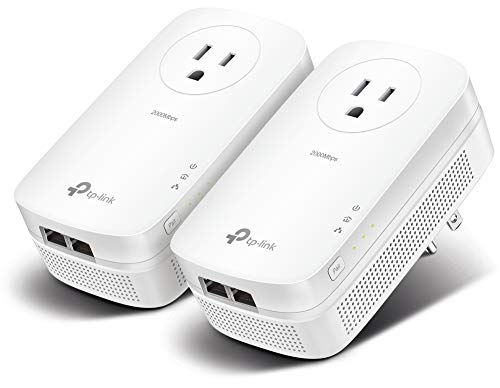
On the powerline side, the TP-Link TL-PA9020P KIT is an AV2000-class kit with 2×2 MIMO. Each adapter carries two Gigabit Ethernet ports, so one wall unit can feed both a PC and a console, and each adapter has a passthrough outlet so the wall socket is not lost. Setup is Plug, Pair and Play, and the kit includes a power saving mode.
The listing’s own cautions define what to expect. AV2000 is a theoretical maximum PHY-layer rate, and real speed is limited by the gigabit Ethernet ports, so treat the class figure as a ceiling rather than a promise. The adapters must plug directly into wall outlets; they do not work through power strips, surge protectors or extension cords. Both adapters also need to be on the same electrical circuit, and performance may be limited or blocked in homes with AFCI breakers.
If your gaming room and router room share a circuit and your wiring is modern, this kit is the simplest route to a wired port without touching coax. If the rooms sit on different circuits or behind AFCI breakers, MoCA is the safer bet.
NETGEAR Powerline Adapter Kit, 2000 Mbps Wall-Plug (PLP2000)

The NETGEAR PLP2000 kit is the second powerline option, built on HomePlug AV2 with a listed data transfer rate of 2000 Megabits Per Second. As with the TP-Link kit, that figure is the technology’s class maximum; the two Gigabit Ethernet ports on each adapter set the practical ceiling. Each adapter also has a noise-filtered passthrough outlet, which helps keep the socket usable for other devices.
The kit includes two Powerline 2000 with Extra Outlet adapters, and the listing states support for up to 16 adapters on one network if you later expand to more rooms. The manufacturer part number is PLP2000-100PAS.
The listing is explicit that this is not a Wi-Fi device: it creates wired Ethernet points only, with no wireless signal of its own. It is also made for use in the US only, per the listing. The usual powerline rules apply here too: plug the adapters directly into wall outlets on the same electrical circuit, not into power strips or extension cords, or the link will fail or slow down.
How to choose
Start with your walls. If the rooms you need to connect have coax outlets that trace back to one main splitter, MoCA is usually the stronger choice: the three kits here all pair a 2.5GbE port with a stated ceiling of up to 2.5 Gbps, and coax is a shielded, dedicated medium that ignores your electrical noise. Confirm the coax is active, that the splitter supports 1125 to 1675 MHz, and that you do not have satellite TV service on the same lines.
If coax is missing or disconnected, powerline is the fallback. It needs both adapters on the same electrical circuit, plugged straight into wall outlets, and it can be limited or blocked by AFCI breakers. Treat AV2000 and 2000 Mbps as class labels; the gigabit ports cap real transfers, which is still plenty for gaming traffic but matters for large file moves.
For either technology, buy a complete two-adapter kit first, verify the link in your actual rooms, and only then add single units to expand. Keep model generations separate, because the listings state that different generations may not pair with each other.
Who should skip
Skip MoCA if your coax carries satellite TV from DirecTV or Dish, if your internet is AT&T U-verse or AT&T Fiber, or if your coax outlets are disconnected and you cannot rejoin them at one splitter. Skip powerline if your rooms are on different electrical circuits, if your panel uses AFCI breakers throughout, or if every nearby outlet is already occupied by power strips you cannot move. Skip both if you can run a real Ethernet cable, which remains the simplest and most predictable option, or if your router already delivers a stable wireless connection where you play.
FAQ
Can I mix MoCA adapters from different brands or generations?
Generations matter more than brands. MoCA 2.5 adapters are backward interoperable with MoCA 2.0 and 1.1 as the listings state, but ScreenBeam warns that its ECB6200, ECB6250 and ECB7250 models are not cross-compatible with each other. Match the generation and model family when expanding, and keep pack and single-unit listings separate.
Why does powerline stop working through a surge protector?
Both powerline listings state that the adapters must plug directly into wall outlets. Power strips, surge protectors and extension cords filter or block the high-frequency signal powerline uses, and adapters on different electrical circuits may not see each other at all. AFCI breakers can also limit or block performance.
Does MoCA interfere with my cable TV or internet service?
The MoCA kits here are listed as working with major cable providers including Xfinity, Spectrum and Cox. The hard exclusions are satellite TV services, AT&T internet and U-verse coax, and AT&T Fiber. MoCA also needs a compatible main splitter covering 1125 to 1675 MHz with every outlet connected through it.
How many adapters do I need to get started?
Two. A MoCA or powerline network needs one adapter at the router and one at the device, and the goCoax listing states the two-adapter minimum explicitly. All five products here are two-adapter kits, and both technologies allow adding more nodes later, up to 16 as listed for the goCoax and NETGEAR kits.
Final verdict
If your home has usable coax, take MoCA: the ScreenBeam kit is the reference pick, the goCoax 2-pack matches it on stated specs with clear provider coverage, and the Hitron pack suits cable and most fiber homes that meet its splitter requirements. If coax is out, the TP-Link and NETGEAR powerline kits both deliver two gigabit ports and a passthrough outlet per adapter, provided your rooms share a circuit. Whichever side you choose, read the exclusion lists first; they decide success more than the speed class does.
Related guides
More from Amazon
Programs that pair well with the guide above. Offers and eligibility are set by Amazon and may change.
Free shipping on eligible items, Prime Video and more. Eligible new members can start with a free trial.
Start a Prime free trialAd-free music streaming. Eligible new subscribers can start with a free trial.
Try Music Unlimited freeA Prime membership for ages 18-24 with a trial period. Eligibility is set by Amazon.
See Prime for Young AdultsAudiobooks and podcasts to listen to on the go. Eligible new members can start with a free trial.
Try Audible freeAs an Amazon Associate we earn from qualifying purchases.