Thinking about playing Thymesia on PC and wondering what hardware you actually need? Released in August 2022, Thymesia is a gruelling action-RPG with fast-paced combat and an intricate plague weapon system where you step into the shoes of Corvus to unravel memories across a disease-ridden kingdom. Because tight parry windows and rapid dodges are vital to surviving encounters, maintaining smooth frame delivery is paramount. Fortunately, the game is relatively accessible on modern PC hardware. This guide breaks down the official PC system requirements for Thymesia, the ideal graphics card for each resolution, and balanced build options to keep combat fluid.
As an Amazon Associate we earn from qualifying purchases at no extra cost to you.


Our Top Picks
 ASUS Dual GeForce RTX 5060 Ti 16GB GDDR7RTX5060Ti|OC|16GB9 x 4.7 x 2 inches1.4 poundsCheck on Amazon
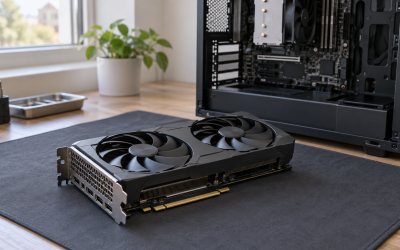
 ASUS SFF-Ready Prime NVIDIA GeForce RTX 5070 GraphicsRTX507012 x 5 x 2 inches3.3 poundsCheck on Amazon


Top 3 picks at a glance
How Demanding Is Thymesia?
Thymesia is quite modest on PC hardware compared to modern open-world blockbusters. Rather than rendering massive sprawling landscapes, its combat-centric design focuses on detailed, enclosed environments. Older GPUs such as the GeForce GTX 950 or Radeon HD 7970 satisfy the minimum specification, while reliable classics like the GTX 1060 and Radeon RX 580 comfortably handle the developer’s recommended tier for 1080p. Modern entry-level cards easily manage high frame rates, and stepping up to 1440p or 4K requires solid mid-tier hardware rather than a top-of-the-line enthusiast system.
Thymesia Official PC System Requirements
| Component | Minimum (official) | Recommended (official) |
|---|---|---|
| OS | Windows 10 (64 Bit) | Windows 10 (64 Bit) |
| Processor | Intel Core i5 or AMD Ryzen 5 | Intel Core i7 or AMD Ryzen 7 |
| Memory | 8 GB RAM | 16 GB RAM |
| Graphics | NVIDIA GeForce GTX 950 or Radeon HD 7970 | NVIDIA GeForce GTX 1060 or AMD Radeon RX 580 |
| DirectX | Version 12 | Version 12 |
| Storage | 16 GB available space | 16 GB available space |
Source: the official Thymesia Steam store listing (app 1343240), checked October 2026. Publishers can update these specs after patches.
Best GPU for Thymesia by Resolution
1080p
At 1080p, Thymesia runs comfortably even on older hardware like the recommended GTX 1060 or RX 580. If you are building or upgrading today, a modern entry-level card such as the AMD Radeon RX 7600 or an NVIDIA GeForce RTX 4060 will easily push high refresh rates on high settings, giving you flawless responsiveness during rapid combat encounters.
1440p
Stepping up to 1440p sharpens the game’s dark gothic visuals without imposing severe hardware strain. A capable mid-range GPU such as the NVIDIA GeForce RTX 4070 SUPER provides abundant headroom for high-refresh-rate 1440p play at max settings, ensuring parries and plague weapon strikes never suffer from frame drops.
4K
At native 4K, rendering fine environmental details and spell effects requires significantly more shader power. An upper-tier graphics card like the NVIDIA GeForce RTX 4070 Ti SUPER or an RTX 5070-class card delivers effortless high-refresh 4K performance, keeping combat fluid even during intensive boss encounters.
CPU, RAM and Storage for Thymesia
Thymesia’s official specifications ask for an Intel Core i5 or AMD Ryzen 5 at minimum, with a Core i7 or Ryzen 7 recommended. Because the game is an action-RPG focusing on contained combat rather than complex world simulations, any modern 6-core processor will easily outpace the engine’s requirements. The AMD Ryzen 5 7600 offers superb gaming value, while the AMD Ryzen 7 7800X3D delivers top-tier frame pacing for high-refresh setups. Intel builders will find plenty of performance in the Intel Core i5-14600K.
For system memory, the minimum requirement is 8 GB, though 16 GB is officially recommended to prevent background stutters. Opting for a 32 GB kit like the Corsair Vengeance DDR5 32GB ensures seamless multitasking and longevity across modern titles. Storage demands are very modest at just 16 GB of available space. While standard drives are supported, placing the game on a fast SSD such as the Samsung 990 Pro 2TB NVMe SSD eliminates load pauses and asset streaming hitches.
Recommended PC Builds for Thymesia
1080p budget build: AMD Radeon RX 7600 + AMD Ryzen 5 7600 + 16 GB DDR5 — comfortably surpasses official recommendations and delivers locked high frame rates at 1080p.
1440p sweet-spot build: NVIDIA GeForce RTX 4070 SUPER + AMD Ryzen 7 7800X3D + 32 GB DDR5 + 2TB NVMe SSD — provides huge graphical headroom for maxed 1440p visuals and effortless responsiveness.
4K high-end build: NVIDIA GeForce RTX 4070 Ti SUPER + AMD Ryzen 7 7800X3D + 32 GB DDR5 + fast NVMe SSD — ideal for uncompromised 4K high-refresh-rate gaming across Thymesia and modern AAA games.
Is It Worth Upgrading Your PC for Thymesia?
If your PC was built in the last five or six years, you likely already exceed the requirements for Thymesia. Because official recommendations call for legacy GPUs like the GTX 1060 or RX 580, full system upgrades are rarely necessary just for this title. If you are using entry-level hardware near the GTX 950 minimum, upgrading to a modern budget GPU offers the most noticeable boost. Ensuring you have at least 16 GB of RAM and keeping the 16 GB install on an SSD are straightforward ways to eliminate stutter without spending heavily on new parts.
Can You Play Thymesia on a Laptop or Handheld?
Thanks to Thymesia’s light-to-moderate demands, mobile hardware performs very well. Modern laptops with entry-to-midrange mobile chips like the RTX 4050 or RTX 4060 run the game smoothly at 1080p on high settings. On handheld devices such as the Steam Deck or ROG Ally, Thymesia is a great portable experience: its modest 16 GB install fits easily on internal storage, and the hardware handles 720p or 800p play at medium settings with dependable performance.
How to Boost FPS in Thymesia
Because Thymesia requires precise timing for deflections and counters, maintaining a rock-solid frame rate is critical. If your hardware is close to the minimum specification, adjusting shadows, volumetric effects, and post-processing provides the fastest performance uplift. Keeping your GPU drivers updated, closing background applications, and installing the game on an SSD will prevent unexpected frame drops during fast-paced boss fights.
Graphics Settings That Matter Most in Thymesia
When tuning settings in Thymesia, shadow quality, volumetric fog, ambient occlusion, and screen-space reflections typically demand the most GPU power. Lowering these options by a notch offers a welcome framerate boost with minimal impact on the gloomy visual style.
Texture quality can generally remain high as long as your card meets the recommended 6 GB VRAM baseline. If you need extra stability on higher-resolution displays, enabling dynamic resolution scaling or in-game upscaling helps preserve high frame rates while keeping Corvus’s combat movements fluid.
Frequently Asked Questions
Can my PC run Thymesia?
If your PC has at least an NVIDIA GeForce GTX 950 or AMD Radeon HD 7970, an Intel Core i5 or AMD Ryzen 5, and 8 GB of RAM running Windows 10 (64-bit), you meet the minimum requirements. For high-setting 1080p gameplay, the recommended hardware includes a GTX 1060 or RX 580, an Intel Core i7 or AMD Ryzen 7, and 16 GB of RAM.
Is Thymesia demanding on PC?
No, Thymesia is quite moderate by modern PC gaming standards. Its recommended specifications target older mid-range hardware, meaning most contemporary systems will run it smoothly.
What GPU do I need for Thymesia at 1440p 60fps?
A modern card like the NVIDIA GeForce RTX 4070 SUPER easily clears 60fps at 1440p with maximum settings in Thymesia. In fact, most recent mid-tier GPUs will achieve high frame rates at 1440p given the game’s light requirements.
How much RAM does Thymesia need?
Thymesia requires a minimum of 8 GB of RAM, but 16 GB is officially recommended for optimal stability and smooth combat frame pacing.
Do I need an SSD for Thymesia?
An SSD is not strictly required by the official 16 GB storage spec, but installing Thymesia on a fast drive such as the Samsung 990 Pro is strongly recommended to reduce load times and avoid asset streaming hitches.
Related guides
More from Amazon
Programs that pair well with the guide above. Offers and eligibility are set by Amazon and may change.
Free shipping on eligible items, Prime Video and more. Eligible new members can start with a free trial.
Start a Prime free trialAd-free music streaming. Eligible new subscribers can start with a free trial.
Try Music Unlimited freeA Prime membership for ages 18-24 with a trial period. Eligibility is set by Amazon.
See Prime for Young AdultsAudiobooks and podcasts to listen to on the go. Eligible new members can start with a free trial.
Try Audible freeAs an Amazon Associate we earn from qualifying purchases.