
The be quiet! Power Zone 2 750W is the best overall pick for most gaming builds on this page: it is listed as 80 Plus and Cybenetics Platinum, fully modular, ATX 3.1 and PCIe 5.1 ready, and built around a zero-RPM low-noise design. An 80 Plus Platinum power supply is one certified to convert wall power to PC power with about 90 to 92 percent efficiency across typical loads, which means less wasted heat than Gold or Bronze models. Two listings below are not strictly 80 Plus Platinum, and they are labeled as runners-up where they appear.
Our Top Picks



Top 3 picks at a glance
Quick List
- MSI MAG A850GL – best as a compact 850W Gold runner-up with a native 12V-2×6 cable
- ASUS ROG Strix 1000W Platinum – best for high-end builds that want GaN components and a Cybenetics noise rating
- ASRock Steel Legend SL-1200P – best for a 1200W Platinum unit with a 10-year warranty
- be quiet! Power Zone 2 1200W – best for quiet, high-wattage builds with a dual-GPU or flagship-card appetite
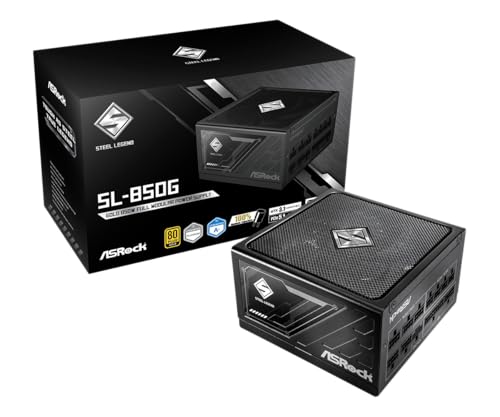
- ASRock Steel Legend SL-850G – best as an 850W runner-up that is Gold under 80 Plus and Platinum under Cybenetics
- be quiet! Power Zone 2 750W – best for a mainstream gaming PC that wants Platinum efficiency and low noise
Which One Is Right for You?
| If you… | Choose |
|---|---|
| build a typical gaming PC with a mid-range or upper-mid graphics card | be quiet! Power Zone 2 750W |
| run a flagship graphics card and a high-end CPU | ASUS ROG Strix 1000W Platinum |
| need 1200W and want the longest warranty on this list | ASRock Steel Legend SL-1200P |
| want 1200W with a focus on quiet operation | be quiet! Power Zone 2 1200W |
| accept Gold efficiency for a compact 850W unit | MSI MAG A850GL |
| want an 850W unit with a Platinum noise-and-efficiency test result from Cybenetics | ASRock Steel Legend SL-850G |
Wattage is the first decision, and efficiency tier is the second. Most gaming PCs run well on 750W to 850W; 1000W and above are for flagship cards, overclocked CPUs, or systems that add many drives and accessories. A Platinum rating saves a modest amount of electricity, so the real benefits are lower heat and, in many designs, quieter fan behavior.
Safety and compatibility deserve a final look before you buy. Make sure the unit fits your case, that it has the connectors your graphics card needs, and that you never mix cables between brands. Never open a power supply: capacitors inside can hold a dangerous charge long after it is unplugged. Plug the PC into a quality surge protector or a wall outlet that can handle the load, and replace any unit that smells of burning, makes loud buzzing, or shuts the PC down repeatedly.
All 6 Picks in Detail
1. MSI MAG A850GL – Best as a Compact Gold Runner-Up
As an Amazon Associate we earn from qualifying purchases at no extra cost to you.

This unit does not carry an 80 Plus Platinum certification: the listing names it as 80+ Gold, so it is included here as a runner-up for buyers who want a compact, current-standard power supply and are willing to step down one efficiency tier. It is an 850W, fully modular, ATX 3.1 and PCIe 5.1 ready unit with a native dual-color 12V-2×6 cable for modern graphics cards. It suits a mainstream or upper-mid gaming build in a case where cable length and space are tight. Buyers who prefer Gold over Platinum for a smaller outlay in warmth and noise terms will find the trade-off easy to accept in a build that rarely reaches full load.
- Capacity: 850W
- Efficiency: 80 Plus Gold, per the listing
- Standards: ATX 3.1 and PCIe 5.1 ready
- Cables: fully modular, with native 12V-2×6 cable
- Form: described as compact
- Warranty and fan size: confirm on listing
Pros
- Native 12V-2×6 cable avoids adapters
- Compact body helps in smaller cases
- Fully modular cabling keeps the build clean
Cons
- Gold, not Platinum, efficiency
- Noise rating and warranty length are not stated in the title
Next to the ASRock SL-850G, the MSI matches the 850W capacity and the Gold 80 Plus tier but does not mention a Cybenetics result in its title, and its compact body is its main differentiator.
2. ASUS ROG Strix 1000W Platinum – Best for High-End Builds

This is a fully modular 1000W unit with 80 Plus Platinum certification, ATX 3.1 compliance, a Cybenetics Lambda A+ noise rating, GaN MOSFETs, and what the listing calls a GPU-first design. GaN, or gallium nitride, is a semiconductor material that can switch faster with less loss than silicon, helping efficiency and power density. It suits builds with a flagship graphics card and a high-end processor where you want headroom and a premium finish.
- Capacity: 1000W
- Efficiency: 80 Plus Platinum
- Noise: Cybenetics Lambda A+ rating
- Standard: ATX 3.1
- Design: fully modular, GaN MOSFETs, GPU-first layout
- Warranty and fan size: confirm on listing
Pros
- Platinum efficiency with a published noise rating
- GaN components and modern standards support
- Ample headroom for flagship graphics cards
Cons
- 1000W is more than a mainstream build needs
- Premium brand positioning
Compared with the 1200W units, the ASUS is the better fit if you want 1000W with a stated noise rating and no need for 1200W. A 1000W Platinum unit already covers most single-GPU flagship builds, so the larger models only make sense for unusual setups such as heavy overclocking or several expansion cards.
3. ASRock Steel Legend SL-1200P – Best for 1200W with a Long Warranty

The Steel Legend SL-1200P is a 1200W, fully modular unit with 80 Plus Platinum, ATX 3.1, and PCIe 5.1 readiness. It uses a 135mm fluid dynamic bearing (FDB) fan and carries a 10-year warranty according to the listing. FDB fans use a thin film of oil instead of a sleeve or ball contact, which tends to run quietly and last longer. It is best for high-wattage builds, such as a flagship card with an overclocked processor, where a long warranty is a major selling point.
- Capacity: 1200W
- Efficiency: 80 Plus Platinum
- Standards: ATX 3.1 and PCIe 5.1 ready
- Cables: fully modular
- Fan: 135mm FDB
- Warranty: 10 years, per the listing
Pros
- 10-year warranty offers long-term reassurance
- FDB fan is built for quiet, durable operation
- Platinum efficiency at a high wattage
Cons
- 1200W is overkill for most builds
- Noise rating is not named in the title
Against the be quiet! 1200W, the ASRock stresses warranty length while the be quiet! stresses low-noise design and zero-RPM operation. If you plan to keep the same power supply across two or three PC builds, the longer coverage is the more meaningful advantage.
4. be quiet! Power Zone 2 1200W – Best for Quiet High-Wattage Builds

This 1200W Power Zone 2 is listed as 80 Plus and Cybenetics Platinum, ATX 3.1, built for PCIe 5.1 graphics cards, fully modular, and a zero-RPM, low-noise design. Zero RPM means the fan stops at light loads, so the PC is silent during web browsing and desktop work. It suits a high-end build where you want both strong output and quiet operation, and where you may run multiple drives, a power-hungry GPU, and a large processor together. Confirm the exact connector count on the product page so that every card and drive has a dedicated cable.
- Capacity: 1200W
- Efficiency: 80 Plus Platinum and Cybenetics Platinum
- Standard: ATX 3.1 with PCIe 5.1 support
- Cables: fully modular
- Fan behavior: zero RPM at low load
- Warranty: confirm on listing
Pros
- Fan stops at idle for silent desktop use
- Two independent Platinum designations in the listing
- Modern connector standards
Cons
- High wattage is only useful in demanding builds
- Zero-RPM fans can spin up audibly under sudden load
The 750W Power Zone 2 shares this design in a size that fits more builds; this 1200W is for those who really need the capacity. Before choosing it, add up your components, because most single-GPU systems will never draw close to its limit.
5. ASRock Steel Legend SL-850G – Best as an 850W Runner-Up
The SL-850G is an unusual listing because it combines two ratings: 80 Plus Gold and Cybenetics Platinum. These are different programs with their own test conditions, so the unit is not an 80 Plus Platinum model, and it is placed here as a runner-up. It is fully modular, ATX 3.1 and PCIe 5.1 ready, and ships with a dual-color 12V-2×6 cable. It suits mainstream and upper-mid gaming PCs that need 850W of headroom.
- Capacity: 850W
- Efficiency: 80 Plus Gold and Cybenetics Platinum, per the listing
- Standards: ATX 3.1 and PCIe 5.1 ready
- Cables: fully modular, with a dual-color 12V-2×6 cable
- Fan and warranty: confirm on listing
Pros
- Cybenetics Platinum result in the listing
- Modern 12V-2×6 cable included
- 850W suits many high-end gaming builds
Cons
- Not 80 Plus Platinum
- Mixed ratings can confuse comparisons
Compared with the MSI A850GL, the ASRock adds a Cybenetics Platinum designation while sharing the 850W capacity and Gold 80 Plus tier. When you shop, be careful to read both certifications, as sellers sometimes headline the higher one.
6. be quiet! Power Zone 2 750W – Best for Mainstream Gaming PCs

The 750W Power Zone 2 is listed as 80 Plus and Cybenetics Platinum, ATX 3.1, ready for PCIe 5.1 graphics cards, fully modular, and zero-RPM low-noise. A 750W unit is the sweet spot for a build with a mid-range or upper-mid graphics card and a mainstream processor, giving about 30 to 40 percent headroom on a typical gaming load. It is the best overall pick for people who want Platinum efficiency without paying for capacity they will not use.
- Capacity: 750W
- Efficiency: 80 Plus Platinum and Cybenetics Platinum
- Standard: ATX 3.1 with PCIe 5.1 support
- Cables: fully modular
- Fan behavior: zero RPM at low load
- Warranty: confirm on listing
Pros
- Right-sized for many gaming builds
- Silent at light load
- Modern standards support
Cons
- May be too small for a flagship graphics card
- Smaller headroom for future upgrades than the 1000W options
Compared with the 850W runners-up, this one is the only 750W Platinum unit here and the better pick when efficiency matters more than extra wattage. If you expect to upgrade to a much more powerful graphics card within a couple of years, consider stepping up to the 1000W model so you do not have to replace the power supply as well.
Specs Compared
| Product | Wattage | 80 Plus tier | Other rating | Standard | Modularity |
|---|---|---|---|---|---|
| MSI MAG A850GL | 850W | Gold | Confirm on listing | ATX 3.1, PCIe 5.1 ready | Fully modular |
| ASUS ROG Strix 1000W Platinum | 1000W | Platinum | Cybenetics Lambda A+ | ATX 3.1 | Fully modular |
| ASRock Steel Legend SL-1200P | 1200W | Platinum | Confirm on listing | ATX 3.1, PCIe 5.1 ready | Fully modular |
| be quiet! Power Zone 2 1200W | 1200W | Platinum | Cybenetics Platinum | ATX 3.1, PCIe 5.1 | Fully modular |
| ASRock Steel Legend SL-850G | 850W | Gold | Cybenetics Platinum | ATX 3.1, PCIe 5.1 ready | Fully modular |
| be quiet! Power Zone 2 750W | 750W | Platinum | Cybenetics Platinum | ATX 3.1, PCIe 5.1 | Fully modular |
How We Chose These
This comparison comes from research rather than lab work. We began with current catalog listings for power supplies whose titles mention 80 Plus Platinum or closely related certifications, then compared stated wattage, efficiency tier, standards support, modularity, noise-related ratings, and warranty details. Where a listing named a different 80 Plus tier, such as Gold, we kept the unit but labeled it as a runner-up so the page does not overstate its certification. Where a detail was missing, we marked it for you to confirm. We relied on certification definitions from the 80 Plus program and Cybenetics and on the published ATX and PCIe power connector standards, and we encourage you to check the product page for current specifications.
What to Look For
What 80 Plus Platinum means
The 80 Plus program certifies how efficiently a power supply converts alternating current from the wall into the direct current your PC uses. At 115V, a Platinum unit must reach at least 90 percent efficiency at 20 percent load, 92 percent at 50 percent load, and 89 percent at 100 percent load. Gold requires 87, 90, and 87 percent at the same points, and Titanium goes higher still. At 230V, the thresholds are a little higher. The rest is waste heat, so a more efficient unit warms your case less and may need less fan speed.
Cybenetics and the other ratings
Cybenetics is a separate certification lab that publishes its own efficiency grades, with tiers such as Gold and Platinum, and a noise rating called LAMBDA. A listing that says Cybenetics Platinum is using a different scale from 80 Plus, so compare like with like. A unit can be Gold under 80 Plus and Platinum under Cybenetics because the two programs use different test conditions and load points. The noise rating is useful: Lambda A+ indicates a quiet design, but the exact decibel range is on Cybenetics’ public report, not in the listing.
Sizing your wattage
Add the power draw of your graphics card and your processor, then add about 100 watts for the motherboard, memory, drives, and fans. A system with a 300W graphics card and a 150W processor needs roughly 550W at full load, and a 750W power supply gives comfortable headroom while still operating near its efficient mid-range. A flagship graphics card at 450 to 600W plus a 250W processor lands near 900W, which is where 1000W and 1200W units make sense. Do not oversize wildly: a 1200W unit running at 200W of load sits at the low end of its efficiency curve.
ATX 3.1, PCIe 5.1, and the 12V-2×6 connector
ATX 3.0 introduced tolerance for short spikes in graphics card power, up to twice the rated power for brief intervals, and ATX 3.1 refined the specification further, including longer hold-up time. The 12V-2×6 connector, a 16-pin plug that can carry up to 600W, replaced the earlier 12VHPWR design with shorter sense pins to reduce the risk of a partly seated plug delivering power. Push the connector in until it is fully seated and avoid bending the cable right at the plug. If your graphics card uses 8-pin connectors instead, make sure the unit has enough of them.
Modularity, cables, and fit
A fully modular unit lets you plug in only the cables you need, which leaves more room for airflow and makes cable routing easier in compact cases. Check the cable count against your parts: modern builds typically need one 24-pin motherboard cable, one or two CPU power cables, one to three PCIe cables for the graphics card, and SATA or Molex leads for drives and accessories. Also check the length of the unit, since 150 mm is standard ATX depth and longer models can crowd drive cages or rear-mounted radiators. Compact designs help in small cases but may have shorter cables, so measure your case if space is tight.
Warranty and fan design
Warranty length is a rough signal of how much the maker expects the unit to last. A 10-year term suggests confidence in the capacitors and fan, while shorter terms are common on entry-level models. Fan type matters too: fluid dynamic bearing and similar designs usually run quieter and longer than sleeve bearings. Zero-RPM modes turn the fan off at low loads, which gives silent desktop use but means the unit relies on its heatsinks to stay cool until the fan starts. When you buy, register the unit and keep the receipt, since power supplies often need proof of purchase for a warranty claim.
A worked example
Suppose a PC averages a 400W load for about four hours a day. A Platinum unit at 92 percent efficiency draws roughly 435W from the wall, while a Gold unit at 90 percent draws about 444W. That is a difference of about 9 watts, or roughly 14 kWh over 1,500 hours of use a year. The savings are real but small, so choose Platinum for lower heat and quieter operation as much as for electricity.
Questions
Is 80 Plus Platinum worth it over Gold?
The efficiency gain is a few percentage points, which saves little electricity in a typical home PC. The practical benefits are lower heat and, in many designs, quieter fan behavior.
How much wattage do I need for a gaming PC?
Add your graphics card and processor power draw, then about 100 watts for everything else, and give yourself 30 to 40 percent headroom. For many mid-range builds that means 650W to 850W.
Will a 1200W power supply use more electricity than a 750W one?
No. A power supply only delivers what the PC asks for. The difference is that a large unit may run slightly less efficiently at a light load.
Do I need ATX 3.1 for an older graphics card?
No, ATX 3.1 units are backward compatible with older cards that use 8-pin connectors. The newer standard mainly benefits cards that use the 12V-2×6 connector and cards with large power spikes.
What does zero RPM mean?
It means the fan stays off until the load or temperature crosses a threshold. This makes the PC silent at idle, and the fan starts spinning as demand rises.
Why do two listings here say Gold?
The MSI and ASRock 850W units are rated Gold under the 80 Plus program in their listings. They are included as runners-up for buyers who want that wattage with modern connectors and are flexible on efficiency tier.
Can I reuse my old cables with a new modular power supply?
No. Modular cable pinouts differ between brands and even between product lines, and a mismatch can damage components. Always use the cables that came with the new unit, and keep the box so you have a place to store spares.
How long should a power supply last?
Quality units are commonly built to run for many years, and warranties of 7 to 12 years reflect that. Replace one sooner if it shows signs of trouble, such as random shutdowns under load, a burning smell, or a failing fan.
Update History
- October 20, 2026 – Initial publication; product set drawn from current catalog listings.
- Check the product page for current specifications and availability before buying.
Sources
- Retailer listing titles and specification fields for each power supply above
- 80 PLUS program certification tiers and Cybenetics efficiency and noise rating definitions
- Published ATX and PCIe 12V-2×6 connector standards, as general background
Related guides
More from Amazon
Programs that pair well with the guide above. Offers and eligibility are set by Amazon and may change.
Free shipping on eligible items, Prime Video and more. Eligible new members can start with a free trial.
Start a Prime free trialAd-free music streaming. Eligible new subscribers can start with a free trial.
Try Music Unlimited freeA Prime membership for ages 18-24 with a trial period. Eligibility is set by Amazon.
See Prime for Young AdultsAudiobooks and podcasts to listen to on the go. Eligible new members can start with a free trial.
Try Audible freeAs an Amazon Associate we earn from qualifying purchases.


