
The Lian Li O11 Vision Compact is the best glass panel PC case on this list for most builders: its three-panel tempered glass design, back-connect motherboard support and generous radiator and GPU clearance make it the strongest showcase case here, and it is offered in both white and black. If you would rather skip buying fans, the MUSETEX models bring six or seven ARGB fans in the box, and the MOROVOL cases cover the ATX and micro-ATX mesh-front end. A glass panel case simply means a chassis with one or more tempered glass windows so the internals stay on display; airflow and size still decide how well it works.
Our Top Picks
 MUSETEX ATX PC Case Pre-Install 6 PWM ARGB18.98" x 15.75" x 8.07"15.75 x 8.07 x 18.98 inches12.6 poundsCheck on Amazon
 MUSETEX ATX PC Case 7 PWM ARGB Fans16.73"D x 8.35"W x 18.5"H16.73 x 8.35 x 18.5 inches15 poundsCheck on Amazon
 MOROVOL MATX PC Case13.39"D x 10.87"W x 12.44"H13.39 x 10.87 x 12.44 inches10.7 poundsCheck on Amazon

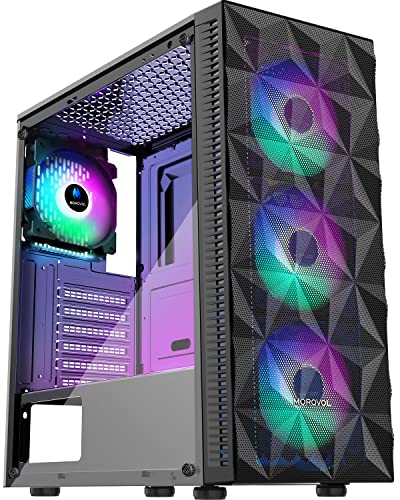
Top 3 picks at a glance
Quick List
- MUSETEX ATX Case with 6 ARGB Fans – best for a pre-fitted fan set and a mesh front
- Lian Li O11 Vision Compact (White) – best for a white showcase build with three glass panels
- MUSETEX ATX Case with 7 ARGB Fans – best for the most fans out of the box and a dual-glass look
- MOROVOL ATX Case with 4 RGB Fans – best for a mesh-front ATX build with moderate lighting
- MOROVOL Micro-ATX Panoramic Case – best for small micro-ATX builds with a wide glass view
- Lian Li O11 Vision Compact (Black) – best for a black showcase build with three glass panels
Which One Is Right for You?
| If you… | Choose |
|---|---|
| want the most polished showcase build with a custom loop or AIO | Lian Li O11 Vision Compact (Black or White) |
| need lots of included fans and do not want to buy more | MUSETEX 7-fan or 6-fan ATX case |
| are building a white-themed PC | Lian Li O11 Vision Compact (White) |
| like a mesh front panel for airflow with a glass side | MOROVOL ATX Case with 4 RGB Fans |
| use a micro-ATX board and want a compact tower | MOROVOL Micro-ATX Panoramic Case |
| want a dark, understated build with back-connect parts | Lian Li O11 Vision Compact (Black) |
Decide on motherboard size first: ATX and mid-tower cases give you the widest part choice, while the micro-ATX MOROVOL limits you to smaller boards. Then decide how much of the visual setup you want to pay for in effort. Included RGB fans save a purchase, but the Lian Li gives you the better frame for later upgrades to radiators and cable routing. Verify GPU length, cooler height and PSU length on each product page before you order.
All 6 Picks in Detail
1. MUSETEX ATX Case with 6 ARGB Fans – Best for Included Fans
As an Amazon Associate we earn from qualifying purchases at no extra cost to you.

This MUSETEX mid-tower arrives with six PWM ARGB fans pre-installed, a polygonal mesh front and an opening tempered glass side panel. It suits first-time builders who want a lit, airy case without buying fans separately. PWM fans let the motherboard adjust speed by temperature, which keeps idle noise down compared with fixed-speed fans. The side panel is described as opening, which is useful when you are routing cables or reseating a graphics card. As with most budget-focused cases, the exact maximum GPU length, cooler height and radiator support are best confirmed on the listing before you buy.
In practice, the fan count is the draw here. A case with six fans can be configured with three intake fans at the front and a mix of rear and top exhaust, which gives a balanced airflow path from the start. Check how the fans are wired before you build: a single hub that plugs into one motherboard header is tidy, while separate connectors mean more cables to hide. Builders who like to tinker can later swap individual fans without replacing the whole set.
- Form factor: ATX mid-tower per the listing name
- 6 PWM ARGB fans pre-installed
- Polygonal mesh front panel for airflow
- Opening tempered glass side panel
- GPU length, cooler height, radiator and PSU clearances: confirm on listing
Pros:
- Large fan count included in the box
- Mesh front supports airflow
- Glass panel that opens for easier access
Cons:
- Fan controllers and hubs differ by listing; confirm how lighting is controlled
- Less refined layout than a premium dual-chamber design
Compared with the 7-fan MUSETEX, it trades one fan and the dual-glass look for a mesh-forward front.
2. Lian Li O11 Vision Compact (White) – Best White Showcase

The white O11VPW is a compact dual-chamber case with three-panel glass and back-connect support. Dual-chamber means the motherboard, GPU and cooling sit in one chamber with the PSU and drive cage separated in the other, which keeps cables and drives out of view. According to Lian Li’s specification page, it supports ATX and smaller boards, as well as E-ATX boards under 280 millimeters wide. Back-connect board support means connectors can sit behind the motherboard tray for a cleaner front view. It suits a white themed build, a custom loop or an AIO showcase.
Think of this as the enthusiast option in the group. The compact dual-chamber layout means the glass reveals the GPU, the cooler and any radiators, while the PSU shroud area stays tidy. It rewards careful planning: a vertical GPU mount, a custom loop or a top-mounted 360 mm AIO are all realistic according to the manufacturer’s published limits. The trade-off is that you will probably spend more time on cable lengths and fan selection than with a case that arrives fully lit.
- Motherboards: ATX, Micro-ATX, Mini-ITX, back-connect boards
- Max GPU length 408 mm with an anti-sag bracket (per manufacturer)
- Radiators: top, side and bottom mounts up to 360 mm (per manufacturer)
- Three-panel tempered glass design
- Included fans: confirm on the product page
Pros:
- Excellent cooling flexibility for a compact footprint
- Clean cable routing with back-connect parts
Cons:
- Check whether fans are included before budgeting for a build
- Glass panels need careful handling
It is identical in design to the black version below; choose white only if your parts match the theme.
3. MUSETEX ATX Case with 7 ARGB Fans – Best for Most Fans in the Box

The second MUSETEX adds a seventh PWM ARGB fan, a Type-C front port and a full-view dual tempered glass layout in black. It suits builders who want the front and side visible, a modern front panel connector and plenty of lighting out of the box. A Type-C port on the front I/O is worth checking against your motherboard: it needs a matching internal header (usually a 19-pin or Type-E connector) to function at full speed. Dual glass panels show off the interior from two angles but make cable management more visible, so plan your routing before you assemble.
Visually this is the loudest design on the list, which is exactly what some builders want. With glass on the front and side, every cable and component is on show, so cable sleeves, a clean PSU shroud and well-chosen RAM make a big difference. Heat is the thing to watch: because the front is glass rather than mesh, the case depends on side or bottom intake paths, so verify dust filter positions and keep the room reasonably cool. If you plan a hot GPU or CPU, the mesh-front models may be more forgiving.
- Form factor: ATX mid-tower per the listing name
- 7 PWM ARGB fans pre-installed
- Type-C port on the front per the listing
- Full-view dual tempered glass panels, black finish
- Clearance numbers and header details: confirm on listing
Pros:
- Highest fan count in the list
- Dual glass gives a panoramic view
Cons:
- Visible cable runs reward neat building
- Glass front may restrict airflow versus a mesh front
Next to the 6-fan MUSETEX, this is the one for a view-first build, while the 6-fan is better when mesh airflow matters more.
4. MOROVOL ATX Case with 4 RGB Fans – Best Mesh Front on ATX
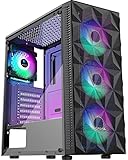
This MOROVOL ATX case lists four pre-installed RGB fans, a diamond-shaped mesh front panel, a tempered glass side panel and USB 3.0 front ports. It suits an airflow-minded builder who wants a conventional single-chamber ATX tower. The mesh front lets the intake fans pull air directly, which usually helps with GPU and CPU temperatures compared with a solid or glass front. Four fans is a reasonable starting point; adding a rear exhaust and top exhaust fans can balance pressure further if the listing’s layout allows it.
This is the practical choice for someone who wants a familiar, forgiving case. A single-chamber layout with a PSU at the bottom, drives behind the tray and a glass side is the pattern most beginner guides assume, which means tutorials and cable-routing tips apply directly. Four RGB fans give you reasonable intake and exhaust coverage, and the mesh front means you can add a front radiator or more fans later if the listing’s mounts allow. It is not flashy, but it is easy to live with.
- Form factor: ATX per the listing name
- 4 RGB fans pre-installed
- Diamond-shaped mesh front with tempered glass side
- USB 3.0 front port
- Fan sizes, filter layout and clearances: confirm on listing
Pros:
- Airflow-focused front panel
- Simple, conventional layout is easy for beginners
Cons:
- Only one glass window
- RGB (not necessarily addressable) lighting; confirm control method
Compared with the 6-fan MUSETEX, the MOROVOL ATX gives you fewer fans but a more traditional layout.
5. MOROVOL Micro-ATX Panoramic Case – Best for Micro-ATX

The MOROVOL V3 is a micro-ATX case with a 270 degree panoramic tempered glass panel, three fans pre-installed and USB 3.0 front ports, finished in black. It suits compact builds where the board is micro-ATX and the goal is a wide display view in a smaller footprint. The panoramic glass wraps around two sides, so the interior is visible from the front corner. Micro-ATX boards offer fewer expansion slots than ATX, usually four, so confirm you do not need extra cards before choosing it.
The panoramic glass is the focal point, and it works best when the build inside is neat: a micro-ATX board, a single GPU and tidy cables look intentional, while a crowded interior looks busy. Because the case is small, airflow depends on the three included fans and on keeping cables out of the way. If you intend to use a tall air cooler or a long graphics card, take the listing’s clearance numbers seriously and consider a low-profile cooler instead.
- Form factor: Micro-ATX per the listing name
- 270 degree panoramic tempered glass
- 3 fans pre-installed
- USB 3.0 front port, black finish
- Maximum GPU length, cooler height and PSU size: confirm on listing
Pros:
- Smaller footprint than ATX towers
- Wide glass view
Cons:
- Not suitable for a full ATX motherboard
- Tighter room for large GPUs and coolers
It is the only micro-ATX-focused case here, so it replaces the Lian Li only when you specifically need a smaller board.
6. Lian Li O11 Vision Compact (Black) – Best Black Showcase

The black O11VPX shares the white model’s compact dual-chamber design, three-panel glass and back-connect support. It suits builders who want a clean, dark case with space for an AIO or a custom loop. Lian Li’s page lists up to a 360 millimeter radiator at the top, side and bottom, and GPU support up to 408 millimeters, which is generous for a case of this footprint. Some retail pages disagree on CPU cooler height by a few millimeters, so check your cooler against the manufacturer’s number.
For many builders this is the version to pick when the rest of the system is black, because the glass, frame and shroud blend into a single dark block that lets the lighting stand out. The same planning advice applies as for the white model: decide on your cooling layout first, then choose fans that suit it. Reverse-blade fans can make the front look uniform, and a vertical GPU mount is possible with the right accessory, but both are optional extras you should confirm and budget for separately before committing.
- Motherboards: ATX, Micro-ATX, Mini-ITX, back-connect boards
- Max GPU length 408 mm (per manufacturer)
- Radiators up to 360 mm in three positions (per manufacturer)
- PSU: ATX, under 220 mm long (per manufacturer)
- Fans: confirm what is included on listing
Pros:
- Strong cooling potential
- Premium dual-chamber layout
Cons:
- Fan inclusion unclear from the listing name; confirm before ordering
- Limited PSU length
Compared with the white version, the only meaningful difference is color.
Specs Compared
| Case | Motherboard size | Included fans | Glass | Front I/O | Color |
|---|---|---|---|---|---|
| MUSETEX ATX 6-fan | ATX | 6 PWM ARGB | Opening tempered glass side | Confirm on listing | Confirm on listing |
| Lian Li O11 Vision Compact (White) | ATX, mATX, ITX, back-connect | Confirm on listing | Three-panel glass | Confirm on listing | White |
| MUSETEX ATX 7-fan | ATX | 7 PWM ARGB | Dual full-view glass | Type-C | Black |
| MOROVOL ATX 4-fan | ATX | 4 RGB | Glass side, mesh front | USB 3.0 | Confirm on listing |
| MOROVOL Micro-ATX V3 | Micro-ATX | 3 | 270 degree panoramic | USB 3.0 | Black |
| Lian Li O11 Vision Compact (Black) | ATX, mATX, ITX, back-connect | Confirm on listing | Three-panel glass | Confirm on listing | Black |
How We Chose These
This list comes from reading current product listings and manufacturer specification pages for tempered glass cases, not from physical builds. We compared what each listing states about motherboard support, glass layout, included fans and front connectors, and we used Lian Li’s published specifications for the O11 Vision Compact. Where a listing leaves out a figure such as GPU clearance or cooler height, we say so and recommend checking the page. We favored cases that clearly describe their glass design and fan count, and we ordered them by use case instead of by brand reputation. We make no claims about noise, temperatures or durability.
What to Look For
Motherboard size and case class
Cases are built around board sizes: Mini-ITX (about 170 mm square), Micro-ATX (244 mm square), ATX (305 by 244 mm) and E-ATX (larger). A case that supports ATX also accepts smaller boards, but not the other way around. Check the listing for ATX versus micro-ATX before anything else, because mixing them up is the most common return reason. Expansion slots also matter: ATX cases usually offer seven, micro-ATX five or four.
Glass layout and airflow
One glass side panel is the classic setup; dual or three-panel designs show the interior from the front and top as well. Glass looks great but blocks airflow, so the intake must come through mesh, a side vent or a bottom filter. A mesh front with glass side is generally the best airflow-to-looks compromise. If a case has a glass front, count on the bottom and side for intake and verify the fan slots and dust filters.
GPU, cooler and radiator clearance
Modern graphics cards run 300 to 360 mm long and some flagship models exceed 330 mm and three slots in thickness. Always compare the card’s length to the case’s stated maximum with at least 10 mm spare for cables. For air coolers, compare tower height to the case’s listed limit; for liquid cooling, check which of the top, side or bottom positions accept 240, 280 or 360 mm radiators, and whether the fan or radiator will collide with memory or the top of the motherboard.
Fans, lighting and connectors
PWM fans can be controlled by the motherboard for quiet idle operation; fixed-speed RGB fans are simpler but louder. ARGB (addressable) lighting uses a three-pin 5V header and RGB uses a four-pin 12V header, and connecting one to the other can damage the lights. If a case includes a hub or controller, confirm how it connects to the motherboard. For front ports, a Type-C connector needs a matching internal header on the board.
Worked example
Say you plan an ATX board, a 320 mm graphics card and a 240 mm AIO. A case that lists a 360 mm GPU limit leaves 40 mm of headroom, enough for cables. Mount the radiator in the top position as exhaust, with the front or side fans as intake. If the case includes six fans, you may already have the airflow you need and can skip extra purchases.
Dust, filters and upkeep. Glass cases show dust faster than solid ones, so look for removable filters on the intake and bottom PSU position. Plan to wipe the glass with a microfiber cloth and blow out filters every month or two, more often in homes with pets or carpet. Positive pressure, where intake airflow exceeds exhaust, helps push dust out through the gaps instead of pulling it in through them, which is one reason a mesh front with filters is popular.
Power supply and storage fit. Case listings often mention a maximum power supply length, and compact dual-chamber designs can be strict about it; the Lian Li, for instance, is listed for ATX supplies under 220 mm long, so measure the unit you own or plan to buy. Also count drive bays: modern builds mostly use M.2 drives on the motherboard, but if you keep a 2.5 inch or 3.5 inch drive for bulk storage, make sure the case lists a mount for it and that the cage does not collide with the front radiator position.
Questions
Do glass panel cases run hotter?
Glass itself does not heat a PC, but a solid glass front blocks intake airflow. Cases with mesh fronts or vented sides stay cooler, and fan placement matters more than the glass.
Is tempered glass safe?
Tempered glass is stronger than regular glass and breaks into small pieces, but edges and corners can still chip when hit. Handle panels flat, avoid leaning them against walls and keep the screws snug rather than overtight.
Can I fit a large GPU in these cases?
The Lian Li lists support up to 408 mm per the manufacturer. For the other cases, confirm the stated GPU length on each listing and leave about 10 mm for cables.
Are included fans good enough?
They are fine for most builds, though quality varies. If you plan a high-end CPU or GPU, consider upgrading to fans with a better static pressure spec.
What is back-connect support?
It places connectors such as the GPU power and motherboard sockets on the back of the board so they hide behind the tray. It needs a compatible motherboard and graphics card.
ATX or micro-ATX for a glass case?
ATX offers more slots and easier cable access, while micro-ATX saves space. Pick micro-ATX only if you do not need extra expansion cards.
Update History
- October 20, 2026 – Initial publication; product set drawn from current catalog listings.
- Check the product page for current specifications and availability before buying.
Sources
- Manufacturer product and specification page for the Lian Li O11 Vision Compact
- Retailer listing titles and specification fields for the MUSETEX and MOROVOL cases
- General PC form factor conventions for ATX, micro-ATX and Mini-ITX boards
Related guides
More from Amazon
Programs that pair well with the guide above. Offers and eligibility are set by Amazon and may change.
Free shipping on eligible items, Prime Video and more. Eligible new members can start with a free trial.
Start a Prime free trialAd-free music streaming. Eligible new subscribers can start with a free trial.
Try Music Unlimited freeA Prime membership for ages 18-24 with a trial period. Eligibility is set by Amazon.
See Prime for Young AdultsAudiobooks and podcasts to listen to on the go. Eligible new members can start with a free trial.
Try Audible freeAs an Amazon Associate we earn from qualifying purchases.


