
For most people moving an NVMe drive into a portable case, the Sabrent EC-PNVO is the cleanest starting point: a tool-free, aluminum-topped enclosure that runs over USB-C at 10Gbps and takes the common 2230 through 2280 lengths. If you also own older SATA-based M.2 drives, step up to a dual-protocol case such as the Sabrent EC-SNVE or the SSK model below. An M.2 SSD enclosure is a small bridge board and housing that turns a bare internal drive into a USB device, so bridge chip, cable and heat handling matter as much as the shell.
Our Top Picks
 SABRENT USB-C NVMe Enclosure & Reader10Gbps NVMe Only4.59 x 1.24 x 0.6 inches0.2 poundsCheck on Amazon
 SABRENT Tool-Free NVMe & SATA M.2 SSD Enclosure10Gbps NVMe + SATA4.59 x 1.24 x 0.5 inches0.2 poundsCheck on Amazon
 ASUS ROG Strix Arion Aluminum Alloy M.2 NVMeBlack|up to 10Gbps7.1 x 3.8 x 1.6 inches0.2 poundsCheck on Amazon


Top 3 picks at a glance
Quick List
- Sabrent EC-PNVO – best for a simple, tool-free NVMe-only case at 10Gbps
- Sabrent EC-SNVE – best for owners who swap between NVMe and SATA M.2 drives
- FIDECO sandwich-style case – best for quick, no-screw drive swaps with NVMe
- ASUS ROG Strix Arion – best for gamers who want an aluminum heatsink-style body and two bundled cables
- ORICO NVMe case – best for large drives and UASP-focused file transfers
- SSK RTL9210B enclosure – best for NVMe and SATA compatibility on a named, well-documented bridge chip
Which One Is Right for You?
| If you… | Choose |
|---|---|
| only use NVMe drives and want the simplest case | Sabrent EC-PNVO |
| have a mix of NVMe and SATA M.2 drives | Sabrent EC-SNVE or the SSK RTL9210B case |
| dislike screws and want a clamshell-style swap | FIDECO sandwich-style case |
| want a gaming look with both USB-C-to-C and USB-C-to-A cables included | ASUS ROG Strix Arion |
| plan to fit a very large drive (the listing states support up to 8TB) | ORICO NVMe enclosure |
| want a bridge chip you can look up and compare before you commit | SSK RTL9210B enclosure |
If you are undecided, start with the drive itself. Read the label on your SSD: NVMe drives normally have a single notch (M key) on the connector edge, while SATA-based M.2 drives often show two notches (B+M). Once you know which protocol you own, the choice usually narrows to two cases. After that, cable type, tool-free handling and heat management decide the rest. Buy for the drives you own today, not the ones you might buy later, because bridge chips cannot be upgraded.
All 6 Picks in Detail
1. Sabrent EC-PNVO – Best for a Simple NVMe-Only Case
As an Amazon Associate we earn from qualifying purchases at no extra cost to you.

The EC-PNVO is built around one job: hold an M.2 PCIe NVMe drive and connect it to a computer over USB-C. Its listing describes a tool-free design for 2230 to 2280 drives, a USB 3.2 Gen 2 connection rated at 10Gbps and an aluminum body that doubles as a cooling surface. Because it supports NVMe only, it avoids the extra complexity of dual-protocol bridges, which suits a buyer who is upgrading a laptop, handheld or console and wants to reuse the old drive as portable storage. You open the case, seat the drive, close it and plug in, with no screwdriver and no tiny screws to lose on the carpet.
- Interface: USB-C, USB 3.2 Gen 2 (10Gbps)
- Drive support: M.2 PCIe NVMe only; SATA-based M.2 drives are not supported
- Sizes: 2230, 2242, 2260 and 2280 per the listing
- Build: aluminum top with a thermal pad against the drive, as described in public specification summaries
- Installation: tool-free, no screwdriver required
- Cable: USB-C connection; confirm cable type and length on the listing
Pros
- Straightforward tool-free assembly that suits occasional drive swaps
- Covers the common drive lengths, including 2230 for handheld upgrades
- Aluminum body helps spread heat during long copies
Cons
- Will not accept SATA M.2 drives, so check your drive first
- Needs a USB-C port or a separate adapter on older computers
Compared with the EC-SNVE, it gives up SATA support in exchange for a simpler design focused on NVMe, so choose the EC-SNVE if you ever expect to plug in a SATA M.2 drive.
2. Sabrent EC-SNVE – Best for Mixed NVMe and SATA M.2 Drives

The EC-SNVE is the more flexible of the two Sabrent cases. Its listing states that it handles both M.2 NVMe and M.2 SATA drives, uses a USB 3.2 Type-C connection and is sold as an enclosure only, so you supply the SSD. It is tool-free, which makes it handy for anyone who bounces between drives, such as a photographer who keeps one SATA SSD from an older laptop and a newer NVMe card in a drawer. The trade-off is that dual-protocol bridges are usually less specialized than NVMe-only designs, so results can vary depending on the drive you install. It is also the case to pick if a relative hands you an old laptop drive and asks you to rescue the photos.
- Interface: USB 3.2, Type-C connector
- Drive support: M.2 NVMe and M.2 SATA per the listing
- Sizes: 2242, 2260 and 2280 are named in the listing; confirm whether 2230 is supported
- Packaging: enclosure only, SSD not included
- Installation: tool-free
- Speed class: confirm the exact USB generation and rated throughput on the listing
Pros
- Accepts both common M.2 protocols
- Tool-free swapping suits people with several drives
- Same brand family as the NVMe-only EC-PNVO, so the choice is easy to frame
Cons
- Small 2230 drives may not be covered, so confirm before buying
- Dual-protocol bridges can limit some fast NVMe drives
Next to the SSK RTL9210B model it targets the same buyer, but the SSK listing names its bridge chip explicitly while the Sabrent listing leans on its tool-free design.
3. FIDECO Sandwich-Style Case – Best for Screw-Free Drive Swaps

FIDECO’s M.2 NVMe case uses what its listing calls a sandwich-style design: the drive sits between two halves that close together without tools. That makes it appealing to people who change drives often, for example video editors who keep each project on a separate SSD and carry them in a pouch. The listing states USB 3.2 Gen 2 at 10Gbps and support for M-key and M+B-key NVMe drives, so it is clearly aimed at NVMe owners rather than SATA owners. If your priority is speed of handling, not exotic features, this is the style that gets you from bare drive to working external disk fastest.
- Interface: USB 3.2 Gen 2 (10Gbps) over USB-C
- Drive support: NVMe SSDs with M-key and M+B-key edge connectors
- Design: sandwich-style housing, tool-free
- Cooling: confirm body material and thermal pad details on the listing
- Capacity limit: confirm the largest supported drive on the listing
- Sizes: confirm supported lengths on the listing
Pros
- Quick tool-free opening and closing
- Explicitly names M-key and M+B-key NVMe support
- Compact shape that slips into a laptop bag
Cons
- SATA M.2 drives are not the intended use
- Several details, including maximum capacity, need confirming on the listing
It is easier to open than the ASUS Arion, which uses a thumbscrew and pin system, but the Arion ships with more cables and a more substantial aluminum body.
4. ASUS ROG Strix Arion – Best for Gamers and Heat Management

The ROG Strix Arion is a gaming-brand NVMe enclosure with an aluminum alloy body, thermal pads and two cables, one USB-C to USB-C and one USB-C to USB-A. The USB-A cable matters if your desktop, console or older laptop lacks a USB-C port. ASUS describes the design as screwdriver-free, built around a pin and thumbscrew mechanism, and the case supports Aura Sync lighting on some versions, which appeals to people building a themed desk. It is also the pick when you want the enclosure itself to act as a passive heatsink for a warm-running drive during long game-library copies.
- Interface: USB 3.2 Gen 2 Type-C, 10Gbps
- Drive support: M.2 NVMe in M-key or B+M-key form; SATA-based drives are not supported according to manufacturer documentation
- Sizes: 2230, 2242, 2260 and 2280
- Cables: USB-C to C and USB-C to A
- Cooling: aluminum alloy body with included thermal pads
- Extras: RGB lighting through Aura Sync on some versions; confirm on the listing
Pros
- Both common cable types included
- Sturdy aluminum body for steady heat spreading
- Wide size coverage, including 2230
Cons
- Assembly relies on a thumbscrew and pin, so it is not a pure clamshell
- Gaming styling may not appeal to everyone
It takes a little more effort to open than the FIDECO, yet it offers better thermal contact and a more complete cable set than most cases on this list.
5. ORICO NVMe Enclosure – Best for Large Drives and UASP
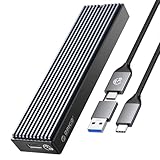
ORICO’s NVMe case is positioned for people who need a roomy, dependable external drive adapter. The listing describes USB 3.1 Gen 2 at 10Gbps, support for 2230, 2242, 2260 and 2280 SSDs, and capacities up to 8TB. It also mentions UASP support, a transfer protocol that reduces command overhead and helps sustained copies on compatible systems. A buyer assembling a portable 4TB archive or a large game library would find the stated capacity ceiling reassuring, since some enclosures never state a limit at all and leave large drives to chance.
- Interface: USB 3.1 Gen 2, 10Gbps, PCIe NVMe
- Sizes: 2230, 2242, 2260 and 2280 per the listing
- Capacity: SSDs up to 8TB according to the listing
- Protocol: UASP supported
- Cooling: confirm body material and thermal pad on the listing
- Installation: confirm whether it is tool-free or screw-based
Pros
- States support for very large drives
- UASP can help sustained transfers
- Covers all common M.2 lengths
Cons
- Installation style and cooling details need confirming
- NVMe focus means SATA M.2 owners should look elsewhere
It matches the Sabrent EC-PNVO on speed class and sizes, but the ORICO listing leads with capacity and UASP, while the Sabrent leads with tool-free assembly.
6. SSK RTL9210B Enclosure – Best for Dual-Protocol Buyers Who Want a Named Chip
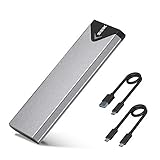
The SSK enclosure advertises an improved RTL9210B chip, a Realtek bridge widely used in enclosures that handle both NVMe and SATA M.2 drives. The listing also names USB 3.2 Gen 2 at 10Gbps, M-key and B+M-key compatibility and an aluminum build. Naming the chip lets you read independent discussion of its behavior, which helps if you care about TRIM support, sleep behavior or firmware quirks. It suits someone with a pile of mixed drives who wants one adapter for all of them, for example an IT hobbyist who refurbishes laptops and meets every kind of M.2 drive sooner or later.
- Bridge chip: RTL9210B per the listing
- Interface: USB 3.2 Gen 2, 10Gbps
- Drive support: M.2 NVMe and SATA, M-key and B+M-key
- Build: aluminum housing
- Sizes: confirm supported lengths on the listing
- Installation: confirm tool-free or screw-based assembly
Pros
- Dual-protocol support
- Named bridge chip makes research easier
- Aluminum construction
Cons
- Installation details need confirming
- Dual-protocol chips can run warm under long sustained copies
It is the closest rival to the Sabrent EC-SNVE; pick the SSK if the named chip matters to you and the Sabrent if tool-free handling matters more.
Specs Compared
| Model | Interface | Drive type | Sizes | Build / install |
|---|---|---|---|---|
| Sabrent EC-PNVO | USB 3.2 Gen 2, 10Gbps | NVMe only | 2230-2280 | Aluminum top, tool-free |
| Sabrent EC-SNVE | USB 3.2 Type-C | NVMe and SATA | 2242/2260/2280; confirm 2230 | Tool-free |
| FIDECO sandwich case | USB 3.2 Gen 2, 10Gbps | NVMe (M and M+B key) | confirm on listing | Sandwich style, tool-free |
| ASUS ROG Strix Arion | USB 3.2 Gen 2, 10Gbps | NVMe | 2230-2280 | Aluminum alloy, thumbscrew and pin |
| ORICO NVMe case | USB 3.1 Gen 2, 10Gbps | NVMe, UASP | 2230-2280, up to 8TB | confirm on listing |
| SSK RTL9210B case | USB 3.2 Gen 2, 10Gbps | NVMe and SATA | confirm on listing | Aluminum, confirm install style |
Reading the table, the clearest divide is protocol support: the Sabrent EC-SNVE and the SSK case are the two that state NVMe plus SATA, while the others are built around NVMe alone. The second divide is installation. The Sabrent models and the FIDECO case are described as tool-free, the ASUS Arion uses a pin and thumbscrew, and the ORICO and SSK listings leave the method for you to confirm. Where the table says to confirm on the listing, treat that as a real instruction, because manufacturers revise packaging and sometimes change internal parts between production runs.
How We Chose These
We compared the six enclosures by reading each product’s listing title and description, then cross-checking manufacturer documentation and public specification pages where they were available. Our criteria were protocol support (NVMe only versus NVMe plus SATA), advertised interface speed, supported drive lengths and capacity, how the drive is installed, how heat is handled, and whether the package includes useful cables. Where a listing did not state a detail, we say to confirm it rather than assume. We weighted flexibility and clear specifications over styling, and we did not rank by brand reputation alone.
What to Look For
NVMe, SATA and the key notch
M.2 is only a connector shape. Inside that shape sit two very different protocols. NVMe drives talk PCI Express and are what most laptops, handhelds and consoles use today. SATA M.2 drives use the older SATA protocol and appeared in many budget laptops and older ultrabooks. The notch on the edge connector gives a hint: NVMe drives usually have a single M-key notch, while SATA drives often have a B+M pattern with two cutouts. An NVMe-only enclosure will not recognize a SATA drive even though the card slides into place, so check your drive’s label or model number before ordering. A dual-protocol enclosure with a bridge such as the RTL9210B avoids that problem at the cost of being slightly less specialized.
Speed: what 10Gbps really means
USB 3.2 Gen 2 is rated at 10Gbps, which works out to roughly 1,000 MB/s of usable throughput after protocol overhead. Many NVMe drives can read faster than that internally, so a 10Gbps case becomes the bottleneck rather than the drive. A worked example: copying a 100GB video project at about 900 MB/s takes a little under two minutes, compared with a quarter of an hour or more on a typical spinning hard drive. If you routinely move several hundred gigabytes, faster USB4 or Thunderbolt cases exist, but they run hotter and demand compatible ports. For backups, game libraries and general file transfer, a 10Gbps case is a sensible balance, and it is the speed class every pick here advertises.
Heat and throttling
Fast SSDs generate heat, and a closed case traps it. Aluminum bodies with a thermal pad pressed against the controller move that heat into the shell, where it can radiate away. When a drive overheats, its firmware slows it down to protect the hardware, which is called thermal throttling. Sustained writes, such as copying a 200GB folder, are the typical trigger. If you plan to do that often, favor a metal body with a pad and keep the enclosure off soft surfaces like a bed or couch cushion. A small stand or just an open desk surface helps. Cases that are mostly plastic may stay cool for short bursts, but long transfers will expose the difference.
Sizes, capacity and cables
M.2 drives are named by width and length: 2280 is 22 mm wide and 80 mm long, 2260 is 60 mm, 2242 is 42 mm, and 2230 is the tiny size used by handheld gaming devices and some ultrabooks. A case that lists 2230 through 2280 covers nearly everything. Check the stated capacity limit as well. Several enclosures list support for drives up to 8TB, while others do not state a limit. Finally, look at cables. A USB-C to USB-C cable is ideal for modern laptops, but older desktops often have only USB-A ports, so a bundled USB-C to USB-A cable saves a separate purchase. Use a short, good-quality cable to avoid dropouts during large transfers.
Bridge chips and why they matter
Every enclosure contains a bridge controller that translates between the PCIe or SATA signals on the drive and the USB signals on the cable. Well-known options include the Realtek RTL9210B, which supports both NVMe and SATA, and the ASMedia and JMicron NVMe-only bridges used in many 10Gbps cases. The chip sets the ceiling for speed, decides whether TRIM commands pass through to the drive, and influences how the case behaves when a computer sleeps. Most listings do not name the chip, which is why the SSK listing stands out. When the chip is not named, rely on the rated interface, the protocol list and the reputation of the manufacturer, and treat any unusually cheap no-name case with caution. A practical test after purchase is to copy a large file, eject the drive, reconnect it and confirm the file opens correctly.
Reliability habits
Even the best enclosure cannot protect data if the drive is pulled mid-write. Use your operating system’s eject option, keep a second copy of anything important and avoid bending a loaded case in a bag. Occasionally check the manufacturer’s page for firmware updates for the bridge chip, because they sometimes address sleep or disconnect behavior. As a rule of thumb, treat an external SSD as a convenient working copy, not as your only backup.
Questions
Can I put a SATA M.2 drive in an NVMe-only enclosure?
No. NVMe-only enclosures do not recognize SATA M.2 drives even though the card may fit physically. Choose a dual-protocol model if you own both types.
Will a 10Gbps enclosure slow down my fast NVMe drive?
It can. Many NVMe drives read faster than the roughly 1,000 MB/s that USB 3.2 Gen 2 can carry, so the enclosure becomes the limit. For everyday backups and file moves you will still see a major improvement over a hard drive.
Do I need a heatsink or thermal pad?
For short copies, usually not. For long sustained writes, a metal case with a thermal pad reduces the chance of throttling. Check whether pads are included with the model you choose.
What is the difference between 2230, 2242, 2260 and 2280?
The numbers describe width and length in millimeters. 2280 is the common laptop and desktop size, while 2230 is the small size used in handheld gaming devices. A case that supports all four is the safest choice.
Does UASP matter?
UASP is a transfer protocol that reduces overhead and can improve sustained transfer performance on compatible operating systems. It is a helpful bonus, not a requirement.
Can I clone my laptop drive through one of these cases?
Yes, many people connect a new drive through an enclosure, run a cloning tool, then swap the drives. Let the clone finish completely before disconnecting, and verify that the new drive boots before wiping the old one.
Update History
- October 21, 2026 – Initial publication; product set drawn from current catalog listings.
- Check the product page for current specifications and availability before buying.
Sources
- Manufacturer product and specification pages for Sabrent and ASUS ROG
- Retailer listing titles and specification fields for all six products
- Public documentation on NVMe and SATA M.2 key and protocol compatibility
- USB-IF naming conventions for USB 3.2 Gen 2
Related guides
More from Amazon
Programs that pair well with the guide above. Offers and eligibility are set by Amazon and may change.
Free shipping on eligible items, Prime Video and more. Eligible new members can start with a free trial.
Start a Prime free trialAd-free music streaming. Eligible new subscribers can start with a free trial.
Try Music Unlimited freeA Prime membership for ages 18-24 with a trial period. Eligibility is set by Amazon.
See Prime for Young AdultsAudiobooks and podcasts to listen to on the go. Eligible new members can start with a free trial.
Try Audible freeAs an Amazon Associate we earn from qualifying purchases.


