Buying a learning tablet for a young child is really two purchases in one. You are picking hardware that can survive drops, sticky fingers, and the occasional trip across the living room, and you are picking an environment that decides what your child sees, taps, and learns. A tablet for a three-year-old needs large touch targets, a locked-down app store, and content that teaches letters, numbers, and early reading. A tablet for a seven-year-old can handle more open-ended apps, but still needs limits on screen time and a way to block anything unsuitable.
The seven devices below cover three very different styles: a full kids edition of a mainstream tablet, general Android tablets dressed up with cases and kid modes, and dedicated learning devices with preloaded lessons. Entering 2026, the biggest trap for parents is the spec list. Numbers like 24GB of RAM or 1TB of expansion sound impressive, but a preschooler benefits more from durable construction, parental controls, and age-appropriate content than from raw capacity. This guide reads each listing with that in mind and stays with the facts in the titles.
Our Top Picks
 LeapFrog LeapPad Academy Kids’ Learning Tablet8.5" x 5.9" x 0.6"0.59 x 8.54 x 5.94 inches1.6 poundsCheck on Amazon


Top 3 picks at a glance
Quick Picks
As an Amazon Associate we earn from qualifying purchases at no extra cost to you.


| Product | Best for | Key spec from the title |
|---|---|---|
| Fire HD 8 Kids | Ages 3 to 7 with curated content | 4GB memory, 64GB, 13-hour battery, ad-free content |
| Kids Tablet 7-inch Offline Learning | Toddlers who learn without Wi-Fi | Preloaded educational games, offline apps, parental control |
| Android 16 Kids Tablet 10-inch | Older kids who want a bigger screen | 10-inch HD, stylus and case, ages 3 to 12 |
| LeapFrog LeapPad Academy | Parents who want a dedicated learning device | Learning tablet from a children’s education brand |
| PEICHENG Kids Tablet 7-inch | Compact size with a protective case | Android 12, 4GB RAM, 32GB, dual camera |
| Kids Tablet 10-inch with Case | Shared family screen with controls | 10-inch, case, parental controls, Wi-Fi, dual camera |
| Preschool ABC Learning Pad | Ages 2 to 6, no apps to manage | ABC, words, songs, music, and numbers |
How to Choose
Match the age range to the device type
Children aged two to four do best with a tablet that opens straight into simple lessons and avoids menus. Dedicated learning pads with built-in alphabet, number, and song activities fit this stage, and they have the added advantage of keeping the child away from open web access. From about age five, a real tablet with a kid mode makes sense, because reading apps, drawing tools, and educational videos expand beyond what a single-purpose pad can offer. Pick a device that matches today’s age but has room to grow for two or three years.
Parental controls and content quality
Controls are the most important feature on the list. Look for named parental controls, time limits, and a kids space that blocks the full app store. A device that includes ad-free content or a curated library saves you from monitoring every download. Beware of tablets that advertise parental controls in the title without naming the platform, because their quality varies. If a tablet supports streaming apps, remember that a streaming account may bypass the kids filter unless you set up a child profile.
Content quality deserves its own check. A good learning tablet teaches in short, finishable activities: matching letters to sounds, counting objects, tracing shapes, and listening to stories. Apps that reward endless tapping or push constant purchases do the opposite. Open the preloaded library before handing the device over, look for lessons that match your child’s current level, and remove anything that feels like a game wearing an educational label. If a tablet allows downloads, add a short list of approved apps first and expand it as your child grows, instead of starting wide and trimming later.
Screen size, memory, and durability
A 7-inch screen is lighter and easier for small hands to hold, while 8 to 10 inches give clearer drawing and reading space. Memory at 2GB is too limited for modern apps, and 3GB to 4GB gives smoother performance. Treat inflated RAM figures with caution, since many are virtual. A thick rubber case, which several listings include, matters more than any chip, because the most common cause of tablet failure in a child’s hands is a fall. Expandable storage is handy for downloaded videos but does not replace sturdy construction.
Battery life, software age, and where budgets cut corners
Battery claims are only useful when stated clearly. A 13-hour figure suits long car trips, while many generic listings give no capacity at all. Software age matters too: an older Android release may not run current learning apps. Budget tablets often trim screen quality, update support, and speakers, and the content libraries bundled with them can be thin or weighted toward ads. Ignore feature lists that read like gaming-tablet spec sheets, and focus on safety, content, and build quality.
The 7 Best Options
Fire HD 8 Kids
This kids edition is aimed at ages 3 to 7 and lists 4GB of memory, 64GB of storage, a 13-hour battery, ad-free and exclusive content, and parental controls. It fits families that want a polished, curated experience out of the box, with content chosen for children instead of a general app store.
- Strength: Ad-free kids content and parental controls come built in.
- Strength: A listed 13-hour battery suits long trips.
- Trade-off: The age range tops out around 7, and it is tied to its own content ecosystem.
Skip it if you want a wider Android app selection or a device that grows with a pre-teen.
Kids Tablet 7-inch Offline Learning
This 7-inch tablet promotes offline learning apps for toddlers, preloaded educational games, parental control, and an HD IPS screen. It suits toddlers and preschoolers in homes where Wi-Fi is not always available, such as road trips or grandparent visits.
- Strength: Preloaded games and apps work without a connection.
- Strength: Compact 7-inch size is easy for small hands.
- Trade-off: The title does not list memory, battery, or Android version, so those details need checking.
Skip it if you want a large screen or a broad app library.
Android 16 Kids Tablet 10-inch
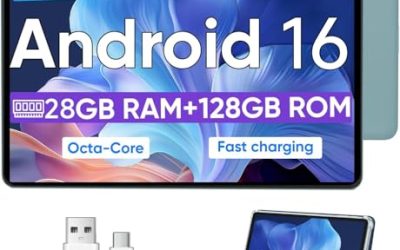
This 10-inch Android 16 tablet bundles a stylus and a case, lists 24GB of RAM (much of it virtual), 64GB of storage, 1TB of expansion, and targets ages 3 to 12. It includes parental control and a kids space. It suits a household that wants one bigger tablet for drawing, reading, and homework.
- Strength: Broad age range of 3 to 12 means a longer useful life.
- Strength: Stylus and case are included in the package.
- Trade-off: The 24GB RAM figure is mostly a headline, and a 10-inch tablet is heavy for toddlers.
Skip it if your child is under four and needs a lighter, simpler device.
LeapFrog LeapPad Academy
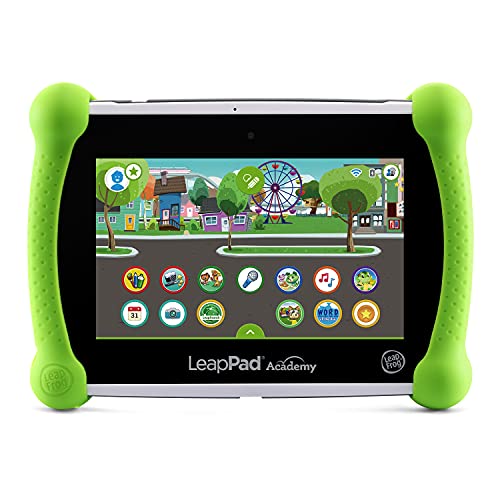
The LeapPad Academy is a learning tablet from a brand built around children’s education. The title is short and gives no specifications, so expect a device centered on guided lessons and games, and confirm details such as screen size, storage, and age range on the full listing. It fits parents who care about educational content more than tech specs.
- Strength: Positioned as a learning tablet rather than a general-purpose device.
- Strength: Brand focus on children’s education suggests structured content.
- Trade-off: The title provides no specs to compare.
Skip it if you want broad Android app access or detailed specs before deciding.
PEICHENG Kids Tablet 7-inch
The PEICHENG runs Android 12 with 4GB of RAM, 32GB of storage, an IPS screen, Bluetooth, dual cameras, parental control, and a shockproof case. It fits a preschooler or early grade-schooler who needs a compact tablet with a protective shell and a reasonable amount of memory.
- Strength: 4GB of RAM is generous for a 7-inch kids tablet.
- Strength: A shockproof case is included.
- Trade-off: Android 12 is an older release than several competitors.
Skip it if you want the newest software or a larger screen for drawing.
Kids Tablet 10-inch with Case
This 10-inch Android tablet is described as a toddler tablet with a case, parental controls, Wi-Fi, dual cameras, and apparent support for streaming services, though the title is cut off. It fits a family that wants one larger screen for lessons and videos, shared between siblings.
- Strength: 10-inch screen offers room for reading and drawing.
- Strength: Case and parental controls are included.
- Trade-off: The title lists no memory, storage, or battery details.
Skip it if you want a spec-transparent listing or a screen that small children can hold easily.
Preschool ABC Learning Pad
This learning pad for ages 2 to 6 focuses on ABC, words, songs, music, and numbers. It is a dedicated early-learning device, not a full tablet, which makes it a good first screen for toddlers because there is no app store or web browser to manage.
- Strength: Built-in lessons on letters, words, music, and numbers.
- Strength: Suits ages 2 to 6 without app management.
- Trade-off: It cannot run new apps, so it will be outgrown as the child ages.
Skip it if you want videos, drawing apps, or content that grows with the child.
Which One Fits Your Situation
Your child is two or three and new to screens
Pick the Preschool ABC Learning Pad. It teaches letters, numbers, and songs without opening the door to web access or app downloads, and the ages 2 to 6 range covers the whole preschool stretch.
You want curated content and strong controls
The Fire HD 8 Kids gives ad-free content, parental controls, and a 13-hour battery in one package, aimed at ages 3 to 7.
You travel often and cannot count on Wi-Fi
The 7-inch Kids Tablet with offline learning apps suits long drives, and the PEICHENG Kids Tablet adds 4GB of RAM and a shockproof case.
You have an older child who will keep it for years
Choose the Android 16 Kids Tablet 10-inch. Its stylus, case, and ages 3 to 12 range give the longest runway of the group.
Common Mistakes
- Buying a general tablet and assuming it is safe for toddlers without setting up a child profile.
- Trusting headline RAM and storage numbers over build quality and a sturdy case.
- Skipping content checks and discovering that bundled apps are mostly ads.
- Choosing a 10-inch tablet for a two-year-old who cannot hold it comfortably.
- Letting a streaming account bypass the kids filter because no separate profile was created.
Related guides
- Gaming Chair Cushions And Lumbar Supports
- Warranty Considerations When Buying On Sale
- How To Use Camelcamelcamel For Amazon Deals
Frequently Asked Questions
What age should a child start using a learning tablet?
Many parents introduce simple learning devices around age two or three, with short supervised sessions. Pediatric guidance generally favors limited, high-quality screen time, so keep sessions brief and shared.
Is a dedicated learning pad better than a kids tablet?
A dedicated pad is simpler and safer for toddlers because it has no app store. A kids tablet offers more variety and lasts longer, but needs setup and ongoing supervision.
Do I need a case for a kids tablet?
Yes. Drops are the main cause of damage, so a thick, shockproof case is one of the most useful features. Several of these listings include one.
Are parental controls enough on their own?
They help a lot, but they work best with house rules. Set time limits, choose the apps your child can open, and review what they use every few weeks.
Related guides
More from Amazon
Programs that pair well with the guide above. Offers and eligibility are set by Amazon and may change.
Free shipping on eligible items, Prime Video and more. Eligible new members can start with a free trial.
Start a Prime free trialAd-free music streaming. Eligible new subscribers can start with a free trial.
Try Music Unlimited freeA Prime membership for ages 18-24 with a trial period. Eligibility is set by Amazon.
See Prime for Young AdultsAudiobooks and podcasts to listen to on the go. Eligible new members can start with a free trial.
Try Audible freeAs an Amazon Associate we earn from qualifying purchases.