AutoCAD is not a typical tablet app. The full desktop program is a Windows application, which means the tablet that suits it best is really a small Windows PC with a touchscreen, not a consumer slate. Android tablets can still open, review, and mark up drawings through a mobile viewer, but they will not run the full program. That single fact decides most of this purchase, and it is why the strongest picks below lean toward rugged Windows tablets that can follow you onto a job site, while the Android models are better understood as companions.
This guide is for surveyors, contractors, field engineers, and students who want to open drawings away from a desk and, in some cases, edit them. It compares five tablets by operating system, processor class, memory, and durability so you can see which ones belong in the “full software” camp and which are better treated as drawing viewers. All comments rely on the specs stated in each listing, and none of them replace checking the current system requirements for the version of the software you plan to run. Pricing tiers range from budget viewers to premium rugged workstations, and the gap between them is mostly processor, memory, and build quality.
Our Top Picks
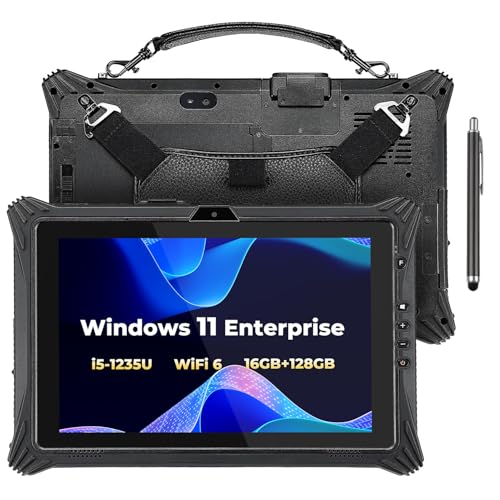 MUNBYN High-End Rugged Windows Tablet IRT1010.1 inches11.41 x 7.44 x 1.08 inches3.1 poundsCheck on Amazon


Top 3 picks at a glance
Quick Picks
As an Amazon Associate we earn from qualifying purchases at no extra cost to you.


| Product | Best for | Key spec from the listing |
|---|---|---|
| MUNBYN IRT10 | Running full CAD software in the field | 10.1″ Windows 11, Core i5-1235U, 16GB + 128GB SSD |
| CENAVA IP68 Rugged | Wet, dusty, or outdoor sites | 10.1″ Windows 11 Pro, i5-10210Y, 8+128GB, 700 nit |
| MUNBYN IRT06 | Light CAD and site checklists | 8″ Windows 11 Pro, Intel N5100, 8GB + 128GB |
| MUNBYN ILT03 Android | Viewing drawings and GPS fieldwork | 8.68″ Android 14, IP68, 8000mAh |
| ZZB 7-inch Android | Basic drawing viewing on a budget | 4GB RAM, 32GB storage, SD expansion |
How to Choose
Start with the operating system
If you need to create or edit full drawings, choose Windows 11. The full AutoCAD program runs on Windows, and an Android tablet cannot install it. Android tablets are fine for viewing, measuring, and light markup through a mobile app, but expect fewer commands and tools than the desktop program offers. Decide up front whether you need an editor or a viewer, because that choice outweighs every other spec on the list. The cost of guessing wrong is real: a tablet that cannot install the software you need is simply an expensive drawing viewer. Students should also check whether their school provides a cloud desktop, which could make a cheaper tablet viable. Even then, a cloud session depends on a steady connection, so a model with a SIM slot is safer for travel.
Processor and memory thresholds
For full CAD work, look for a Core i5 class processor and at least 8GB of RAM, with 16GB preferred for large drawings and several open files. Entry processors such as the Intel N5100 can handle light two-dimensional work but will slow down on heavy external references and 3D models. Storage of 128GB is workable if you keep project files on a server or cloud drive; consider a larger or replaceable drive if you store many large drawing sets locally, and keep in mind that the operating system and the program itself take a sizable share of that space. Memory that can be upgraded or storage that can be swapped, as the IRT10 title describes, extends the useful life of the device.
Screen readability and durability
A job-site tablet competes with daylight, so check for a brightness figure around 700 nits, which the listings describe as sunlight readable. Look for an IP rating such as IP68 for dust and water resistance. Screen size matters for drawings: 10 inches gives you a usable canvas, while 7 to 8 inches is more of a field notepad where you pan and zoom constantly. A stylus helps with precise selection on a touchscreen, and a screen that works with gloves is useful if you work outside in cold weather.
Ports, connectivity, and what to ignore
Field work often needs an Ethernet port, a SIM slot for cellular data, GPS, and a battery that lasts a shift or can be swapped. Ignore generic claims about toughness and check the stated protection rating instead. Budget tablets cut corners on the processor, memory, and display brightness, so a low price usually signals a viewer rather than a workstation. Even in 2026, treat any non-Windows tablet as a companion device for AutoCAD rather than a replacement for a laptop. If you will draft for hours at a time, pair any of these with a keyboard and an external monitor at the office.
The 5 Best Options
MUNBYN IRT10 Rugged Windows Tablet
This is the strongest match for the keyword because it combines a 10.1-inch Windows 11 IoT Enterprise system with an i5-1235U processor, WiFi 6, and 16GB of memory with a 128GB replaceable SSD. The title also mentions a hot-swappable battery, which helps on long days away from power outlets and suits crews who share equipment. For a shop that issues one device to many people, that flexibility is worth real money.
- Core i5-1235U and 16GB give it the most headroom for full CAD work.
- Replaceable SSD and swappable battery suit shared or long-lived equipment.
- Premium tier and rugged bulk; it is heavier than a consumer tablet.
Skip it if you only need to view drawings occasionally, since the extra power and cost are wasted in that role. A cheaper option makes more sense for light use.
CENAVA IP68 Waterproof Rugged Tablet
A 10.1-inch Windows 11 Pro tablet with an i5-10210Y processor, 8GB of memory plus 128GB of storage, and a 700 nit display built for sunlight. The IP68 rating, LTE SIM slot, and Ethernet port make it a field-first machine for crews working outdoors in wet or dusty conditions where a regular laptop would be a liability. Because it lists a Pro edition of Windows, it also fits managed fleets that rely on standard business tools.
- IP68 protection and a sunlight-readable screen suit harsh sites.
- LTE slot and an Ethernet port let you pull files away from Wi-Fi.
- The i5-10210Y is a lower-power part, so very large drawings may feel slower.
Skip it if your priority is maximum processing power for heavy 3D files and large assemblies.
MUNBYN IRT06 8-Inch Rugged Windows Tablet
The smaller IRT06 runs Windows 11 Pro on an Intel N5100 with 8GB of memory and 128GB of storage, and the title promises a 700 nit sunlight-readable screen for construction work. It is the compact route to a real Windows environment for people who need to open drawings, check dimensions, and fill out site paperwork in the same device. The compact footprint is the draw here, not raw speed.
- Full Windows 11 Pro in a small, field-friendly body.
- 700 nit display is stated for outdoor visibility.
- N5100 is an entry-class processor, and an 8-inch screen is tight for detailed drawings.
Skip it if you will spend long stretches editing complex plans with many layers.
MUNBYN ILT03 Rugged Android Tablet
An 8.68-inch Android 14 tablet with IP68 protection, an 8000mAh battery, 33W fast charging, GPS, and a dual camera. It does not run the full desktop program, but it suits viewing drawings, photographing site conditions, and logging locations, particularly for vehicle-mounted or outdoor work where durability matters more than horsepower. It also pairs well with a desk machine, where the heavy editing happens after the day in the field.
- 8000mAh battery is listed at about 11 hours of use.
- GPS and a dual camera support surveying and inspection work.
- Android means no full AutoCAD install; use it as a companion viewer.
Skip it if you need to edit drawings with the complete command set. Buyers who need a full editor should look at the Windows tablets above instead.
ZZB 7-Inch Android Tablet
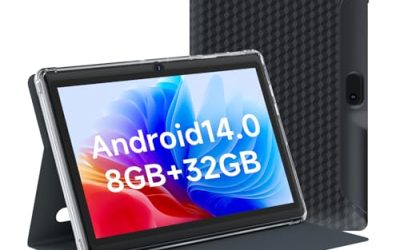
A basic Android tablet with 4GB of RAM, 32GB of storage, support for SD card expansion, a quad-core processor, and an IPS HD screen. It is the entry point for people who only want to open a drawing on a small screen, for example to confirm a dimension on a shop floor or to show a client a layout. Treat it as a convenience purchase rather than a core work tool.
- SD expansion gives you room for stored reference drawings.
- Lowest cost tier in the group.
- Small screen and modest memory limit it to simple viewing.
Skip it if you want real CAD productivity; it is a reader, not a workstation. The SD slot is handy for stashing PDFs of plans, but do not expect smooth zooming on dense drawings.
Which One Fits Your Situation
You draft and edit on site
The MUNBYN IRT10 is the choice. Its i5-1235U and 16GB of memory are the best match for running desktop CAD software away from a desk, and the swappable battery keeps you working through a long shift.
You work outdoors in rough conditions
The CENAVA IP68 tablet pairs a 700 nit screen with water and dust protection plus LTE, so it handles rain, dust, and sunlight better than most options here. It is a good fit for utility and construction crews. Pair it with a tablet stand or vehicle mount if you work from a truck.
You carry a tablet for light checks and notes
The MUNBYN IRT06 gives you Windows 11 Pro in a pocketable size, good for opening drawings and updating site records without carrying a laptop around a muddy site.
You only need to view and mark up
Choose the MUNBYN ILT03 for its battery and GPS, or the ZZB 7-inch if budget is the main limit and the drawings you open are small and simple.
Common Mistakes
- Buying an Android tablet and expecting the full desktop program to install on it.
- Choosing a small, low-power processor for large drawings with many layers and external references.
- Overlooking screen brightness for outdoor use and ending up with a display you cannot read in sunlight.
- Skipping the memory spec; 4GB is rarely enough for serious CAD work.
- Ignoring ports such as Ethernet and cellular when your site has poor or no Wi-Fi.
Related guides
- Gaming Chair Cushions And Lumbar Supports
- Business Laptops For Graphic Designers
- Warranty Considerations When Buying On Sale
Frequently Asked Questions
Can an Android tablet run AutoCAD?
Not the full desktop version. Android tablets work with the mobile viewer and editor, which handles viewing and light markup. For the complete feature set, pick a Windows tablet like the IRT10 or the CENAVA.
How much RAM do I need?
For full CAD, aim for 8GB at minimum and 16GB if you work on large or complex drawings. Anything lower is better suited to viewing files than to editing them.
Do I need a rugged tablet?
Only if you work outdoors or in harsh environments. A rugged build adds weight and cost, so office-based users may be better served by a standard laptop or a two-in-one convertible.
Is an 8-inch screen big enough?
It works for checking measurements and notes, but detailed drawing work is easier on a 10-inch screen. Expect more panning and zooming on the smaller display, and consider an external monitor for desk work. Using a stylus also reduces mis-taps when you select small objects.
Related guides
More from Amazon
Programs that pair well with the guide above. Offers and eligibility are set by Amazon and may change.
Free shipping on eligible items, Prime Video and more. Eligible new members can start with a free trial.
Start a Prime free trialAd-free music streaming. Eligible new subscribers can start with a free trial.
Try Music Unlimited freeA Prime membership for ages 18-24 with a trial period. Eligibility is set by Amazon.
See Prime for Young AdultsAudiobooks and podcasts to listen to on the go. Eligible new members can start with a free trial.
Try Audible freeAs an Amazon Associate we earn from qualifying purchases.