
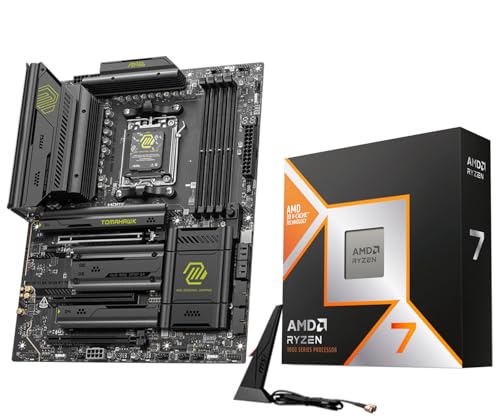
For most Ryzen 7 9800X3D builds, a B850 board such as the MSI MAG B850 Tomahawk Max WiFi is enough, while an X870 or X870E board like the ASRock X870E Taichi or ASUS ROG Crosshair X870E Hero suits buyers who want extra M.2 slots, USB4 or heavy tuning. The 9800X3D uses the AM5 socket, and reviewers note that none of the chipsets makes the chip render games faster, so the board choice is about features, VRM quality and budget rather than gaming speed.
As an Amazon Associate we earn from qualifying purchases at no extra cost to you.


Our Top Picks

Top 3 picks at a glance
At a Glance: Boards Reviewers Pair With the 9800X3D
| Board | Chipset | Best for | Key stated features | Limits |
|---|---|---|---|---|
| MSI MAG B850 Tomahawk Max WiFi | B850 | Most builds | PCIe 5.0, Wi-Fi 7, 5GbE and solid power delivery (per roundups) | No USB4 |
| ASRock B850 Steel Legend WiFi | B850 | Value ATX builds | Named as a good fit for most builds by one guide | Fewer premium extras |
| GIGABYTE B850M Gaming X WiFi6E | B850 | Affordable micro-ATX | Compact budget board | Wi-Fi 6E rather than 7; fewer slots |
| ASUS ROG Strix B850-G Gaming WiFi | B850 | Compact white builds | Micro-ATX, white styling | Fewer expansion slots |
| MSI MAG X870 Tomahawk WiFi | X870 | Value with X870 features | Named best overall by Tech4Gamers | Costs more than B850 equivalents |
| ASRock X870E Taichi | X870E | Full X870E feature set | Best overall in one guide, ranked first by GeekaWhat | Premium tier |
| ASUS ROG Strix X870E-E Gaming WiFi | X870E | Tuning and PBO | 18+2+2 power stages, dual 8-pin CPU power connectors (per roundups) | Premium tier |
| ASUS ROG Crosshair X870E Hero | X870E | Flagship overclockers | 18+2+2 stages, five M.2, dual USB4 (per a guide) | Highest cost |
| GIGABYTE X870E AORUS Elite X3D | X870E | X3D-focused buyers | Pitched as made for X3D chips | Premium tier |
| MSI MPG X870E Carbon WiFi | X870E | Well-rounded high end | Described as a well-rounded X870E | Premium tier |
Check the maker’s page for the exact variant, since similar names often cover several models.
Chipsets Explained for 9800X3D Owners
B850
B850 is the sweet spot for many 9800X3D builds. It supports Ryzen 9000, PCIe 5.0 storage on most boards and modern networking without paying for USB4. Reviewers say the VRMs on good B850 boards are well within what the 9800X3D needs.
X870 and X870E
X870 adds USB4 as a requirement and more connectivity, and X870E adds extra PCIe lanes and generally more expansion. They matter if you want several fast M.2 drives, multiple PCIe 5.0 devices or USB4 docking. They do not add gaming performance with the 9800X3D.
B650 and X670
Older AM5 boards also support Ryzen 9000 chips. The GIGABYTE B650 Aorus Elite AX was cited as a budget pick with a strong VRM, though you may need a BIOS update to recognise the 9800X3D if the board was built before that chip. Check the maker’s CPU support list and look for BIOS Flashback.
What to Check Before Buying
- CPU support list: Confirm the 9800X3D appears with the minimum BIOS version, and whether the board ships with it or needs a flash.
- BIOS Flashback: A dedicated button lets you update the BIOS without a CPU installed.
- Memory: The 9800X3D uses DDR5 only. Check the board’s qualified memory list; many gamers use DDR5-6000 with EXPO profiles.
- PCIe layout: Look for a PCIe 5.0 x16 slot for the GPU and a PCIe 5.0 M.2 slot if you want the fastest storage.
- M.2 count: Count your drives. B850 boards typically offer fewer slots than X870E.
- Networking: Wi-Fi 7 and 2.5GbE or 5GbE help future-proofing; a wired connection is ideal for gaming.
- Rear I/O: Count USB ports, and check for USB4 only if you need it.
- Form factor: ATX, micro-ATX and mini-ITX affect case compatibility and expansion.
- Cooling: The 9800X3D runs relatively cool, so a good mid-range air or 240mm AIO cooler is adequate; check the board’s cooler mounting is compatible.
Budget Tiers
| Tier | Typical pick | What to expect |
|---|---|---|
| Budget | GIGABYTE B850M Gaming X WiFi6E, GIGABYTE B650 Aorus Elite AX | Solid CPU support, fewer extras |
| Mid-range | MSI MAG B850 Tomahawk Max WiFi, ASRock B850 Steel Legend WiFi, MSI MAG X870 Tomahawk WiFi | PCIe 5.0, Wi-Fi 7, strong VRMs |
| Premium | ASRock X870E Taichi, ASUS ROG Crosshair X870E Hero, ASUS ROG Strix X870E-E, MSI MPG X870E Carbon | USB4, more M.2, heavy tuning headroom |
Pick X If… Decision Table
| Pick this | If you… |
|---|---|
| MSI MAG B850 Tomahawk Max WiFi | want the standard sensible choice for a gaming build |
| ASRock B850 Steel Legend WiFi | want a solid ATX board at a lower tier |
| GIGABYTE B850M Gaming X WiFi6E | are building micro-ATX on a tight budget |
| ASUS ROG Strix B850-G Gaming WiFi | want a compact white build |
| MSI MAG X870 Tomahawk WiFi | want X870 features without flagship cost |
| ASRock X870E Taichi | want a full-featured X870E at a lower cost than the ASUS flagship |
| ASUS ROG Crosshair X870E Hero | plan heavy tuning, many drives and USB4 |
Alternatives
- Ryzen 7 9700X or 9600X: Lower-cost chips for the same boards if you do not need the 9800X3D’s gaming gains.
- Intel Core Ultra 200S platform: A different socket and board family if you prefer Intel.
- Newer X3D chips: Check whether newer AM5 X3D processors suit your budget; the same boards generally support them.
Build Tips
Update the BIOS before installing the CPU if the board lacks 9800X3D support out of the box. Enable EXPO for memory, and keep Resizable BAR on. Use the chipset drivers from the maker. The 9800X3D has cache stacked beneath the cores, so follow AMD’s guidance on voltage and avoid unsupported overclocking; the maker’s tuning tools such as PBO and Curve Optimizer are the usual route.
VRM and Power Connectors: Why They Matter Less Here
Marketing for high-end boards stresses power stage counts, but the 9800X3D draws moderate power in games, so a competent B850 VRM is usually sufficient. Heavy all-core workloads such as rendering put more stress on power delivery, and those users may prefer the stronger heatsinks and extra CPU power connectors of the ASUS Strix and Crosshair boards. If you only game and stream, putting the saved money into the graphics card is the common advice.
Storage and Expansion Planning
Count the M.2 drives you want now and later. Some boards share lanes between M.2 slots and PCIe or SATA ports, so using one slot may disable another; the manual lists these trade-offs. A PCIe 5.0 SSD runs hot and needs the board’s M.2 heatsink, and it is not required for gaming loads. Most players are well served by a fast PCIe 4.0 or 5.0 drive for the operating system and one or two further drives. If you add capture cards, sound cards or extra network cards, check the number and lane width of the spare PCIe slots.
Memory Choices and EXPO
AM5 boards support EXPO memory profiles. Many 9800X3D builders choose a two-module DDR5 kit around the 6000 MT/s mark, because it is widely supported and sits near the sweet spot of the platform. Four-module configurations are possible but may require lower speeds to stay stable. Always check the board’s qualified vendor list and update the BIOS if you encounter memory training errors. 32GB is a common capacity target for modern games, with more for streaming or heavy creative work.
Form Factor and Case Fit
ATX boards give the most slots and cooling room, micro-ATX saves space with fewer expansion options, and mini-ITX suits small cases but has limited slots. Check your case’s support for the board size, the position of front-panel connectors, and clearance for large coolers and long graphics cards. White and black themed boards are available from several makers, so choose a colour that matches the rest of your build if appearance matters.
Cooling the 9800X3D
The 9800X3D keeps its cache stack beneath the cores, so heat transfer behaves differently from older chips, yet reviewers generally find a good tower air cooler or a 240mm to 360mm liquid cooler keeps it comfortable. AM5 coolers use the same mounting pattern as the earlier AM4 hardware in many cases, but check the cooler maker’s compatibility list. Make sure the board has a CPU fan header with PWM control and, for liquid coolers, a pump header.
Frequently Asked Questions
Is B850 good enough for the 9800X3D?
Yes. Reviewers broadly agree that B850 has the power delivery and PCIe 5.0 features this CPU needs, so you do not have to pay for X870E.
Does X870E make the 9800X3D faster?
No. Roundups note that chipset choice does not change gaming speed. X870E adds connectivity and expansion.
Do I need a BIOS update?
Possibly, on older boards. Check the maker’s CPU support list and use BIOS Flashback if needed.
What memory should I use?
The 9800X3D uses DDR5. Many builders choose DDR5-6000 kits with EXPO profiles and check the board’s qualified list.
Is Wi-Fi 7 necessary?
No, but it is common on recent boards. A wired connection is still better for gaming.
Can I use an older AM5 board?
Yes, many B650 and X670 boards support Ryzen 9000 after a BIOS update. Confirm support on the maker’s page.
Related guides
More from Amazon
Programs that pair well with the guide above. Offers and eligibility are set by Amazon and may change.
Free shipping on eligible items, Prime Video and more. Eligible new members can start with a free trial.
Start a Prime free trialAd-free music streaming. Eligible new subscribers can start with a free trial.
Try Music Unlimited freeA Prime membership for ages 18-24 with a trial period. Eligibility is set by Amazon.
See Prime for Young AdultsAudiobooks and podcasts to listen to on the go. Eligible new members can start with a free trial.
Try Audible freeAs an Amazon Associate we earn from qualifying purchases.


