
The best AMD Radeon gaming PC for most players is an RX 9070 XT build with a Ryzen X3D chip and 32GB of DDR5. The Skytech Azure 3, Harpy and the STORMCRAFT Skyhawk PRO fit that profile, while the ROG GM700 and Lenovo Legion Tower 5 add big-brand support. The Ocean of Stars is the 16GB RX 9060 XT option, and the Qehi is the cheapest entry. This guide compares eleven listings using titles and published specifications only.
Our Top Picks
Top 3 picks at a glance
Radeon prebuilts side by side
As an Amazon Associate we earn from qualifying purchases at no extra cost to you.


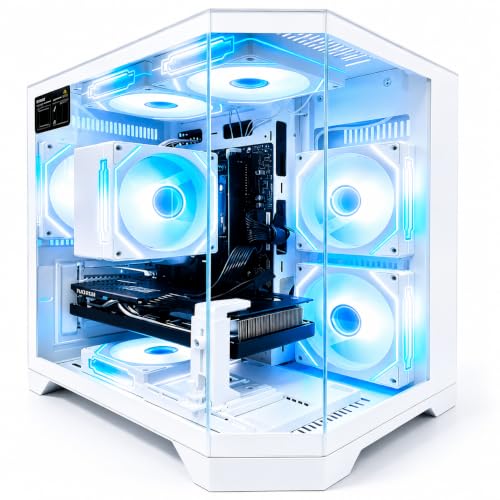


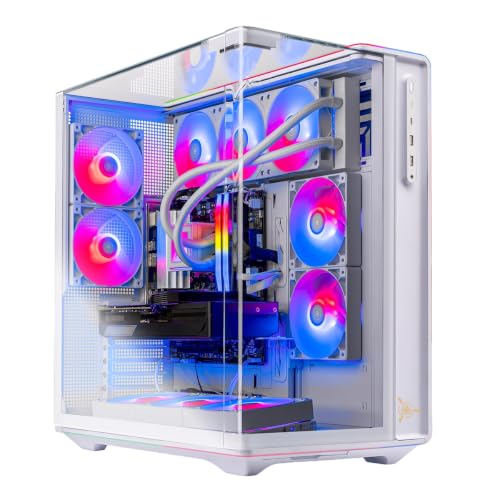

| Model | Key point from title | Price tier | Best for |
|---|---|---|---|
| Skytech Rampage | Ryzen 7 7700, RX 9070 XT, 16GB DDR5-5200, 1TB, 850W Gold | Mid-range | 1440p on a controlled budget |
| Skytech Azure 3 | Ryzen 7 9850X3D, RX 9070 XT, 32GB DDR5-5600, 2TB, 360mm AIO | Premium | High-refresh gaming at 1440p and above |
| Skytech Harpy | Ryzen 7 9850X3D, RX 9070 XT, 32GB DDR5-6000, 2TB | Premium | Same buyers as Azure 3, faster RAM |
| Qehi RX 9060 XT | Ryzen 7 (model not named), RX 9060 XT 8GB, 16GB DDR4, 512GB | Budget | Entry 1080p play |
| Ocean of Stars | Ryzen 7 9700X, RX 9060 XT 16GB, 32GB DDR5, 1TB, 240mm AIO, 850W | Mid-range | 1440p with more VRAM |
| ASUS ROG GM700 | Ryzen 7 9800X3D, RX 9070 XT Prime OC, 32GB DDR5, 2TB | Premium | Brand-backed high-end builds |
| STORMCRAFT Skyhawk PRO | 9800X3D, RX 9070 XT 16GB, 32GB DDR5-6000, 2TB, B850, 360mm AIO | Premium | Feature-complete performance builds |
| Lenovo Legion Tower 5 | 9800X3D, RX 9070 XT, 32GB, 1TB, Windows 11 Home, Game Pass offer | Premium | Mainstream-brand support |
| Skytech King 95 | 7800X3D, RX 9070 XT, 24GB DDR5-6000, 1TB Gen4, 360mm AIO | Mid-range | X3D gaming at a lower tier |
| Acer Nitro 85 | Ryzen 9 9900X, RX 9070 XT, 16GB DDR5, 1TB Gen4, Wi-Fi 7 | Mid-range | Productivity plus gaming |
| STORMCRAFT Falcon | 7800X3D, RX 9070 XT 16G, 32GB DDR5, 1TB, 850W, 360mm AIO | Mid-range | X3D value builds |
Eleven systems in detail
Skytech Rampage (Ryzen 7 7700, RX 9070 XT)
A Ryzen 7 7700 paired with an RX 9070 XT, 16GB of DDR5-5200, a 1TB NVMe drive and an 850W Gold ATX 3 supply. The graphics card is the same tier as the pricier builds, but the 16GB of RAM is the minimum for current games, and the plain 7700 has no X3D cache. The cooler is not named.
Pros
- RX 9070 XT at the lower cost end
- 850W Gold ATX 3 power supply
Cons
- 16GB of RAM leaves little headroom
- Cooler type not stated
Who it’s for: 1440p players who want the big Radeon card and will add RAM later.
Skytech Azure 3 (Ryzen 7 9850X3D, RX 9070 XT)
The title lists a Ryzen 7 9850X3D, an RX 9070 XT, 32GB of DDR5-5600, a 2TB Gen4 SSD, an 850W Gold supply and a 360mm liquid cooler. X3D chips are generally positioned for gaming, so this is a performance-first build. It is the DDR5-5600 version, so compare it with the Harpy below.
Pros
- 32GB RAM and 2TB storage
- X3D-class CPU named in the title
- 360mm cooler
Cons
- Wi-Fi 5 is dated
- RAM speed is lower than the Harpy
Who it’s for: Players who want a top gaming CPU and a big Radeon card with room for storage.
Skytech Harpy (Ryzen 7 9850X3D, RX 9070 XT)
Almost identical to the Azure 3 above, but the title lists DDR5-6000 instead of 5600. All other major specs match: 2TB Gen4 SSD, an 850W Gold supply, a 360mm liquid cooler and Wi-Fi 5. The two are near-duplicates, so choose on current stock and live price, not on expected gaming differences.
Pros
- DDR5-6000 listed
- Same strong core parts as the Azure 3
Cons
- Near-duplicate of another listing
- Wi-Fi 5 only
Who it’s for: Buyers who want the 9850X3D build and prefer the faster RAM listing.
Qehi Gaming PC (Ryzen 7, RX 9060 XT 8GB)
This is the weakest-specified listing. The title names only “Ryzen 7” with no model, an RX 9060 XT with 8GB of GDDR6, 16GB of DDR4 and a 512GB SSD. Wi-Fi 6 and RGB are also listed. With 8GB of VRAM and a small drive, headroom is limited, and the power supply and cooler are not named. Ask the seller for details.
Pros
- Lowest entry cost in the set
- Ready for basic 1080p play
Cons
- CPU model and PSU not stated
- 512GB fills up fast
Who it’s for: Budget buyers who accept limits and plan to upgrade RAM and storage soon.
Ocean of Stars AI Gaming PC (Ryzen 7 9700X, RX 9060 XT 16G)
A Ryzen 7 9700X with a 16GB RX 9060 XT, 32GB of DDR5, a 1TB PCIe SSD, a 240mm liquid cooler and an 850W power supply. The 16GB card avoids the memory squeeze of 8GB versions at higher texture settings. It is a smaller-brand listing, so check the warranty and the PSU rating, since the title gives no tier for it.
Pros
- 16GB graphics memory
- 32GB DDR5 included
- 240mm liquid cooling
Cons
- Smaller brand needs warranty checks
- PSU rating not stated
Who it’s for: Players who want more VRAM without paying for a 9070 XT.
ASUS ROG GM700 (GM700TZ-MS777)
A branded build with a Ryzen 7 9800X3D, an RX 9070 XT Prime OC, 32GB of DDR5 and a 2TB PCIe 4 SSD, plus Windows 11 Home. The “Prime OC” label suggests a factory-tuned graphics card. The title omits the PSU wattage and cooler type, so check the listing. The ROG name brings a recognisable support network.
Pros
- 9800X3D and 2TB SSD
- Factory-tuned graphics card named
- Large-brand support
Cons
- PSU and cooler not stated
- Likely premium cost
Who it’s for: Buyers who want a top-tier Radeon system from a major manufacturer.
STORMCRAFT Skyhawk PRO (Ryzen 7 9800X3D, RX 9070 XT)
The title lists a Ryzen 7 9800X3D, an RX 9070 XT 16GB, 32GB of DDR5-6000, a 2TB SSD, a B850 board, a 360mm liquid cooler and an 850W Gold supply. That is a full spec for the class. The “5.2GHz” figure is a peak boost claim. STORMCRAFT is a smaller seller brand, so read the warranty terms.
Pros
- 16GB VRAM and 2TB storage stated
- B850 board and 850W Gold PSU
Cons
- Smaller brand support
- Marketing wording like “AI-Enhanced” says little
Who it’s for: Players who want the 9800X3D and 9070 XT with detailed specs shown in the title.
Lenovo Legion Tower 5 (Ryzen 7 9800X3D, RX 9070 XT)
Lenovo’s tower lists a Ryzen 7 9800X3D, an RX 9070 XT, 32GB of memory and 1TB of storage with Windows 11 Home. The title also mentions three months of PC Game Pass; check that the offer is still active. RAM type, PSU wattage and cooling are not listed, so confirm them. Storage is smaller than on the ROG and STORMCRAFT builds.
Pros
- Recognised brand and support
- Game Pass offer in the title
Cons
- RAM type and PSU not named
- 1TB is smaller than some rivals
Who it’s for: Shoppers who want a mainstream brand and a strong gaming CPU.
Skytech King 95 (Ryzen 7 7800X3D, RX 9070 XT)
This pairs a Ryzen 7 7800X3D with an RX 9070 XT, 24GB of DDR5-6000, a 1TB Gen4 SSD, an 850W Gold PSU and a 360mm cooler. The 24GB RAM figure is unusual and may mean mixed or odd-sized modules, so check the listing. The 7800X3D is an older X3D generation than the 9000-series chips.
Pros
- X3D CPU and 9070 XT together
- 850W Gold and 360mm cooler
Cons
- 24GB RAM is an unusual setup
- Older X3D generation
Who it’s for: Buyers who want X3D gaming performance and accept a previous-generation CPU.
Acer Nitro 85 (Ryzen 9 9900X, RX 9070 XT)
An Acer desktop with a Ryzen 9 9900X, an RX 9070 XT, 16GB of DDR5, a 1TB Gen4 SSD, Wi-Fi 7 and Windows 11 Home. The 12-core class CPU (general knowledge) suits streaming and editing as well as games, but it is not an X3D chip. The 16GB of RAM is the weak point, so budget for an upgrade.
Pros
- Strong multi-core CPU
- Wi-Fi 7 listed
Cons
- 16GB of RAM is small for this class
- Not an X3D gaming chip
Who it’s for: People who game and also stream, edit or compile on the same PC.
STORMCRAFT Falcon AI Gaming PC (Ryzen 7 7800X3D, RX 9070 XT)
A Ryzen 7 7800X3D with an RX 9070 XT 16G, 32GB of DDR5, a 1TB SSD, an 850W supply and a 360mm cooler, plus USB-C and Bluetooth. It overlaps with the Skytech King 95 but lists 32GB of RAM. The title adds game design and office use, which is general wording. The PSU efficiency rating is not stated here.
Pros
- 32GB RAM and a 16GB VRAM card
- 360mm cooler and USB-C
Cons
- PSU rating not named
- Smaller brand support
Who it’s for: Players who want a 7800X3D build with the full 32GB of memory.
How we picked these
We compared product titles, published specifications, manufacturer documentation and buyer reviews, grouping each system by GPU tier, Ryzen model, RAM size and storage. Nobody on the team used or measured these units. Boost clocks, brand claims and promotions come from the titles and are seller claims. Price tiers are relative inside this set, and no frame rates are quoted since results vary by game and settings.
What to look for in an AMD Radeon gaming PC
RX 9070 XT or RX 9060 XT
The RX 9070 XT is the higher tier and suits 1440p at high settings and some 4K. The RX 9060 XT is a step down for 1080p and 1440p. The RX 9060 XT appears in both memory sizes in this set: the Qehi lists 8GB and the Ocean of Stars lists 16G. The title does not always state VRAM, so check the listing.
VRAM planning
As a rough planning estimate, 8GB suits 1080p at medium to high settings, 12GB to 16GB suits 1440p with high textures, and 16GB gives room for 4K and ray tracing. Newer games vary, so treat this as a guide, not a guarantee. If you keep a PC for five years, favour 16GB.
Ryzen pairing: X3D or not
X3D chips (9850X3D, 9800X3D, 7800X3D) are generally aimed at gaming. The 9700X and 9900X are strong general-purpose chips. The plain 7700 in the Rampage is the weakest of these. A Ryzen 9 only makes sense if you also create content.
RAM size and speed
DDR5 at 6000 is a common sweet spot for Ryzen, and 32GB is comfortable. The Rampage and Acer list 16GB, which is a bare minimum. The Qehi lists DDR4, which is older.
FSR 4 and ray tracing
AMD has presented FSR 4 as a feature of its newer Radeon cards, and the RX 9000 series is where to expect it. Titles do not confirm software support, so check AMD’s documentation. Ray tracing performance varies by game.
Power, cooling and value
An 850W Gold supply suits an RX 9070 XT build with headroom, and a 360mm cooler suits hot CPUs. Compare Radeon builds with GeForce rivals using our AMD vs Nvidia value comparison and our AMD vs Intel platform guide.
Mistakes buyers make with Radeon prebuilts
The first mistake is paying for a Ryzen 9 and then pairing it with a modest graphics tier, since the GPU drives frame rates. The second is accepting 16GB of RAM in a premium build. Third, buyers do not check VRAM when the title says only “RX 9060 XT”, and the 8GB version can run short. Fourth, they trust boost-clock marketing as if it were a result. Fifth, they overlook what a title leaves out, such as the PSU, cooler and case. Sixth, they ignore timing: with sales season approaching, see our seasonal deals comparison for timing. Finally, many forget that a fast SSD cannot fix a weak GPU.
Which Radeon PC to buy
For the best all-round build, choose the Skytech Azure 3 or Harpy, or the STORMCRAFT Skyhawk PRO if you want its full spec list. For brand backing, the ASUS ROG GM700 and Lenovo Legion Tower 5 are the sensible picks. Value shoppers should look at the Skytech King 95 or STORMCRAFT Falcon. The Ocean of Stars is the 16GB mid-tier choice, the Rampage and Acer need a RAM upgrade, and the Qehi is a basic starter. Check the live listing.
Related guides
- Gaming Chair Cushions And Lumbar Supports
- Warranty Considerations When Buying On Sale
- How To Use Camelcamelcamel For Amazon Deals
Frequently asked questions
Is the RX 9070 XT good for 1440p gaming?
It is positioned as a strong 1440p high-refresh card and can handle some 4K titles with upscaling. Results depend on the game, resolution and settings, so check recent buyer reviews for your favourite titles before you commit. The Skytech, STORMCRAFT, ASUS, Lenovo and Acer builds here all list this graphics card.
Is 8GB of VRAM enough for the RX 9060 XT?
It can work for 1080p, but newer games may use more memory at high texture settings. The Qehi lists 8GB, while the Ocean of Stars lists 16G. If you plan to keep the PC for years or play at 1440p, 16GB is the safer choice, and it costs relatively little more on cards in this class.
Are X3D Ryzen processors worth it for gaming?
X3D chips are generally positioned as the strongest Ryzen option for gaming because of their extra cache. The 9850X3D, 9800X3D and 7800X3D appear in this guide. They help most in CPU-limited games and high-refresh play, so a strong graphics card still matters more at 4K, where the GPU becomes the limit and the CPU matters less.
How much RAM should a Radeon gaming PC have?
Thirty-two gigabytes of DDR5 is a comfortable level for modern games and multitasking, and most builds here list it. Sixteen gigabytes works but leaves little room, as on the Rampage and Acer Nitro 85. The Skytech King 95 lists 24GB, which is unusual, so ask whether the modules are matched and whether a free slot remains for expansion.
Does the Radeon RX 9070 XT support FSR 4?
AMD has presented FSR 4 as a feature of its newer Radeon cards, and the RX 9070 XT is part of that generation. Support also depends on each game, and the product titles here do not mention it, so check AMD’s documentation and the game’s settings menu before assuming a given title will use it.
Related guides
More from Amazon
Programs that pair well with the guide above. Offers and eligibility are set by Amazon and may change.
Free shipping on eligible items, Prime Video and more. Eligible new members can start with a free trial.
Start a Prime free trialAd-free music streaming. Eligible new subscribers can start with a free trial.
Try Music Unlimited freeA Prime membership for ages 18-24 with a trial period. Eligibility is set by Amazon.
See Prime for Young AdultsAudiobooks and podcasts to listen to on the go. Eligible new members can start with a free trial.
Try Audible freeAs an Amazon Associate we earn from qualifying purchases.


