As an Amazon Associate we earn from qualifying purchases
Best Ambidextrous Gaming Mouse Picks for Both Hands
Most gaming mice are sculpted for the right hand, with a slanted shell and a thumb rest that simply do not work mirrored. An ambidextrous gaming mouse solves that with a symmetrical shell: the left and right sides curve the same way, so the mouse feels identical whichever hand holds it. That matters if you play left-handed, if you switch hands to spread the strain during long sessions, or if you just prefer the neutral, predictable grip of a symmetrical shape for claw and fingertip aim.
This guide compares four symmetrical gaming mice that take different approaches to the same idea. Two are esports flagships built around minimum weight and maximum polling rates, one is a smaller, flatter shape aimed at claw-grip players, and one is a hybrid wireless all-rounder with Bluetooth for a second machine. Along the way, we explain the one detail spec sheets gloss over: a symmetrical shell is not always the same thing as buttons on both sides, and that distinction decides whether a left-handed player gets full use of the side buttons.
Top 3 picks at a glance


Quick Picks
| Product | Best for | Key spec |
|---|---|---|
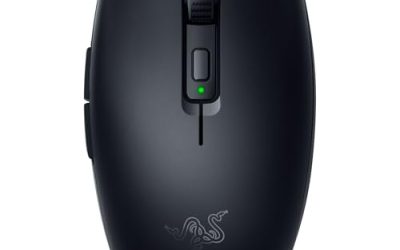
| Razer Viper V3 Pro | Competitive FPS at the highest level | 54-55 g, Focus Pro 35K sensor, true 8,000 Hz wireless polling |
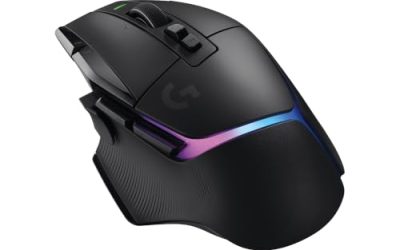
| Logitech G Pro X Superlight 2 | A safe, refined all-round esports pick | 60 g, HERO 2 sensor up to 44,000 DPI, up to 8 kHz polling |
| Pulsar X2V2 | Claw and fingertip grips on smaller hands | 53 g, PAW3395 sensor, flat symmetrical shell in two sizes |
| Glorious Model O 2 Wireless | Gaming plus a second device over Bluetooth | 68 g, BAMF 2.0 sensor, 2.4 GHz and Bluetooth hybrid wireless |
How to Choose the Best Ambidextrous Gaming Mouse
Symmetrical shell vs. buttons on both sides
This is the most important distinction in the category, and the most commonly blurred. A symmetrical shell means the shape is mirrored left-to-right, so either hand grips it the same way. A truly ambidextrous button layout goes further and puts side buttons on both flanks, so a left-handed player gets thumb buttons too.
Almost every modern esports mouse, including all four picks below, takes the first approach but not the second: the shell is symmetrical, while the two side buttons sit on the left flank only. A right-handed player uses them with the thumb. A left-handed player holding the mouse in the left hand reaches those buttons with the ring finger, which some players adapt to and others find unusable. If side buttons matter to your left-handed play, check the button layout, not just the word “ambidextrous” in the title, and consider remapping: most gaming software lets you move key actions to the right-click or scroll click instead. Players who switch hands for comfort rather than for competitive left-handed play usually find a symmetrical shell alone is exactly what they need.
Shape and grip style
Symmetrical shells are naturally suited to claw and fingertip grips, because there is no sculpted palm hump forcing the hand into one position. Within the category, shapes still differ. The Viper V3 Pro and Pro X Superlight 2 use a medium, gently curved shell that also tolerates a relaxed palm grip on average hands. The Pulsar X2V2 is flatter and lower, which rewards an aggressive claw and fingertip control but gives palm players less support. The Model O 2 Wireless is longer, suiting medium-to-large hands. Measure your hand and be honest about your grip: a symmetrical mouse that is too long or too flat will fatigue the hand faster than a heavier mouse that fits.
Sensor performance
Every pick here uses a flagship-class optical sensor, and at this level sensor differences are the least likely thing to decide your aim. What to check is that the sensor is a proven model (Razer’s Focus Pro line, Logitech’s HERO 2, PixArt’s PAW3395, or Glorious’s BAMF 2.0), that it tracks cleanly at high speed (all four are rated between 650 and 888 IPS), and that lift-off behaviour is adjustable if you play at low sensitivity and lift the mouse often. DPI headline numbers far exceed what anyone uses in a match; treat them as a sign of sensor generation, not a buying reason.
Weight
All four picks sit between 53 and 68 grams. Lighter mice reduce the effort of fast flicks and repeated micro-corrections, which is why esports shapes have chased weight down. Below roughly 55 grams, though, the returns shrink and grip preference matters more than the number. If you play at low sensitivity with big arm movements, the lightest shells feel effortless; if you play wrist-heavy at high sensitivity, a slightly heavier mouse like the 68 g Model O 2 can feel steadier.
Switches and click feel
Three of the four picks use optical switches, which actuate with a light beam instead of a metal contact. Optical switches cannot develop the worn-contact double-click fault that affects mechanical switches, and they are rated for 90 million clicks on the Viper V3 Pro and X2V2. Logitech’s LIGHTFORCE switches are a hybrid design that pairs an optical actuation point with a mechanical click feel. The Model O 2 uses mechanical switches rated for 80 million clicks, which some players prefer for their crisper, more traditional click. None of these is a wrong answer; durability ratings and click feel are the real differences.
Polling rate and connectivity
Standard gaming mice report their position 1,000 times per second. The Viper V3 Pro reaches a true 8,000 Hz wirelessly through its included HyperPolling dongle, the Pro X Superlight 2 supports up to 8 kHz polling, and the X2V2 supports 4,000 Hz with a separately available dongle. Higher polling smooths cursor movement on high-refresh monitors, at the cost of battery life: Razer rates the Viper V3 Pro at up to 95 hours at 1,000 Hz, and the runtime drops sharply at 8,000 Hz. The Model O 2 polls at the standard 1,000 Hz but adds Bluetooth, which none of the esports picks offer, making it the only one here that pairs with a laptop or tablet without a dongle.
The Picks in Detail
Razer Viper V3 Pro

The Viper V3 Pro is Razer’s flagship esports mouse and the purest expression of the modern symmetrical formula. The shell is a medium symmetrical shape at 54 g in black and 55 g in white, with flared main buttons and a smooth, coating-focused finish. Inside is the Focus Pro 35K Optical Sensor Gen-2, rated to 35,000 DPI with 750 IPS tracking and 70 G acceleration, paired with Razer’s Gen-3 optical switches. The included HyperPolling Wireless Dongle delivers a true 8,000 Hz polling rate over the HyperSpeed wireless connection, and the mouse also works wired over USB-C. Battery life is rated at up to 95 hours at 1,000 Hz polling.
- Strength: The complete esports package: flagship sensor, genuine 8,000 Hz wireless polling in the box, optical switches, and one of the lightest wireless shells available.
- Trade-off: The side buttons sit on the left flank only, so left-handed players get the symmetrical shape but not thumb buttons; battery life falls steeply when you run the full 8,000 Hz polling rate.
- Skip it if: You need side buttons under a left-hand thumb, or you want Bluetooth for a second device.
Logitech G Pro X Superlight 2
The Pro X Superlight 2 refines the symmetrical shape that defined the original Superlight. It weighs 60 g, keeps the same low-profile symmetrical shell, and upgrades the internals to the HERO 2 sensor, rated up to 44,000 DPI with sub-micron tracking, alongside LIGHTFORCE hybrid switches that combine optical actuation with a mechanical click feel. LIGHTSPEED wireless supports up to 8 kHz polling, battery life is rated at up to 95 hours, charging is over USB-C, and the mouse is compatible with Logitech’s POWERPLAY wireless charging system. There are five buttons in total, with the two side buttons on the left flank.
- Strength: A proven, safe shape with top-tier sensor performance, hybrid switches, long battery life, and the option of never plugging in a cable if you use a POWERPLAY mat.
- Trade-off: Slightly heavier than the lightest rivals, the shape is a conservative evolution rather than a new fit, and the side buttons are again left-flank only.
- Skip it if: You want the absolute lightest shell, or a flatter shape for an aggressive claw grip.
Pulsar X2V2
The X2V2 is Pulsar’s symmetrical esports mouse, built around a flatter, lower shell that claw and fingertip players tend to prefer. It weighs 53 g in the medium size and is also sold in a smaller Mini size, which is rare among flagship shapes and genuinely useful for smaller hands. The sensor is PixArt’s PAW3395, rated to 26,000 DPI with 650 IPS tracking and 50 G acceleration. Optical switches are rated for 90 million clicks, stock polling is 1,000 Hz over the 2.4 GHz connection with support for 4,000 Hz using Pulsar’s separate high-polling dongle, and battery life is rated at 70 hours at 1,000 Hz.
- Strength: The flattest, most claw-friendly shape in this guide, a flagship sensor, optical switches, and a choice of two shell sizes at a spec level that matches far costlier mice.
- Trade-off: The 4,000 Hz polling rate needs a dongle that is not in the box, battery life is the shortest here, and the flat shell gives palm-grip players little support.
- Skip it if: You palm your mouse, or you want high polling rates without buying an extra dongle.
Glorious Model O 2 Wireless

The Model O 2 Wireless is the all-rounder of the group. Its ambidextrous shell weighs 68 g, runs Glorious’s BAMF 2.0 sensor rated to 26,000 DPI, and connects three ways: 2.4 GHz wireless, Bluetooth, and wired. That hybrid wireless is the headline feature, because it lets one mouse serve a gaming PC on the low-latency connection and a laptop or second machine over Bluetooth. Battery life is rated at up to 110 hours on 2.4 GHz and up to 210 hours over Bluetooth. It has six buttons, mechanical switches rated for 80 million clicks, RGB lighting, and PTFE feet.
- Strength: The only pick with Bluetooth, the longest battery life here, and a symmetrical shape that works for gaming and everyday desk use on more than one machine.
- Trade-off: Heavier than the esports picks, polling tops out at the standard 1,000 Hz, and the mechanical switches carry a lower click rating than the optical competition.
- Skip it if: You compete in fast-paced FPS titles and want the lightest shell and highest polling rate available.
Which One Fits Your Situation
You play left-handed
Start with the shape question, because every pick here fits a left hand equally well. Your real decision is the side buttons: on all four, they sit on the left flank, so under a left hand they fall to your ring finger. If you can live with that, or you are happy remapping those actions elsewhere, the Viper V3 Pro and X2V2 give you the lightest shells. If side buttons are central to your game, none of these is a true both-sides layout, and you should prioritise remapping flexibility in software before you buy.
You switch hands to manage strain
A symmetrical shell is exactly the right tool, because the mouse feels the same after every switch and your aim does not need to relearn a shape. The Pro X Superlight 2 is a comfortable default: a safe shape, moderate weight, and long battery life. The Model O 2 Wireless also works well here if the second hand is doing everyday work, thanks to Bluetooth for a work machine.
You play competitive FPS right-handed
The Viper V3 Pro is the sharpest tool: the lightest flagship shell, a top sensor, and true 8,000 Hz wireless polling included. Choose the X2V2 instead if your grip is an aggressive claw or fingertip and you prefer a flatter shell, and the Pro X Superlight 2 if you value a proven shape and hybrid switch feel over the last few grams.
One mouse for gaming and everything else
The Model O 2 Wireless is built for this. Bluetooth pairing covers the laptop, the 2.4 GHz dongle covers the gaming PC, the battery lasts for weeks of mixed use, and the symmetrical shell stays comfortable for ordinary desk work between matches.
Common Mistakes
- Assuming “ambidextrous” means buttons on both sides. Most modern symmetrical mice put side buttons on the left flank only. Check the layout if you play left-handed.
- Buying by DPI number. Every sensor here exceeds what games can use. Shape fit and weight affect your aim far more than the gap between 26,000 and 44,000 DPI.
- Running maximum polling rate all the time. 8,000 Hz polling cuts wireless battery life dramatically. Use it for matches, drop to 1,000 Hz for everything else.
- Ignoring shell size. A symmetrical shape in the wrong length still cramps your hand. The X2V2’s two sizes exist precisely because one shell does not fit all.
- Expecting palm support from an esports shape. Symmetrical shells are designed for claw and fingertip control. Full palm players with large hands may find them too flat and unsupportive.
- Forgetting the dongle. High-polling modes and wireless connections depend on the receiver. Keep it close to the mouse with a clear line of sight to avoid dropouts that feel like sensor problems.
FAQ
Can a left-handed player use these mice?
Yes, for the main buttons and shape: the symmetrical shells, left and right clicks, and scroll wheel work identically in either hand. The limitation is the side buttons, which sit on the left flank on all four picks and fall under the ring finger of a left hand. Many left-handed players adapt or remap those actions; if thumb buttons are essential to you, look specifically for a model with buttons on both flanks.
Is a symmetrical mouse better for claw grip?
Generally, yes. Symmetrical shells lack the one-sided sculpting of ergonomic mice, so the fingers can curl over the top in a claw position from either side, and the flatter Pulsar X2V2 in particular is shaped for claw and fingertip control. Palm grip is the style symmetrical esports mice support least.
Does 8,000 Hz polling actually matter?
It reduces the interval between mouse reports to 0.125 ms, which can make cursor movement look smoother on a high-refresh-rate monitor and shaves a small amount of input delay. The benefit is subtle, it costs a lot of battery life, and some games handle very high polling rates poorly. Treat it as a competitive extra rather than a requirement.
Which of these is best for small hands?
The Pulsar X2V2, because it is sold in a Mini size as well as the medium shell, at 51 to 53 g depending on size. The other three picks come in a single medium size that smaller hands can find long, especially for fingertip grip.
Can I use these mice for work as well as gaming?
Yes. All four are comfortable for general use, and the symmetrical shape is often easier on the wrist across a long day than a tall ergonomic shell if you alternate hands. The Glorious Model O 2 Wireless is the most work-friendly thanks to Bluetooth pairing and its long battery life.
Related guides
More from Amazon
Programs that pair well with the guide above. Offers and eligibility are set by Amazon and may change.
Free shipping on eligible items, Prime Video and more. Eligible new members can start with a free trial.
Start a Prime free trialAd-free music streaming. Eligible new subscribers can start with a free trial.
Try Music Unlimited freeA Prime membership for ages 18-24 with a trial period. Eligibility is set by Amazon.
See Prime for Young AdultsAudiobooks and podcasts to listen to on the go. Eligible new members can start with a free trial.
Try Audible freeAs an Amazon Associate we earn from qualifying purchases.