A gaming mouse earns its place on a work desk when it solves office problems as well as game problems: a wheel that flies through long documents, a Bluetooth mode that pairs with a laptop without stealing the receiver, and a battery that lasts weeks instead of days. The catch is that the lightest esports shells strip out exactly those features, while button-heavy gaming mice often keep them. Choosing well means deciding which work habits matter most before looking at any sensor figures.
This guide is for hybrid workers who game after hours, spreadsheet and document editors who scroll all day, and laptop users who move between two machines. Every pick is a gaming mouse sold on Amazon US whose listing states the work-friendly features we describe — connection modes, wheel behaviour, button counts and battery figures all come from the product pages, so you can judge each mouse on what it actually offers for a working day.
Our Top Picks
 Logitech G502 X Plus Wireless RGB Gaming MouseWireless7.1 x 4.6 x 2.7 inches0.84 poundsCheck on Amazon
 Razer Basilisk V3 X HyperSpeed Customizable Wireless GamingStandard5.12 x 2.96 x 1.67 inches0.2 poundsCheck on Amazon

Top 3 picks at a glance
Quick Picks
As an Amazon Associate we earn from qualifying purchases
| Product | Best for | Key spec from title |
|---|---|---|
| Razer Basilisk V3 Pro 35K | One mouse for desk gaming and document work | HyperScroll Tilt Wheel, 13 customizable controls, up to 140 hr battery |
| Logitech G502 X Plus | Spreadsheet work with a free-spinning wheel | Infinite scroll toggle, 13 programmable controls, up to 130 hr battery |
| Razer Basilisk V3 X HyperSpeed | Long battery life on a single AA cell | HyperSpeed and Bluetooth modes, 9 programmable controls, up to 285 hr battery |
| Razer Orochi V2 | A travel mouse for laptop bags | Two wireless modes, up to 950 hr battery life, 18K DPI sensor |
| Logitech G305 | A simple second mouse for a spare machine | 250 hr battery life, 6 programmable buttons, onboard memory |
How to Choose
Connectivity decides how easily you switch machines
For productivity, the connection list matters more than raw speed. A mouse with both a 2.4 GHz receiver and Bluetooth, like the Basilisk V3 Pro 35K, Basilisk V3 X and Orochi V2 in this guide, can stay paired to a work laptop over Bluetooth while the receiver lives in a gaming desktop, and you swap between them with a switch. Receiver-only mice such as the G502 X Plus and G305 are simpler and very reliable, but moving them between machines means moving the dongle or the cable. Count your machines first, then check that the listing states the modes you need.
The scroll wheel is a work tool
Gaming wheels are usually simple notched rollers, but document work rewards more. A tilt wheel adds horizontal scrolling for wide spreadsheets, and a free-spin mode lets you flick through hundred-page documents or long code files without repeated finger strokes. The Basilisk V3 Pro 35K and G502 X Plus both build their wheels around that idea, with switchable ratchet and free-spin behaviour stated in their listings. If your day is mostly short documents and chat windows, a standard wheel is fine; if you live in large files, the wheel alone can justify the bigger mouse.
Battery strategy: rechargeable or AA
Long stated battery life changes how a mouse fits a routine. Rechargeable picks here run from up to 130 hours on the G502 X Plus to up to 140 hours on the Basilisk V3 Pro 35K over their fast wireless modes, with the Razer stretching further on Bluetooth. The AA-powered Basilisk V3 X and Orochi V2 trade charging for swapping: up to 285 and up to 950 hours respectively, and a spare cell in a drawer ends any downtime in seconds. Pick the system that matches your habits, and remember the headline figures assume the efficient modes, not maximum polling or full lighting.
Buttons, profiles and onboard memory
Extra programmable controls pay off at work when they hold copy, paste, window switching or application shortcuts, and both Basilisk models and the G502 X Plus provide nine to thirteen controls to assign. Profiles matter too: onboard memory, which the G305 states in its listing title, keeps your settings on the mouse when you move to a machine without the software installed. Think about whether your work computer allows utility software at all. If it does not, onboard memory and hardware mode switches move from nice extras to the deciding features.
The 5 Best Options
Razer Basilisk V3 Pro 35K

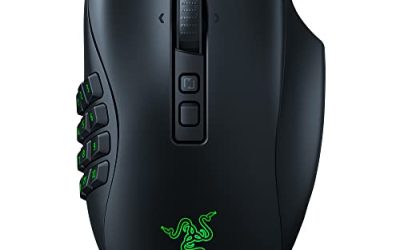
This is the most complete work-and-play mouse in the guide. Its HyperScroll Tilt Wheel clicks side to side for horizontal scrolling and switches into a free-spin mode for long documents, while 13 customizable controls leave room for editing shortcuts beside game bindings. It connects three ways — HyperSpeed wireless for the gaming PC, Bluetooth for the work laptop, and wired USB-C when the battery runs low — and the listing states up to 140 hours over HyperSpeed and up to 210 hours over Bluetooth. The Focus Pro 35K sensor and Gen-3 optical switches mean none of that versatility costs gaming performance.
Specs
- Sensor: Razer Focus Pro 35K optical sensor Gen-2, up to 35,000 DPI
- Scroll wheel: HyperScroll Tilt Wheel with free-spin mode
- Controls: 13 customizable controls, including a multi-function trigger
- Battery life: Up to 140 hours over HyperSpeed, up to 210 hours over Bluetooth
- Switches: Razer Optical Mouse Switches Gen-3
- Weight: 112 g
- Connectivity: HyperSpeed wireless, Bluetooth, wired USB-C
Best for: Hybrid workers who want one flagship mouse to cover a gaming desktop and a work laptop.
Watch out for: The 112 g sculpted shell is large and right-handed only, and reaching 8,000 Hz polling needs a Razer dongle or dock that the listing treats as a separate accessory.
Logitech G502 X Plus
Logitech’s all-rounder suits desk work because of its wheel and its button count. The dual-mode wheel toggles between precise ratchets and an infinite scroll that runs through long documents and timelines, and 13 programmable controls give you somewhere to put undo, screenshot and window-switching shortcuts. LIGHTFORCE hybrid switches keep the main clicks crisp, the HERO 25K sensor covers gaming without compromise, and the listing states up to 130 hours of battery life with USB-C charging. It lacks Bluetooth, so it suits a single main machine rather than constant two-laptop switching, but as a fixed-desk mouse it is hard to fault.
Specs
- Sensor: Logitech HERO 25K, up to 25,600 DPI
- Controls: 13 programmable controls
- Scroll wheel: Dual-mode, with an infinite scroll toggle
- Switches: LIGHTFORCE hybrid optical-mechanical
- Battery life: Up to 130 hours
- Weight: 106 g
- Connectivity: LIGHTSPEED wireless, USB-C, POWERPLAY charging capable
Best for: Spreadsheet and timeline editors who want a free-spinning wheel and many shortcut buttons on one desk.
Watch out for: No Bluetooth, so a second machine means moving the receiver; the 106 g weight and busy button layout are more than small hands usually want.
Razer Basilisk V3 X HyperSpeed
The Basilisk V3 X keeps the ergonomic Basilisk shape and the dual-mode connectivity of its flagship sibling, then stretches battery life by running on a single AA cell: the listing states up to 285 hours, with Bluetooth available for a laptop and HyperSpeed for the gaming rig. Nine programmable controls, including a multi-function trigger, cover the shortcut needs of most office work, and Razer HyperShift lets a held button turn the rest into a second layer of commands. The 18K optical sensor is a step below the flagship sensors here, but for mixed work and evening play it is more than sufficient.
Specs
- Sensor: Razer 5G Advanced 18K optical sensor
- Controls: 9 programmable controls, including a multi-function trigger
- Battery life: Up to 285 hours on a single AA battery
- Switches: Razer Mechanical Mouse Switches Gen-2
- Connectivity: Razer HyperSpeed wireless and Bluetooth
- Shape: Ergonomic, right-handed, with a thumb rest
- Lighting: Chroma RGB
Best for: Workers who hate charging cables and want months between battery swaps.
Watch out for: The AA cell is not included in some listings, so check the page contents; this shape is full-size, and a renewed version of this mouse circulates under a different listing, so confirm you are on the new one.
Razer Orochi V2
The Orochi V2 is the travel pick: a compact, symmetrical shell that weighs under 60 g with a AAA battery fitted, small enough to disappear into a laptop sleeve. It pairs over Bluetooth for work machines or HyperSpeed for gaming, and the listing states up to 950 hours of battery life on Bluetooth, the longest figure in this guide. A clever touch for travellers is the battery slot, which accepts either an AA or a AAA cell, so whatever a hotel shop sells will keep you working. The 18K sensor and mechanical switches keep it honest as a gaming mouse when the workday ends.
Specs
- Sensor: Razer 5G Advanced 18K optical sensor, up to 18,000 DPI
- Weight: Under 60 g with a AAA battery fitted
- Battery life: Up to 950 hours over Bluetooth
- Power: Runs on a single AA or AAA battery
- Switches: Razer Mechanical Mouse Switches Gen-2
- Connectivity: Razer HyperSpeed wireless and Bluetooth
- Shape: Symmetrical, compact
Best for: Travellers and hot-desk workers who carry their mouse with a laptop every day.
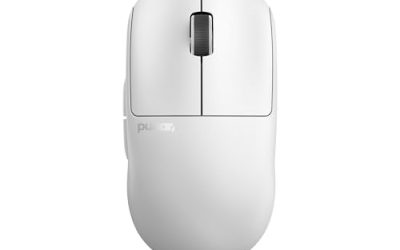
Watch out for: The small shell cramps large hands and palm grips, there is no tilt wheel for wide spreadsheets, and colour variants sit under separate listings — this one is the white version.
Logitech G305

The G305 is the simple, dependable option: LIGHTSPEED wireless, a HERO sensor up to 12,000 DPI, six programmable buttons and a stated 250 hours of battery life from a single AA battery. Its listing title calls out onboard memory, which matters for productivity because your button assignments and sensitivity settings stay on the mouse when you plug the receiver into a machine without Logitech software. The compact 99 g shell suits smaller hands and tidy desks, and there is no lighting to drain the cell. It gives up Bluetooth and a fancy wheel, but as a second mouse for a spare or shared machine it is exactly enough.
Specs
- Sensor: Logitech HERO, up to 12,000 DPI
- Battery life: Up to 250 hours on a single AA battery
- Buttons: 6 programmable buttons
- Memory: Onboard memory for stored profiles
- Weight: 99 g
- Connectivity: LIGHTSPEED wireless via USB receiver
- Colour of this listing: Mint
Best for: A low-maintenance second mouse for a home office, spare PC or family computer.
Watch out for: Receiver-only wireless means no Bluetooth pairing with a tablet or laptop, and the mint colour is one of several colour listings — check you have the colour you intended.
Which One Fits Your Situation
You split the day between a work laptop and a gaming PC
Choose the Basilisk V3 Pro 35K and pair each machine its own way: Bluetooth for the laptop, HyperSpeed for the desktop. The Basilisk V3 X offers the same switching trick with far longer battery life if you prefer AA cells. Either way, one mouse stays on the desk and the cable clutter disappears.
Your workday is spreadsheets, documents and timelines
The G502 X Plus earns its spot with the infinite scroll toggle and 13 controls for shortcuts, while the Basilisk V3 Pro 35K adds tilt scrolling for wide sheets. Decide by connectivity: the Logitech is the stronger fixed-desk tool, the Razer the stronger two-machine tool. Both wheels make long files noticeably less tedious.
You travel or hot-desk with a laptop
The Orochi V2 is built for the bag: under 60 g, months of Bluetooth battery, and a battery slot that takes AA or AAA cells, so a dead mouse is a two-minute fix anywhere. Its compact shape is the compromise, so pair it with a full-size mouse at your main desk if you have one.
You want a spare mouse that never asks for attention
The G305 runs for a stated 250 hours on one AA battery, stores its settings onboard and asks for nothing else. It suits the family computer, the workshop PC or the drawer of backup gear. When it finally needs a battery, the swap takes seconds and you are working again.
Common Mistakes
- Buying a receiver-only mouse for a two-laptop setup, then swapping the dongle back and forth all day.
- Judging battery life by the headline figure without checking which mode it assumes; Bluetooth figures and fast-wireless figures differ a lot.
- Ignoring the wheel: long-document workers feel the scroll wheel far more than a few thousand extra DPI.
- Setting up profiles only in software, then losing them on a work machine where the utility is not installed; onboard memory avoids this.
- Ordering a colour variant or a renewed listing by accident, since the same mouse appears under several listings.
Frequently Asked Questions
Can a gaming mouse really replace a dedicated work mouse?
For most desk work, yes. The picks here add the features that matter at work — tilt or free-spin wheels, Bluetooth pairing, long battery life and programmable shortcut buttons — while keeping gaming-grade sensors and switches. What you give up versus a pure office mouse is mainly the ergonomic specialisation of shapes built only for eight-hour document days.
Which connection mode should I use for work?
Bluetooth is the convenient choice for a work laptop because it needs no receiver and sips battery, which is how the Basilisk V3 Pro 35K reaches its longest stated battery figure. Use the 2.4 GHz mode for gaming, where its lower latency matters. Mice here with both modes let you keep each machine on its best connection.
How long do these batteries actually last in mixed use?
Expect less than the headline figure if you mix gaming sessions, lighting and higher polling into the week. Even so, the stated ranges in this guide — 130 to 950 hours depending on model and mode — translate to weeks or months between charges or battery swaps for typical mixed use, far beyond a daily-charge routine.
Do I need the brand software installed on my work computer?
Not always. Mice with onboard memory, like the G305, carry their settings with them and work the same on a locked-down machine. For the others, basic pointing and clicking work without any software; you only need the utility to change button assignments, lighting or stored profiles, which you can set once on your own computer.
Related guides
More from Amazon
Programs that pair well with the guide above. Offers and eligibility are set by Amazon and may change.
Free shipping on eligible items, Prime Video and more. Eligible new members can start with a free trial.
Start a Prime free trialAd-free music streaming. Eligible new subscribers can start with a free trial.
Try Music Unlimited freeA Prime membership for ages 18-24 with a trial period. Eligibility is set by Amazon.
See Prime for Young AdultsAudiobooks and podcasts to listen to on the go. Eligible new members can start with a free trial.
Try Audible freeAs an Amazon Associate we earn from qualifying purchases.