Choosing a gaming mouse as a left-hander is rarely about sensor numbers. The real decision is the shell: most gaming mice are sculpted for a right hand, with thumb buttons placed where a left thumb can never reach them. Your realistic options narrow to two families — the rare mice built as true left-handed editions with mirrored shapes, and ambidextrous models whose symmetrical shells and movable side buttons genuinely work in a left hand. Picking the wrong family means paying for buttons you cannot press.
This guide is for left-handed players across shooters, MOBAs and MMOs, including anyone switching from a right-handed setup for comfort. Every pick below is either a dedicated left-handed model or an ambidextrous mouse whose Amazon product page supports left-hand use, and each product was chosen from the names and specifications printed on its Amazon product page, so the shapes, button layouts and sensors described here match what the listings actually state.
Our Top Picks


Top 3 picks at a glance

Quick Picks
As an Amazon Associate we earn from qualifying purchases.
| Product | Best for | Key spec from title |
|---|---|---|
| Corsair M75 Wireless RGB Lightweight FPS Gaming Mouse | Wireless FPS play with thumb buttons under a left thumb | 26,000 DPI |
| Logitech G903 LIGHTSPEED Wireless Gaming Mouse | Long wireless sessions and a fully configurable button layout | 25,600 DPI |
| Razer Naga Left-Handed Edition | MMO and MOBA players who need a full thumb grid | 8,200 DPI |
| Logitech G305 LIGHTSPEED Wireless Gaming Mouse | A simple, light wireless mouse for everyday left-hand play | 12,000 DPI |
How to Choose
True Left-Handed Shape or Ambidextrous Shell
A mirrored left-handed shell curves the mouse around your left palm and moves the thumb rest to the correct side, which matters most in long sessions and button-heavy games. Ambidextrous shells are flat and symmetrical, so either hand gets the same shape, but comfort then depends on size and hump position rather than sculpted support. Check the listing’s stated hand orientation before anything else: a mouse described only as ergonomic is almost always right-handed. If you play palm grip, a mirrored shell usually wins; claw and fingertip players often do fine with a symmetrical one.
Where the Side Buttons Sit
Side buttons decide whether a symmetrical mouse is truly usable in your left hand. On many ambidextrous mice the buttons sit on the left flank only, which puts them under your ring finger instead of your thumb. Look for models with buttons on both flanks, swappable magnetic buttons, or removable covers that let you move a working pair to the right side. The product page should say which arrangement you get. If the listing is vague, assume the buttons are fixed, and plan your keybinds around your keyboard hand instead.
Wireless, Battery and Weight Trade-Offs
Wireless frees your left side of the desk from cable drag, which matters because many left-handed setups route the cable across the keyboard. Compare the battery figures printed on each listing: rechargeable models quote hours per charge, while AA-powered mice trade a little extra weight for months of use and instant swaps. Weight also shapes aim style. Heavier mice feel steady in palm grip and suit slower tracking, while lighter shells reduce fatigue during fast flicks. Match the quoted weight, including any optional add-on weights, to the games you actually play.
Sensor Range and Software Support
Modern optical sensors all track accurately at the sensitivities players actually use, so treat the maximum DPI figure on a listing as headroom rather than a quality score. What matters more is the adjustment range, whether DPI can be changed on the mouse itself, and whether the maker’s software lets you remap buttons and save profiles to onboard memory. Left-handers should also confirm the software allows swapping the primary click, because holding a mirrored mouse with the standard button assignment feels wrong within minutes of your first match.
The 4 Best Options
Corsair M75 Wireless RGB Lightweight FPS Gaming Mouse
The M75 Wireless is the ambidextrous pick that treats left-handers as first-class users. Its symmetrical shell ships with swappable side buttons, so you can fit a working pair on the right flank and blank off the other side, giving your left thumb real buttons instead of decoration. The MARKSMAN optical sensor, low weight and two wireless modes suit fast-paced shooters, while the rechargeable battery removes AA swaps from your routine. For left-handed FPS and MOBA players who want one wireless mouse that needs no workarounds, this is the most complete option in the guide.
Specs
- Sensor: CORSAIR MARKSMAN optical sensor, 26,000 DPI
- Tracking: 650 IPS, up to 50G acceleration
- Shape: Ambidextrous with swappable side buttons
- Connectivity: SLIPSTREAM Wireless, Bluetooth, wired USB-C
- Battery: Up to 105 hours via 2.4GHz SLIPSTREAM Wireless
- Weight: 89 g
- Software: iCUE compatible
Best for: Left-handed shooter players who want thumb buttons on the correct side without a cable.
Watch out for: Confirm the swappable button set is included in the box, and disable the unused flank’s buttons in iCUE so ring-finger presses do not trigger binds.
ASIN: B0CTN26P3Z
Logitech G903 LIGHTSPEED Wireless Gaming Mouse
The G903 builds its left-hand case on flexibility. The ambidextrous body accepts side buttons on either flank, so left-handed players can run a thumb pair on the right side, buttons on both sides, or none at all. Its HERO 25K sensor and LIGHTSPEED wireless suit competitive play, and the long rechargeable battery stretches through weeks of evening sessions between charges. An optional add-on weight lets palm-grip players add steadiness. It suits left-handers who switch between shooters and strategy games and want one configurable mouse that adapts to each.
Specs
- Sensor: HERO 25K, 100 to 25,600 DPI
- Connectivity: LIGHTSPEED wireless, 1 ms report rate
- Battery: Up to 140 hours with LIGHTSYNC RGB, up to 180 hours without lighting
- Weight: 107 g, plus optional 10 g weight
- Shape: Ambidextrous, configurable side buttons
- Charging: POWERPLAY wireless charging compatible
- Model number: 910-005670
Best for: Left-handed players who want a premium wireless mouse with buttons they can place on either side.
Watch out for: The listing covers several G903 revisions, so check the product details show the HERO 25K version and model 910-005670 before ordering.
ASIN: B07NSVMT22
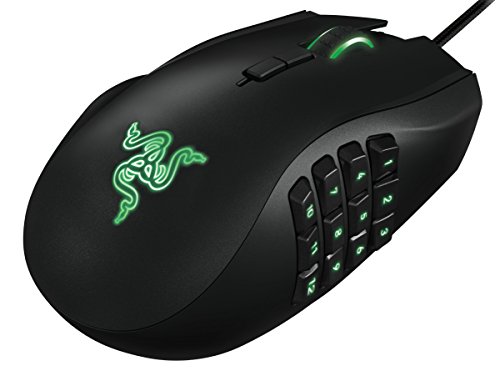
Razer Naga Left-Handed Edition
This is the only mouse in the guide shaped for a left hand rather than adapted to one. Razer mirrored its MMO shell, moving the sculpted thumb rest and the twelve-button grid to the right side, where a left thumb can work spell rotations and macros without contorting. The wired connection means no battery management, and the adjustable laser sensor covers both slow inventory dragging and fast camera turns. For left-handed MMO and MOBA players, nothing else on Amazon US offers this many buttons arranged for the correct hand.
Specs
- Design: Left-handed ergonomic MMO gaming mouse
- Thumb grid: 12 programmable thumb buttons on the right side
- Sensor: 8,200 adjustable DPI laser sensor
- Connectivity: Wired USB
- Model number: RZ01-01050100-R3M1
Best for: Left-handed MMO and MOBA players who bind a full ability rotation to the mouse.
Watch out for: This listing is sold by third-party sellers rather than Amazon itself, so check the seller and the model number RZ01-01050100-R3M1 on the listing before ordering.
ASIN: B00EO2ECUY
Logitech G305 LIGHTSPEED Wireless Gaming Mouse
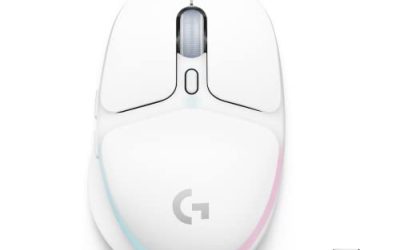
The G305 is the straightforward route into left-hand wireless play. Its symmetrical shell fits a left hand without sculpted ridges fighting your grip, the HERO sensor delivers full gaming tracking, and a single AA battery runs for months, so the mouse is always ready when you sit down. Six programmable buttons cover the essentials for shooters and action games, and onboard memory keeps your settings when you move between computers. It suits left-handed players who want a light, simple mouse for mixed gaming rather than a button panel.
Specs
- Sensor: HERO, 12,000 DPI
- Connectivity: LIGHTSPEED wireless
- Buttons: 6 programmable buttons
- Battery: 250 hours on one AA battery
- Memory: On-board memory
- Compatibility: PC and Mac
- Model number: 910-005280
Best for: Left-handed players who want an affordable, light wireless mouse for everyday gaming.
Watch out for: The side buttons sit on one flank only, so in a left hand they rest under your ring finger; plan to bind them lightly or disable them.
ASIN: B07CMS5Q6P
Which One Fits Your Situation
You Play MMOs With a Full Ability Bar
Choose the Razer Naga Left-Handed Edition. Its twelve-button thumb grid sits on the right side of a mirrored shell, exactly where your left thumb rests, so rotations, mounts and consumables stay on the mouse instead of crowding your keyboard hand. The wired connection removes battery worries during long raid nights, and the sculpted shape supports a palm grip through extended sessions better than any flat ambidextrous shell in this guide.
You Play Competitive Shooters
Pick the Corsair M75 Wireless. The symmetrical shell and swappable buttons let you place a working pair under your left thumb and blank the far side, while the 26,000 DPI optical sensor and low weight support fast, repeated flicks. SLIPSTREAM Wireless keeps the desk clear for wide mouse sweeps, and Bluetooth covers a second machine for work between matches without re-pairing a receiver.
You Want One Mouse for Work and Play
The Logitech G903 LIGHTSPEED fits a shared desk best. Its configurable buttons let you run a full gaming layout at night and a simpler one for daytime, the rechargeable battery lasts through long stretches between charges, and POWERPLAY compatibility can remove charging cables from the desk entirely with the matching mat. The ambidextrous shape also means a right-handed partner or colleague can use the same mouse comfortably.
You Want Wireless Without the Premium Features
Go with the Logitech G305 LIGHTSPEED. You give up swappable buttons and a rechargeable cell, but you keep a proper gaming sensor, a symmetrical shell that a left hand can grip naturally, and a battery that runs for months on a single AA. It is the easiest pick for a first left-hand gaming setup, a laptop bag, or a second desk where simple and ready beats fully loaded.
Common Mistakes
- Buying a right-handed ergonomic mouse because the listing calls it comfortable; sculpted shells and thumb rests are molded for one hand only.
- Assuming every ambidextrous mouse has thumb buttons for both hands; many carry buttons on one flank only, which lands under your ring finger.
- Forgetting to swap the primary click in the software or operating system, leaving your index finger on the wrong button.
- Choosing by maximum DPI alone instead of checking shape, button placement and battery type against how you actually play.
- Skipping the model number check on older left-handed listings, where several revisions share one product name.
Frequently Asked Questions
Can a left-handed gamer use an ambidextrous mouse comfortably?
Yes, provided the shell size suits your hand and grip. A symmetrical mouse gives both hands the same shape, so comfort comes down to length, hump position and grip style rather than sculpted support. The catch is the side buttons: only models with buttons on both flanks, or swappable buttons, give your left thumb a working pair.
What makes the Razer Naga Left-Handed Edition different?
It is a true left-handed design rather than a symmetrical one. Razer mirrored the ergonomic shell, so the thumb rest and the twelve-button grid sit on the right side of the mouse, under a left thumb. That layout is built for MMO and MOBA players who bind many abilities to the mouse, and it is wired, so there is no battery to manage.
Should left-handed players swap the main mouse buttons?
Most left-handed players find it helps. Swapping puts the primary click under your index finger, matching how the buttons were designed to be pressed, and most gaming software and operating systems offer the toggle. If you have used the standard layout since childhood and it feels natural, keep it; consistency matters more than matching a convention.
Is wireless responsive enough for left-handed gaming?
Yes. The wireless mice in this guide use gaming-grade connections, with the G903 quoting a 1 ms report rate over LIGHTSPEED and the M75 Wireless using SLIPSTREAM Wireless or Bluetooth. In practice the connection is not the limiting factor for left-handed players; shell fit and button placement affect your aim and comfort far more than the cable does.
Related guides
More from Amazon
Programs that pair well with the guide above. Offers and eligibility are set by Amazon and may change.
Free shipping on eligible items, Prime Video and more. Eligible new members can start with a free trial.
Start a Prime free trialAd-free music streaming. Eligible new subscribers can start with a free trial.
Try Music Unlimited freeA Prime membership for ages 18-24 with a trial period. Eligibility is set by Amazon.
See Prime for Young AdultsAudiobooks and podcasts to listen to on the go. Eligible new members can start with a free trial.
Try Audible freeAs an Amazon Associate we earn from qualifying purchases.