A rechargeable gaming mouse changes the daily routine in a small but real way. Instead of keeping spare AA batteries in a drawer and swapping them mid-match, you plug in a cable or drop the mouse on a dock when you finish playing. The trade is that you have to think about charging at all: a mouse with a short battery life and a slow charge can leave you wired on the night you wanted wireless freedom, so battery life, charge speed and weight matter more than raw sensor numbers alone.


This guide is for competitive shooter players who want the lightest wireless mouse they can flick, for MOBA and MMO players who need extra buttons, and for people who use one mouse for games and office work all day. Every mouse below has a built-in rechargeable battery charged over USB-C, and every specification comes from its Amazon listing.
Top 3 picks at a glance

Quick Picks
As an Amazon Associate we earn from qualifying purchases.
| Product | Best for | Key spec from title |
|---|---|---|
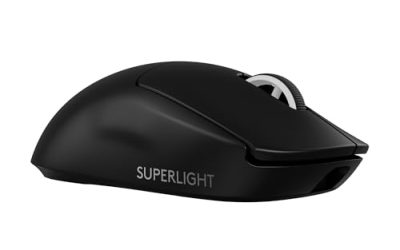
| Logitech G PRO X Superlight 2 | Competitive FPS players who want the lightest mouse | 60g, 44K DPI sensor, USB-C charging |
| Razer DeathAdder V3 Pro | Right-handed players who want an ergonomic shape | 63g, 30K optical sensor, 90-hour battery |
| Razer Viper V2 Pro | Fingertip and claw grip players who want symmetry | 30K DPI sensor, 90-hour battery, USB-C cable |
| Logitech G502 X Lightspeed | Players who want many buttons and a long battery | HERO 25K sensor, 140-hour battery, USB-C charging |
| SteelSeries Aerox 5 Wireless | MOBA and MMO players who want extra side buttons | 74g, 18K DPI sensor, 9 buttons |
How to Choose
Battery life and how you charge
Battery life decides how often the mouse interrupts you. A mouse listed for 90 hours or more can run for weeks of evening sessions before it needs a cable, while a shorter-lived mouse with RGB lighting on full brightness will ask for power far sooner. Check whether the mouse charges over USB-C, because that is the cable most desks already have, and check whether it keeps working while plugged in. A mouse that turns into a wired mouse during charging is fine at a desk, but a mouse that must sit idle while it charges will annoy you on a busy night.
Weight and shape for your grip
Weight changes how a mouse feels far more than any sensor number does. A mouse under 65 grams flicks across the pad with little effort, which suits fast aim in shooters, while a mouse near 100 grams feels planted and steady for players who rest their whole palm on it. Shape matters just as much: an ergonomic right-handed shell supports the thumb and suits palm grip, a symmetrical shell suits fingertip and claw grip, and a narrow shell can cramp a large hand over a long session. Hold the shape in mind before the spec sheet.
Sensor and polling rate
The sensor decides how accurately the mouse tracks fast movement, and the polling rate decides how often it reports its position to the PC. Modern flagship sensors track cleanly at 25,000 DPI and above, which is more headroom than most players ever use, so the real difference sits in consistency at high swipe speeds and in lift-off distance. A polling rate of 1,000 Hz is standard and smooth, while an 8,000 Hz rate reports more often and can feel slightly more responsive, though it also draws more battery and needs a strong CPU to show any difference.
Buttons, software and connectivity
Extra buttons are only useful if you can reach them without shifting your grip, so count the side buttons you can actually press mid-game rather than the total on the box. Software matters too: it sets DPI steps, polling rate, button assignments and lighting, and some mice store those settings on board so they travel with the mouse to another PC. For connectivity, a 2.4 GHz dongle gives the lowest latency for gaming, Bluetooth is handy for a laptop on the move, and a mouse with both lets one device cover the desk and the bag.
The 5 Best Options
Logitech G PRO X Superlight 2
The Superlight 2 is the mouse to look at first if competitive shooters are your main game. At 60 grams it is one of the lightest wireless mice with a built-in rechargeable battery, and the HERO 2 sensor tracks up to 44,000 DPI with an 8,000 Hz report rate for fast, precise aim. It keeps the shape simple, with five programmable buttons and no RGB lighting to drain the battery, and it charges over USB-C. The clean, symmetrical-ish shell suits claw and fingertip grips, and the LIGHTSPEED wireless link keeps latency low in fast matches.
Specs
- Weight: 60g
- Sensor: HERO 2, up to 44,000 DPI
- Report rate: 8,000 Hz
- Programmable buttons: 5
- Switches: LIGHTFORCE hybrid optical-mechanical
- Wireless: LIGHTSPEED
- Charging: USB-C
Best for: Competitive FPS players who want the lightest wireless mouse and a top sensor.
Watch out for: It has no Bluetooth mode and no RGB lighting, so check that a dongle-only wireless mouse fits your setup.
Razer DeathAdder V3 Pro
The DeathAdder V3 Pro is the ergonomic pick in this list, built for right-handed players who rest their palm on the mouse for hours. Its sculpted shell supports the thumb and the ring finger, the Focus Pro 30K optical sensor tracks cleanly at high speeds, and the listed battery runs up to 90 hours on a charge. Optical switches built for long use sit under the main buttons, HyperSpeed wireless keeps the connection steady, and the mouse charges over USB-C. It is a strong fit for shooters and action games where comfort over a long session matters as much as aim.
Specs
- Weight: 63g
- Sensor: Focus Pro 30K optical
- Battery life: up to 90 hours
- Programmable buttons: 5
- Switches: Optical Switches Gen-3
- Wireless: HyperSpeed
- Charging: USB-C
Best for: Right-handed palm grip players who want an ergonomic shape for long sessions.
Watch out for: The symmetrical shape of other mice in this list may suit left-handed players better, since this shell is right-handed only.
Razer Viper V2 Pro
The Viper V2 Pro suits players who grip with fingertips or a claw and want a symmetrical shell that feels the same from either side. Its Focus Pro 30K optical sensor and Gen-3 optical switches give fast, consistent clicks, HyperSpeed wireless keeps latency low, and the listed battery runs up to 90 hours before it needs the included USB-C cable. On-mouse DPI controls let you change sensitivity without opening software, and the low, flat shape makes quick lifts and resets easy during fast aim duels. It is the lightest-feeling symmetrical mouse here for shooter players.
Specs
- Sensor: Focus Pro 30K optical
- Battery life: up to 90 hours
- Programmable buttons: 5
- Switches: Optical Switches Gen-3
- Wireless: HyperSpeed
- Charging: USB-C cable included
- DPI controls: on-mouse
Best for: Fingertip and claw grip players who want a symmetrical shell for fast shooters.
Watch out for: Some listings state different weights for this model, so confirm the weight on the listing you buy from before ordering.
Logitech G502 X Lightspeed

The G502 X Lightspeed is the pick for players who want a mouse that does more than aim. Its HERO 25K sensor tracks up to 25,600 DPI, the LIGHTFORCE hybrid switches give a crisp click, and the battery is listed at up to 140 hours of constant motion, so charging becomes a rare event. Thirteen programmable controls, a reversible DPI-shift button and a dual-mode scroll wheel give MOBA, MMO and strategy players plenty of bindings, and the mouse charges over USB-C and works with the POWERPLAY wireless charging system. At 102 grams it is the heaviest mouse here, which suits players who like a planted feel.
Specs
- Weight: 102g
- Sensor: HERO 25K, 100 to 25,600 DPI
- Battery life: up to 140 hours
- Programmable controls: 13
- Switches: LIGHTFORCE hybrid optical-mechanical
- Wireless: LIGHTSPEED
- Charging: USB-C, POWERPLAY compatible
- Scroll wheel: dual-mode, hyper-fast and ratchet
Best for: Players who want many buttons, a long battery and a heavier, planted mouse.
Watch out for: The shape and weight suit medium to large hands best, so small-handed players should check the dimensions first.
SteelSeries Aerox 5 Wireless

The Aerox 5 Wireless is the multi-genre pick, built for players who jump between shooters, MOBAs and MMOs and want one mouse for all of them. Its perforated honeycomb shell keeps the weight at 74 grams, nine programmable buttons cover ability bars and macros, and Quantum 2.0 dual wireless runs over 2.4 GHz for gaming and Bluetooth for a laptop. The TrueMove Air sensor tracks up to 18,000 DPI, the shell carries IP54 AquaBarrier protection against splashes and dust, and RGB lighting runs through the perforations. It charges over USB-C and suits players who want buttons and versatility over pure lightness.
Specs
- Weight: 74g
- Sensor: TrueMove Air, up to 18,000 DPI
- Programmable buttons: 9
- Wireless: Quantum 2.0, 2.4 GHz and Bluetooth
- Protection: IP54 AquaBarrier
- Lighting: RGB through the honeycomb shell
- Charging: USB-C
Best for: MOBA and MMO players who want extra side buttons and dual wireless in one mouse.
Watch out for: Sources disagree on the battery life figure for this model, so treat battery claims with care and check the listing before buying.
Which One Fits Your Situation
You play competitive shooters most nights
Pick the Logitech G PRO X Superlight 2. Its 60-gram weight and 44,000 DPI HERO 2 sensor suit fast flicks and precise tracking, and the simple five-button layout keeps nothing in the way of your aim. The Razer Viper V2 Pro is the backup choice if you prefer a symmetrical shell and on-mouse DPI controls.
You switch between games and office work
Pick the SteelSeries Aerox 5 Wireless. Bluetooth covers the work laptop while the 2.4 GHz dongle covers the gaming PC, and nine buttons handle both macros and shortcuts. The Logitech G502 X Lightspeed also fits here if you want a longer battery and a heavier mouse for all-day use at your desk.
You play MOBAs or MMOs with many abilities
Pick the Logitech G502 X Lightspeed or the SteelSeries Aerox 5 Wireless. The G502 X gives thirteen programmable controls and a DPI-shift button for binding-heavy games, while the Aerox 5 gives nine buttons in a lighter shell. Choose the G502 X for the most bindings and the Aerox 5 for faster movement.
You hate charging mid-session
Pick the Logitech G502 X Lightspeed. Its listed 140-hour battery runs far longer than the other mice here, so a weekly charge covers most players. Keep the USB-C cable on the desk anyway, since every mouse here keeps working while plugged in and a short top-up beats a dead battery mid-match.
Common Mistakes
- Buying a mouse that runs on AA batteries when you wanted a rechargeable one: check the listing for a built-in battery and USB-C charging before ordering.
- Chasing the highest DPI number instead of checking weight, shape and polling rate, which change how the mouse feels far more.
- Turning RGB lighting to full brightness and then wondering why the battery drains in a few days.
- Picking an ergonomic right-handed shell when you are left-handed, or a narrow shell when you have large hands.
- Forgetting to check whether the mouse works while charging, and whether its software stores settings on board for use on another PC.
Frequently Asked Questions
How long does a rechargeable gaming mouse battery last?
It depends on the model and on lighting and polling rate. The mice in this guide list battery life from 90 hours to 140 hours of use, with RGB lighting and high polling rates shortening that figure. In practice, a mouse listed for 90 hours or more lasts most players one to two weeks of evening sessions before it needs a USB-C cable.
Can I use a rechargeable gaming mouse while it charges?
Yes, in most cases. The mice in this guide keep working as wired mice while plugged into USB-C, so you can finish a match and let the battery top up at the same time. A few mice charge slowly while in use, so a short break with the cable attached is the fastest way to add a useful amount of charge.
Is wireless as fast as wired for gaming?
Modern 2.4 GHz wireless from the main gaming brands reports at 1,000 Hz or higher, which matches wired mice for latency in real play. Bluetooth is slower and better suited to office work than competitive games, so use the dongle for gaming and keep Bluetooth for a laptop or a second device.
Do rechargeable gaming mice work on Mac?
Most do for basic pointing and clicking, and the mice here list PC and Mac compatibility, though the full software for DPI steps, button assignments and lighting is usually Windows only. Check the listing for Mac support before buying if you plan to change settings on a Mac, since on-board memory may be needed to carry settings over.
Related guides
More from Amazon
Programs that pair well with the guide above. Offers and eligibility are set by Amazon and may change.
Free shipping on eligible items, Prime Video and more. Eligible new members can start with a free trial.
Start a Prime free trialAd-free music streaming. Eligible new subscribers can start with a free trial.
Try Music Unlimited freeA Prime membership for ages 18-24 with a trial period. Eligibility is set by Amazon.
See Prime for Young AdultsAudiobooks and podcasts to listen to on the go. Eligible new members can start with a free trial.
Try Audible freeAs an Amazon Associate we earn from qualifying purchases.