Glorious built its name on one idea: a light mouse should not cost a fortune. The Model O made honeycomb shells and paracord cables mainstream, and the brand has since grown into a full lineup that covers symmetrical shapes, ergonomic right-handed shells, and button-heavy MMO layouts. Picking the best Glorious gaming mouse therefore means matching a shape and a connection type to your hand and your games, not just chasing the highest sensor number.
This guide covers four current Glorious mice that are easy to find and easy to recommend. Two are wireless, one is a wired ergonomic option, and one is a wired button-rich mouse for players who want more controls under the thumb. Each one is light by the standards of its class, each one uses a sensor that tracks cleanly in fast games, and each one works with Glorious Core software on PC for button changes and lighting. Read the buying checklist first, then compare the picks side by side.
One note before the list: Glorious sells several versions of each model, including wired, wireless, and newer second-generation editions. The names look similar, so check the exact model name and connection type on the listing before you buy. A Model O Wireless and a Model O 2 Wireless are different mice with different sensors, weights, and battery life, and this guide treats them as separate picks for that reason.
Top 3 picks at a glance


What to Look For
Shape first, sensor second. A mouse that fights your grip will slow you down no matter how good its sensor is. Glorious makes three main shapes: the symmetrical Model O line, the ergonomic right-handed Model D line, and the wider ergonomic Model I line with a thumb rest. Try to match the shape to your grip style and hand size before comparing specifications.
Weight and balance. Glorious mice are famous for low weight, and the difference between 68 and 75 grams is easy to feel during fast flicks. Lighter mice suit fingertip and claw grips and long sessions, while a slightly heavier shell can feel more planted for palm grips. Check whether the weight includes the cable and battery, since wired and wireless versions of the same shape can differ.
Sensor and DPI range. Current Glorious mice use the BAMF sensor family, with DPI ceilings from 19,000 to 26,000 depending on the model. Those numbers far exceed what most players use, so the practical question is tracking quality at your usual DPI, usually between 400 and 3,200. All four picks here track cleanly at those settings with no smoothing or acceleration.
Polling rate and connection type. Wired Glorious mice poll at 1,000 Hz, which is the standard for competitive play. Wireless models use a 2.4 GHz link with the same 1,000 Hz polling, plus Bluetooth for everyday use at a lower rate. If you play competitive shooters, use the 2.4 GHz link rather than Bluetooth, and keep the receiver close to the mouse.
Battery life on wireless models. Glorious quotes up to 71 hours of use for the first-generation wireless models and up to 210 hours on Bluetooth for the second generation. Real battery life depends on lighting and polling settings, so turn RGB lighting down or off if you want the longest run between charges. All wireless models charge over USB-C.
Button count and layout. Six buttons cover most FPS and battle royale games. Nine buttons, like those on the Model I, suit MOBA and MMO players who bind abilities to the mouse. Check that the side buttons sit where your thumb actually rests, since a button you cannot reach without shifting your grip is a button you will not use.
Switches and click feel. Glorious uses mechanical switches on the wired models and optical switches on some newer editions. Mechanical switches give a familiar crisp click, while optical switches respond faster and avoid double-click wear over time. Either type works well for gaming; the difference is mostly a matter of feel and long-term durability.
Software and on-board memory. Glorious Core software handles DPI steps, polling rate, lighting, and button assignments on PC. Settings saved to on-board memory stay with the mouse when you move it to another computer. If you play on more than one machine, confirm that the model you choose has on-board memory, since the feature varies across the lineup.
Top Picks
1. Glorious Model O Wireless
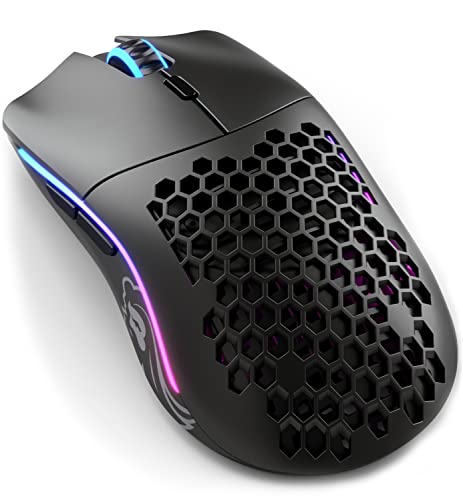
The Glorious Model O Wireless is the mouse that put the brand on the map, and it remains the safest first pick for most players. The matte black version weighs 69 grams, uses the BAMF optical sensor at up to 19,000 DPI, and connects over 2.4 GHz wireless or Bluetooth. Battery life reaches up to 71 hours with lighting off, which covers a full week of evening sessions before a USB-C top-up is needed. The symmetrical honeycomb shell suits medium to large hands in claw and fingertip grips, and the six-button layout keeps everything within easy reach.
What makes this mouse special is how little it asks you to give up for its weight. The honeycomb shell is rigid rather than flexy, the PTFE feet glide smoothly on cloth pads, and the clicks feel crisp without being stiff. RGB lighting runs along the sides and the scroll wheel, and it can be toned down or switched off in Glorious Core software if you prefer a plain look. The sensor tracks cleanly at low DPI settings, and the 1,000 Hz wireless polling keeps input delay low enough for competitive play.
The Model O Wireless is not the newest Glorious mouse, and the second-generation version beats it on sensor range and battery life. But it is also the most proven model in the lineup, with years of owner feedback behind it, and it remains a strong choice for players who want a light, reliable wireless mouse without paying for the newest sensor. If you like symmetrical shapes and you play a mix of FPS and casual games, start here.
2. Glorious Model O 2 Wireless
The Glorious Model O 2 Wireless is the updated version of the original, and it improves nearly every number that matters. Weight drops to 68 grams, the sensor jumps to the BAMF 2.0 at 26,000 DPI, and battery life stretches to up to 110 hours on 2.4 GHz wireless and up to 210 hours on Bluetooth. The shell keeps the symmetrical shape of the original but refines the curves slightly, with a narrower waist that suits claw grips and a cleaner look without the honeycomb holes of the first generation.
In use, the Model O 2 Wireless feels faster than its predecessor in two ways. The lighter shell and smoother PTFE feet make small adjustments easier, and the newer sensor holds tracking steady during fast swipes at low DPI. The 2.4 GHz link polls at 1,000 Hz, and the mouse switches to Bluetooth with a button on the underside for travel or office use. Six programmable buttons cover the essentials, and the scroll wheel has a light, defined step that works well for weapon switching and page scrolling alike.
The main trade-off is that the solid shell gives up the airy look of the honeycomb original, which some owners loved for its style and ventilation. The mouse also sits at a higher tier than the first-generation model, so budget-minded buyers may prefer the original. For players who want the newest Glorious sensor, the longest battery life, and the lightest symmetrical shell the brand makes, the Model O 2 Wireless is the pick.
3. Glorious Model D Wireless
The Glorious Model D Wireless is the ergonomic answer to the Model O line, built for right-handed players who want palm support and a shape that fills the hand. The matte white version weighs 69 grams, uses the BAMF optical sensor at up to 19,000 DPI, and runs for up to 71 hours on 2.4 GHz wireless. The right-handed curve supports the ring and pinky fingers, the thumb rests in a shallow groove, and the hump sits further back than on the Model O, which suits palm and relaxed claw grips during long sessions.
Comfort is where this mouse earns its place. The ergonomic shell spreads contact across the palm instead of focusing it on the fingertips, so the hand stays relaxed during long matches. The six-button layout mirrors the Model O, with two thumb buttons that are easy to reach without shifting the grip. The honeycomb shell keeps weight down despite the larger shape, and the PTFE feet give the same smooth glide as the rest of the lineup. RGB lighting accents the sides and can be adjusted or disabled in software.
The Model D Wireless only makes sense for right-handed players, since the shape is not symmetrical. Left-handed players should look at the Model O line instead. It is also a first-generation wireless model, so its sensor and battery life sit a step behind the Model O 2 Wireless. If your grip is palm-first and your sessions run long, though, the shape advantage outweighs the older sensor, and this is the most comfortable Glorious mouse in the guide.
4. Glorious Model I Wired
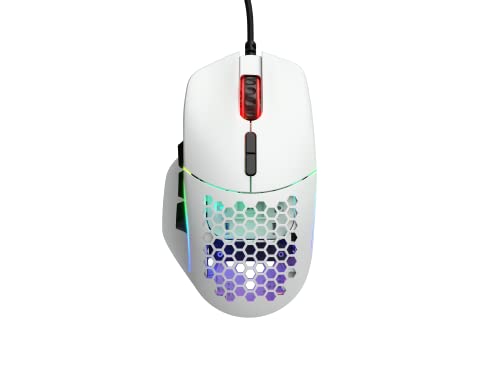
The Glorious Model I Wired is the button-heavy option in the lineup, and the right choice for players who bind abilities, items, or build commands to the mouse. It weighs 69 grams, carries nine programmable buttons, and uses two swappable side buttons that can be changed for different thumb layouts. The PixArt optical sensor reaches 12,000 DPI, the wired connection polls at 1,000 Hz, and the flexible paracord-style cable feels closer to wireless than a stiff rubber cable does.
What sets the Model I apart is the thumb area. A sculpted thumb rest supports the thumb during long sessions, and the side panel holds four buttons plus a two-way paddle, giving MMO and MOBA players enough controls to keep their left hand on movement keys. The swappable button modules let you choose between a two-button and a four-button thumb layout, so the mouse adapts to your game instead of forcing you to adapt to it. RGB lighting and PTFE feet round out a package that feels more premium than its weight suggests.
The Model I is wider than the Model O and Model D, so it suits medium to large hands best, and small-handed players may find the thumb cluster a stretch. It is also wired only in this version, which is a plus for latency and a minus for desk tidiness. For players who want the most controls Glorious makes in a light, ergonomic shell, the Model I is the clear pick.
Comparison at a Glance
| Mouse | Weight | Sensor / DPI | Connection | Battery |
|---|---|---|---|---|
| Model O Wireless | 69 g | BAMF, 19,000 DPI | 2.4 GHz, Bluetooth | Up to 71 hours |
| Model O 2 Wireless | 68 g | BAMF 2.0, 26,000 DPI | 2.4 GHz, Bluetooth | Up to 110 hours |
| Model D Wireless | 69 g | BAMF, 19,000 DPI | 2.4 GHz, Bluetooth | Up to 71 hours |
| Model I Wired | 69 g | PixArt, 12,000 DPI | Wired USB | Wired, no battery |
FAQ
Which Glorious mouse is best for FPS games?
The Model O 2 Wireless is the strongest FPS pick, thanks to its 68-gram weight, 26,000 DPI BAMF 2.0 sensor, and 1,000 Hz wireless polling. The original Model O Wireless is a close second and suits players who prefer the honeycomb shell. Palm-grip players who want more support should look at the Model D Wireless instead.
Are Glorious mice good for small hands?
The Model O line suits small to medium hands in claw and fingertip grips, since the symmetrical shell is narrow at the waist. The Model D and Model I are wider and suit medium to large hands better. If your hand measures under 17 centimeters from wrist to fingertip, start with a Model O and avoid the wider ergonomic models.
Do Glorious wireless mice work on Bluetooth?
Yes. The wireless models in this guide connect over 2.4 GHz for gaming and over Bluetooth for everyday use. Bluetooth uses less power and stretches battery life, but it polls at a lower rate, so switch to the 2.4 GHz receiver for competitive games.
What software do Glorious mice use?
Glorious Core software handles DPI steps, polling rate, lighting, and button assignments on Windows. Settings saved to on-board memory stay with the mouse when you move it to another computer. The software is optional for basic use, since DPI and lighting can be changed with on-board controls on most models.
Is the honeycomb shell hard to clean?
The honeycomb holes can collect dust over time, but a soft brush or a blast of compressed air clears them quickly. The solid-shell Model O 2 Wireless avoids the issue entirely if you prefer a smooth surface. Either way, wipe the mouse down once a week and the shell stays clean.
Conclusion
The best Glorious gaming mouse depends on your grip and your games. The Model O 2 Wireless leads the lineup for FPS players who want the newest sensor and the longest battery life, the original Model O Wireless remains a proven all-rounder, the Model D Wireless is the most comfortable pick for palm grips, and the Model I Wired gives MOBA and MMO players the buttons they need. Pick the shape that fits your hand first, then choose wired or wireless, and you will end up with a light, fast mouse that feels like it was made for the way you play.
Disclosure: As an Amazon Associate, gamingpcpromo.com earns from qualifying purchases.
Related guides
More from Amazon
Programs that pair well with the guide above. Offers and eligibility are set by Amazon and may change.
Free shipping on eligible items, Prime Video and more. Eligible new members can start with a free trial.
Start a Prime free trialAd-free music streaming. Eligible new subscribers can start with a free trial.
Try Music Unlimited freeA Prime membership for ages 18-24 with a trial period. Eligibility is set by Amazon.
See Prime for Young AdultsAudiobooks and podcasts to listen to on the go. Eligible new members can start with a free trial.
Try Audible freeAs an Amazon Associate we earn from qualifying purchases.