A pink gaming mouse is not a small decision when it is the thing your hand rests on for hours. The colour has to match the desk, but the shape has to suit your grip, the sensor has to keep up with fast turns, and the connection has to stay steady in the middle of a match. A mouse that looks right and feels wrong will sit unused, while a comfortable mouse in the wrong colour will never quite finish the setup you pictured.
This guide is for PC gamers building a pink setup, for players with smaller hands who want a lighter mouse, for wireless players who want a tidy desk, and for anyone who wants a pink mouse that is a genuine gaming mouse first. Every product below was chosen from the name and specifications shown on its Amazon product page, in the pink colour variant listed there, so you can check the colour before you buy.
Top 3 picks at a glance

Quick Picks
As an Amazon Associate we earn from qualifying purchases.
| Product | Best for | Key spec from title |
|---|---|---|
| Razer Orochi V2 Quartz Pink | Small hands and portable play on the move | 18K DPI optical sensor |
| Razer Viper Ultimate Quartz Pink | Ambidextrous wireless play with a charging dock | 20K DPI optical sensor |
| DAREU Sakura Pink with Charging Dock | A pink desk centrepiece with a matching dock | 12K DPI sensor |
| Glorious Model D Forge Flamingo Pink | Larger right hands and long wireless sessions | 19K sensor |
How to Choose
Start with grip and hand size
A pink finish will not fix a mouse that is too large or too small for your hand. Palm grip players need a longer shell that supports the whole hand, claw grip players need a shape with a clear hump under the palm, and fingertip players need a short, light shell they can lift and reposition quickly. The Razer Orochi V2 suits smaller hands and fingertip or claw grips, while the Glorious Model D Forge suits larger right hands that want an ergonomic curve. Before you settle on a colour, compare the length and width in the listing with a mouse you already find comfortable, and picture how your fingers fall on the main buttons and the side buttons.
Decide between wired and wireless
Wireless mice keep the desk clear and suit players who move the mouse across a wide pad, but they need charging or a battery change, and a dead battery in the middle of a session is a real interruption. A charging dock solves much of that problem, because the mouse has a home between sessions. Wired mice never need charging and suit players who leave the mouse in one place. In this guide, the Razer Viper Ultimate and the DAREU Sakura Pink both come with a charging dock, the Razer Orochi V2 runs on a replaceable battery, and the Glorious Model D Forge is a rechargeable wireless mouse.
Check the sensor and DPI range, not just the top number
The highest DPI number in a title is rarely the setting you will play at. Most players use a far lower sensitivity, so what matters is clean tracking at your usual setting, a sensor that does not spin out on fast flicks, and a polling rate that keeps movement smooth. The mice in this guide list sensors from 12K DPI to 20K DPI, which gives plenty of headroom for low-sensitivity play and for high-sensitivity play alike. Look for the sensor name and the tracking speed in the listing, set the DPI in steps that feel natural for your games, and remember that a steady mid-range setting usually beats a maximum setting that feels twitchy.
Weigh the mouse and count the buttons you will actually use
Weight changes how a mouse feels far more than most buyers expect. A mouse under 60 grams feels quick to lift and flick, which suits fast-paced shooters and small hands, while a heavier mouse can feel steadier for slower, deliberate aiming. The Glorious Model D Forge lists 58 grams, the Razer Orochi V2 is listed as under 60 grams, and the Razer Viper Ultimate lists 78 grams, so the spread here is wide enough to feel. Buttons matter too. Extra side buttons help in games with many abilities, but buttons placed where your thumb rests by accident will cause misclicks, so check the button count and layout against the games you play most.
The 4 Best Options
Razer Orochi V2 Quartz Pink

The Razer Orochi V2 in Quartz Pink is the pick for players who want a small, light wireless mouse that travels well and still behaves like a proper gaming mouse. Its compact shell suits smaller hands and fingertip or claw grips, and the two wireless modes mean it can connect to a laptop over Bluetooth or to a desktop through its HyperSpeed dongle. The long battery life is a practical advantage for players who game away from a charger, and the pink finish is a solid Quartz Pink rather than a pale tint that fades into white.
Specs
- Colour: Quartz Pink
- 5G Advanced 18K DPI optical sensor
- 2 wireless modes: Bluetooth and Razer HyperSpeed Wireless
- Up to 950 hours of battery life
- Ultra lightweight, under 60 grams
- Mechanical mouse switches
- 6 programmable buttons
- Runs on an AA or AAA battery
Best for: Smaller hands, portable play, and players who want a light wireless mouse with very long battery life.
Watch out for: Check that the listing shows Quartz Pink as the selected colour, and confirm whether you want the AA or AAA battery setup before you order, since the battery type affects weight and balance.
Razer Viper Ultimate Quartz Pink
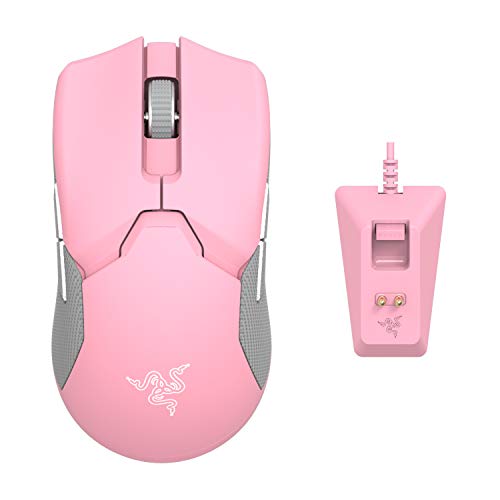
The Razer Viper Ultimate in Quartz Pink is the pick for players who want a full-size ambidextrous wireless mouse with a dock waiting on the desk. Its symmetrical shape works for left-handed and right-handed players, and the included RGB charging dock keeps the mouse charged between sessions without a cable trailing across the desk. The 20K DPI sensor and optical switches give it the responsiveness expected from a higher-end wireless mouse, and the pink finish pairs with other Quartz Pink Razer gear for a matched setup.
Specs
- Colour: Quartz Pink
- 20K DPI optical sensor
- HyperSpeed Wireless technology
- 78 grams
- Optical mouse switches
- Up to 70 hours of battery life
- RGB charging dock included
- 8 programmable buttons
Best for: Ambidextrous players who want a wireless mouse with a charging dock and a full-size shell.
Watch out for: Confirm the listing includes the RGB charging dock in the box, and check that Quartz Pink is the colour selected, because this mouse is also sold without the dock and in other colours.
DAREU Sakura Pink with Charging Dock
The DAREU Sakura Pink mouse is the pick for players who want the pink look to be the point of the desk, without giving up a real gaming sensor. Its white shell carries pink cherry blossom artwork and pink accents, and the matching magnetic charging dock with RGB lighting makes it a centrepiece rather than a plain peripheral. Six programmable buttons cover the usual in-game actions, and the rechargeable wireless design means there is no battery to replace. It suits casual and mid-paced games, streaming setups, and anyone building a sakura-themed desk.
Specs
- Colour: Sakura Pink
- 12K DPI sensor
- 6 programmable buttons
- 300 IPS tracking speed
- 1000 Hz polling rate
- Rechargeable wireless mouse
- Magnetic RGB charging dock included
Best for: A sakura-themed desk, casual and mid-paced games, and players who want a charging dock included.
Watch out for: Check the dock in the listing photographs and the items included, and measure the dock against your desk space, since the dock takes up more room than a plain cable.
Glorious Model D Forge Flamingo Pink

The Glorious Model D Forge in Flamingo Pink is the pick for right-handed players with larger hands who want a light ergonomic wireless mouse. Its curved shell supports the palm through long sessions, and at 58 grams it stays easy to lift and reposition despite the fuller shape. The 19K sensor and six programmable buttons cover competitive and everyday play, and the long battery life means fewer charging breaks. The Flamingo Pink finish is a clear, warm pink that stands out on a dark desk as well as a light one.
Specs
- Colour: Flamingo Pink
- 19K sensor
- 6 programmable buttons
- Up to 80 hours of battery life
- 58 grams
- Rechargeable wireless mouse
- Ergonomic right-handed shape
Best for: Larger right hands, long wireless sessions, and players who want an ergonomic shape in a light mouse.
Watch out for: This is a right-handed ergonomic shape, so left-handed players should look elsewhere, and confirm the Flamingo Pink variant is selected, because the same mouse is sold in other Forge colours.
Which One Fits Your Situation
You have small hands and play on the move
Choose the Razer Orochi V2 in Quartz Pink. Its compact shell and weight under 60 grams suit smaller hands and fingertip or claw grips, and the two wireless modes let it move between a laptop and a desktop without a cable. The long battery life also means it can travel without a charger in the bag.
You want a wireless mouse that is always charged
Choose the Razer Viper Ultimate in Quartz Pink or the DAREU Sakura Pink, depending on the shape you prefer. Both include a charging dock, so the mouse has a home between sessions. Pick the Viper Ultimate for an ambidextrous shape and a higher-end sensor, and pick the DAREU for a sakura look and a matching RGB dock.
You want the pink look to lead the whole desk
Choose the DAREU Sakura Pink with Charging Dock. The cherry blossom artwork, pink accents, and matching RGB dock make it the most decorative mouse in this guide, while the 12K DPI sensor and six programmable buttons keep it usable for real games rather than decoration alone. It also photographs well for a streaming setup and pairs naturally with a pink keyboard and headset.
You have larger hands and play for long sessions
Choose the Glorious Model D Forge in Flamingo Pink. Its ergonomic right-handed curve supports the palm, its 58-gram weight keeps it easy to move, and the long battery life covers extended play without a mid-session charge. It is the most comfortable fit in this guide for bigger hands. The 19K sensor and six programmable buttons cover competitive and everyday games alike.
Common Mistakes
- Choosing by colour alone and ending up with a shell that is too large or too small for your grip.
- Ordering the black or white variant by mistake because the colour selector was left on the default option.
- Picking a mouse with no charging plan, then running out of battery in the middle of a session.
- Setting the DPI to the maximum in the title instead of a sensitivity that feels steady in your games.
- Ignoring the dock or cable in the box, and finding the mouse needs an accessory you did not expect.
Frequently Asked Questions
What is the best pink gaming mouse for small hands?
The Razer Orochi V2 in Quartz Pink is the best fit for small hands in this guide. Its compact shell suits fingertip and claw grips, it weighs under 60 grams, and it connects over Bluetooth or HyperSpeed Wireless. The long battery life also suits players who carry the mouse between a laptop and a desktop.
Are pink gaming mice as good as black gaming mice?
Yes, when the pink version is the same model as the black version. The mice in this guide are pink colour variants of established gaming mice, with the same sensors, switches, and buttons as their other colours. Check the model name and specifications on the Amazon listing, not just the colour name.
Do wireless pink gaming mice need a charging dock?
No, a dock is convenient but not required. The Razer Viper Ultimate and the DAREU Sakura Pink include a dock, the Glorious Model D Forge recharges over a cable, and the Razer Orochi V2 runs on a replaceable battery. Pick the charging method that fits how you play and how tidy you want the desk to stay.
How do I make sure I get the pink version?
Select the pink colour on the Amazon product page before adding the mouse to your basket, and read the colour in the order summary. For this guide that means Quartz Pink for the Razer mice, Sakura Pink for the DAREU mouse, and Flamingo Pink for the Glorious mouse, since each model is sold in several colours.
Related guides
More from Amazon
Programs that pair well with the guide above. Offers and eligibility are set by Amazon and may change.
Free shipping on eligible items, Prime Video and more. Eligible new members can start with a free trial.
Start a Prime free trialAd-free music streaming. Eligible new subscribers can start with a free trial.
Try Music Unlimited freeA Prime membership for ages 18-24 with a trial period. Eligibility is set by Amazon.
See Prime for Young AdultsAudiobooks and podcasts to listen to on the go. Eligible new members can start with a free trial.
Try Audible freeAs an Amazon Associate we earn from qualifying purchases.