Fortnite asks a mouse to do three jobs at once: snap onto a target in a close shotgun fight, track a moving player at medium range, and fire build and edit binds without a missed press. The wrong mouse shows up as a heavy drag on every flick, a shape that cramps your hand by the third hour, or a sensor that stutters on a fast swipe. The right one disappears into your hand — you move, the crosshair follows, and each wall and edit lands where you meant it to land.


This guide covers ranked players chasing cleaner mechanics, casual players who want a mouse that keeps up in build fights, and parents buying a first serious mouse for a younger player. Each pick below is a gaming mouse with a live Amazon listing, chosen from the weight, sensor, polling rate and button layout shown on its product page.
Our Top Picks
Top 3 picks at a glance

Quick Picks
As an Amazon Associate we earn from qualifying purchases.
| Product | Best for | Key spec from title |
|---|---|---|
| Logitech G PRO X SUPERLIGHT 2 | All-round ranked play | 60g shell, 44K DPI sensor, 8kHz report rate |
| Razer Viper V3 Pro | Fast flicks and edits | 54g shell, 8K polling, 35K DPI sensor |
| Logitech G305 LIGHTSPEED | A first wireless mouse | 250-hour battery, 12,000 DPI sensor |
| Razer DeathAdder V3 Pro | Palm-grip comfort in long sessions | 63g shell, Focus Pro 30K sensor, 90-hour battery |
| HyperX Pulsefire Haste 2 Wireless | Switching between two machines | 61g shell, dual wireless, 100-hour battery |
How to Choose
Weight and shape decide more than the sensor
A light mouse changes how Fortnite feels before any sensor number matters. Flicking to a shotgun target, snapping back for an edit, and resetting your aim all get easier when the mouse stops fighting your wrist, which is why most competitive picks sit near 60 grams. Shape matters just as much: a low, symmetrical shell suits claw and fingertip grips, while a taller ergonomic shell fills a palm grip and supports the hand through long sessions. Before you compare sensors, check the length and width against your hand, because a mouse that forces your fingers into an awkward curl will cost you more fights than any sensor upgrade will win back.
Sensor and polling rate, in plain terms
The sensor decides how faithfully the mouse reports your hand, and the polling rate decides how often it reports. A modern optical sensor with a high maximum DPI tracks cleanly at the low sensitivity most Fortnite players use, so treat the headline DPI number as headroom rather than a target — nobody aims well at 26,000 DPI. Polling rate is the more practical number: 1000 Hz is the standard for smooth play, while 8000 Hz shortens the gap between your movement and the cursor, at the cost of faster battery drain on wireless models. Pick a sensor from a current generation, set the polling rate you can live with, and spend the rest of your attention on shape.
Wireless connection and battery life
Wireless stopped being a compromise years ago, and every mouse in this guide runs on a 2.4 GHz receiver that keeps up with fast Fortnite play. What separates them is what happens around that connection: some add Bluetooth for a laptop or a second machine, some charge over USB-C, and one still runs on a replaceable AA battery. Battery life ranges from around 90 hours to 250 hours on a charge or a cell, so check the number against your own habits — a mouse that dies mid-tournament is worse than a slightly heavier one that lasts the week. If you play daily, a USB-C rechargeable model with a long battery rating is the easy choice.
Buttons, grip and build binds
Fortnite leans on the mouse more than most shooters, because building and editing live on your binds. Two side buttons cover the usual setup — one for a wall, one for an edit or a weapon swap — while extra buttons suit players who bind stairs, floors and cones to the mouse as well. Your grip decides which layout works: claw players reach side buttons with the thumb tip, palm players press them with the thumb pad, and fingertip players need buttons that sit close to the shell. Count the buttons you actually use in a match, not the ones on the box, and make sure each one falls under your thumb without shifting your grip.
The 5 Best Options
Logitech G PRO X SUPERLIGHT 2
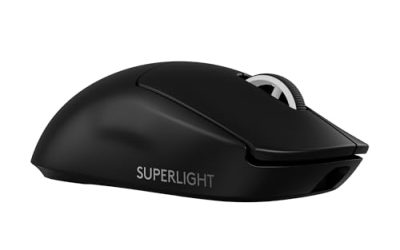
The Superlight 2 is the safe pick for most Fortnite players because it gets the fundamentals right and stays out of the way. At 60 grams it flicks and resets without dragging your wrist, the HERO 2 sensor tracks cleanly at low sensitivity, and the 8kHz report rate keeps the cursor tight to your hand in fast build fights. The shape is a low, symmetrical shell that suits medium to large hands in claw and palm grips, and the five programmable buttons cover the usual wall, edit and swap binds. It connects over LIGHTSPEED wireless or USB-C, so there is no cable tugging at your aim mid-fight.
Specs
- 60g lightweight shell
- HERO 2 sensor with up to 44,000 DPI
- 8kHz report rate
- 5 programmable buttons
- LIGHTSPEED wireless with USB-C charging
- Works with PC and Mac
Best for: Ranked players who want one mouse that handles aim, building and long sessions without fuss.
Watch out for: The side buttons sit on the left edge only, so left-handed players should check the layout first, and there is no Bluetooth mode for a second machine.
Razer Viper V3 Pro
The Viper V3 Pro is the pick for players who chase raw speed. Its 54-gram symmetrical shell is one of the lightest in this guide, so flicks to a shotgun target and snap edits feel instant, and the Focus Pro 35K sensor holds tracking steady through fast swipes. True 8000 Hz wireless polling tightens the link between hand and cursor, and the eight programmable controls give builders room for extra binds beyond the usual two side buttons. The shape is low and neutral, which suits claw and fingertip grips best, and the 95-hour battery covers a full week of evening sessions before it needs a charge.
Specs
- 54g symmetrical shell
- Focus Pro 35K optical sensor
- True 8000 Hz wireless polling
- Gen-3 optical switches
- 8 programmable controls
- Up to 95 hours of battery life
Best for: Competitive players who want the lightest flicks and the fastest polling in this guide.
Watch out for: The fastest polling mode drains the battery quicker, so drop to 1000 Hz for casual sessions, and the low symmetrical shape feels different from a tall ergonomic mouse.
Logitech G305 LIGHTSPEED
The G305 is the sensible starting point for a first wireless gaming mouse. Its HERO 12K sensor and 12,000 DPI ceiling are more than enough for Fortnite at the low sensitivity most players use, and the six programmable buttons cover the usual build and edit binds. The 250-hour battery life means a single cell lasts for months of regular play, and the on-board memory keeps your settings on the mouse when you move it between machines. The shape is a compact, right-handed shell that suits small to medium hands, and it works as a spare mouse for a second setup long after you upgrade.
Specs
- HERO 12K sensor with up to 12,000 DPI
- 6 programmable buttons
- Up to 250 hours of battery life
- On-board memory for saved settings
- LIGHTSPEED wireless connection
- Works with PC and Mac
Best for: First-time buyers and younger players who want a reliable wireless mouse without a complicated setup.
Watch out for: It runs on a replaceable AA battery rather than a rechargeable cell, so keep a spare nearby, and the compact shell can feel small for large hands.
Razer DeathAdder V3 Pro
The DeathAdder V3 Pro is the comfort pick for palm-grip players. Its tall, right-handed ergonomic shell fills the hand and supports the palm through long sessions, which matters when a ranked night runs past midnight. At 63 grams it stays light enough for quick flicks, the Focus Pro 30K sensor tracks cleanly at low sensitivity, and the 90-hour battery covers a week of play. Five programmable buttons sit within easy thumb reach for wall and edit binds, and HyperSpeed wireless keeps the connection steady without a cable. If your current mouse leaves your hand aching, this is the shape to try first.
Specs
- 63g ultra-lightweight ergonomic shell
- Focus Pro 30K optical sensor
- Gen-3 optical switches
- HyperSpeed wireless connection
- 5 programmable buttons
- Up to 90 hours of battery life
Best for: Palm-grip players with medium to large hands who want ergonomic support in long sessions.
Watch out for: The ergonomic shape is right-handed only, and the standard listing runs at 1000 Hz — the 8000 Hz bundle with the HyperPolling dongle is a separate listing.
HyperX Pulsefire Haste 2 Wireless

The Pulsefire Haste 2 Wireless is the flexible pick for players who move between machines. Dual wireless connectivity covers both 2.4 GHz for gaming and Bluetooth for a laptop or a second setup, so you can switch without re-pairing a receiver. The 61-gram solid shell stays light for flicks and edits, the HyperX 26K sensor tracks up to 26,000 DPI with 650 IPS tracking speed, and the battery lasts up to 100 hours on a charge. Six programmable buttons cover the usual binds, and the mouse charges over USB-C. It is the easiest mouse in this guide to share between a desktop and a laptop.
Specs
- 61g ultra-lightweight solid shell
- HyperX 26K sensor with up to 26,000 DPI
- 650 IPS tracking speed
- Up to 100 hours of battery life
- Dual wireless connectivity (2.4 GHz and Bluetooth)
- USB-C charging
Best for: Players who switch between a desktop and a laptop and want Bluetooth as a backup connection.
Watch out for: Changing DPI stages and lighting needs the NGENUITY software, and the solid shell has no honeycomb openings, so players who liked the original Haste should expect a different feel.
Which One Fits Your Situation
You want one mouse for ranked play
Pick the Logitech G PRO X SUPERLIGHT 2. It pairs a 60-gram shell with a current sensor and 8kHz polling, so it handles flicks, tracking and build fights without a weak spot, and the shape fits the widest range of hands in this guide. If you only want to buy once and stop thinking about your mouse, this is the one to stop on.
You build and edit at full speed
Pick the Razer Viper V3 Pro. Its 54-gram shell and 8000 Hz polling make snap edits and fast piece control feel immediate, and the eight programmable controls leave room for extra build binds beyond the usual two. The low symmetrical shape suits claw and fingertip grips, which are the grips most fast builders use.
Your hand tires during long sessions
Pick the Razer DeathAdder V3 Pro. The tall ergonomic shell supports a palm grip through hours of play, and at 63 grams it stays light enough for quick flicks between builds. The 90-hour battery means it will not quit mid-session, and the five thumb buttons keep wall and edit binds close. If your hand aches after a long night, shape is the fix, not a higher DPI number.
You are buying a first mouse or a second setup
Pick the Logitech G305 LIGHTSPEED if you want a simple first wireless mouse: the 250-hour battery lasts for months, the six buttons cover the usual binds, and the compact shape suits small to medium hands. Pick the HyperX Pulsefire Haste 2 Wireless if the mouse has to move between two machines, since its Bluetooth mode and USB-C charging make the switch easy.
Common Mistakes
- Chasing the highest DPI number instead of a shape that fits your hand and grip.
- Buying a mouse that is too large or too small, then blaming the sensor for missed flicks.
- Binding build and edit keys to macros, which Fortnite does not allow — keep every bind a single action per press.
- Leaving polling at the maximum setting on a wireless mouse and wondering why the battery drains fast.
- Ordering a colour or edition variant without checking that the listing matches the exact model you wanted.
Frequently Asked Questions
What DPI should I use for Fortnite?
There is no single best DPI, because it works together with your in-game sensitivity. Most competitive players use a low setup, often 400 or 800 DPI with a moderate in-game sensitivity, so small hand movements stay precise. Start at 800 DPI, set your in-game sensitivity until a full swipe across your pad turns you about-face, then leave it alone for a week before changing anything.
Is a wireless mouse fast enough for Fortnite?
Yes. Modern wireless gaming mice use a 2.4 GHz receiver that reports movement as quickly as a wired connection in normal play, so the cable is no longer the deciding factor. Keep the receiver close to the mouse, keep the battery charged, and pick by shape and weight instead. A wired mouse still works fine if you already own one and like it.
How heavy should a Fortnite mouse be?
Most players do best with a mouse under about 65 grams, because lighter mice make flicks, snap edits and fast resets easier on the wrist. All five picks in this guide sit between 54 and 63 grams. Weight still comes second to shape, though: a light mouse with the wrong shape will feel worse than a slightly heavier mouse that fits your hand.
Do I need extra side buttons for building?
Two side buttons are enough for most players: one for a wall and one for an edit or a weapon swap covers the binds you press constantly. Extra buttons help heavy builders who bind stairs, floors and cones to the mouse as well. Whatever you bind, keep each button a single action, since Fortnite does not allow macros, and place binds where your thumb reaches them without shifting your grip.
Related guides
More from Amazon
Programs that pair well with the guide above. Offers and eligibility are set by Amazon and may change.
Free shipping on eligible items, Prime Video and more. Eligible new members can start with a free trial.
Start a Prime free trialAd-free music streaming. Eligible new subscribers can start with a free trial.
Try Music Unlimited freeA Prime membership for ages 18-24 with a trial period. Eligibility is set by Amazon.
See Prime for Young AdultsAudiobooks and podcasts to listen to on the go. Eligible new members can start with a free trial.
Try Audible freeAs an Amazon Associate we earn from qualifying purchases.