
Building a custom PC for a home office or modern gaming room requires balancing thermal performance with room aesthetics. Heavy black steel towers often absorb room lighting and make a modest corner desk feel cluttered and dark. Switching to a bright, reflective white chassis instantly uplifts a room’s interior design, blending smoothly with light wood desks, Scandinavian furniture, and minimalist wall palettes. However, trapped heat remains a constant threat to internal components when cases prioritize closed glass panels over ventilation.
To help you find the best budget white gaming case with good airflow, we evaluated chassis designs that maintain high air turnover while staying within accessible price points between $54.99 and $104.99. Modern PC hardware running high-wattage graphics cards generates substantial ambient heat, demanding smart fan placement, room for radiators, and vented mesh panels. The following guide highlights top-performing white enclosures that maintain cool operating environments without compromising the clean, bright aesthetic of your desktop setup.
As an Amazon Associate we earn from qualifying purchases at no extra cost to you. Product prices and availability are accurate as of the date shown and are subject to change.




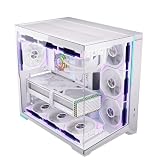
Top 3 picks at a glance
Quick Picks
| Product | Best for | Price |
|---|---|---|
| CORSAIR 3500X RS ARGB Panoramic Mid-Tower PC Case – White | Best Overall Aesthetic & Quality | $99.99 |
| MUSETEX Y6 PC Case (7 Infinity Mirror Fans) | Best Visual Lighting Features | $89.99 |
| RUIX OV303 ATX Mid-Tower PC Case | Best Mesh Intake Value | $79.99 |
| HYXN H2 (2026) HYXN ATX PC Case | Best Maximum Air Circulation | $89.99 |
| ANSAITE ATX PC Case C9 | Best Dual-Glass Budget Option | $79.99 |
| MUSETEX ATX PC Case Y6 Pure White | Best Radiator Compatibility | $104.99 |
| SAMA S41 ATX Mid-Tower Gaming PC Case | Best Ultra-Low Budget Entry | $54.99 |
| ESGAMING ZEROMAX ATX PC Case | Best Custom Fan Airflow Setup | $69.99 |
How We Picked
Selecting a budget-friendly white chassis requires evaluating thermal dynamics, physical construction, and component clearance. We focused heavily on cases priced strictly under $110 that deliver effective thermal management for components drawing between 300W and 650W total system power.
Our evaluation criteria focused on three core areas:
- Airflow Infrastructure: We analyzed the layout of intake mesh, ventilation cutouts, and pre-installed fan count (ranging from 0 to 8 PWM fans) to ensure continuous fresh air intake across the GPU and CPU zones.
- Interior Clearances: Cases had to support standard ATX motherboards, graphics cards up to 380mm–420mm in length, CPU air coolers up to 160mm–175mm tall, and top or side liquid cooling radiators measuring 240mm to 420mm.
- Build Quality & Cable Routing: We prioritized chassis featuring sturdy steel frames (0.6mm–0.8mm thick), tempered glass side panels, dedicated cable routing channels behind the motherboard tray, and modern front panel connectivity including USB Type-C.
The 8 Best Picks
1. CORSAIR 3500X RS ARGB Panoramic Mid-Tower PC Case – White
The CORSAIR 3500X RS ARGB is designed for builders who want a clean, uninterrupted view of their hardware alongside modern motherboard connector support. For anyone looking for the best budget white gaming case with good airflow, this chassis offers a sleek wraparound tempered glass panel combined with strategic side and top ventilation to keep internal temperatures balanced. The white finish is crisp and matches well with light office decor.
- Pros: Panoramic tempered glass panel with zero corner pillar obstruction; includes pre-installed RS ARGB fans with daisy-chaining.
- Con: Upper boundary of budget pricing at $99.99.
When to skip: Skip if you need a front mesh panel for direct front-to-back wind-tunnel air movement.
2. MUSETEX Y6 PC Case (7 Infinity Mirror Fans)
The MUSETEX Y6 delivers an eye-catching focal point for modern gaming rooms. Equipped with 7 pre-installed infinity mirror PWM ARGB fans, this mid-tower creates a mesmerizing lighting show visible through its 270° full-view tempered glass panels. The dual-chamber structure keeps the power supply and cables isolated, allowing clean airflow across the graphics card and motherboard zones.
- Pros: Excellent value with 7 pre-installed infinity mirror PWM ARGB fans; features modern front USB Type-C connectivity.
- Con: Glass front limits direct frontal air intake compared to full mesh fronts.
When to skip: Skip if you prefer minimal lighting or non-RGB office aesthetics.
3. RUIX OV303 ATX Mid-Tower PC Case
The RUIX OV303 focuses strictly on high-volume thermal dissipation. With a heavily perforated mesh front intake and 4 pre-installed 120mm Prism ARGB PWM fans, it drives cooler ambient air directly across high-draw graphics cards. At $79.99, it provides an ideal middle ground between physical cooling capability and low pricing for tight budgets.
- Pros: Direct front-to-back airflow channel via fine mesh front panel; includes 4 pre-installed PWM Prism ARGB fans.
- Con: Included fan hub offers basic customization options compared to software-driven hubs.
When to skip: Skip if you want panoramic dual-glass visual styling instead of front mesh.
4. HYXN H2 (2026) HYXN ATX PC Case
The HYXN H2 (2026) HYXN ATX PC Case offers massive air intake out of the box with 8 pre-installed PWM ARGB fans, including six 140mm fans and two 120mm fans. This large dual-chamber mid-tower chassis supports heavy-duty cooling setups, accommodating up to a 420mm liquid cooling radiator along the top or side mounts, making it ideal for high-wattage gaming builds.
- Pros: Exceptional airflow potential driven by 8 pre-installed fans (including 140mm sizes); supports massive 420mm radiators.
- Con: Broader dual-chamber footprint requires more desk surface area.
When to skip: Skip if your desk width is restricted to under 18 inches.
5. ANSAITE ATX PC Case C9
The ANSAITE C9 mid-tower PC case pairs a full-view dual tempered glass aesthetic with 7 pre-installed PWM ARGB fans for immediate out-of-the-box thermal management. Selling at $79.99, it provides a bright pure-white internal frame that reflects custom ARGB lighting beautifully, making it a great accent piece for styled rooms.
- Pros: Comes equipped with 7 PWM ARGB fans at an affordable $79.99 price point; dual glass panels offer clean internal visibility.
- Con: Internal drive mounting brackets feel somewhat lightweight.
When to skip: Skip if you frequently install multiple 3.5-inch mechanical hard drives.
6. MUSETEX ATX PC Case Y6 Pure White
This edition of the MUSETEX Y6 mid-tower chassis features a pure white design spanning the frame, fan shrouds, cables, and front I/O ports. Pre-loaded with 6 PWM ARGB fans and supporting up to a 360mm radiator, it blends seamless 270° tempered glass visibility with targeted ventilation cutouts across the top and side panels.
- Pros: Pure white color matching across all internal components and fan frames; full top and side 360mm AIO support.
- Con: Slightly higher price tag at $104.99.
When to skip: Skip if you want to keep your overall case budget strictly under $100.
7. SAMA S41 ATX Mid-Tower Gaming PC Case
The SAMA S41 is the most budget-friendly option on our list at $54.99, freeing up funds to invest in faster processors or GPUs. Despite its entry-level price, it includes 4 ARGB fans, a front mesh panel for unobstructed airflow, USB Type-C support, and space for a 360mm top-mounted liquid cooler.
- Pros: Outstanding price point at $54.99; supports standard 360mm AIO liquid coolers and features built-in USB-C.
- Con: Thinner sheet metal frame compared to higher-priced mid-towers.
When to skip: Skip if you require ultra-rigid chassis construction for heavy travel or LAN events.
8. ESGAMING ZEROMAX ATX PC Case
The ESGAMING ZEROMAX approaches airflow with a specialized 8° slanted base design engineered to draw cool air upward into the GPU fan intake. Arriving without pre-installed fans at $69.99, this fully ventilated panoramic frame allows PC builders to install their preferred high-static pressure fan configurations from scratch.
- Pros: Innovative 8° slanted chassis base aids thermal intake underneath the graphics card; allows full customization of fan brands.
- Con: Ships with no pre-installed fans, requiring additional purchase.
When to skip: Skip if you prefer an out-of-the-box solution with fans included.
Buying Guide
1. Airflow Dynamics: Mesh Fronts vs. Glass Panoramas
Choosing between a mesh front panel and a dual-tempered glass panoramic enclosure comes down to matching your system’s heat output with intake volume. Traditional mesh-front cases, like the RUIX OV303 or SAMA S41, draw air directly from the front room environment across the motherboard chamber. This setup keeps internal hardware operating at low ambient temperatures under prolonged heavy loads.
Conversely, panoramic glass enclosures (such as the MUSETEX Y6 or CORSAIR 3500X) rely on side intake vents, bottom air channels, and top exhaust ports to circulate air. If you choose a panoramic glass case, aim for models with at least 6 to 8 pre-installed fans to ensure adequate static pressure and consistent air movement across your graphics card.
2. Clearance, Dimensions, and Desk Footprint
Before purchasing a white PC case, verify its spatial measurements to ensure it fits your desk and accommodates your components:
- GPU Length Clearance: Modern graphics cards range from 300mm to 390mm in length. Cases like the HYXN H2 accommodate oversized cards with room to spare.
- CPU Cooler Height: Tower-style air coolers typically require 160mm to 175mm of vertical clearance from the CPU socket to the glass panel.
- Desk Dimensions: Standard mid-towers occupy a footprint of approximately 18 to 20 inches in length and 8 to 10 inches in width. Dual-chamber designs expand width up to 12 inches, so measure your desk space beforehand.
3. Cable Routing and Aesthetic Integration
White PC cases show internal dust, stray cables, and dark components more visibly than black cases. Look for cases that provide 20mm to 35mm of cable management depth behind the motherboard tray, along with white rubber grommets or painted white cable cutouts. Dual-chamber cases simplify cable clutter by hiding the power supply, hard drives, and excess wiring behind a central partition, ensuring a clean view through the glass panels.
Our Verdict
For the best overall balance of modern design, build quality, and airflow options, the CORSAIR 3500X RS ARGB ($99.99) takes our top recommendation. If your priority is maximum pre-installed cooling fan value, the HYXN H2 ($89.99) delivers an impressive 8-fan array alongside support for up to 420mm radiators. Finally, builders prioritizing strict budget savings will find the SAMA S41 ($54.99) hard to beat, offering strong thermal ventilation and 4 pre-installed ARGB fans for under $60.
FAQ
How do white PC cases handle dust and discoloration over time?
Modern white computer cases use powder-coated steel finishes and treated ABS plastics that resist yellowing caused by ambient indoor light exposure. However, dust shows up more visibly on bright white surfaces. Selecting a chassis with removable nylon dust filters on top, bottom, and side intakes makes regular cleaning quick and simple using micro-fiber cloths.
Are pre-installed budget fans quiet enough for a home office setup?
Most pre-installed fans included with budget cases under $100 feature PWM (Pulse Width Modulation) 4-pin connectors. This allows your motherboard BIOS to adjust fan speeds based on real-time temperatures. Running these fans between 800 RPM and 1200 RPM maintains low acoustic levels under 28 dBA, perfect for quiet work and gaming environments.
Do dual-chamber PC cases take up too much desk space?
Dual-chamber cases are roughly 2 to 4 inches wider than standard single-tower cases because the power supply sits behind the motherboard. While they take up slightly more desk real estate, their shorter overall height and clean interior cable routing make them an attractive choice for wide gaming setups.
What size liquid cooler fits in a budget white mid-tower case?
Most budget white mid-tower cases comfortably fit 240mm and 360mm liquid cooling (AIO) radiators along their top or side panels. Larger, specialized chassis like the HYXN H2 can accommodate radiators up to 420mm. Always check radiator clearance against high-profile RAM modules before finalizing your build.


