
The modern home office is no longer just a utilitarian workspace hidden away in a dark corner. Today, our desks, chairs, and computers are active elements of our home decor. When building or buying a desktop computer, the tower is no longer a boring beige box; it is a piece of furniture that sits proudly on top of a wooden desk or next to a minimalist bookshelf. This shift in interior design has made the aesthetic appeal of a PC chassis incredibly important.
For budget-conscious builders looking at cases priced between $45 and $75, the most significant decision is the material of the transparent window. This brings us to the classic debate: a tempered glass vs acrylic side panel budget case. While both materials allow you to show off your internal components, custom cabling, and RGB lighting, they behave very differently in a home environment. Choosing the wrong one can lead to premature wear, safety hazards for pets and children, or an eyesore that ruins the clean aesthetic of your room.
As an Amazon Associate we earn from qualifying purchases at no extra cost to you. Product prices and availability are accurate as of the date shown and are subject to change.


Top 3 picks at a glance
Quick Verdict
If you prioritize a premium, scratch-resistant look that mirrors high-end home decor and you do not plan on moving your computer frequently, tempered glass is the superior choice. It offers unmatched clarity and does not degrade over time. However, if you live in a busy household with small children or pets, or if you move frequently, an acrylic side panel is the safer, lighter, and more shatterproof option that still delivers a beautiful, transparent view of your system on a strict budget.
Side by Side
To help you visualize how these two materials compare across key home-use categories, we have broken down their physical and practical differences below:
| Feature | Tempered Glass Side Panel | Acrylic Side Panel |
|---|---|---|
| Visual Clarity | Excellent; completely transparent and does not warp light. | Good, but can have a slight plastic sheen or minor warping. |
| Scratch Resistance | High; resists dust wipes, fingernails, and minor bumps. | Very low; can scratch even from a rough microfiber cloth. |
| Shatter Resistance | Low; can shatter into small pebbles if dropped or struck on the edge. | High; virtually shatterproof, making it highly impact-resistant. |
| Weight | Heavy (adds 3 to 5 lbs to the total case weight). | Lightweight (adds less than 1 lb to the case weight). |
| Maintenance & Cleaning | Easy; compatible with standard glass cleaners. | Delicate; requires specialized plastic cleaners to avoid cloudiness. |
| Acoustic Dampening | Slightly better at blocking high-frequency fan whine. | Worse; thin plastic allows more high-pitched noise to escape. |
| Price Range (Budget Cases) | Typically $55 to $75. | Typically $45 to $55. |
| Resale Value | Higher; retains a clean, premium look for years. | Lower; accumulated micro-scratches quickly age the look. |
| Best For | Quiet home offices, adult spaces, and static setups. | Kids’ rooms, high-traffic family areas, and frequent travelers. |
Where Tempered Glass Wins
Tempered glass is the undisputed king of premium aesthetics. The material undergoes a specialized thermal tempering process that makes it up to four times stronger than standard plate glass. In the context of a home office, this translates to a crystal-clear window that does not warp, yellow, or distort the internal lighting of your computer. Because of its density (approximately 2.5 grams per cubic centimeter), glass also acts as an effective sound dampener, helping to block the high-pitched hum of a 600W power supply or spinning 120mm cooling fans.
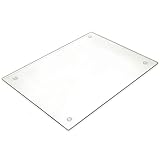
The standout advantage of tempered glass is its incredible scratch resistance. We rely on glass in our daily lives for high-wear applications because of this exact property. For example, we trust the thin, ultra-hard surface of the Ailun 3 Pack Screen Protector for iPhone 16 / iPhone 15 / iPhone 15 Pro ($5.95) to shield our most touched devices from keys and coins. In the kitchen, a heavy-duty tool like a Tempered Glass Cutting Board – Long Lasting Clear Glass – Scratch Resistant, Heat Resistant, Shatter Resistant, Dishwasher Safe. (Large 12×16) ($12.75) endures the constant sliding of metal blades and high heat without losing its smooth, non-porous finish.
When applied to a PC case, this hardness means you can wipe away dust, pet hair, and fingerprints using standard household glass cleaner and a paper towel without worrying about leaving permanent swirl marks. Over years of ownership, a tempered glass panel will look exactly as pristine as the day you unboxed it, keeping your home workspace looking clean, sophisticated, and high-end.
Where Acrylic Side Panel Budget Case Wins
While glass looks luxurious, acrylic (often referred to by the brand name Plexiglass) is the champion of safety, weight management, and absolute affordability. Acrylic is a synthetic polymer that is exceptionally lightweight—about half the weight of glass. If you are building a PC in a budget chassis, keeping the weight down is highly beneficial if you need to move the system around for cleaning, rearrangement, or travel.
The most compelling argument for acrylic is that it is virtually shatterproof. If you drop a tempered glass panel onto a hard tile or hardwood floor, the internal tension of the tempered material can cause it to instantaneously explode into thousands of tiny safety pebbles. While designed not to cut you deeply, cleaning thousands of glass fragments out of a home carpet or hardwood grooves is an absolute nightmare. Acrylic, on the other hand, will simply bounce or chip if dropped.
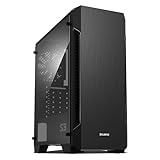
This resilience makes acrylic panels a staple in highly affordable, reliable budget cases. For instance, the Zalman – S3 – ATX Mid-Tower PC Case – Full Acrylic Side Panel – 3x Case Fan 120mm Pre-Installed, Black ($52.99) leverages a full-window acrylic panel to keep both the weight and the price tag remarkably low, while still pre-installing three 120mm fans. Similarly, the ARESGAME at-M1 Mid-Tower PC Case, Transparent Side Panel and ATX/M-ATX Support, Liquid Cooling Support up to 240mm Radiator, Black ($59.99) utilizes a lightweight transparent panel to offer robust hardware and liquid cooling support without crossing into the premium price bracket.
Additionally, acrylic is highly customizable. If you enjoy DIY home projects, you can easily drill ventilation holes or mount custom brackets directly into an acrylic panel using standard household power tools—something that is completely impossible with tempered glass, which shatters instantly if drilled.
Cost Over 5 Years
When managing a household budget, it is vital to look beyond the initial purchase price and calculate the total cost of ownership over a five-year lifecycle. Budget PC cases are built to last, often surviving through multiple hardware upgrades, but the durability of the side panel material heavily influences long-term costs.
- The Acrylic Scenario: You purchase a budget acrylic case for around $50. Because acrylic is highly susceptible to static electricity, it acts as a magnet for household dust and pet hair. Every time you wipe it down, even with a clean microfiber cloth, microscopic dust particles act as abrasives, slowly clouding the window. By year three, the panel may look hazy and scratched. To restore its look, you will either need to buy a specialized plastic polishing kit (approx. $15) or replace the entire case. Estimated 5-Year Cost: $50 to $65 + maintenance time.
- The Tempered Glass Scenario: You buy a tempered glass budget case for around $65. As long as you handle the panel with care during initial assembly and avoid placing it directly on hard stone or ceramic tile floors, the glass remains perfectly clear. It requires nothing more than occasional wipes with standard window cleaner. Estimated 5-Year Cost: $65.
Ultimately, if handled with basic care, tempered glass is the more cost-effective and low-maintenance investment over a five-year span.
Which One for Your Home?
The physical layout of your home, your living arrangements, and your daily habits should dictate which material is best for your space.
Small Apartment
In a compact studio or small apartment, your computer is often close to your bed or main living area. Space is at a premium, and noise pollution is a major concern. Tempered glass is the ideal choice here. Its dense structure provides superior acoustic isolation, keeping the hum of your PC’s internal fans from disrupting a quiet evening or a movie night. Additionally, the premium finish of glass helps a small room feel less cluttered and more like a curated, adult living space.
Family with Kids/Pets
If your home features toddlers throwing wooden blocks, curious cats climbing on desks, or dogs with heavy, wagging tails, safety is your number-one priority. A tempered glass panel sitting on or under a desk is a safety hazard waiting to happen. A sharp impact from a toy or a vacuum cleaner nozzle can shatter the glass. In these high-traffic, dynamic households, an acrylic panel is by far the safer option. It can take direct impacts without breaking, giving you total peace of mind.
Rental
If you are renting and anticipate moving to a new apartment or home every year or two, portability is key. Packing and moving a heavy, fragile desktop tower is stressful. A lightweight acrylic-paneled case is much easier to pack into a cardboard box, and you won’t have to worry about the panel cracking or shattering if the moving truck hits a major pothole on the highway.
Long-Term Home
For those who own their home or have a dedicated, permanent home office setup, tempered glass is the clear winner. A glass-paneled case sitting on a heavy oak or metal standing desk looks timeless. It integrates seamlessly with modern home decor trends of 2026, which emphasize natural materials, clean lines, and premium textures. It is an investment in an elegant, permanent fixture for your home.
FAQ
Does tempered glass break easily?
Tempered glass is highly resistant to direct impacts on its flat surface. However, it is vulnerable to impacts on its outer edges. If you drop a glass panel flat on its face, it will likely survive; if you bump its corner against a hard surface like a ceramic tile or concrete floor, the internal tension will cause it to shatter instantly into small, dull-edged pieces.
Can you polish scratches out of an acrylic side panel?
Yes, you can remove light scratches and haziness from acrylic panels using specialized plastic polishing compounds (such as Novus or Meguiar’s PlastX) and a clean, high-quality microfiber cloth. However, this process requires patience, and deep gouges cannot be fully removed.
Which side panel material is better for PC temperatures?
Neither material has a direct, noticeable impact on your PC’s internal temperatures. Both glass and acrylic act as thermal insulators. Your system’s operating temperatures will depend entirely on the case’s overall ventilation design, mesh panels, fan configuration, and internal component layout rather than the side panel material.
Why is tempered glass so much heavier than acrylic?
Tempered glass is a much denser material than acrylic plastic. Glass has a density of roughly 2.5 g/cm³, whereas acrylic has a density of only 1.18 g/cm³. This makes a glass panel of the same size and thickness more than twice as heavy as its acrylic counterpart, adding significant weight to the finished desktop computer.


