
AMD Radeon Vega graphics is the integrated GPU built into Ryzen APUs. Radeon RX Vega 11 has 11 compute units and 704 shaders, while Radeon Vega 8 has 8 compute units and 512 shaders. That gives Vega 11 roughly 38 percent more shaders and about a third more graphics performance in published comparisons. Both can run esports and older games at 720p to 1080p low settings, but neither suits modern AAA titles.
Our Top Picks
 AMD YD2200C5FBBOX Ryzen 3 2200G Processor with RadeonProcessor1.6 x 1.6 x 0.3 inches1 poundsCheck on Amazon
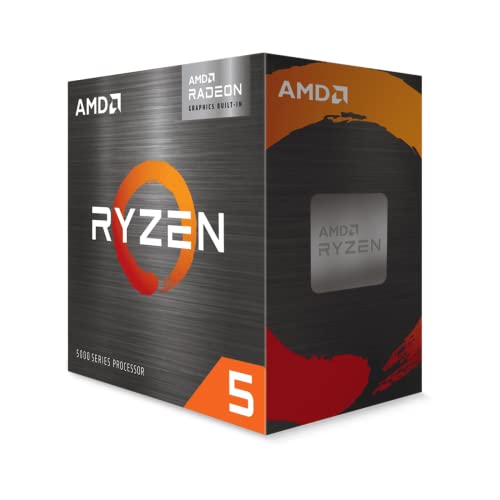 AMD Ryzen™ 5 5600G 6-Core 12-Thread Desktop Processor1.6 x 1.6 x 0.2 inches0.9 poundsCheck on Amazon

Top 3 picks at a glance
Vega 8 vs Vega 11 at a Glance
Searches for “radeon vega 8” and “amd radeon rx vega 11 graphics” usually mean the integrated graphics inside a specific processor. The number simply counts compute units (CUs), each of which holds 64 shaders. The table below summarizes the desktop parts that matter to PC builders, using figures from AMD listings and the hardware databases named at the end.
| Processor | Graphics | Compute units | Shaders | Max graphics clock | CPU cores / threads |
|---|---|---|---|---|---|
| Ryzen 3 2200G | Radeon Vega 8 | 8 | 512 | 1100 MHz | 4 / 4 |
| Ryzen 5 2400G | Radeon RX Vega 11 | 11 | 704 | 1250 MHz | 4 / 8 |
| Ryzen 5 3400G | Radeon RX Vega 11 | 11 | 704 | 1400 MHz | 4 / 8 |
| Ryzen 5 5600G | Radeon Graphics (Vega 7) | 7 | 448 | 1900 MHz | 6 / 12 |
Notice the last row. The Ryzen 5 5600G has fewer compute units than either Vega 8 or Vega 11, yet its graphics are reported to be about 12 to 13 percent faster in games than the 3400G’s Vega 11, according to NanoReview. Compute unit count alone does not decide performance.
What “Vega” Means and Why the Numbers Differ
Vega is the name of AMD’s graphics architecture (GCN 5) first used on high-end discrete cards. In Ryzen APUs, AMD scaled it down to between 3 and 11 compute units and shipped it inside the same chip as the CPU cores. A shader is a small processing unit, and AMD groups 64 of them into each compute unit. Multiply the compute units by 64 to get shaders: 8 x 64 = 512, 11 x 64 = 704, and 7 x 64 = 448.
The peak FP32 compute rate follows from shaders and clock: shaders x 2 operations x clock. For Vega 11 at 1.25 GHz that is 704 x 2 x 1.25 = about 1.76 TFLOPS, which matches the figure published by cpu-monkey. At 1.4 GHz in the 3400G it is about 1.97 TFLOPS. Vega 8 in the 2200G at 1.1 GHz comes to 512 x 2 x 1.1, about 1.13 TFLOPS.
Desktop versus laptop Vega
The same “Vega 8” name also appears in laptop and later-generation chips, where the clock speed can be far higher than the 1100 MHz of the desktop Ryzen 3 2200G. One comparison site lists a Vega 8 at around 2000 MHz for a 7 nm mobile part. That is a different product from the desktop 2200G, so always check which processor a spec or benchmark refers to before comparing numbers.
Performance Gap: How Much Faster Is Vega 11?
On paper Vega 11 has 38 percent more shaders (704 divided by 512 is 1.375). Published comparisons show real gaps close to that. NanoReview reports Vega 11 about 28 percent ahead in a GeekBench 6 compute test and about 34 percent ahead in PassMark graphics, while PassMark’s own data shows about 36 percent in GPU compute. In games, the gap depends on the title and on memory speed, but roughly 20 to 35 percent in favor of Vega 11 is a reasonable expectation (approximate).
What You Can Play on Vega 8 and Vega 11
The ranges below are approximate and typical of what published reviews and user reports show. They vary with game version, driver, resolution scaling, RAM speed and whether memory runs in dual channel.
| Game type | Vega 8 (2200G class) | Vega 11 (2400G/3400G class) |
|---|---|---|
| Esports (CS2, Valorant, League-style) at 720p to 1080p low | Roughly 40 to 80 fps | Roughly 50 to 100 fps |
| Older AAA, 2015 to 2018 era, 1080p low | Roughly 25 to 40 fps | Roughly 30 to 50 fps |
| Battle royale at low settings, reduced scaling | Borderline, below 40 fps | Borderline to playable, roughly 30 to 45 fps |
| Recent AAA at 720p low with upscaling | Mostly unplayable | Mostly unplayable to marginal |
| Indie, strategy, retro and emulation | Comfortable | Comfortable |
Memory: The Hidden Limit on Vega Graphics
Integrated graphics do not have their own VRAM. They borrow system RAM, so memory bandwidth acts like a ceiling on frame rates. The calculation is channels x 64 bits x transfer rate / 8.
| Memory setup | Peak bandwidth | What it means for Vega |
|---|---|---|
| 1 stick DDR4-2400 | 19.2 GB/s | Heavily limited |
| 2 sticks DDR4-2400 | 38.4 GB/s | Decent |
| 2 sticks DDR4-3000 | 48.0 GB/s | Good |
| 2 sticks DDR4-3200 | 51.2 GB/s | Best realistic for these chips |
The move from one stick to two sticks of the same speed doubles bandwidth and is the cheapest upgrade you can make. The official memory support for the Ryzen 5 2400G is DDR4 up to 2933 MT/s, though many boards run faster kits with XMP. Stability above the official rating depends on your board and memory.
How much memory should the iGPU get?
Windows and the BIOS allocate part of system RAM to graphics. A 2 GB setting is usually enough for light games on an 8 GB or 16 GB system. A larger allocation does not add bandwidth; it only reserves more memory. Having 16 GB total, in two sticks, is a safe target.
How to Get the Best Gaming Experience From Vega Graphics
- Fill two memory slots. Use a matched pair, as explained above, and enable XMP. This single change often yields the largest improvement.
- Update the AMD Adrenalin or chipset drivers. Driver support for older Vega APUs may be in maintenance mode, but the latest available package still gives the best stability.
- Lower the resolution before the details. Dropping from 1080p to 900p or 720p improves frame rate more than most in-game settings.
- Use a frame limiter. A cap at 30 or 60 fps avoids stutter from sudden drops.
- Turn down texture quality and shadows. They put the heaviest load on shared memory.
- Try upscaling. Games that support FidelityFX Super Resolution can claw back frames at the cost of image sharpness.
- Keep the system cool. The CPU and GPU share one package and one cooler, so good airflow prevents clock drops.
A Short History of Vega in Ryzen APUs
AMD introduced desktop Ryzen APUs with Vega graphics in early 2018 with the Ryzen 3 2200G and Ryzen 5 2400G, built on the first-generation Zen architecture and a 14 nm process. These were the first desktop chips to pair Zen CPU cores with Vega graphics, and for a time they made a very small gaming PC possible without a graphics card. The Ryzen 5 3400G refreshed the formula with higher clocks. The Ryzen 5 5600G later moved to newer Zen 3 cores while keeping Vega-based graphics with fewer compute units but much higher clocks. Newer AM5 chips moved on to RDNA-based integrated graphics, so Vega is now a legacy design.
How to Check Which Vega You Have
Many buyers see “Radeon Vega Graphics” in Windows and are unsure of the exact configuration. These steps identify it.
- Find the processor name. Open Settings, then System, then About. The processor line (for example Ryzen 5 2400G) tells you the chip.
- Match it to the table above. The processor model decides the compute units and the maximum graphics clock.
- Check Task Manager. The Performance tab shows the GPU entry and how much shared memory is in use.
- Confirm memory mode. A free tool such as CPU-Z will show whether your RAM runs in single or dual channel.
- Look at the BIOS. Many boards have an iGPU memory setting (often called UMA frame buffer size) where you can set the reserved amount.
Be careful with listings that say only “Radeon Vega Graphics” without a number. That wording is used across several generations, so the model name of the processor is the only reliable guide.
Power, Heat and Noise
The desktop Vega 11 APUs discussed here are 65 W parts per the manufacturer spec sheets for the 2400G and 3400G. Because graphics and CPU cores share one die and one cooler, a heavy gaming session pushes both at once. The included Wraith Stealth cooler is adequate for stock operation, but a case with decent airflow keeps boost clocks steady. A small tower cooler is a cheap way to cut noise if the stock fan becomes loud during long sessions.
Common Mistakes With Vega Builds
- One stick of RAM: The most frequent reason for disappointing performance. Fix it with a matched pair.
- Expecting modern AAA performance: Vega 8 and Vega 11 were designed for light gaming. Set realistic expectations for resolution and settings.
- Buying a board without video output: Check for HDMI, DVI or DisplayPort on the motherboard.
- Ignoring the BIOS: A new APU on an old board may not boot until the BIOS is updated.
- Comparing the wrong Vega 8: Desktop and laptop parts under the same name can differ significantly in clocks.
- Forgetting the platform age: These are AM4 chips on DDR4. If you start a new build, compare the cost of the newer AM5 platform before committing.
Worked Example: A Budget Build on Vega 11
Suppose you want a PC that plays esports titles at 1080p low and handles homework and streaming video. A Ryzen 5 3400G or 2400G on a B450 board, two 8 GB sticks of DDR4-3200 and a 500 GB SSD is a workable core. The graphics memory bandwidth is 51.2 GB/s in that dual-channel setup, compared with 19.2 GB/s for one stick at 2400 MT/s. If your budget stretches a little, a Ryzen 5 5600G swaps to six cores and faster graphics with the same RAM and board, though you must confirm that the BIOS supports Ryzen 5000. Either route leaves room to add a discrete graphics card later without replacing the platform.
Which Vega Chip Should You Buy in 2026?
Use this decision matrix to match your needs to a processor. All options use socket AM4, and the first two are used or leftover stock in most cases.
| Your situation | Best choice | Reason |
|---|---|---|
| Cheapest possible legacy build | Ryzen 3 2200G (Vega 8) | Lowest cost; fine for basic and light games |
| Cheap build that should game better | Ryzen 5 2400G or 3400G (Vega 11) | More shaders and four threads of extra headroom |
| Fresh build with no graphics card | Ryzen 5 5600G | Six cores, faster graphics, current-generation CPU design |
| Build that will get a graphics card soon | Ryzen 5 5600 and a discrete GPU | Integrated graphics would be wasted |
| Modern AAA at 1080p medium or higher | Any discrete graphics card | No Vega iGPU is fast enough |
Vega Graphics for Non-Gaming Work
Vega iGPUs also handle everyday tasks well. They decode common video formats, drive up to several monitors through the motherboard ports (the exact number depends on the board), and accelerate browsers and some photo and video editing tools. For a home office or a media center PC, Vega 8 is more than enough, and the extra shaders on Vega 11 only matter when you play games or run GPU-assisted software. This is worth remembering when deciding how much to spend: if gaming is a minor use, the cheaper chip with a good pair of memory sticks is usually the better value than paying extra for the top Vega part.
Vega Graphics Compared With a Cheap Discrete Card
Even an entry-level discrete card is far ahead. A modern budget graphics card has dedicated GDDR memory with several times the bandwidth shown in the table above, and its own power budget. That is why a Vega APU is best understood as a bridge: it lets you game while you save, then you add a card later. Keep in mind that the processor stays on AM4 and the graphics card slot is ready when you are.
Compatibility and Platform Notes
- Video output: The motherboard must have an HDMI, DVI or DisplayPort connector to use the iGPU. Some boards have none.
- Board support: Ryzen 2000G chips work on A320, B350, X370, B450 and X470 boards, with a BIOS update needed on some. Newer 500-series boards target later Ryzen generations, so confirm support on the manufacturer’s CPU list before buying.
- Ryzen 5000G chips: They need a BIOS that supports Ryzen 5000. Many B450 and B550 boards have it after an update.
- Adding a graphics card: The iGPU can stay enabled or be turned off in the BIOS. Plug the monitor into the card once it is installed.
Suggested APUs With Vega Graphics
AMD Ryzen 3 2200G Processor with Radeon Vega 8 Graphics
The entry point of the first Vega APU generation: four cores, four threads and Vega 8 graphics. It fits light gaming, web use and a media PC. Expect lower frame rates than the Vega 11 models, and remember that availability depends on remaining stock. Always run it with two memory sticks.
As an Amazon Associate we earn from qualifying purchases at no extra cost to you.

AMD Ryzen 5 3400G Processor with Integrated Radeon RX Vega 11 Graphics
Four cores, eight threads and Vega 11 graphics running at a higher clock than the 2400G, with a 65 W TDP and an AM4 socket. A reasonable choice if you want the strongest Vega 11 version for a budget machine. It still shares the limits of integrated graphics: memory speed and low-resolution targets.

AMD Ryzen 5 5600G 6-Core 12-Thread Desktop Processor with Radeon Graphics
The most capable AM4 APU in this group, with six cores, twelve threads and Vega-based graphics running up to 1.9 GHz. It suits a fresh no-GPU gaming and productivity build and keeps the option of adding a graphics card later. Pick it over older Vega 11 chips unless the price gap is significant.
Frequently Asked Questions
Is Vega 11 better than Vega 8?
Yes. Vega 11 has 704 shaders against 512, which is about 38 percent more, and published comparisons show roughly a quarter to a third more graphics performance.
Can Radeon Vega 8 run modern games?
Only at very low settings and resolutions, and many recent titles are not playable. It is better suited to esports, indie games and older releases.
Which Ryzen CPUs have Vega 11?
On desktop, the Ryzen 5 2400G and Ryzen 5 3400G use Radeon RX Vega 11 graphics. Several laptop chips use Vega-branded graphics with different compute unit counts.
Is the Ryzen 5 5600G graphics better than Vega 11?
Yes, in games. Although it has only 7 compute units, higher clocks and architectural improvements make it roughly 12 to 13 percent faster than the 3400G’s Vega 11, per NanoReview.
Does RAM speed matter for Vega graphics?
Very much. Integrated graphics use system memory, so dual-channel DDR4-3000 to 3200 can deliver far better frame rates than a single slow stick.
Can I add a graphics card to a Vega APU system?
Yes. Install a discrete card in the PCIe slot, plug the monitor into the card and keep the memory in dual channel. The APU’s integrated graphics simply become unused.
Is Vega 11 enough for 1080p gaming?
For esports and older games at low settings, often yes. For recent releases you will need to drop to 720p or 900p and use upscaling, and many will still run poorly.
Sources
- cpu-monkey integrated graphics database
- NanoReview GPU comparison: Radeon Vega 8 vs Radeon RX Vega 11
- PassMark GPU comparison data
- CpuTronic and CPU-World processor specifications
Last updated: October 2026
Related guides
More from Amazon
Programs that pair well with the guide above. Offers and eligibility are set by Amazon and may change.
Free shipping on eligible items, Prime Video and more. Eligible new members can start with a free trial.
Start a Prime free trialAd-free music streaming. Eligible new subscribers can start with a free trial.
Try Music Unlimited freeA Prime membership for ages 18-24 with a trial period. Eligibility is set by Amazon.
See Prime for Young AdultsAudiobooks and podcasts to listen to on the go. Eligible new members can start with a free trial.
Try Audible freeAs an Amazon Associate we earn from qualifying purchases.


