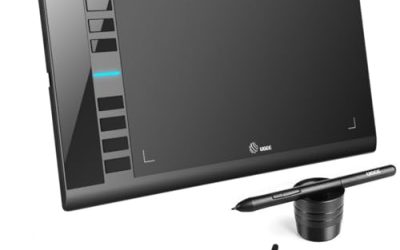
Pairing a drawing tablet with a PC sounds simple, yet the choice splits into two camps that behave very differently. A pen tablet has a blank active area that you draw on while watching the monitor, a skill that takes a week or two to feel natural. A pen display, by contrast, puts a screen under the pen so your hand and the image line up. Both connect to Windows through a driver, but the learning curve, desk space and cost of the two are far apart, so the first question is which style fits how you work.
This guide is for PC users who want to start digital drawing, sketch over photos, mark up documents, teach online or play pen-driven games such as osu!. It compares eight models: seven pen tablets in sizes from about 4 by 2.6 inches to 10.5 by 6.56 inches, plus one 13.3-inch pen display. Each judgment below comes straight from the listing titles, and the aim is to help you match active area, pen pressure and shortcut keys to the work you do in 2026 instead of paying for features you will not use.
Our Top Picks
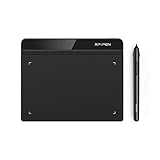
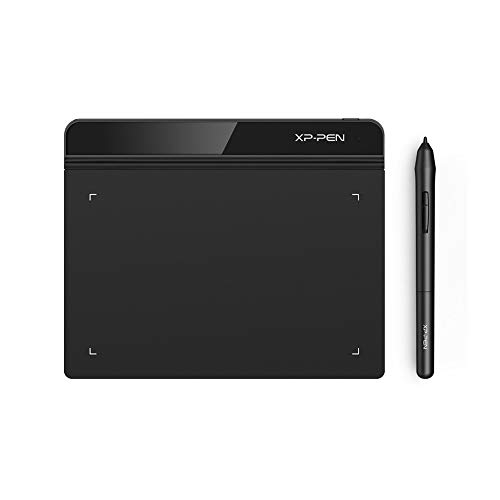 Drawing Tablet XPPen StarG640 Digital Graphic Tablet 6x47.5 x 6.5 x 0.1 inches0.4 poundsCheck on Amazon
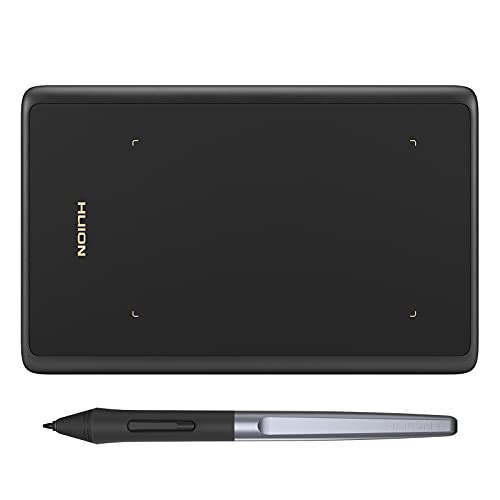 HUION Drawing Tablet H420X Graphics Tablet with 8192Small6.77 x 4.3 x 0 inches0.2 poundsCheck on Amazon


Top 3 picks at a glance
Quick Picks
As an Amazon Associate we earn from qualifying purchases at no extra cost to you.




| Product | Best for | Key spec taken from the product title |
|---|---|---|
| HUION Inspiroy H640P | Beginners with a small desk | 6×4 inch, 8192 pressure levels, tilt, 6 hot keys |
| XPPen Deco 01 V3 | Teaching and mid-size drawing | 10×6 inch, 16K battery-free stylus, 8 keys |
| HUION Inspiroy 2 Large | Shortcut-heavy digital art | 10.5×6.56 inch, 8 ExpressKeys, scroll wheel |
| XPPen StarG640 | Compact drawing on PC or Chromebook | 6×4 inch, battery-free stylus |
| HUION H420X | osu! and signatures | 4.17×2.6 inch, 8192 pressure levels |
| XOPPOX Graphics Tablet | Large area with many shortcuts | 10×6 inch, 8192 levels, 12 hot keys |
| HUION Kamvas 13 (Gen 3) | Drawing directly on a screen | 13.3-inch display, 99% sRGB, 16384 levels |
| GAOMON M10K | Students and teachers | 10×6 inch, touch ring, 10 keys, 8192 pressure |
How to Choose
Active area and desk space
Active area is the part of the tablet that tracks the pen. A 6 by 4 inch surface is easy to fit beside a keyboard and works well for signatures, photo retouching and games, but long arm strokes get cramped for illustration. A 10 by 6 inch area gives room for full-arm movement and is a common comfortable size for sketching. Larger areas need more desk and more wrist travel, so measure the space next to your keyboard before choosing.
Pressure levels, tilt and pen type
Pressure levels such as 8192 or 16384 describe how many steps the pen can sense, and any of them is plenty for a beginner. The more useful checks are a battery-free pen, which never needs charging, and tilt support if you shade with a brush. Do not pay extra for a bigger pressure number alone, because the software and driver shape the actual feel more than the headline figure does.
Shortcut keys, dials and rings
Programmable keys let you map undo, brush size and eraser to your hand without touching the keyboard. Four to eight keys are enough for most artists, while ExpressKeys, scroll wheels, dials and touch rings add continuous controls for zoom and brush size. For osu! or note-taking, extra keys matter less than a stable, low-profile body.
Compatibility and what to ignore
Confirm the tablet lists Windows support, and check whether Chromebook or Android support is included if you use more than one device. Pen displays add specs such as sRGB coverage, lamination and etched glass, which affect color accuracy and pen feel, while plain tablets have no display to calibrate. Budget models usually cut corners on build, driver polish and surface texture, and they rarely include a carrying case or a stand.
The 8 Best Options
HUION Inspiroy H640P
The H640P is a 6 by 4 inch starter tablet with 8192 pressure levels, a battery-free stylus, tilt support and six hot keys. It is listed for Mac, PC and Android, which gives a new artist room to switch devices later. A hobbyist doodling after work or a student learning to retouch photos would be the typical buyer.
- Strength: Battery-free pen with tilt recognition at the entry tier.
- Strength: Six hot keys on a small body that fits next to most keyboards.
- Trade-off: The 6 by 4 inch area is tight for large illustration strokes.
Skip it if you plan to draw full-page illustrations and want room for the whole forearm to move.
XPPen Deco 01 V3
The Deco 01 V3 moves up to a 10 by 6 inch area and a battery-free stylus with 16K pressure levels, plus eight keys. The title names teaching, osu! and digital art, which suggests a versatile general-purpose tablet for a home studio, a classroom desk or a streamer who also draws on camera.
- Strength: A roomy 10 by 6 inch surface suits full-arm sketching and lesson work.
- Strength: Eight keys and a 16K pen give flexibility for PC art software.
- Trade-off: A larger surface takes more desk space than the 6 by 4 inch tablets.
Skip it if your desk is small and you mainly sign documents or play rhythm games.
HUION Inspiroy 2 Large
The Inspiroy 2 Large offers a 10.5 by 6.56 inch area with three groups of eight customized ExpressKeys and a scroll wheel. That makes it a shortcut-friendly choice for artists who live in layers, zoom and brush resizing.
- Strength: Three key groups plus a scroll wheel reduce keyboard trips.
- Strength: Large surface with a battery-free stylus for long sessions.
- Trade-off: The large footprint and many controls take time to learn and map.
Skip it if you prefer a minimal setup with just a few keys.
XPPen StarG640
The StarG640 is a straightforward 6 by 4 inch tablet with a battery-free stylus, listed for Mac, Windows and Chromebook. It suits beginners and anyone who wants a light second tablet for a laptop bag, including Chromebook users who rarely see a Windows-only driver.
- Strength: Compact and simple, with broad operating system support.
- Strength: Battery-free stylus means nothing to charge.
- Trade-off: The title lists no shortcut keys or pressure figure to compare.
Skip it if you rely on programmable keys or want to know the exact pressure range.
HUION H420X
The H420X is the smallest tablet here, at 4.17 by 2.6 inches, with 8192 pressure levels and a battery-free stylus. The title points to osu!, design and drawing, and it makes the most sense where the tablet will share a desk with a mouse and keyboard, replacing the mouse for fast, precise cursor work.
- Strength: Tiny footprint with 8192 levels of pressure.
- Strength: Well suited to osu!, signatures and quick annotations.
- Trade-off: The small area limits detailed drawing and long strokes.
Skip it if you want to sketch full compositions.
XOPPOX Graphics Drawing Tablet
This 10 by 6 inch tablet lists a battery-free stylus, 8192 pressure levels and 12 hot keys, the highest key count in the group. It is aimed at people who want a large area and plenty of shortcuts, such as an editor who cycles between brush, eraser and zoom hundreds of times a session.
- Strength: Twelve hot keys offer a lot of customization.
- Strength: Large active area with a battery-free pen.
- Trade-off: It is a lesser-known brand, so check driver availability and support options.
Skip it if you want a name with an established software ecosystem.
HUION Kamvas 13 (Gen 3)
The Kamvas 13 is the one pen display in the roundup, with a 13.3-inch screen, dual dials, full lamination, Canvas Glass 2.0, 99% sRGB coverage and PenTech 4.0 with 16384 pressure levels. Drawing directly on the image removes the hand-eye gap that many beginners struggle with.
- Strength: A screen under the pen, with 99% sRGB coverage and full lamination.
- Strength: Dual dials and 16384 pressure levels for detailed work.
- Trade-off: As a display it needs cables and more desk space than a plain tablet.
Skip it if you only need a simple tablet for signatures or games.
GAOMON M10K
The M10K has a 10 by 6 inch area, a touch ring, 10 keys and 8192 pressure levels with a battery-free stylus. The title targets beginners, students and teachers, which suits classroom demonstrations, recorded lessons and marking up student homework.
- Strength: Touch ring plus ten keys give flexible shortcut control.
- Strength: Large area suited to lessons and annotation.
- Trade-off: Pressure is listed at 8192 levels, lower than the 16K pens elsewhere in the group.
Skip it if you want the highest listed pressure resolution.
Which One Fits Your Situation
You are new to digital drawing
The HUION Inspiroy H640P is a gentle starting point with tilt and six hot keys, while the XPPen StarG640 keeps things even simpler. Either one lets you learn the pen-to-screen coordination before buying anything larger, and the small size means a failed experiment costs little desk space.
You teach or present on a PC
The GAOMON M10K and XPPen Deco 01 V3 both give a 10 by 6 inch surface that suits whiteboard-style work. The M10K’s touch ring is handy for scrolling through slides.
You paint with lots of shortcuts
The HUION Inspiroy 2 Large, with three groups of ExpressKeys and a scroll wheel, is designed for that workflow. The XOPPOX tablet is an alternative if you want a dozen keys.
You want to draw directly on a screen
The HUION Kamvas 13 (Gen 3) is the only display in the set, and its 99% sRGB coverage is relevant for color work. Expect to budget for a stand and cable management, and remember that a screen under the pen also means a second display to arrange next to your main monitor.
Common Mistakes
- Choosing the highest pressure number and ignoring active area, which matters more to comfort.
- Buying a small tablet for illustration, then fighting cramped strokes across a 6 by 4 inch surface.
- Skipping the driver step on Windows, which can leave the pen behaving like a basic mouse.
- Assuming a pen tablet works like a screen, when it requires looking at the monitor while drawing.
- Paying for a pen display when you only need a tablet for signatures, games or annotation.
Related guides
- Warranty Considerations When Buying On Sale
- How To Use Camelcamelcamel For Amazon Deals
- Browser Extensions For Finding Deals
Frequently Asked Questions
Do drawing tablets work with any PC?
Most connect over USB and support Windows, but check the listing for supported operating systems. A driver is generally needed to unlock pressure and shortcut keys, so download it from the maker rather than relying on the default Windows pen behavior.
Is a pen display better than a pen tablet?
A display shows your strokes under the pen, which feels natural, but it costs more and needs more desk space. A pen tablet is cheaper and portable, though it takes practice to coordinate hand and eye.
How many pressure levels do I need?
8192 levels is already more than most beginners will notice. Higher figures such as 16K are a nice bonus but should not decide the purchase.
Can I use these tablets for osu!?
Several titles mention osu! directly, and small tablets are popular for it because they are light and quick to move. Choose a smaller active area for faster cursor control, since a short hand movement then covers the whole screen. The HUION H420X is the most obvious fit among the eight.
Related guides
More from Amazon
Programs that pair well with the guide above. Offers and eligibility are set by Amazon and may change.
Free shipping on eligible items, Prime Video and more. Eligible new members can start with a free trial.
Start a Prime free trialAd-free music streaming. Eligible new subscribers can start with a free trial.
Try Music Unlimited freeA Prime membership for ages 18-24 with a trial period. Eligibility is set by Amazon.
See Prime for Young AdultsAudiobooks and podcasts to listen to on the go. Eligible new members can start with a free trial.
Try Audible freeAs an Amazon Associate we earn from qualifying purchases.