
For most tight bedrooms and dorm-sized spaces, the Korfile 40 Inch L-shaped gaming desk is the most balanced pick here: it gives you a corner-friendly footprint, built-in power outlets, LED lighting and a tiered storage stack without demanding a full wall of floor space. If you need something narrower, the 32-inch Lufeiya is the shortest option on the list. “Small room” in a desk context really means width and depth: a desk in the 32 to 47 inch range that still holds a monitor, keyboard and tower without crowding doorways or closets. Every desk below is judged on that footprint-versus-usable-surface trade-off.
Our Top Picks
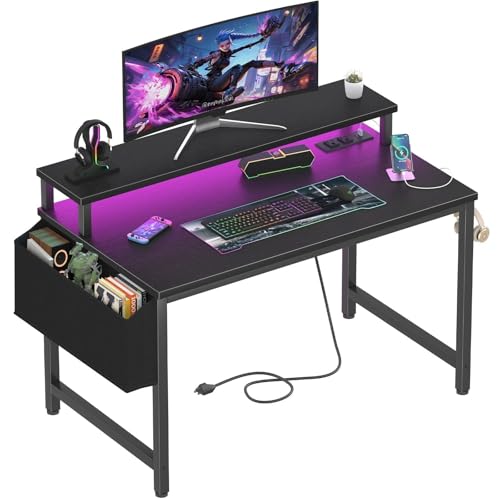 Lufeiya Small Desk with Power Outlets and LED31.5"19.7 x 31.5 x 33.4 inches19.8 poundsCheck on Amazon
 33.7 Inch Small Gaming Desk Table with LED33.66 x 15.75 x 43.35 inches15.75 x 33.66 x 43.35 inches10 poundsCheck on Amazon
 X-cosrack 33.5" Small Gaming Desk with LED Lights33.5"15.75 x 33.5 x 35 inches18.2 poundsCheck on Amazon
 Korfile 47 Inch Gaming Computer Desk with Power47 Inch18.5 x 47.2 x 35 inches41.89 poundsCheck on Amazon


Top 3 picks at a glance
Quick List
- Lufeiya 32 Inch Small Desk – best for the tightest corners and single-monitor setups
- Korfile 40 Inch L-Shaped Desk – best overall for corner placement with shelf storage
- 33.7 Inch Compact L-Shaped Desk – best for a mid-width corner build with a drawer and CPU stand
- X-cosrack 33.5 Inch Desk – best for keeping the tower off the floor in a small footprint
- Lufeiya 40 Inch Black Gaming Desk – best for a straight, simple rectangle with a monitor riser
- Korfile 47 Inch Desk with 5 Drawers – best for storage-heavy rooms that can spare more width
Which One Is Right for You?
| If you… | Choose |
|---|---|
| have a closet-sized nook or very short wall | Lufeiya 32 Inch Small Desk |
| want a corner layout plus shelves for consoles and headsets | Korfile 40 Inch L-Shaped Desk |
| need a drawer and a place for the PC tower on a compact frame | 33.7 Inch Compact L-Shaped Desk |
| keep your tower on the floor and want it elevated for dust and airflow | X-cosrack 33.5 Inch Desk |
| prefer a plain rectangular top against one wall | Lufeiya 40 Inch Black Gaming Desk |
| own lots of accessories, controllers and cables and have a longer wall | Korfile 47 Inch Desk with 5 Drawers |
| run a dual-monitor setup | Korfile 47 Inch or Lufeiya 40 Inch |
Start by measuring the wall segment where the desk will sit and subtract at least 2 inches of clearance for cables and a power strip. If the width is under 36 inches, the 32 to 34 inch models are the realistic choices; between 36 and 44 inches you can step up to the 40 inch pair; beyond that the 47 inch model adds real storage. Always confirm the final dimensions, weight capacity and assembly details on each product page, because small-desk listings change revisions often.
All 6 Picks in Detail
1. Lufeiya 32 Inch Small Desk – Best for Tight Corners
As an Amazon Associate we earn from qualifying purchases at no extra cost to you.
This is the most compact desk on the list, built around a 32 inch width, power outlets, LED lights and a monitor stand. It suits students, kids’ rooms and anyone converting a hallway corner into a play spot. The listing frames it as a study and writing table that also works for gaming, so expect a clean, minimal surface rather than a sprawling battle station. The built-in outlets mean a charger, a lamp and a monitor can plug in at desk level instead of snaking down to the floor, which is a genuine help in rooms where the wall socket is far away.
- Width: 32 inches per the listing name
- Built-in power outlets (confirm count and USB ports on listing)
- LED lighting strip (confirm remote or button control on listing)
- Monitor stand included
- Frame style, depth and weight limit: confirm on listing
Pros:
- Smallest footprint of the six
- Outlets at the desk surface cut cable clutter
- Easy to fit beside a bed or window
Cons:
- Limited room for a second monitor or a full-size mouse pad
- Compact frames can feel crowded with a tower on top
Compared with the 40 inch Lufeiya further down, this one trades roughly eight inches of width for a far easier fit in cramped spaces.
2. Korfile 40 Inch L-Shaped Desk – Best Overall for Corners

The Korfile 40 inch is an L-shaped corner design in a carbon fiber black finish with power outlets, LED lights and a three-tier storage unit, according to the listing name. The L-shape is the main reason it earns the top slot: it turns dead corner space into usable surface, so the keyboard sits on the main arm and the return holds a laptop, a controller or notes. The tiered storage lets you stack a router, a console or books vertically instead of spending floor area on a separate shelf. For a room under about 120 square feet, vertical storage is often the difference between feeling tidy and feeling cramped.
- Width: 40 inches per the listing name
- L-shaped corner layout, carbon fiber black finish
- Built-in power outlets and LED lighting
- 3-tier storage shelving as named in the listing
- Reversibility, depth and load capacity: confirm on listing
Pros:
- Corner placement increases usable surface without increasing wall length
- Vertical shelves free up floor space
Cons:
- L-shapes need a clear corner and may block a window or vent
- Shelving can limit where a taller monitor or speaker sits
Next to the 33.7 inch L-shaped model, the Korfile gives more width and more shelving, but it also asks for more corner clearance.
3. 33.7 Inch Compact L-Shaped Desk – Best for a Drawer and CPU Stand

This model pairs a 33.7 inch width with an L-shaped footprint, LED lights, power outlets, a CPU stand, a drawer and extra storage. The CPU stand is the standout practical feature: lifting a tower a few inches off the floor reduces dust intake and keeps the intake fans away from carpet, and it frees leg room. The drawer is a good home for cables, a spare mouse and headset parts. The listing name does not state a maker, so check the seller and warranty details on the product page before you decide.
- Width: 33.7 inches per the listing name
- Compact L-shaped layout
- LED lights and built-in power outlets
- CPU stand, drawer and storage included
- Assembly time, depth and weight limit: confirm on listing
Pros:
- Drawer hides small clutter
- CPU stand keeps the tower off the floor
- Narrow enough for small alcoves
Cons:
- L-shape reduces open leg space on one side
- Smaller work surface than the 40 inch options
Versus the X-cosrack, this one adds a drawer, while the X-cosrack keeps the layout simpler with a monitor stand as the focus.
4. X-cosrack 33.5 Inch Desk – Best for Raising the Tower

The X-cosrack is a 33.5 inch small gaming desk with LED lights, power outlets, a monitor stand and a CPU stand, aimed at people who want a gamer-style look in a compact footprint. It suits a single-monitor player who wants the computer tower off the floor but does not need a drawer. A monitor stand matters in small rooms because it lifts the screen to eye level and gives you a hidden shelf for a keyboard or notebook underneath, effectively adding surface without adding width.
- Width: 33.5 inches per the listing name
- LED lights and power outlets
- Monitor stand and CPU stand included
- Gamer table styling with storage elements per the listing
- Outlet count, depth and load limit: confirm on listing
Pros:
- Compact width suits most corners
- Both monitor and tower stands included
Cons:
- Stand height may not suit every monitor
- Limited storage compared with drawer-equipped models
It sits very close to the 33.7 inch model in footprint; pick the X-cosrack if you would rather skip the drawer and keep the frame lighter.
5. Lufeiya 40 Inch Black Gaming Desk – Best Straight Rectangle

This black 40 inch Lufeiya is the straightforward option: LED lights, power outlets and a monitor stand on a rectangular layout described as a study or home office table that doubles for gaming. It is the right choice if your room favors a single wall and you want predictable geometry, since straight desks slide into place without corner math. At 40 inches it holds a 24 to 27 inch monitor, a keyboard and a mouse comfortably, though a second display will feel tight.
- Width: 40 inches per the listing name
- Black finish with LED lights
- Power outlets built in
- Monitor stand included
- Depth, height and weight capacity: confirm on listing
Pros:
- Simple layout works against any wall
- Same brand family as the 32 inch model, so the feature set is familiar
Cons:
- No corner return, so less total surface than an L-shape
- Limited storage mentioned in the listing name
Compared with the Korfile 40 inch, you lose the corner return and shelves but gain simplicity and easier room layout.
6. Korfile 47 Inch Desk with 5 Drawers – Best for Storage

The widest desk here, the Korfile 47 inch, lists five drawers, LED lights, power outlets and a reversible design. It suits a room that can spare a longer wall and where clutter is the real enemy: controllers, chargers, cables, game cases and desk supplies can disappear into drawers. Reversible means the drawer side can usually be set to the left or right, which helps with awkward door swings and outlet positions. It is the one pick that comfortably supports two side-by-side monitors for most 24 inch panels.
- Width: 47 inches per the listing name
- Five drawers for built-in storage
- Reversible design per the listing
- Power outlets and LED lights
- Depth, drawer slide type and weight limit: confirm on listing
Pros:
- Most storage and the largest surface of the six
- Handles two monitors more easily
Cons:
- Takes the most wall space; may not suit very tiny rooms
- Drawers reduce under-desk leg room
It is the natural step up from the 40 inch Lufeiya when drawers matter more than keeping the footprint small.
Specs Compared
| Desk | Width | Shape | Power outlets | LED lights | Storage / stands |
|---|---|---|---|---|---|
| Lufeiya 32 Inch Small Desk | 32 in | Confirm on listing | Yes | Yes | Monitor stand |
| Korfile 40 Inch L-Shaped | 40 in | L-shaped corner | Yes | Yes | 3-tier storage |
| 33.7 Inch Compact L-Shaped | 33.7 in | L-shaped | Yes | Yes | CPU stand, drawer, storage |
| X-cosrack 33.5 Inch | 33.5 in | Confirm on listing | Yes | Yes | Monitor stand, CPU stand |
| Lufeiya 40 Inch Black | 40 in | Confirm on listing | Yes | Yes | Monitor stand |
| Korfile 47 Inch with 5 Drawers | 47 in | Confirm on listing | Yes | Yes | 5 drawers, reversible |
How We Chose These
We built this list by reading the product listings and manufacturer-style specification fields for desks sold as compact gaming or computer desks, then comparing the details each listing states. Our criteria were footprint (listed width and whether the shape is L-shaped or straight), built-in power outlets, lighting, included stands and storage, and how clearly the listing describes those features. We favored designs that let a small room keep a clear floor, and we flagged any detail the listing does not state, such as depth or weight limits, as something to confirm on the product page. We did not rank by popularity or brand name, and we make no claims about long-term durability that the listings cannot support.
What to Look For
Footprint first: width, depth and clearance
Small-room shopping begins with a tape measure. Most gaming desks run 40 to 63 inches wide, and the compact end of the market runs from roughly 31 to 47 inches. Depth matters just as much: 20 to 24 inches is workable for a laptop or a single 24 inch monitor, but a 27 inch screen and a keyboard are happier with 24 inches or more. Leave at least 30 inches of clear floor in front of the chair for comfortable movement, and keep 2 to 4 inches behind the desk for cables and the power strip. Check that doors, closet tracks and heating vents are not blocked once the desk is in place.
Shape: L-shaped, straight or reversible.
A straight desk is easiest to place; an L-shaped desk turns a corner into a work area but needs the full corner clear. Reversible designs, meaning the return or the drawer unit can switch sides, are valuable when you cannot yet decide which wall will host the desk. If you share a room, think about where your back faces: sitting with your back to a door is unpleasant, and a corner arrangement can change that.
Power outlets, USB ports and safety
Built-in outlets are convenient, but they are essentially a power strip bolted to a desk. Check what the unit is built to handle and whether it has overload protection. A typical household circuit in the US is 15 amps at 120 volts, about 1,800 watts at the limit, and a continuous load should stay near 80 percent of that. A gaming PC, a monitor and a few chargers usually draw well under this, but do not daisy-chain extra power strips into the desk’s outlets, and avoid covering the strip with fabric or cardboard. If the listing does not state a surge-protection spec, treat it as a plain extension and consider your own surge protector.
Stands, drawers and ergonomics
A monitor stand should put the top third of the screen near eye level. A common seated eye height is 40 to 46 inches from the floor, and a standard desk surface is about 28 to 30 inches high, so a riser of 3 to 6 inches helps most people. Keyboard and mouse should let your elbows rest near 90 degrees. Drawers are useful but cost leg room; if you are tall, check the clearance beneath the surface on the product page.
Worked example.
Suppose your wall is 44 inches between a window and a closet, you use a 24 inch monitor (about 21 inches wide) and a tower. A 40 inch desk leaves 2 inches on each side, which is enough for the power strip, while a 47 inch model would not fit at all. In that case the Korfile 40 inch or Lufeiya 40 inch is the right class. If the same space were 34 inches, the 33.5 or 33.7 inch models become the realistic choices and the tower goes on the included stand to save floor space.
Weight capacity and stability.
Compact desks use lighter frames, so check the stated load limit before adding a heavy monitor arm, large speakers or a full-size tower. Spread heavy items near the legs, not at the edge of an unsupported surface, and tighten all bolts a second time after a week of use because fasteners can settle.
LED lighting: useful or just flashy?
Every desk on this list advertises LED lights, and in a small room they can actually be practical. A soft strip under the rear edge or along the shelf works as bias lighting behind a monitor, which reduces the contrast between a bright screen and a dark wall and can be easier on the eyes during evening sessions. Look for a controller that lets you dim the strip or turn it off without unplugging the desk, and prefer warm or single-color modes if you also use the room for homework or sleeping. If the listing mentions a remote or app, confirm that on the product page, since small desks often ship with a basic button controller instead.
Assembly and room logistics.
Compact desks ship flat, and the larger drawer models can arrive in more than one box. Plan for 45 to 90 minutes of assembly with a second person for the 47 inch version, and clear the floor space first because you will need room to lay panels out. Check the hallway and stairwell too: the longest carton is usually the desktop panel, and a narrow stairwell can be harder than the room itself. Keep the included hardware bag until the desk is fully assembled, and tighten every bolt a second time after the first week.
Cable management in a tight footprint.
Small desks leave nowhere to hide a mess, so plan the cables before you plug in. Route the monitor and power leads straight down the nearest rear leg, group them with reusable hook-and-loop ties, and leave a little slack so you can slide the desk out for cleaning. If the desk has built-in outlets, use them for the monitor, lamp and chargers, and run only the PC and any high-draw device to the wall. Short cables, such as a one-meter DisplayPort or HDMI lead, are neater than the three-meter ones that come in many boxes.
Questions
How wide should a gaming desk be for a small room?
A width of 32 to 47 inches covers most small-room needs, with 40 inches the sweet spot for one monitor plus a keyboard and mouse. Go narrower only if your wall forces it, and go wider only if you need two monitors.
Is an L-shaped desk good for a small space?
Yes, if you have a clear corner, because the L-shape adds surface without extending the wall length. It is a poor fit when the corner holds a door, vent or window you need to open.
Are built-in power outlets on a desk safe?
They are generally fine for a PC, monitor and chargers, provided you stay within the stated limit and do not chain other power strips. Check the listing for a protection or limit statement and confirm on the product page.
Do I need a CPU stand?
It is not required, but lifting the tower off the floor reduces dust intake and frees leg room. It matters most on carpet or in rooms with pets.
Can these desks hold two monitors?
The wider 40 and 47 inch models can hold two 24 inch monitors side by side, while the 32 to 34 inch models are best for one. Confirm the depth and the monitor stand’s maximum load on each product page.
How do I keep cables tidy on a compact desk?
Run the power strip along the back edge, bundle cables with reusable ties and use any grommet or drawer for adapters. Label the plugs so you can swap devices quickly.
Update History
- October 20, 2026 – Initial publication; product set drawn from current catalog listings.
- Check the product page for current specifications and availability before buying.
Sources
- Retailer listing titles and specification fields for each desk named above
- General ergonomic guidance on seated eye height, desk height and elbow angle
- Standard US household circuit limits (15-amp, 120-volt) for the power-outlet guidance
Related guides
More from Amazon
Programs that pair well with the guide above. Offers and eligibility are set by Amazon and may change.
Free shipping on eligible items, Prime Video and more. Eligible new members can start with a free trial.
Start a Prime free trialAd-free music streaming. Eligible new subscribers can start with a free trial.
Try Music Unlimited freeA Prime membership for ages 18-24 with a trial period. Eligibility is set by Amazon.
See Prime for Young AdultsAudiobooks and podcasts to listen to on the go. Eligible new members can start with a free trial.
Try Audible freeAs an Amazon Associate we earn from qualifying purchases.


