Dust is the quiet enemy of every gaming PC. It creeps through intake vents, coats fan blades, clogs heatsink fins, and slowly chokes the airflow your graphics card and processor depend on. A gaming rig that ran cool on day one can start throttling months later simply because dust has built up where you cannot easily see it, and cleaning a fully assembled case takes far longer than preventing the buildup in the first place.


A good dust filter stops that problem at the case wall. The picks below cover the layouts most gaming builds actually use, from a single 120mm rear intake to a full 360mm radiator top, and from ready-to-fit magnetic frames to sheets you trim to any odd opening. Three of the five mount magnetically and lift off in seconds for cleaning, the SilverStone pick mounts on the fan with a rigid grille frame, and the MECCANIXITY panels are plain mesh covers that sit over the vent. Cleaning means lifting the filter off, rinsing or brushing the mesh, drying it, and putting it back.
As an Amazon Associate, we earn from qualifying purchases.
Top 3 picks at a glance
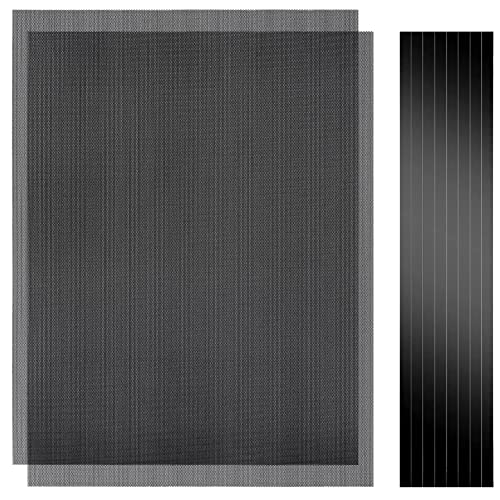
Table of Contents
- Quick Answer
- 1. YIMATEECO Dust Filter PC 360x120mm
- 2. SilverStone FF121W 120mm Fan Filter
- 3. YSSHUI 400x300mm DIY Dust Filter
- 4. MECCANIXITY 6-Pack 140x140mm Dust Filters
- 5. YSSHUI 280x140mm Magnetic Dust Filters
- How to Choose
- Who Should Skip It
- Frequently Asked Questions
- Conclusion
- Product and ASIN Reference
Quick Answer
For most gaming PCs, the YIMATEECO 360x120mm magnetic filter is the best starting point because it covers a top or front vent in one piece. Add the SilverStone FF121W for a single 120mm intake, the YSSHUI 400x300mm sheets for odd openings, and the MECCANIXITY six-pack when several 140mm fans need covering. Measure first, since a filter that does not match the opening leaves gaps dust will find.
1. YIMATEECO Dust Filter PC 360x120mm
The YIMATEECO 360x120mm filter is the simplest answer for the most common high-end gaming layout: a case with a 360mm radiator mount or a long top vent. One piece spans the full 14.17 by 4.72 inch opening, so there are no seams between smaller filters for dust to slip through, and the magnetic frame holds it flat against a steel panel without screws or tools. The PVC mesh uses a 50 mesh weave, fine enough to catch household dust and pet hair while leaving the airflow path open enough that intake fans can still do their job.
At 0.08 inches thick and 1.76 ounces, it adds no meaningful bulk to the outside of a case, and the white finish blends with light-colored builds instead of standing out as an afterthought. Because the frame is magnetic rather than adhesive, removing the filter for cleaning takes a few seconds: lift it off, rinse or brush the mesh, dry it, and press it back into place. That low friction matters, because a filter that is annoying to clean is a filter that stays dirty, and a dirty filter restricts airflow more than no filter at all.
The listing shows an Add to Cart option alongside the product information, which is the strongest availability signal among the five picks here. For a builder setting up a new case with a 360mm top vent, or for anyone whose current top filter is a flimsy stock insert that never sat flat, this is the one to buy first and the one most likely to stay on the case for the life of the build.
Specs
- Size: 14.17 x 4.72 x 0.08 inches (360 x 120mm)
- Material: PVC mesh, 50 mesh
- Mounting: Magnetic frame
- Color: White
- Weight: 1.76 ounces
- Model: YIMATEECO-PC1WH0133
2. SilverStone FF121W 120mm Fan Filter
SilverStone is the only established case-hardware brand in this roundup, and the FF121W shows why that matters. Instead of a bare mesh sheet, it pairs the filter mesh with a honeycomb grille, so the filter is protected from accidental pokes and the airflow pattern stays even across the full 120mm circle. The grille also gives the filter a rigid shape, which means it sits square over a fan mount instead of curling at the corners the way thin mesh sheets sometimes do.
The filter measures 4.72 by 4.72 by 0.18 inches and fits any standard 120mm fan position, the size that covers rear exhaust-adjacent intakes, side-panel mounts, and the front intakes of compact cases. The white color matches the many white builds that dominate current gaming setups, and the honeycomb pattern reads as part of the case rather than an add-on. SilverStone lists the model as SST-FF121W, and the listing carries full product information on the model, dimensions, and construction.
This is the pick for a builder who wants one filter for one fan and wants it to look finished. It is also the right choice for a small-form-factor build where a single intake does most of the cooling work, since the grille keeps the mesh from being pushed into the fan blades when the case is moved or bumped. Buy one per 120mm intake, and match the color to the case so the filter disappears into the build.
Specs
- Size: 4.72 x 4.72 x 0.18 inches (120mm)
- Material: Filter mesh with honeycomb grille
- Mounting: Fan-mount filter
- Color: White
- Model: SST-FF121W
3. YSSHUI 400x300mm DIY Dust Filter
Not every case vent matches a standard fan size. Front panels with irregular cutouts, power-supply shrouds, and the long intake strips on some tower cases all need a filter that can be shaped to the opening, and that is exactly what the YSSHUI 400x300mm DIY kit is for. The pack includes two sheets of PVC mesh, each 15.75 by 11.81 inches and 0.01 inches thick, plus magnetic strips you attach to the trimmed piece so it mounts the same way a framed filter does.
Cutting the sheet with household scissors is the whole job. Measure the opening, add a small margin so the magnetic strip has something to grip, trim the mesh, and press the strip-backed edges onto the steel panel. The two-sheet pack covers at least two large openings, and the leftover offcuts can cover smaller vents like the gaps around a power-supply intake. The sheets weigh 12.3 ounces for the pack, which is light enough that the magnetic strips hold them firmly without sagging.
The listing carries full product information under model 40x30Filter, and the product has been listed since April 2022, which gives it the longest track record of any pick here. Choose this one when the case has at least one vent no standard-size filter fits, or when you want one purchase that can cover several odd openings across a single build instead of ordering a different framed filter for each one.
Specs
- Size: 15.75 x 11.81 x 0.01 inches per sheet (400 x 300mm)
- Material: PVC mesh
- Mounting: Magnetic strips included
- Quantity: 2 sheets
- Weight: 12.3 ounces
- Model: 40x30Filter
- Date first available: April 16, 2022
4. MECCANIXITY 6-Pack 140x140mm Dust Filters

The MECCANIXITY six-pack solves the most common quantity problem in PC building: a case with three or four 140mm fan positions and only one filter in the box. Six 140 by 140mm PVC mesh covers arrive in a single purchase, enough for the front intakes, the top mount, and the power-supply vent of a full tower, with spares left over for the next build or for a second case. The white mesh suits light builds, and the 140mm square is the standard size for the larger fans that move the most air in modern gaming cases.
Each cover is a plain PVC mesh panel rather than a framed unit, which keeps the per-filter cost down and makes the pack the best value in this roundup for anyone covering multiple positions at once. The listing carries full product information under model mea231216ee000185, with package dimensions of 5.75 by 5.59 by 0.55 inches and a pack weight of 2.39 ounces. The thin, flexible panels sit flat against a vent, and because there are six of them, you can keep a clean spare ready and swap a dirty filter out immediately instead of waiting for one to dry after washing.
This is the pick for a builder filling out a new case from scratch, or for someone whose current 140mm filters have yellowed or torn. Order the six-pack when two or more 140mm positions need coverage; a single framed filter makes more sense when only one fan is involved.
Specs
- Size: 140 x 140mm per filter
- Material: PVC mesh
- Color: White
- Quantity: 6 filters
- Package dimensions: 5.75 x 5.59 x 0.55 inches
- Weight: 2.39 ounces
- Model: mea231216ee000185
5. YSSHUI 280x140mm Magnetic Dust Filters
A dual 140mm vent, the kind found on the front of many mid-tower cases and on the top of cases with a 280mm radiator mount, is awkward to cover with two separate square filters: the seam between them becomes a dust lane. The YSSHUI 280 by 140mm filter solves that with a single magnetic-frame panel sized for exactly two 140mm fans side by side, and the two-pack means the front and the top of a case can both be covered from one purchase.
Each filter is a black mesh panel in a magnetic frame, so it snaps onto a steel panel in seconds and lifts off just as fast for cleaning. The two-pack weighs 50 grams total, and the listing carries full product information for the pair. Black is the right color for the majority of gaming cases, which still ship in black far more often than any other finish, and the magnetic frame means no adhesive residue on the case if the filter is ever removed for good.
Pick this one when the case has a 280mm vent and you want a single-piece cover rather than two squares. It is also the natural partner for the YIMATEECO 360mm pick in a build that has both a 280mm front vent and a 360mm top vent, since together they cover the two largest openings most gaming cases offer.
Specs
- Size: 280 x 140mm per filter
- Material: Mesh with magnetic frame
- Color: Black
- Quantity: 2 filters
- Weight: 50 grams
How to Choose
Start by measuring the vents, not by guessing. Open the case or check the case manual and write down the length and width of every intake opening, plus whether each one matches a standard fan size. A 120mm opening takes a 120mm filter, a 140mm opening takes a 140mm filter, and a 360mm or 280mm radiator vent takes the matching long filter. A filter that is even a few millimeters short on one side leaves a gap, and intake fans pull air through the gap first because it is the path of least resistance.
Next, check what the vent is made of. Magnetic filters only grip steel panels. If the case uses aluminum or plastic for a vented panel, a magnetic frame will not hold, and a filter that mounts with screws or adhesive strips is the better choice. Most steel cases work with magnets, which is why three of the five picks here use them, but verify the panel material before ordering.
Mesh density is the trade-off that decides cooling performance. A finer mesh catches more dust but restricts airflow more, which can raise temperatures if the fans are already working hard. A coarser mesh lets more air through but lets fine dust pass as well. For a gaming PC, a medium mesh like the 50 mesh PVC on the YIMATEECO pick is the right balance: it stops the dust and hair that clog heatsinks while leaving enough airflow for the fans to keep temperatures in check. In a very dusty room, a finer mesh is worth the airflow cost; in a clean room, a coarser mesh keeps the fans quieter.
Pack quantity matters more than it first appears. A case with four fan positions needs four filters, and buying a six-pack for that job is cheaper and simpler than ordering four singles. Count the positions first, then choose the pack size that covers them all, and keep one spare so a filter can be swapped out while the dirty one dries.
Finally, think about cleaning. A filter that rinses clean under a tap and dries in minutes will actually get cleaned on schedule. Mesh that traps dust deep in its weave, or a frame that has to be unscrewed every time, tends to stay dirty, and a dirty filter is worse than no filter because it chokes the intake while still letting some dust through the gaps. Magnetic frames and simple PVC mesh are the easiest to maintain, which is why they dominate this roundup.
Who Should Skip It
Skip a dust filter entirely if the case already has built-in filters that sit flat and clean easily, since adding a second layer over the same vent restricts airflow without catching meaningfully more dust. Doubling up on filtration sounds safer, but two meshes in series cut airflow far more than either one alone, and the extra restriction can raise component temperatures enough to matter during long gaming sessions.
Skip magnetic filters if the case panels are aluminum or plastic, because the magnets will not grip and the filter will fall off or slide out of position. Check the panel material first; if a magnet does not stick to the vent surround, order a screw-mounted or adhesive-mounted filter instead.
Skip the DIY cut-to-fit sheets if the case has only standard fan-size vents. Trimming a sheet takes time and leaves edges that can fray, and a framed filter made for the exact size will fit better and look cleaner. The DIY sheets earn their place only when at least one vent has no standard-size match.
Skip the finest mesh options if the PC runs hot already. A build with a high-wattage graphics card and a processor that already pushes its cooler hard has little airflow headroom to spare, and a fine filter can push temperatures high enough to trigger throttling. In that situation, a medium mesh filter and a slightly more frequent cleaning schedule is the better trade.
Finally, skip buying filters before the case arrives. Vent sizes vary between cases even from the same brand, and a filter ordered on a guess often ends up the wrong size. Measure the actual openings, then order the filters that match.
Frequently Asked Questions
How often should I clean a gaming PC dust filter?
Every two to four weeks in a normal room, and every one to two weeks if the PC sits on carpet, near a window, or in a home with pets. A quick visual check tells you when it is time: if you can see a gray film on the mesh, airflow is already reduced. Lift magnetic filters off, rinse or brush them, let them dry fully, and press them back on.
Do dust filters make a gaming PC run hotter?
Any filter adds some airflow resistance, and a dirty filter adds much more. With a clean medium-mesh filter and fans running at their normal speed, the temperature difference is small in most builds. The problem comes from a filter left dirty for months, which can restrict intake enough to raise temperatures. Regular cleaning keeps the penalty negligible.
Can I use a dust filter on an exhaust fan?
No, filters belong on intakes only. An exhaust fan pushes hot air out of the case, and a filter on that vent traps the heat inside while collecting dust that was already leaving. Cover every intake, leave every exhaust open, and the case will stay cleaner and cooler than the other way around.
What size dust filter does my gaming PC need?
Measure the vent opening, not the fan behind it. A 120mm fan usually sits behind a 120mm opening, but some cases have larger cutouts around the fan, and radiator vents are much longer than the fans they hold. Measure length and width in millimeters, match the filter to those numbers, and leave no gap around the edges.
Conclusion
A gaming PC dust filter is a small purchase that protects a large one. The YIMATEECO 360x120mm filter covers the big radiator vent most gaming cases have, the SilverStone FF121W handles a single 120mm intake with a proper grille, the YSSHUI 400x300mm sheets fit the openings no standard filter matches, the MECCANIXITY six-pack covers every 140mm fan in a full tower, and the YSSHUI 280x140mm pair closes the dual-fan vents in one piece. Measure the vents, match the filter to the opening, and clean the mesh every few weeks. The fans will stay cleaner, the heatsinks will stay clearer, and the PC will hold its temperatures far longer between deep cleanings.
Product and ASIN Reference
| Product | ASIN | Source |
|---|---|---|
| YIMATEECO Dust Filter PC 360x120mm | B0FHQK29KJ | Amazon listing |
| SilverStone FF121W 120mm Fan Filter | B0CKV42S8Z | Amazon listing |
| YSSHUI 400x300mm DIY Dust Filter | B09Y336F2R | Amazon listing |
| MECCANIXITY 6-Pack 140x140mm Dust Filters | B0CRVBXTC3 | Amazon listing |
| YSSHUI 280x140mm Magnetic Dust Filters | B08HX4PZ4Y | Amazon listing |
Related guides
More from Amazon
Programs that pair well with the guide above. Offers and eligibility are set by Amazon and may change.
Free shipping on eligible items, Prime Video and more. Eligible new members can start with a free trial.
Start a Prime free trialAd-free music streaming. Eligible new subscribers can start with a free trial.
Try Music Unlimited freeA Prime membership for ages 18-24 with a trial period. Eligibility is set by Amazon.
See Prime for Young AdultsAudiobooks and podcasts to listen to on the go. Eligible new members can start with a free trial.
Try Audible freeAs an Amazon Associate we earn from qualifying purchases.