Every gaming PC owner eventually ends up with bare drives: an old hard drive from a previous build, a retired SATA SSD holding a game library, or a backup drive that only comes out when something goes wrong. Hard drive docking stations solve that problem in the simplest possible way. You drop a bare 2.5-inch or 3.5-inch SATA drive into an open slot, connect one USB cable, and the drive appears on your desktop ready for backups, file recovery, or a full clone to a newer and larger drive.
This guide compares five long-running hard drive docking stations from established storage brands, covering single-bay lay-flat and top-loading designs as well as dual-bay models with offline cloning. Whether you need to read one spare drive, clone a boot drive without opening your case, or rotate backups beside a gaming desk, one of these picks should fit.
As an Amazon Associate, we earn from qualifying purchases.
Top 3 picks at a glance



What to look for in hard drive docking stations
Start with bay count and layout. A single-bay dock is the smallest option and suits occasional drive checks, one-off backups, and rescuing files from a retired PC. A dual-bay dock holds two drives at once, which matters for cloning and for copying directly between drives. Top-loading toaster-style docks keep drives vertical and easy to swap, while lay-flat designs hold one drive horizontally and feel steadier on a crowded desk.
Offline cloning is the headline feature on dual-bay models. A dock with a hardware clone function copies a source drive to a target drive with a button press and no computer connection at all, which is ideal for migrating a game library or system drive to a larger SSD. Remember that the target drive must be the same size as the source or larger, and that cloning overwrites the target completely, so double-check which bay holds which drive before starting. Progress lights on the dock show how far the copy has advanced.
Next, check the host connection. USB 3.0 docks with UASP support make the most of SATA SSD speeds, while older USB 2.0 models feel slow with large game folders. All of the picks here use widely supported connections that work with Windows, macOS, and Linux without extra drivers.
Power and capacity deserve a quick look too. A 3.5-inch desktop drive needs the included external power adapter. Check the stated maximum capacity if you plan to dock large modern drives, and look for a clear power switch and activity light. Finally, consider warranty support from an established brand, since a dock is a tool you will reach for across several builds.
1. Sabrent Dual Bay Docking Station (EC-HD2B)
The Sabrent EC-HD2B is the most versatile pick in this roundup and a sensible default for gamers who both back up and upgrade drives regularly. Its two top-loading bays accept 2.5-inch and 3.5-inch SATA I, II, and III hard drives and SSDs, so a laptop drive pulled from an old machine and a full-size desktop drive can sit side by side. With both bays populated, you can copy files between drives over USB or run the built-in duplicator function entirely offline.
Offline cloning is the reason many buyers choose this model. Insert a source drive and a target drive of equal or greater capacity, disconnect the USB cable, and hold the clone button to start a sector-by-sector copy with LED progress indicators. That workflow is perfect for moving a Windows install and game library to a bigger SSD without imaging software, and it frees your PC for gaming while the copy runs. The dock supports very large drives, which keeps it useful as backup drives keep growing.
Day to day, the EC-HD2B behaves like a straightforward USB 3.0 dock with UASP support, tool-free insertion, and a power adapter that properly supports 3.5-inch drives. Status lights make it obvious which bay is active. For a gaming desk that handles backups, cloning, and spare-drive checks in one place, this is the dock to shortlist first.
Specs
| Item | Detail |
|---|---|
| Model | EC-HD2B |
| Bays | 2, top-loading |
| Drive support | 2.5-inch and 3.5-inch SATA I/II/III HDD and SSD |
| Host connection | USB 3.0 with UASP |
| Offline cloning | Yes, hardware duplicator function |
| Power | External power adapter included |
2. Inateck Dual Bay Docking Station (FD2002)
The Inateck FD2002 is another dual-bay cloning dock with a long track record, and it appeals to buyers who want simple controls and dependable offline duplication. Both bays accept 2.5-inch and 3.5-inch SATA drives, and the dock handles reading and writing to two drives at once over USB 3.0 when connected to a PC. When disconnected, the same hardware becomes a standalone cloner for drive upgrades and full-disk backups.
The cloning process uses a dedicated button and a row of progress lights that fill as the copy advances in quarters, so you can glance at the dock and know roughly how long is left. Inateck rates the dock for large drives, which suits modern high-capacity backup hard drives as well as smaller SSDs. Automatic sleep after a period of inactivity helps spare drives rest when a backup finishes, a thoughtful touch for a dock that may stay connected beside a gaming PC all week.
Build quality is plain and functional, with a compact footprint that fits behind a monitor or beside a tower case. If your main jobs are cloning a boot drive before an upgrade and rotating backup drives without opening your case, the FD2002 covers both in one tidy, long-running unit.
Specs
| Item | Detail |
|---|---|
| Model | FD2002 |
| Bays | 2, top-loading |
| Drive support | 2.5-inch and 3.5-inch SATA I/II/III HDD and SSD |
| Host connection | USB 3.0 with UASP |
| Offline cloning | Yes, with progress indicator lights |
| Power | External power adapter included |
3. Thermaltake BlacX Duet (ST0014U-D)
The Thermaltake BlacX line is one of the longest-running names in docking stations, and the BlacX Duet ST0014U-D brings that toaster-style design to two drives at once. Both slots accept 2.5-inch and 3.5-inch SATA drives, and the open-top layout makes swapping drives exceptionally quick, which suits anyone working through a stack of older drives to sort game installs, media, and backups. Protective slot covers help keep dust out when a bay is empty.
Unlike the two cloning docks above, the BlacX Duet focuses on straightforward dual-drive access over USB 3.0 rather than standalone duplication. That makes it a good fit for comparing two drives, copying between an old and a new drive through your PC, or keeping a backup drive docked semi-permanently beside a gaming rig. Hot-swap support means you can change drives without rebooting, and the compact base stays stable even with two tall 3.5-inch drives installed.
Thermaltake includes the power supply needed for desktop drives, and the dock works across Windows and Mac systems without drivers. Choose the BlacX Duet if your priority is fast, frequent swapping between two bays and you do not need a hardware clone button.
Specs
| Item | Detail |
|---|---|
| Model | ST0014U-D |
| Bays | 2, top-loading with slot covers |
| Drive support | 2.5-inch and 3.5-inch SATA I/II/III HDD and SSD |
| Host connection | USB 3.0 |
| Offline cloning | No |
| Power | External power adapter included |
4. StarTech.com Single Bay Dock (SDOCKU33BV)

StarTech.com builds connectivity gear for IT benches as much as home desks, and the SDOCKU33BV reflects that practical focus. This single-bay top-loading dock accepts one 2.5-inch or 3.5-inch SATA drive and connects over USB 3.0 with UASP support, giving fast access to bare drives for diagnostics, data recovery, and backups. An eject button helps release drives cleanly, reducing the temptation to wiggle a drive off its connector.
The appeal is reliability for occasional but important jobs: checking a pulled drive, copying a game library off a retired SSD, or imaging a drive before recycling an old PC. The dock supports large drives, includes a power adapter for 3.5-inch models, and works the same on Windows, Mac, and Linux systems.
Because it holds one drive, the SDOCKU33BV cannot clone on its own, so upgraders will pair it with imaging software instead. In exchange you get a smaller footprint and a fuss-free tool that lives in a drawer until needed.
Specs
| Item | Detail |
|---|---|
| Model | SDOCKU33BV |
| Bays | 1, top-loading with eject button |
| Drive support | 2.5-inch and 3.5-inch SATA I/II/III HDD and SSD |
| Host connection | USB 3.0 with UASP |
| Offline cloning | No |
| Power | External power adapter included |
5. Sabrent Lay-Flat Docking Station (EC-DFLT)
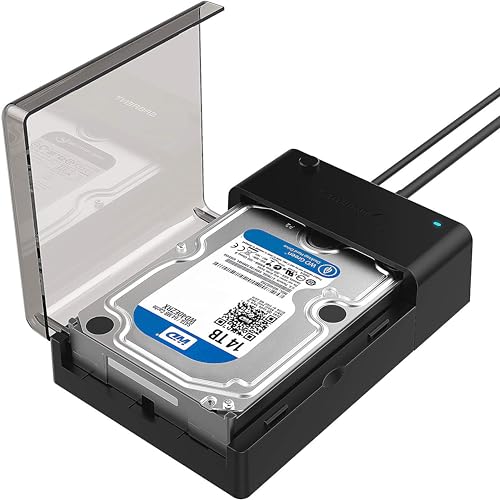
The Sabrent EC-DFLT takes a different shape from the toaster-style docks above. Instead of standing a drive upright, it lays a single 2.5-inch or 3.5-inch SATA drive flat inside a low-profile base, which feels stable on a desk and keeps the drive fully supported along its length. That layout suits a semi-permanent backup drive that stays docked beside a gaming PC, as well as quick one-drive checks.
Performance is modern where it counts, with USB 3.0 and UASP support for fast transfers from SATA SSDs and steady throughput from mechanical backup drives. Setup is tool-free and driver-free: place the drive, close the cover, connect USB and power, and the drive mounts like any external storage. An activity light shows reads and writes at a glance, and the included power adapter properly supports 3.5-inch desktop drives that cannot run from USB power alone.
The EC-DFLT has been a high-volume seller for years. It will not clone drives or hold a second disk, so heavy upgraders should look at the dual-bay models instead. As a proven single-bay dock for backups and spare-drive access, it remains an easy recommendation.
Specs
| Item | Detail |
|---|---|
| Model | EC-DFLT |
| Bays | 1, lay-flat |
| Drive support | 2.5-inch and 3.5-inch SATA HDD and SSD |
| Host connection | USB 3.0 with UASP |
| Offline cloning | No |
| Power | External power adapter included |
FAQ
Can a docking station clone a drive without a computer?
Yes, if the dock has a hardware duplicator function like the Sabrent EC-HD2B or the Inateck FD2002. You insert a source and a larger or equal target drive, disconnect USB, and start the clone with the dock button. The copy runs on the dock itself with progress lights, and the target drive is overwritten completely.
Will these docks work with both laptop and desktop SATA drives?
Yes. Every dock in this guide accepts both 2.5-inch laptop-size and 3.5-inch desktop-size SATA hard drives and SSDs. Desktop 3.5-inch drives need the included external power adapter, which every pick here supplies, while smaller 2.5-inch drives use the same slots and connectors.
Are hard drive docking stations faster than a USB adapter cable?
A modern dock and a good adapter cable can reach similar USB 3.0 speeds, especially with UASP support. The dock advantage is convenience and stability: drives sit securely, 3.5-inch models get proper power, swapping is tool-free, and dual-bay models add offline cloning that a simple cable cannot offer.
Can I leave a backup drive in a dock all the time?
You can, and lay-flat or top-loading docks are commonly used that way for scheduled backups. Just keep the dock ventilated, avoid bumping a spinning mechanical drive, and use the power switch or safe-eject process before removing a drive. For long-term storage, many users rotate two backup drives through the same dock.
Final verdict
For most gaming PC owners, the Sabrent EC-HD2B is the best all-around choice, combining dual-bay access with true offline cloning. The Inateck FD2002 is a close alternative. Choose the BlacX Duet for frequent two-drive swapping, the StarTech.com SDOCKU33BV for a support-backed single-bay tool, or the Sabrent EC-DFLT for a stable lay-flat backup dock.
Product and ASIN Reference
| Product | ASIN |
|---|---|
| Sabrent Dual Bay Docking Station (EC-HD2B) | B0759567JT |
| Inateck Dual Bay Docking Station (FD2002) | B00N1KXE9K |
| Thermaltake BlacX Duet (ST0014U-D) | B01J4XNLN6 |
| StarTech.com Single Bay Dock (SDOCKU33BV) | B00H11QT3S |
| Sabrent Lay-Flat Docking Station (EC-DFLT) | B00LS5NFQ2 |
Related guides
More from Amazon
Programs that pair well with the guide above. Offers and eligibility are set by Amazon and may change.
Free shipping on eligible items, Prime Video and more. Eligible new members can start with a free trial.
Start a Prime free trialAd-free music streaming. Eligible new subscribers can start with a free trial.
Try Music Unlimited freeA Prime membership for ages 18-24 with a trial period. Eligibility is set by Amazon.
See Prime for Young AdultsAudiobooks and podcasts to listen to on the go. Eligible new members can start with a free trial.
Try Audible freeAs an Amazon Associate we earn from qualifying purchases.