
Here is the surprise about laptops under 400 dollars: the list is almost entirely Chromebooks, and four of the eight are the same Celeron N4120 machine with different logos on the listing. That is not bad news. If your work lives in a browser, a Chromebook delivers a faster feel than a Windows laptop at the same price. The best balance in this set is the Lenovo Chromebook m with 8GB, followed by a plain 14-inch HP for the lowest spend. The Acer Spin is the only one that probably misses the budget.
Our Top Picks
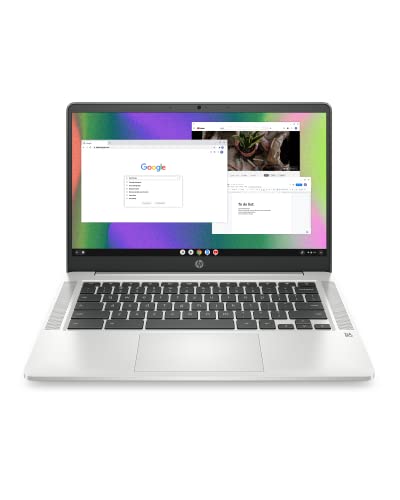
 HP 14" HD Chromebook Laptop for StudentsN4120|64GB eMMC12.85 x 8.94 x 0.72 inches3.35 poundsCheck on Amazon
 HP 14 2-in-1 Chromebook 14in FHD Intel CPU4GB Ram 64GB Storage14 x 13 x 1 inches5 PoundsCheck on Amazon
Top 3 picks at a glance
Quick comparison of the eight
As an Amazon Associate we earn from qualifying purchases at no extra cost to you.



| Model | Key point from title | Price tier | Best for |
|---|---|---|---|
| Lenovo Flagship Chromebook 14-inch | 14-inch FHD touch, MediaTek Kompanio 520, 4GB, 64GB eMMC | Budget | Touchscreen use on Chrome OS |
| HP Chromebook 14 (14a-na0226nr) | Celeron N4120, 4GB, 64GB eMMC, 14-inch HD | Budget | Basic school and web tasks |
| Lenovo Chromebook m 14-inch | Kompanio 540, 14-inch WUXGA IPS, 8GB, 64GB UFS | Mid-range | Best memory and display of the set |
| HP 14-inch HD Chromebook for Students | N4120, 4GB, 64GB eMMC, HDMI, USB-A and C, 14-hr claim | Budget | Students on a minimal budget |
| HP Chromebook 14, 128GB (64GB + 64GB SD) | N4120, 4GB, 7-in-1 USB-C hub, 128GB total | Mid-range | Extra storage via card and hub |
| HP 14 2-in-1 Chromebook (Renewed) | 14-inch FHD, Intel CPU, 4GB, 64GB | Mid-range | Tent and tablet modes at a renewed price |
| HP 2023 Chromebook 14-inch | Celeron N4120, 4GB, 64GB eMMC, UHD Graphics 600 | Budget | Plain Chromebook for light work |
| Acer Chromebook Spin 314 | Core i3-N305, 14-inch WUXGA touch, 8GB LPDDR5, 128GB | Premium | The only pick above the 400 line |
Each laptop, and who should skip it
Lenovo Flagship Chromebook, 14-inch FHD touch
A MediaTek Kompanio 520 with eight cores, a Full HD touchscreen, 4GB of RAM and 64GB of eMMC running Chrome OS. The FHD touchscreen sets it apart from the HD HP panels. Four gigabytes is the weak point once tabs pile up.
Pros
- FHD touchscreen at a low tier
- Wi-Fi 6 named in the title
Cons
- 4GB RAM limits multitasking
- eMMC storage is not upgradeable
Who it’s for: students and families who want a sharper touch display on a budget.
HP Chromebook 14 (14a-na0226nr)
A Celeron N4120 with 4GB of RAM, 64GB eMMC and a 14-inch HD display. The “4K Graphics” wording in the title is marketing language for the integrated chip, not a 4K screen; the display is HD, so check the listing before assuming otherwise. It is a 2022 model.
Pros
- Low entry price
- Thin design with long-battery claim
Cons
- HD panel only
- Older generation
Who it’s for: light users who want the simplest cheap Chromebook.
Lenovo Chromebook m 14-inch
A Kompanio 540 with 8GB of RAM, 64GB UFS storage and a 14-inch WUXGA IPS display. Double the memory of most of the set and a taller screen, which helps with documents. The title mentions Google Gemini; check what that means in practice.
Pros
- 8GB RAM and WUXGA IPS
- UFS storage is faster than eMMC
Cons
- Highest price among the under-400 picks
- 64GB still modest
Who it’s for: buyers who open many tabs and want the best value in the set.
HP 14-inch HD Chromebook for Students
A Celeron N4120 with 4GB, 64GB eMMC and a webcam, with HDMI and both USB-A and USB-C ports. The “CUE Accessories” tag in the title points to a reseller bundle, so check what is actually in the box. A 14-hour battery claim appears, which we treat as a ceiling.
Pros
- Good port selection
- Low price
Cons
- Same core hardware as other HP listings
- Bundle contents unclear
Who it’s for: students who need ports and a low price.
HP Chromebook 14 with 128GB (64GB + 64GB SD)
The same N4120 and 4GB of RAM, with a 7-in-1 USB-C hub and a 64GB SD card in the listing. The “128GB” is internal plus card; the card is removable and slower. Useful if you carry files, less so for apps.
Pros
- Hub and card included per title
- More total storage
Cons
- Storage is split, not one drive
- Reseller bundle
Who it’s for: buyers who carry files and want extra ports.
HP 14 2-in-1 Chromebook (Renewed)
A 14-inch FHD 2-in-1 with an Intel CPU the title does not name, 4GB and 64GB. The flip design gives tablet and tent modes, and the Renewed label means a prior owner. Check the seller grade.
Pros
- Flip design with FHD panel
- Renewed pricing
Cons
- Processor not named in the title
- Battery wear risk
Who it’s for: people who want a convertible and accept refurbished.
HP 2023 Chromebook, 14-inch
A Celeron N4120, 4GB of RAM, 64GB eMMC and UHD Graphics 600 with Wi-Fi and Bluetooth. It is a near-duplicate of the other N4120 listings, so the decision is the seller, warranty and return terms.
Pros
- Predictable, proven hardware class
- Low entry price
Cons
- Near-duplicate of three others
- HD screen
Who it’s for: buyers who just need a basic laptop.
Acer Chromebook Spin 314
The most capable machine: Core i3-N305, 14-inch WUXGA IPS touchscreen with Corning Gorilla Glass, 8GB of LPDDR5, 128GB eMMC and Wi-Fi 6E. The convertible hinge gives tablet mode. It sits above 400 dollars in the listing, so it is the stretch pick.
Pros
- Strongest processor and 8GB LPDDR5
- Convertible with touchscreen
Cons
- Likely over the 400 target
- eMMC storage
Who it’s for: buyers who can stretch the budget for a faster Chromebook.
How we picked these
The shortlist comes from published specifications, manufacturer documentation and buyer reviews, read through each title. Where the title was vague, such as the unnamed CPU, we said so. Nobody on the team used or measured these units. We kept listings above the 400 line only where they explain the trade-off.
Choosing a laptop at the 400 dollar line
Chromebook or Windows
If your tools are web-based, Chrome OS keeps cheap hardware responsive. If you need Windows programs, look for 8GB of RAM and 128GB of storage, which usually costs more. Our list of the best laptops under 500 with 16GB of RAM shows what a bigger budget buys.
RAM and SSD minimums
Treat 4GB as the floor and 8GB as the comfort level. For storage, 64GB eMMC is fine for cloud work but fills with downloads; 128GB is better. Memory in most listings is soldered, so see our note on laptop RAM upgrades before assuming anything is swappable.
Panel quality
HD panels at 1366×768 look soft on 14 inches. FHD or WUXGA IPS panels are noticeably sharper and are the clearest upgrade at this price.
Battery claims, derated
A worked estimate: if a listing claims 14 hours and real use reaches about 60 percent of that claim, you get roughly 8 hours, enough for a school day. These percentages are an assumption, not a measurement; screen brightness and video calls shorten it.
Refurbished and upgradeability
A renewed unit can be a bargain if the seller offers a clear return window and warranty. Do not count on upgrades.
A four-step decision path
- Write down the one program you cannot live without; if it is Windows-only, remove every Chromebook from your shortlist.
- Count how many browser tabs you keep open on a normal day. Up to about five suits 4GB; beyond that, aim for 8GB.
- Decide whether a touchscreen or a flip hinge matters; it narrows this set to the Lenovo Flagship, the HP 2-in-1 and the Acer Spin.
- Set a ceiling that includes a case and a mouse, then compare return windows on the remaining listings.
The path also helps with the near-duplicates. Four of the HP listings share the same Celeron N4120, 4GB of RAM and 64GB of eMMC, so the real differences are the bundle, the seller and the return terms. Pick the one with the clearest warranty text rather than the longest title. If two listings tie, favor the one whose title names every component, because vague titles tend to hide weaker parts.
What a low price does not include
A budget laptop rarely comes with a backlit keyboard, a metal body or a high-resolution webcam. Speakers are usually thin, so a pair of earbuds is a sensible add-on. Charging is often over USB-C, but check whether a charger is in the box and what wattage it supplies. None of this is a flaw at the price; it is simply where the money was not spent, and it helps to know before you are disappointed.
Mistakes buyers make
Buyers compare processor names instead of RAM and panel. They assume “128GB” means one drive. They overlook that four listings here are near-identical machines. They also forget that Chromebooks receive updates for a limited window; check the manufacturer documentation for the support period. And some buy the Acer expecting to stay under budget. Another habit is trusting a battery claim of 12 or 14 hours as if it were a promise; treat it as a best case. Finally, many shoppers skip the return policy, even though a cheap laptop is exactly the kind of purchase where a faulty hinge or a dim panel shows up in the first week.
Verdict
The Lenovo Chromebook m with 8GB is the pick for most buyers; the plain HP 14-inch is the cheapest sensible choice; the Acer Spin is for those stretching the budget. Check the current listing for the exact configuration.
A short ranking by situation may help. For a child or teen starting middle school, the plain HP 14-inch models are hard to fault, since a scratch or a spill hurts less when the machine is inexpensive. For a college student who lives in browser tabs and shared documents, the Lenovo Chromebook m offers the memory and the sharper panel that long sessions reward. For a parent who wants a flip-over screen for recipes and video, the HP 2-in-1 or the Acer Spin fits, with the Acer demanding a larger budget. For anyone who needs Windows software, none of these eight is the answer, and the better move is to raise the budget rather than force a Chromebook to do a job it cannot.
Frequently asked questions
Can you get a good laptop for under 400 dollars?
You can get a good everyday laptop, but not a powerful one. At this level, expect a Chromebook or an entry Windows machine with 4GB to 8GB of RAM and 64GB to 128GB of storage, suited to browsing, documents, streaming and video calls. Demanding games, video editing and big spreadsheets are out of range. Check the listing for the exact memory and storage before deciding.
Is a Chromebook or a Windows laptop better at this price?
A Chromebook usually feels quicker on modest hardware because Chrome OS is light. A Windows laptop runs desktop programs that a Chromebook cannot. If your work lives in a browser and Google apps, a Chromebook is a sound pick; if you depend on a specific Windows program, choose Windows and aim for 8GB of RAM. Confirm with your school or employer if unsure.
Is 4GB of RAM enough on a Chromebook?
For light use it is workable. A handful of tabs, a video call and a document are about the limit. More tabs or Android apps will slow things down, and the memory cannot be upgraded on most thin models. Where the budget allows, an 8GB model such as the Lenovo Chromebook m in this list gives more breathing room.
Should I buy a renewed laptop to stay under budget?
It can stretch your money, but check the seller’s grade, the battery condition on offer, the warranty and the return window. A renewed unit has had prior use, so wear on the battery and hinges is a risk. A new listing with a clear warranty may be the safer buy if the price gap is small.
Can I upgrade a cheap laptop later?
Often not by much. Many budget Chromebooks use soldered memory and eMMC storage that cannot be replaced. Some Windows laptops have an open M.2 slot or a SODIMM, but titles rarely say so. Check the listing and your exact model before counting on an upgrade, and treat the specification you buy as the one you keep.
Related guides
More from Amazon
Programs that pair well with the guide above. Offers and eligibility are set by Amazon and may change.
Free shipping on eligible items, Prime Video and more. Eligible new members can start with a free trial.
Start a Prime free trialAd-free music streaming. Eligible new subscribers can start with a free trial.
Try Music Unlimited freeA Prime membership for ages 18-24 with a trial period. Eligibility is set by Amazon.
See Prime for Young AdultsAudiobooks and podcasts to listen to on the go. Eligible new members can start with a free trial.
Try Audible freeAs an Amazon Associate we earn from qualifying purchases.


