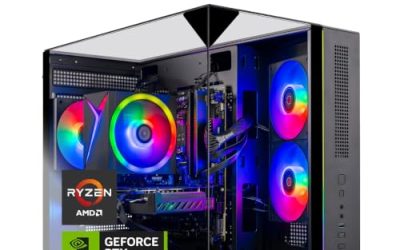
When the tower sits on the desk in plain view, looks stop being a bonus and become part of the buying decision. A “best looking” gaming PC is not simply the one with the most colored lights. It is the one whose case, lighting, cooling hardware, and cable routing look intentional through a glass side panel, and that still has the specs to justify taking up the desk space. The catch is that appearance is rarely in the spec line, so buyers have to read the clues in the title and then confirm the rest from photos. A listing that says RGB in the name and nothing else may hide a plain black box, while one that names the cooler and the fans is usually telling you what will glow behind the glass.
This guide is for gamers who build a visible setup, streamers whose PC appears on camera, and anyone who wants a prebuilt that looks closer to a custom build. The six systems below run from a mid-range RTX 5060 machine to an RTX 5080 flagship, and each is described using only what its listing states. We favor titles that mention ARGB fans, liquid coolers, and branded series, and we flag where the look must be verified before you order in 2026. Because looks are subjective, the notes below separate what the title confirms from what you still need to check yourself, so you do not pay for a style that only exists in the marketing photos.
Our Top Picks
 iBUYPOWER Element Gaming PC Desktop Computer AMD Ryzen20 x 9.1 x 17.4 inches36 poundsCheck on Amazon




Top 3 picks at a glance
Quick Picks
As an Amazon Associate we earn from qualifying purchases at no extra cost to you.



| Product | Best for | Key spec from the listing |
|---|---|---|
| Skytech Ryzen 7 9850X3D RTX 5080 | A showpiece tower with top-tier parts | RTX 5080, 32GB RAM, 2TB SSD, 360 ARGB AIO |
| iBUYPOWER Element | Strong CPU and mid-high GPU | Ryzen 9 7900X, RTX 5070 12GB, 32GB DDR5 |
| Horizon Autherium Dragon RGB | Huge memory and storage with RGB | Core i9, RTX 5070 OC, 64GB RAM, 5TB storage, 360MM AIO |
| CyberPowerPC Gamer Master | Mainstream build from a known brand | Ryzen 7 8700F, RTX 5060 Ti 8GB, 16GB DDR5 |
| YAWYORE Ryzen 7 5700X RTX 5060 | Lit-up build with generous memory | RTX 5060, 32GB DDR4, ARGB fans |
| Skytech Archangel 5 Series | Entry-level look with a gold PSU | i5 14400F, RTX 5060, 750W Gold PSU |
How to Choose
Look at the case before the lights
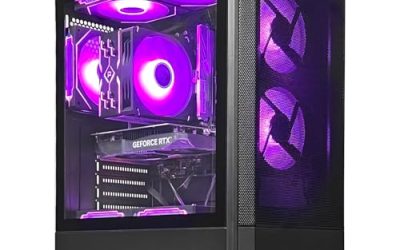
A tempered glass side panel and a mesh front panel give the strongest look and airflow. A cramped case with a solid side hides the build entirely, which wastes any ARGB parts inside. Check the product photos for a clean layout and a visible graphics card, and look for cable routing that hides wires behind the motherboard tray. The listing may show a branded series such as Archangel 5, but photos confirm the case design. Size matters as well: a large case shows off components better, while a compact tower looks neat on a small desk but can hide the build and run hotter.
Judge lighting by control, not count
ARGB fans, as named on the YAWYORE and Skytech systems, allow addressable color effects. The key question is whether lighting is controlled from software or a case button, and whether the fans, pump head, and RAM sync. Multiple lighting zones without sync can look messy. A 360mm liquid cooler, named on the Skytech 5080 and the Horizon, adds a prominent pump head and radiator. Some pump heads carry their own lighting or a small screen, which makes a strong focal point, but they also add another light to control. Aim for a few colors that match rather than a rainbow.
Match the specs to the price tier
Looks should not come at the cost of performance. A GPU such as an RTX 5060 or 5060 Ti suits 1080p and many 1440p games, an RTX 5070 handles 1440p comfortably, and an RTX 5080 targets high-refresh 1440p and 4K. Pair at least 16GB of RAM with any of them, and 32GB if you also stream. Budget prebuilts cut corners on power supplies and motherboards, so a Gold PSU, like those named on the Skytech listings, is a good sign. A well-built power supply also makes for a quieter, cooler system, which is part of what makes a build feel premium in a room.
Check upgrade paths and ignore inflated specs
Newer platforms such as DDR5 and AM5 leave more room to upgrade than DDR4 systems. A very high storage figure like 5TB looks good on paper, but the drive type matters more than size. Ignore headline numbers such as “up to 5.4GHz” until you confirm the cooler can sustain them. It is also worth asking how easily you can open the case, since swapping a graphics card or adding storage later should not require a full teardown.
The 6 Best Options
Skytech Ryzen 7 9850X3D RTX 5080
This is the top system on the list, pairing a Ryzen 7 9850X3D with an RTX 5080, 32GB of RAM, a 2TB NVMe SSD, DDR5 6000, an 850W Gold ATX 3 PSU, and a 360mm ARGB liquid cooler. It is made for players who want visible high-end hardware, with a large liquid cooler as the centerpiece behind the glass. The pairing of an RTX 5080 with an X3D processor is aimed at high-refresh play, so the looks come with performance to match.
- Strength: the 360mm ARGB AIO gives a strong visual centerpiece.
- Strength: RTX 5080 and an 850W Gold PSU leave headroom.
- Trade-off: the listing shows Wi-Fi 5, which is older than current standards.
Skip it if you play at 1080p and do not need this power, or if you would prefer a more modest build that costs less to run.
iBUYPOWER Element
The Element lists a Ryzen 9 7900X, an NVIDIA RTX 5070 with 12GB, 32GB of DDR5 RAM, a 1TB NVMe SSD, and Windows 11 Home. It is a strong all-rounder for gamers who value processor power for streaming alongside play. The title names a branded Element series, which gives the line a recognizable identity, though the case itself should be confirmed from photos before you assume it matches your taste.
- Strength: the Ryzen 9 7900X processor suits streaming alongside play.
- Strength: 32GB of DDR5 is generous for the tier.
- Trade-off: the visible title says little about case design or lighting.
Skip it if the lighting setup is the priority and you cannot verify it, since the visible title focuses on components rather than looks.
Horizon Autherium Dragon RGB
The most spec-heavy listing here: a Core i9, RTX 5070 OC, 64GB of RAM, 5TB of storage, Windows 11 Pro, and a 360MM AIO cooler. The name signals an RGB-driven design, and the large cooler gives it a visible centerpiece. It suits creators who edit video or run many programs at once, because memory and storage sit far above the rest of the list. Windows 11 Pro is also listed, which may matter for business tools.
- Strength: 64GB of RAM and 5TB of storage are far above the rest.
- Strength: Windows 11 Pro and a 360MM liquid cooler are listed.
- Trade-off: the GPU is an RTX 5070, so more of the budget goes into memory and storage than graphics.
Skip it if you want the graphics card to take priority, or if you prefer a well-known brand name.
CyberPowerPC Gamer Master
A mainstream build with a Ryzen 7 8700F, an RTX 5060 Ti 8GB, 16GB of DDR5 RAM, and a 1TB PCIe 4.0 SSD, with Wi-Fi ready and Windows 11 Home. The Gamer Master series is a recognized line, and the Wi-Fi ready wording means you may still need to connect an antenna or use a cable. It is a safe middle option for buyers who want a tidy, mainstream prebuilt rather than an attention-grabbing showpiece.
- Strength: DDR5 and PCIe 4.0 are modern platform parts.
- Strength: a known prebuilt brand and series name.
- Trade-off: only 16GB of RAM and 8GB of video memory.
Skip it if you want future headroom for 1440p ultra settings, or if the look is your main reason for buying.
YAWYORE Ryzen 7 5700X RTX 5060
This system lists a Ryzen 7 5700X, an RTX 5060, 32GB of DDR4 RAM, a 1TB M.2 NVMe SSD, ARGB fans, and WiFi plus Bluetooth. It suits buyers who want a lit-up build and generous memory at a lower tier. The ARGB fans give the glow, and 32GB of RAM leaves room for gaming with a browser and chat apps open in the background.
- Strength: 32GB of RAM is a lot at this tier.
- Strength: ARGB fans are named in the listing.
- Trade-off: DDR4 and an older platform limit upgrades.
Skip it if you want a platform that will last many upgrade cycles, or if you want a liquid-cooled look.
Skytech Archangel 5 Series
The entry model on the list: an Intel i5 14400F, an RTX 5060, 16GB of RAM, a 1TB SSD, DDR5 6000, a 750W Gold PSU, and Wi-Fi 5. It is for gamers who want a clean prebuilt with a solid power supply and a name that signals a gaming series. For a first prebuilt, it keeps the parts list simple and leaves room to add lighting or a better cooler later.
- Strength: a Gold-rated 750W PSU is a quality part at this tier.
- Strength: DDR5 6000 memory and an NVMe SSD are listed.
- Trade-off: the title does not name lighting or a cooler type.
Skip it if a liquid cooler is a must, or if you want 32GB of RAM out of the box.
Which One Fits Your Situation
You want the best centerpiece for a streaming backdrop
The Skytech Ryzen 7 9850X3D RTX 5080 pairs a 360mm ARGB cooler with top graphics, so the visible hardware also happens to be the strongest on the list.
You also create content and need memory
The Horizon Autherium Dragon RGB offers 64GB of RAM and 5TB of storage, along with a 360MM cooler. The CyberPowerPC Gamer Master is the calmer alternative if you want a mainstream brand.
You need a balanced build for 1440p gaming
The iBUYPOWER Element mixes a Ryzen 9 with an RTX 5070, a balance that suits a gamer who also streams or edits. Confirm the case style from photos before you buy.
You want a lit-up build in the mid tier
The YAWYORE with ARGB fans and 32GB of RAM fits, and the Skytech Archangel 5 Series is the pick if you prefer a Gold PSU and a cleaner parts list.
Common Mistakes
- Assuming RGB means a good case, when airflow can suffer behind a solid front.
- Buying on lighting while overlooking the power supply rating.
- Ignoring the platform age, such as DDR4, when planning upgrades.
- Believing “up to” clock speeds without checking the cooler.
- Skipping product photos and relying on titles alone for appearance, then discovering the case looks nothing like the listing name suggests.
Related guides
- Gaming Chair Cushions And Lumbar Supports
- How To Use Camelcamelcamel For Amazon Deals
- Business Laptops For Graphic Designers
Frequently Asked Questions
Does a prebuilt look as good as a custom build?
Many do, especially those with glass panels and tidy cabling. Check photos for cable routing and component layout. Many prebuilt makers now use tempered glass cases with tidy builds, but quality varies between brands and price tiers.
Is ARGB worth caring about?
It is cosmetic, but it adds control over color and effects. Make sure lighting can be turned off or adjusted without extra software.
Which GPU is enough for 1440p?
An RTX 5070 handles 1440p comfortably in most games, and an RTX 5060 Ti works at medium to high settings. The RTX 5080 suits high-refresh play and 4K.
Should I worry about Wi-Fi 5?
For most home networks it is fine, but newer standards give better stability in crowded areas. A wired connection avoids the issue, and a router upgrade later is an easy fix if you play online with others.
Related guides
More from Amazon
Programs that pair well with the guide above. Offers and eligibility are set by Amazon and may change.
Free shipping on eligible items, Prime Video and more. Eligible new members can start with a free trial.
Start a Prime free trialAd-free music streaming. Eligible new subscribers can start with a free trial.
Try Music Unlimited freeA Prime membership for ages 18-24 with a trial period. Eligibility is set by Amazon.
See Prime for Young AdultsAudiobooks and podcasts to listen to on the go. Eligible new members can start with a free trial.
Try Audible freeAs an Amazon Associate we earn from qualifying purchases.