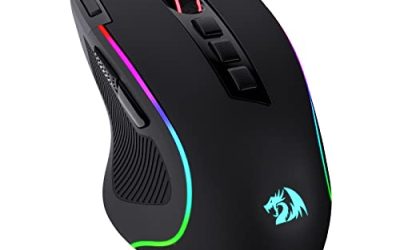
The honest way to shop Razer’s lower tier is by the line’s own positioning, not by a number. Razer names its entry DeathAdder the Essential, builds the Cobra as its basic lightweight wired line, and marks its simpler wireless models with an X. Those positions, all stated in the listings themselves, are what separate the five mice below from the flagship Viper and DeathAdder Pro models that headline the brand’s range.
Two of the five need framing care, and this guide gives it openly: the wired Basilisk V3 is a full-feature model that sits in Razer’s lower wired tier rather than an entry model by name, and the Orochi V2 is a portable mouse included for its simple two-mode design, not because its listing calls it entry-tier. Every specification below comes from the Amazon listing, and tier language follows the listings’ own positioning throughout.
Our Top Picks
 Razer DeathAdder Essential Ergonomic Wired Gaming Mouse5.01 x 2.86 x 1.69 inches0.3 poundsCheck on Amazon
 Razer Basilisk V3 X HyperSpeed Customizable Wireless GamingStandard5.12 x 2.96 x 1.67 inches0.2 poundsCheck on Amazon
 Razer Basilisk V3 Customizable RGB Wired Ergonomic GamingMouse2.96 x 5.12 x 1.67 inches0.2 poundsCheck on Amazon
 Razer Orochi V2 Wireless Gaming Mouse4.26 x 1.52 inch (Pack of 1)4.26 x 1.52 x 2.47 inches0.13 poundsCheck on Amazon
Top 3 picks at a glance

Quick Picks
As an Amazon Associate we earn from qualifying purchases.
| Product | Best for | Key spec from title |
|---|---|---|
| Razer DeathAdder Essential Gaming Mouse, Classic Black | A first-Razer buyer who wants the DeathAdder’s ergonomic shape in the line’s own Essential entry model, wired and simple. | True 6,400 DPI optical sensor, 5 programmable buttons |
| Razer Cobra Wired Gaming Mouse, Black | A player who wants the lightest, simplest wired Razer for fingertip or claw play, with modern optical switches and PTFE feet. | 58 g lightweight, 8,500 DPI optical sensor, Gen-3 switches |
| Razer Basilisk V3 X HyperSpeed Wireless Gaming Mouse | A player who wants the ergonomic Basilisk shape wirelessly, with AA power that never needs a charging cable and a long Bluetooth battery claim for laptop use. | 18K optical sensor, 9 programmable controls, AA-powered |
| Razer Basilisk V3 Wired Gaming Mouse, Classic Black | A wired player who wants the full Basilisk feature set, tilt wheel and eleven buttons, from the lower wired tier rather than the wireless Pro line. | 26K DPI optical sensor, 11 programmable buttons, tilt wheel |
| Razer Orochi V2 Mobile Wireless Gaming Mouse, Black | A player who games on a laptop away from home and wants one very light wireless Razer in the bag, with battery life measured in months on Bluetooth. | Under 60 g, 2 wireless modes, up to 950-hour Bluetooth battery |
How to Choose
Read the tier from the line, not from a headline
Razer’s own structure is the map: Essential names the entry DeathAdder, the plain Cobra is the basic wired line beneath the Cobra Pro, and the X suffix marks the simpler wireless Basilisk. The flagship names, Viper V3 Pro, DeathAdder V3 Pro, Basilisk V3 Pro, sit above all five picks here. Shopping by that structure keeps expectations honest: you are choosing which flagship features to leave behind, and the listings state plainly which ones each model leaves.
Wired simplicity versus wireless routine
Two of these mice are wired, three are wireless, and the wireless ones split further: the Basilisk V3 X and Orochi V2 run on AA batteries, which means no charging cable and no dead-mouse mornings, at the cost of carrying spare cells. Wired picks remove power from the decision entirely. In this tier the connection choice changes your weekly routine more than any sensor figure does, so choose the routine first. AA power also means a spare cell in a drawer replaces a charging schedule, a trade many players in this tier prefer once they have lived with both.
Shape decides before specifications
The set contains three ergonomic right-handed shells (both DeathAdder and Basilisk shapes), one light symmetrical wired mouse (Cobra) and one small portable shell (Orochi V2). A player who palms a large ergonomic mouse will not adapt happily to the Orochi’s travel size, and a fingertip player will find the Basilisk bulky. Your current mouse’s shape family is the strongest predictor of satisfaction here, stronger than any DPI figure in the listings. Grip style refines the same choice: palm players belong on the ergonomic shells, while claw and fingertip players are the Cobra’s and Orochi’s natural audience.
Battery claims need their mode attached
The wireless listings quote their longest figures in Bluetooth mode: up to 285 hours for the Basilisk V3 X, up to 950 for the Orochi V2, whose HyperSpeed figure is 425 hours. Bluetooth is the low-power mode; the gaming connection draws more. Read every battery claim in this tier with its mode named, and distrust any summary, including a headline, that prints the biggest number without one. The honest summary is that the gaming-mode figure is the one your evenings will actually consume, and it is the lower number in both listings.
The 5 Best Options
Razer DeathAdder Essential Gaming Mouse, Classic Black
The DeathAdder Essential is the entry model by its own name: Razer’s listing positions it as the Essential tier of the DeathAdder line, keeping the line’s ergonomic right-handed form while simplifying the specification. The listing states a true 6,400 DPI optical sensor, five programmable buttons, mechanical switches and rubber side grips, wired over USB and programmed through Razer Synapse. For a player who wants the DeathAdder shape as the starting point of the range, this is the listing written for them. Its captured weight fields conflict, so this guide prints no weight rather than choosing one.
Specs
- Sensor: true 6,400 DPI optical
- Buttons: 5 programmable
- Switches: mechanical, 10-million click durability per listing-derived text
- Grips: rubber side grips
- Shape: ergonomic right-handed form
- Connectivity: wired USB
- Weight: listing fields conflict, so no figure is printed
Best for: A first-Razer buyer who wants the DeathAdder’s ergonomic shape in the line’s own Essential entry model, wired and simple.
Watch out for: Do not swap this ASIN for the white model or the older 2018-model listings, which carry different codes, and read the live listing for a settled weight figure since the captured fields disagree.
Razer Cobra Wired Gaming Mouse, Black
The Cobra is Razer’s basic wired line, the step below the Cobra Pro, and its listing builds the case on lightness: 58 g, a precise 8,500 DPI optical sensor, Gen-3 optical switches, 100% PTFE mouse feet and a Speedflex cable, with Chroma RGB underglow for the lighting. It is the pick for a smaller-handed or fingertip player who wants a light symmetrical wired mouse without paying attention to wireless features at all. Note the framing honestly: the listing does not use the word entry, so this guide calls it what the line structure shows, Razer’s basic wired Cobra, and lets the specification speak.
Specs
- Sensor: 8,500 DPI optical
- Weight: 58 g
- Switches: Razer Optical Gen-3
- Feet: 100% PTFE mouse feet
- Cable: Speedflex
- Lighting: Chroma RGB with underglow
- Connectivity: wired USB
Best for: A player who wants the lightest, simplest wired Razer for fingertip or claw play, with modern optical switches and PTFE feet.
Watch out for: The listing fields captured do not state a button count, so do not assume one from the Pro model; a different-ASIN mirror of this mouse states 57 g, and this guide uses the amazon.com ASIN’s 58 g figure.
Razer Basilisk V3 X HyperSpeed Wireless Gaming Mouse
The Basilisk V3 X HyperSpeed is the wireless step in this tier: the X marks Razer’s simpler take on the Basilisk shape, with a 5G Advanced 18K optical sensor, nine programmable controls and Mechanical Gen-2 switches per the listing. It connects by HyperSpeed Wireless or Bluetooth and runs on a single AA battery, with listing-derived text claiming up to 285 hours on Bluetooth. The ergonomic Basilisk shell with its thumb rest carries over, which makes this the pick for a player who wants the shaped, feature-style Razer in wireless form without moving to the Pro tier’s specification.
Specs
- Sensor: 5G Advanced 18K optical, up to 18,000 DPI
- Controls: 9 programmable controls
- Switches: Mechanical Gen-2
- Connectivity: HyperSpeed Wireless (2.4 GHz) and Bluetooth
- Power: single AA battery per listing box contents
- Battery: up to 285 hours on Bluetooth per listing-derived text
- Software: Razer Synapse, Chroma RGB
Best for: A player who wants the ergonomic Basilisk shape wirelessly, with AA power that never needs a charging cable and a long Bluetooth battery claim for laptop use.
Watch out for: Use only this US ASIN; a same-name mirror carries a non-US variant code. The 285-hour figure is Bluetooth mode from listing-derived text, so re-read the live listing before quoting it as your expected runtime.
Razer Basilisk V3 Wired Gaming Mouse, Classic Black
The wired Basilisk V3 is the feature outlier of this set, and its framing needs care: it is a full-feature model, with a Focus+ 26K optical sensor, 11 programmable buttons and the HyperScroll tilt wheel, that sits in Razer’s lower wired tier rather than wearing an entry name. Buyers get the tilt wheel’s free-spin and tactile modes and the Basilisk thumb-rest shape on a wire, programmed through Synapse with Chroma RGB. If your budget angle is really about getting the most complete wired Razer before the wireless Pro models, this is the listing that answers it, described as exactly that.
Specs
- Sensor: Focus+ 26K optical, up to 26,000 DPI
- Buttons: 11 programmable
- Wheel: HyperScroll tilt wheel
- Connectivity: wired USB
- Software: Razer Synapse, Chroma RGB
- Model: RZ01-04000100-R3U1 (US); a regional twin listing exists
Best for: A wired player who wants the full Basilisk feature set, tilt wheel and eleven buttons, from the lower wired tier rather than the wireless Pro line.
Watch out for: A second listing for this model name carries a different model suffix from another region; order by this US ASIN, and verify the switch generation on the live listing before repeating any figure for it, since the captured fields do not settle it.
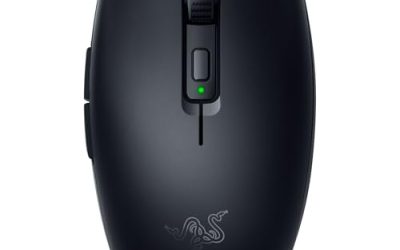
Razer Orochi V2 Mobile Wireless Gaming Mouse, Black
The Orochi V2 is the portable pick in this set, included for its design rather than an entry label its listing never claims: Razer positions it as a mobile wireless mouse for work and play. The listing states a 5G Advanced 18K optical sensor, mechanical switches, two wireless modes, HyperSpeed Wireless and Bluetooth, and a weight under 60 g as the listing phrases it. Its battery figures are mode-specific: up to 950 hours on Bluetooth, up to 425 hours on HyperSpeed, both AA-powered per listing family text. For a laptop bag that also games, nothing else in this set is built for the job.
Specs
- Sensor: 5G Advanced 18K optical, up to 18,000 DPI
- Weight: under 60 g as the listing phrases it
- Switches: mechanical
- Connectivity: HyperSpeed Wireless and Bluetooth
- Battery: up to 950 hours Bluetooth, up to 425 hours HyperSpeed, AA-powered per listing family text
- Positioning per listing: mobile mouse for work and play
- Colour of this ASIN: Classic Black; white and pink are separate ASINs
Best for: A player who games on a laptop away from home and wants one very light wireless Razer in the bag, with battery life measured in months on Bluetooth.
Watch out for: Do not call this an entry-tier mouse; its listing positions it as a portable model, and this guide includes it on that basis. Quote battery figures only with their mode attached, and never swap in the white or pink ASINs.
Which One Fits Your Situation
Your first Razer, for a gaming desk at home
Take the DeathAdder Essential for the line’s own entry model in the classic ergonomic shape, or the Cobra if your hand and grip favour a light symmetrical wired mouse instead. Both are wired, both program through Synapse, and both leave the wireless question for a later upgrade rather than a compromise now.
You want wireless without a charging cable
Take the Basilisk V3 X HyperSpeed for the ergonomic shape and nine controls, powered by a single AA; its Bluetooth figure suits the laptop days and HyperSpeed covers the gaming PC. The same AA cell also means the mouse works the minute a battery dies, with a drawer swap instead of an overnight charge.
You want the most wired features in this tier
Take the Basilisk V3 wired: eleven buttons, the tilt wheel and a 26K sensor make it the complete wired Razer below the Pro line, framed honestly as a lower-wired-tier model rather than an entry mouse. Its tilt wheel alone justifies the step for players who scroll long documents or inventories between matches.
You game on a laptop in several places
Take the Orochi V2 for its under-60 g portable shell and two wireless modes, with the understanding that its listing positions it as a mobile mouse, which is precisely the job. Its small shell also disappears into a laptop sleeve’s pocket in a way none of the full-size ergonomic models can.
Common Mistakes
- Calling every model in this tier an entry mouse, when the Orochi V2 is a portable model and the wired Basilisk V3 is a full-feature lower-tier model; the listings’ own positioning is the accurate language.
- Quoting the Orochi’s 950-hour battery figure without its Bluetooth mode, when the same listing family states 425 hours for HyperSpeed mode; the mode is part of the specification.
- Ordering a colour variant’s ASIN by accident, since the Essential, Cobra and Orochi listings all carry separate codes per colour, and the code printed here is the black US model in each case.
- Printing a weight for the DeathAdder Essential from whichever field you saw first, when its listing fields conflict; the honest move, used in this guide, is to omit the figure until the live listing settles it.
- Assuming the plain Cobra shares the Cobra Pro’s specification because the names are close, when the Pro is a separate, higher model with its own listing and this set covers the basic wired Cobra only.
Frequently Asked Questions
Which of these is Razer’s true entry model?
The DeathAdder Essential, by its own name: the listing positions it as the Essential tier of the DeathAdder line. The Cobra is the basic wired line, and the Basilisk V3 X is the simpler wireless step; the other two picks are framed by their own positioning in their entries.
Why is the Orochi V2 in an entry-tier guide?
Because its listing positions it as the simple, portable two-mode option, not because it is labelled entry-tier, and this guide says so in its entry. It earns its place as the laptop-bag pick; buyers who need a strictly entry-named model should take the Essential.
Are the battery figures real?
They are the listings’ own figures, quoted with their modes: up to 950 hours for the Orochi V2 on Bluetooth, 425 on HyperSpeed, and up to 285 hours for the Basilisk V3 X on Bluetooth. Runtime in gaming mode is the lower figure in each pair, and the live listing is the place to confirm them.
Wired or wireless at this tier?
Wired removes power management entirely and suits a fixed desk; the AA-powered wireless models remove the cable and the charging routine together. Sensor figures overlap across both groups, so the decision is about routine and shape, not performance. Shape, not connection, is where satisfaction is decided in this tier, and it is worth settling before comparing any other figure.
Related guides
More from Amazon
Programs that pair well with the guide above. Offers and eligibility are set by Amazon and may change.
Free shipping on eligible items, Prime Video and more. Eligible new members can start with a free trial.
Start a Prime free trialAd-free music streaming. Eligible new subscribers can start with a free trial.
Try Music Unlimited freeA Prime membership for ages 18-24 with a trial period. Eligibility is set by Amazon.
See Prime for Young AdultsAudiobooks and podcasts to listen to on the go. Eligible new members can start with a free trial.
Try Audible freeAs an Amazon Associate we earn from qualifying purchases.