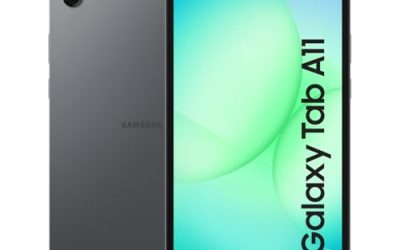
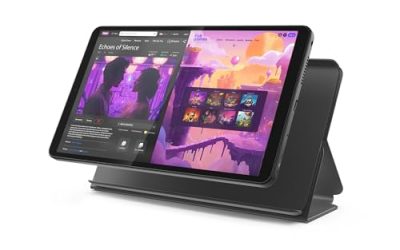
College note-taking has split into two camps. One group wants a full tablet that handles lecture slides, textbook PDFs, a browser, and handwriting in the same device. The other wants something that feels like paper: a low-glare, pen-first screen or E Ink notebook that does not tempt you to open social media halfway through a lecture. The answer to which camp you belong to determines everything else, from the screen and storage to whether a stylus comes in the box.
This guide covers six devices that fit the brief, from full Android tablets to paper-style tablets and digital notebooks. The comparisons use only what the listings state, such as screen size, refresh rate, memory, storage, pressure levels, and bundled accessories. If you are shopping before the 2026 school year and want to avoid a mismatch between your classes and your gear, work through the notes below before comparing anything else.
Our Top Picks


Top 3 picks at a glance
Quick Picks
As an Amazon Associate we earn from qualifying purchases at no extra cost to you.




| Product | Best for | Key spec from the title |
|---|---|---|
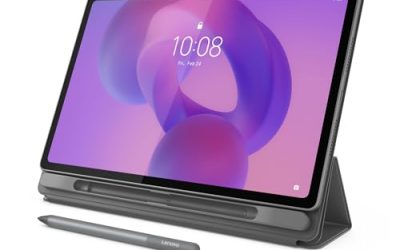
| Lenovo Idea Tab (4GB/128GB) | Reading and streaming on a screen | 11 inch 2.5K IPS, 90Hz, 4GB memory, 128GB storage |
| Lenovo Idea Tab (8GB/256GB) | Multitasking and more storage | 11 inch 2.5K IPS, 90Hz, 8GB memory, 256GB storage |
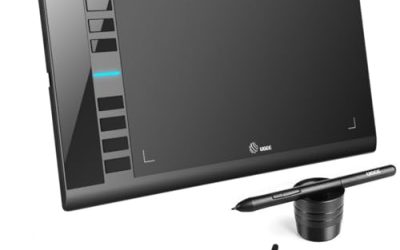
| XPPen 3 in 1 Color Digital Notebook | Paper-style handwriting | 10.95 inch, 16384 pressure levels, X3 Pro Pencil 2, 6+128GB |
| TCL Note A1 NXTPAPER | Full-featured paper-style tablet | 11.5 inch 2.2K 120Hz, 8+256GB, 8000mAh, stylus and case |
| XPPen Note Plus | Light notes that sync to a phone | Digital notebook with pen, syncs to phone |
| iflytek AINOTE Air 2 | Ultraportable E Ink notes | 8.2 inch E Ink, folio case, AI note taking |
How to Choose
Full tablet or paper-style device
A standard tablet, such as the Lenovo Idea Tab, gives you a bright LCD for slides, video lectures, and apps, but it is also full of distractions and can strain eyes in a dim lecture hall. A paper-style display, like the TCL NXTPAPER, reduces glare and mimics the feel of ink on paper. E Ink notebooks, like the iflytek and XPPen devices, go further with a reflective screen and long battery life, but they have slower refresh and limited apps. Think about your course load: a nursing or engineering student with heavy PDFs and diagrams has different needs from a literature major who mostly annotates readings.
Check the stylus and pressure levels
Note-taking lives or dies on the pen. Look for a stylus that is battery-free or includes one in the box, and pressure sensitivity measured in levels, such as 8192 on the TCL pen or 16384 on the XPPen. More levels mean finer control over line thickness, though writing feel also depends on the screen surface. If a listing does not mention a pen, assume you will buy one separately and confirm compatibility before you commit. Also check the writing surface: a slightly textured screen gives the pen some grip, while a slick glass panel can feel slippery during a fast lecture.
Memory, storage, and battery
For PDFs and handwritten notes, 128GB is usually plenty; heavy video and downloaded textbooks reward 256GB. More RAM, such as 8GB, helps with split-screen use and many open apps. Check battery capacity, such as the 8000mAh figure listed for the TCL. E Ink notebooks tend to last far longer between charges than LCD tablets, which matters on a long campus day, and a tablet that must be plugged in between classes quickly becomes a nuisance.
Ignore the AI buzz, and watch where budget devices cut corners
AI note-taking and meeting summaries, listed on several devices, are a nice extra but depend on software and sometimes subscriptions. Budget tablets often skimp on screen brightness, build quality, and included accessories. An unbranded or niche device may have limited app support, so confirm that the apps your classes need will run before buying. Ask your department whether it requires a specific learning platform or exam software, because some proctoring tools do not run on every tablet.
The 6 Best Options
Lenovo Idea Tab (4GB / 128GB)
The Idea Tab is an 11 inch college tablet with a 2.5K IPS touchscreen, a 90Hz display, a MediaTek Dimensity 6300 processor, 4GB of memory, and 128GB of storage. It suits students who read slides, textbooks, and web pages on a bright, sharp screen and may add a stylus later. It is a versatile all-rounder rather than a dedicated note device. Commuters reading between classes, and students who use a laptop for typing but want a second screen for reference material, will find it comfortable to hold and use.
- Strength: 11 inch 2.5K IPS screen with a 90Hz refresh rate.
- Strength: 128GB of storage for documents and apps.
- Trade-off: only 4GB of memory, which can limit heavy multitasking.
Skip it if you want a paper-like feel or a pen included in the listing, as the title does not mention a stylus and you would be buying one separately.
Lenovo Idea Tab (8GB / 256GB)
The higher-spec version doubles the memory to 8GB and the storage to 256GB, with the same 11 inch 2.5K IPS 90Hz screen. It is the better fit for students who use split-screen, keep many apps open, and download lecture recordings and textbooks. Graduate students juggling papers, citations, and reference apps will appreciate the extra headroom.
- Strength: 8GB of memory suits multitasking.
- Strength: 256GB of storage leaves room for large files.
- Trade-off: the listing does not name a bundled stylus.
Skip it if the 4GB version covers your needs and you want to keep costs down, since the extra memory is only useful if you actually multitask.
XPPen 3 in 1 Color Digital Notebook
This 10.95 inch paper-style note-taking tablet offers 16384 pressure levels, a battery-free X3 Pro Pencil 2, a magnetic folio, and 6GB of memory with 128GB of storage. It is built for students who want handwriting that feels natural and a case that holds the pen. The color display supports annotated diagrams and highlighting, which helps in subjects with charts, anatomy figures, or maps. Because the pen is battery-free, there is nothing to charge before an early lecture.
- Strength: 16384 pressure levels and a battery-free pen.
- Strength: magnetic folio keeps pen and device together.
- Trade-off: a specialist device, so general app support may be narrower.
Skip it if you want a general-purpose tablet for streaming and games, since a paper-style tablet is designed for writing first.
TCL Note A1 NXTPAPER
The Note A1 is an 11.5 inch NXTPAPER tablet with a 2.2K 120Hz display, 8GB of memory plus 256GB of storage, an 8192-level stylus and case included, an 8000mAh battery, and AI note-taking. It combines a paper-like screen with enough specifications to double as a daily tablet. The included stylus and case mean a student can start writing as soon as the box is open, and the large battery supports long days between charges.
- Strength: paper-style display with a 120Hz refresh rate.
- Strength: stylus and case included, with an 8000mAh battery.
- Trade-off: stylus pressure levels are lower than the XPPen pen.
Skip it if you want a reflective E Ink screen with the longest battery life, since this is a paper-style LCD-type screen rather than a reflective E Ink panel.
XPPen Note Plus Digital Notebook
The Note Plus is a digital notebook with a pen that syncs notes to your phone, aimed at students who sketch and take notes. It is a lighter-touch option for people who want handwriting captured digitally without carrying a full tablet. A student who carries a laptop for typing can add this for margins, sketches, and quick math, then read the pages later on a phone.
- Strength: syncs to a phone for easy access to notes.
- Strength: aimed at student note-taking and sketching.
- Trade-off: the listing text is cut off, so confirm screen details on the product page.
Skip it if you want a full tablet for apps and media, because the listing frames it as a note-taking notebook.
iflytek AINOTE Air 2
The AINOTE Air 2 is an ultraportable 8.2 inch E Ink tablet with a black folio case, a digital notebook pen, AI note taking, and meeting summaries. It is a compact option for students who want a distraction-free device that slips into any bag. Its AI note taking and meeting summaries suit group projects and seminar discussions, provided you check how the features work and what they require.
- Strength: E Ink screen suited to long reading and writing sessions.
- Strength: portable 8.2 inch size with a folio case.
- Trade-off: a small screen limits full-page PDFs and diagrams.
Skip it if you need color, video, or a broad app library, since an E Ink screen is built for text and handwriting.
Which One Fits Your Situation
You read slides and textbooks and also stream
The Lenovo Idea Tab with 8GB and 256GB handles reading, browsing, and multitasking, with enough storage for a semester of readings.
You want handwriting that feels like paper
The XPPen 3 in 1 Color Digital Notebook pairs a battery-free pen with a magnetic folio, so everything travels together in one bag.
You want a paper-style tablet that does more
The TCL Note A1 NXTPAPER adds a 120Hz display and a bundled stylus and case, which is useful when you want a tablet to cover both class and downtime.
You want the lightest, most distraction-free option
The iflytek AINOTE Air 2 uses an 8.2 inch E Ink screen in a pocketable size, ideal for carrying between lecture halls.
Common Mistakes
- Buying a tablet without checking whether a stylus is included or compatible.
- Choosing the lowest memory option and then running out of room for lecture files halfway through the semester.
- Expecting an E Ink notebook to behave like a full tablet, then missing apps and color.
- Assuming AI note features are free forever, when some depend on services that may change.
- Ignoring screen size when full-page PDFs are part of the course load.
Related guides
- How To Use Camelcamelcamel For Amazon Deals
- Warranty Considerations When Buying On Sale
- Browser Extensions For Finding Deals
Frequently Asked Questions
Is a stylus necessary for note-taking?
For handwritten notes, yes. Check whether the pen is included and what pressure sensitivity it offers, and confirm that the pen works with the exact tablet model you pick.
Is E Ink better than an LCD for notes?
It is easier on the eyes and lasts longer on a charge, but refresh is slower and apps are limited. LCD tablets are more versatile, though a paper-style coating can narrow the gap by cutting glare while keeping a full app library.
How much storage do students need?
128GB is enough for most notes and PDFs, since handwritten pages take little space. Choose 256GB if you store video lectures and many textbooks, or if the tablet will also hold music, photos, and downloaded shows for the commute home.
Are AI note features worth it?
They can help summarize and organize notes, but check whether they require a subscription or internet connection.
Related guides
More from Amazon
Programs that pair well with the guide above. Offers and eligibility are set by Amazon and may change.
Free shipping on eligible items, Prime Video and more. Eligible new members can start with a free trial.
Start a Prime free trialAd-free music streaming. Eligible new subscribers can start with a free trial.
Try Music Unlimited freeA Prime membership for ages 18-24 with a trial period. Eligibility is set by Amazon.
See Prime for Young AdultsAudiobooks and podcasts to listen to on the go. Eligible new members can start with a free trial.
Try Audible freeAs an Amazon Associate we earn from qualifying purchases.