
Choosing between a cheap gaming headset vs budget earbuds for pc gaming is not just about sound quality. It is about how you actually game at home: how long you play, where your PC sits, who else can hear you, and how much clutter you want on your desk. Both options will get you in-game audio and voice chat for under $60, but they solve different problems. A budget over-ear headset gives you an all-in-one solution with a boom mic and isolation, while compact earbuds trade some of that immersion for portability, comfort in heat, and a setup that disappears when you are done.
If you are deciding for a shared desk, a living room PC, or a dedicated gaming corner, the trade-offs around comfort, mic performance, durability, and daily convenience matter more than a spec sheet. Here is how the two stack up for real home use.
As an Amazon Associate we earn from qualifying purchases at no extra cost to you. Product prices and availability are accurate as of the date shown and are subject to change.


Top 3 picks at a glance
Quick Verdict
For most PC gamers who play for more than an hour at a time and need reliable team communication, a cheap gaming headset is the safer pick. You get a positioned boom microphone, larger drivers for directional audio, and passive noise isolation without extra setup.
Budget earbuds for PC gaming make more sense if you value low weight, minimal storage, heat-free comfort, and the ability to use the same audio gear with your phone, handheld, or laptop. You will save desk space and reduce fatigue during summer or in small rooms, but you will typically compromise on mic clarity and long-session immersion unless you add a standalone mic.
Bottom line: Choose a cheap gaming headset for competitive and social gaming from a fixed desk. Choose budget earbuds for casual, portable, and space-conscious gaming where convenience beats all-day immersion.
Side by Side
| Feature | Cheap Gaming Headset | Budget Earbuds for PC Gaming |
|---|---|---|
| Comfort | Over-ear cups with 3 to 4 inch diameter padding and 8 to 11 oz weight; warm after 90+ minutes but even pressure distribution for long sessions | 0.15 to 0.25 oz per bud; no headband pressure or heat buildup, but in-ear pressure can cause fatigue after 2 to 3 hours for some users |
| Durability | Plastic headband and yokes are the usual failure point; average lifespan 1.5 to 3 years with daily use; detachable cables extend life | Fewer moving parts; wired IEM-style buds often last 2 to 4 years if cables are not yanked; wireless buds depend on battery health, typically 2 to 3 years |
| Price Range | $19 to $55 for wired models; wireless budget models $40 to $70 | $9 to $25 for wired IEMs; $35 to $60 for 2.4GHz wireless gaming earbuds |
| Maintenance | Wipe memory foam earmuffs weekly; earpads absorb sweat and need replacement every 12 to 18 months; boom mic needs dusting | Clean silicone tips weekly with mild soap; minimal sweat absorption; wireless case needs charging contact cleaning |
| Space Needed | Requires headphone stand or hook; footprint about 6 x 7 x 3.5 inches when stored; not pocketable | Stores in case about 2.5 x 1.8 x 1 inch; fits in drawer, pocket, or under monitor; ideal for minimal desks |
| Look | Gamer aesthetic with LED accents, large earcups, and visible boom mic; clearly a gaming setup | Low-profile and neutral; disappears in a living room or work-from-home setup; no lights or bulky frame |
| Resale | Low resale value, typically $5 to $15 used due to hygiene concerns with earpads | Very low resale for wired models; wireless models retain $10 to $20 if battery is healthy and case is included |
| Best For | Multiplayer chat, immersive single-player, and fixed PC setups where mic quality matters | Casual gaming, small spaces, hot rooms, travel, and users who want one pair for PC, phone, and console handheld |
| Power & Connectivity | Wired 3.5mm or USB draws 0.1 to 0.5 watts; no charging needed; USB models add virtual surround via software | Wired draws no battery; wireless uses 2.4GHz dongle or Bluetooth with 5 to 7 hour battery per charge, case adds 15 to 25 hours |
Where Cheap Gaming Headset Wins
A budget over-ear headset is built for the way PC gaming actually works: long sessions, Discord calls, and directional audio cues. The physical design does most of the heavy lifting.
First, microphone placement. A boom mic sits 1 to 2 inches from your mouth, which naturally beats an inline or bud-mounted mic for voice clarity. If you play competitive shooters, co-op survival games, or MMOs where callouts matter, that difference is immediate. Your teammates hear less keyboard and room noise, and you do not have to repeat yourself. Models like the BENGOO G9000 Stereo Gaming Headset at around $19.96 lean into this with a flexible noise-cancelling boom and over-ear cups that help keep your voice isolated, while the WIRWTRU Wired Gaming Headset at about $19.99 offers the same basic formula with a lightweight frame and universal 3.5mm plus USB compatibility for PS5, Xbox, and PC.
Second, soundstage and isolation. A cheap gaming headset typically uses 40mm to 50mm drivers inside closed-back cups. You will not get true audiophile imaging, but you get better left-right separation and low-end impact than most tiny bud drivers, which helps with footsteps and environmental cues. The closed cups also block 12 to 20 dB of ambient noise passively, useful if your PC is in a living room or near a TV.
Third, comfort for extended play at a desk. The weight is higher, usually 8.5 to 11 ounces, but the pressure is spread across a padded headband and large memory foam earmuffs. For sessions over 90 minutes, that distribution often feels more stable than ear canal pressure from buds. If you have a dedicated gaming desk and do not need to pack up after each session, a headset can stay plugged in and ready.
Finally, simplicity. A wired headset draws negligible power and never needs charging. Plug the 3.5mm into your front panel or motherboard I/O, select it as your output in Windows sound settings, and you are done. No pairing, no dongle management, no battery anxiety mid-match.
Where Budget Earbuds for Pc Gaming Wins
Earbuds win on convenience, heat, and flexibility. If your gaming setup shares space with work, study, or family life, those factors quickly outweigh the headset advantages.
Weight and heat are the biggest wins. At under a quarter ounce per side, earbuds eliminate headband pressure and earcup sweat entirely. In a warm room or a small apartment without dedicated cooling, that matters. You can game for an hour, then walk away without hat hair or warm ears, and you can comfortably wear them while lounging or lying back, which is awkward with a bulky headset.
Portability and storage are equally practical. A pair of wired IEMs like the Piluyaa Wired Gaming Headphones IEM Earphones at about $9.99 coils to fit in a 2-inch case and weighs less than an ounce total. You can keep them in a desk drawer, use them with your phone on a commute, then plug them into your PC at night. There is no stand to find room for and no frame to protect from kids or pets knocking it off the desk.
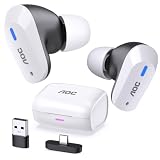
Wireless gaming earbuds have also matured for PC use. The AOC Wireless Gaming Earbuds at around $53.99 use a 2.4GHz USB-C dongle that provides lower latency than standard Bluetooth, typically 30 to 50 ms versus 120 to 200 ms over Bluetooth, which is important for lip sync and competitive timing. That dongle works across PC, PS5, and Switch, so one pair covers multiple platforms without swapping cables. Battery life on these budget wireless models is usually 6 to 8 hours per charge with another 18 to 24 hours in the case, enough for several evenings before you need to dock.
Earbuds also keep your setup visually quiet. If your PC is in a shared living space, a bedroom, or a home office that needs to look tidy on video calls, buds do not broadcast a gamer aesthetic. They are easier to keep hygienic as well, since silicone tips can be removed and washed, while headset pads absorb oils and require eventual replacement.
The main compromise is the microphone. Even good budget earbuds rely on an inline mic or beamforming mics built into the buds, which sit farther from your mouth and pick up more room echo. For casual play it is fine, but for regular competitive chat you may want a $15 to $25 clip-on lapel mic or a basic USB desktop mic to close the gap.
Cost Over 5 Years
Both options are inexpensive upfront, but the total cost depends on how often you replace pads, cables, or batteries.
A cheap wired gaming headset typically costs $19 to $40 to start. Expect to replace earpads once in five years at $8 to $15, and possibly the whole headset once if the headband or cable fails after year two or three. If you buy a $20 headset and replace it once, your five-year spend is about $40 to $55 plus $10 for pads if you keep the first pair longer. Power cost is negligible at under half a watt. As of 2026, this remains the lowest-cost path for a dedicated PC gaming station.
Budget wired earbuds are even cheaper to own. A $9 to $18 pair like the Piluyaa IEMs may last the full five years with only $5 to $8 spent on replacement silicone tips. If the cable frays, a second pair keeps you under $25 total. No charging, no battery degradation.
Wireless gaming earbuds cost more to buy and to maintain. At $45 to $60 upfront, you pay for the 2.4GHz dongle, Bluetooth, and charging case. Over five years, battery capacity will drop to 70 to 80 percent by year three with daily use, which may push you to replace the set once in that period. A two-purchase cycle puts you at $90 to $120 over five years, plus less than $1 per year in electricity for charging at 2 to 5 watts per full charge.
If budget is the primary driver, wired earbuds are the cheapest long-term. If consistent mic quality and immersion matter more than absolute savings, a cheap wired headset offers the best cost-to-performance balance.
Which One for Your Home
Your room and routine should decide more than your game library.
Small Apartment
Choose budget earbuds. When your PC shares a wall with a bedroom or sits three feet from the couch, low profile wins. Earbuds store in a drawer, create no clutter, and let you switch from PC to phone without unplugging a headband. If you use speakers late at night, earbuds also let you keep volume contained without heating up your ears in a compact, warm space. A 2.4GHz wireless pair keeps cables off a tight desk where every inch counts.
Family with Kids or Pets
Choose a cheap gaming headset if you have a fixed desk away from high traffic, and budget earbuds if your gear lives in a shared space. Headsets are easier for kids to put on correctly and the boom mic is intuitive for chat, but the exposed headband and cable are easy for pets or small hands to pull. Earbuds survive tugs better and hide away quickly, yet tiny silicone tips can be a choking hazard and are easy to lose. For a family PC in the living room, a durable wired headset around $19 to $25 that stays on a high hook is often the more practical family choice.
Rental
Choose budget earbuds. Renters often cannot add wall hooks, cable management, or a permanent gaming corner. Earbuds require zero installation and travel well when you move. The WIRWTRU and BENGOO style headsets are light, but they still need a stand and permanent cable routing to stay tidy. If you move within a year or your desk setup is temporary, the ability to pack audio in a pocket outweighs the headset’s mic advantage.
Long-Term Home
Choose a cheap gaming headset. If you have a dedicated office, basement, or gaming room where your PC stays put, the headset becomes part of the furniture. You can mount a $10 to $15 under-desk hanger, route the 3.5mm or USB cable cleanly, and leave it ready. Over several years, the comfort for two to four hour sessions, better directional audio, and superior boom mic performance will be appreciated more than portability. Keep a $10 backup pair of wired IEMs in the drawer for hot summer nights or when you want to game from the couch.
FAQ
Do I need 7.1 surround sound for PC gaming on a budget?
No. Most budget headsets that advertise 7.1 surround use software virtualization through a USB sound card or driver, not true multiple drivers per ear. For competitive awareness, well-tuned stereo with Windows Sonic, Dolby Atmos for Headphones, or the game’s own head-related transfer function usually provides clearer positioning than generic virtual surround. Focus on comfort, mic quality, and a reliable connection instead.
Will budget earbuds work well for voice chat on PC?
They work, but expect thinner voice pickup than a boom mic. For casual chat, an inline mic or built-in bud mics are adequate. For regular team play, consider adding a clip-on lavalier mic for $12 to $20 or a budget USB condenser at $20 to $30 and set it as your input in Discord or Steam. Some wireless gaming earbuds improve this with a low-latency 2.4GHz dongle and beamforming mics, but they still sit farther from your mouth than a headset boom.
Are wired or wireless options better at the budget price point?
Wired is more reliable under $30. You avoid latency, pairing issues, and battery wear, and you get consistent audio with zero charging. Wireless makes sense from $45 to $60 if you value freedom of movement and cross-platform use via a USB-C dongle. If you choose wireless earbuds, look for a model that includes both 2.4GHz and Bluetooth so you can use low latency for PC and Bluetooth for your phone.
How do I make a cheap headset or earbuds last longer?
For headsets, store them on a stand or hook rather than laying them flat, avoid wrapping the cable tightly around the frame, and wipe pads with a dry or slightly damp cloth weekly. Replace pads when they start to flake. For earbuds, clean tips weekly, store them in their case instead of pocket-stuffing the cable, and avoid max volume for long periods which can strain small drivers. For wireless models, avoid leaving the case at 0 percent or 100 percent for weeks; a mid-range charge extends battery health.


