
The Short Answer
No, you do not need 32 gigabytes of RAM if your daily routine consists of writing documents, browsing the web, streaming videos, and managing household finances. For the vast majority of home office users, 16 gigabytes is the absolute sweet spot for smooth multitasking. However, if you are a creative professional editing 4K footage, a software developer running multiple virtual machines, or a gamer wanting to play demanding modern titles while keeping dozens of browser tabs open, then yes—32 gigabytes is a highly beneficial investment.
What You Actually Get
To understand whether you should spend your hard-earned money on extra memory, it helps to think of your computer like a physical home office desk. Your hard drive (SSD) is like a deep filing cabinet in the corner of the room; it holds everything, but it takes time to walk over, open a drawer, and retrieve a file. Random Access Memory (RAM), on the other hand, is the actual surface area of your desk. The larger your desk, the more documents, books, and tools you can spread out and work on simultaneously without cluttering your workspace.
As an Amazon Associate we earn from qualifying purchases at no extra cost to you. Product prices and availability are accurate as of the date shown and are subject to change.

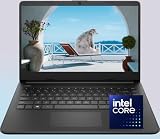
When asking yourself, “do i need thirty two gigabytes of ram,” you are essentially asking if you need an executive-sized double-pedestal desk or if a compact 40-inch writing desk will suffice. With 32 gigabytes of RAM, your system can hold massive amounts of temporary data right at the processor’s fingertips. This means you can switch between a memory-hogging web browser with 50 active tabs, a massive Excel spreadsheet, a Zoom video conference, and an image editing program without experiencing a single stutter or waiting for a page to reload.
However, RAM does not operate in a vacuum. It must work in harmony with your laptop’s Central Processing Unit (CPU). For example, consider customized budget laptops like the WOWPC Custom HP 14″ Laptop. This lightweight, 3.1-pound machine is powered by an Intel Pentium Silver N5030 processor—a highly efficient, 6-watt chip designed primarily for everyday productivity. While custom configurations allow you to pair this budget-friendly computer with up to 32GB of RAM for around $310 to $450, the entry-level processor will bottleneck heavy workloads long before you can utilize all 32GB of memory. It is a stark reminder that a massive desk is only useful if you have the physical strength and speed to reach across all of it.
Pros
- Future-Proofing Your Setup: As we look toward 2026, web browsers, operating systems, and productivity suites are becoming increasingly complex and resource-heavy. Having 32GB ensures your hardware will easily handle software updates for years to come.
- Elimination of Browser Reloads: If you keep dozens of tabs open for research, shopping, or work, 32GB of memory prevents the operating system from “sleeping” older tabs, allowing you to click back to them instantly.
- Seamless Creative Workflows: Programs like Adobe Premiere, Photoshop, and AutoCAD thrive on system memory. More RAM allows these applications to cache larger preview files, making real-time editing significantly smoother.
- Better Virtualization: If you run virtual environments (such as testing different operating systems or running legacy software for your home business), 32GB allows you to allocate generous chunks of memory to those virtual machines without crippling your main system.
Cons
- Diminishing Returns for Casual Users: If your daily computer use is limited to email, Netflix, and basic Word documents, you will utilize less than 8GB to 12GB of RAM. Paying extra for 32GB offers zero visible performance improvement in these scenarios.
- Potential CPU Bottlenecks: If you configure a low-power laptop (such as one with an Intel Pentium or Celeron processor) with 32GB of RAM, the processor will still struggle with demanding tasks. The extra memory cannot compensate for a slow engine.
- Higher Upfront Costs: Choosing a 32GB configuration typically adds $100 to $200 to the price of a mid-range computer, money that might be better spent on a faster processor, a brighter screen, or a larger Solid State Drive (SSD).
- Slightly Higher Power Draw: While negligible in desktop PCs, running more physical RAM chips or high-density memory modules draws a tiny bit more wattage, which can marginally impact laptop battery life.
Who Should Buy It
You should opt for 32GB of RAM if you are a power user who despises system lag and wants a computer that will remain fast for the next five to seven years. This configuration is highly recommended for freelance graphic designers, video editors, music producers handling multi-track projects, and financial analysts who work with massive, macro-enabled spreadsheets. It is also an excellent choice for dedicated gamers who stream their gameplay to platforms like Twitch, as the background encoding software requires substantial memory overhead alongside the game itself.
Who Should Skip It
You should skip 32GB of RAM if you are shopping on a strict budget or if your computer usage is straightforward. Students, casual remote workers, and retirees will find that 16GB—or even 8GB on highly optimized budget machines—is more than enough. Furthermore, if you are looking at entry-level laptops priced under $350, you should skip the 32GB upgrade. Instead, stick to an 8GB or 16GB configuration and pocket the savings, or redirect those funds toward upgrading from a 128GB SSD to a roomier 512GB SSD to store more of your photos and personal files.
Cheaper Alternatives
If you decide that 32GB is overkill for your budget and lifestyle, there are highly practical middle-ground configurations that balance cost and performance beautifully.
| Option | Estimated Cost Range | Trade-off |
|---|---|---|
| 8GB RAM Configuration | $250 – $400 | Excellent for tight budgets and basic tasks. However, it will struggle with heavy multitasking and may feel sluggish under demanding software updates within a few years. |
| 16GB RAM Configuration | $400 – $800 | The absolute sweet spot for 90% of home office users. It handles extensive multitasking and light creative work effortlessly without inflating the computer’s price tag. |
| 16GB RAM + Faster CPU (Core i5 / Ryzen 5) | $500 – $900 | Provides a far better real-world performance boost than pairing 32GB of RAM with a weak, entry-level processor. A balanced, snappy system for everyday work. |
FAQ
Will 32GB of RAM make my computer boot up faster?
No. Your computer’s boot-up speed is almost entirely determined by the speed of your storage drive (SSD vs. HDD) and the efficiency of your processor. Upgrading from 8GB or 16GB to 32GB of RAM will not make your computer start up any faster, though it will allow you to open more applications immediately after booting without slowing down.
Can I buy a cheap laptop and upgrade it to 32GB of RAM myself?
It depends entirely on the laptop’s design. Many modern, ultra-thin laptops and budget devices have their RAM soldered directly onto the motherboard, meaning it cannot be upgraded after purchase. However, some traditional 14-inch and 15-inch laptops feature accessible memory slots that allow you to install extra RAM modules later. Always check the manufacturer’s specifications before purchasing if you plan to upgrade manually.
Is 16GB of RAM enough for working from home?
Yes, 16GB of RAM is currently the gold standard for working from home. It easily accommodates typical office workloads, including running corporate communication tools like Microsoft Teams, keeping multiple web browsers open with dozens of active tabs, and working on large PDF documents and spreadsheets simultaneously.
Does having more RAM drain my laptop battery faster?
Technically, yes, but the difference is incredibly minor. Running more RAM chips or higher-capacity modules does require a tiny fraction of a watt more power. However, in real-world usage, this power draw is virtually unnoticeable compared to the energy consumed by your laptop’s screen brightness, processor workload, and cooling fans.


