
The Short Answer
No, an 80 Plus Platinum power supply is almost never worth the extra money for a budget build. The single exception is if you are building an ultra-compact, small-form-factor (SFF) home office PC or media center where thermal management is severely restricted, and you happen to find a premium SFX Platinum unit on a rare, deep clearance sale.
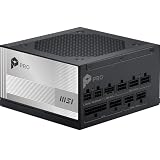
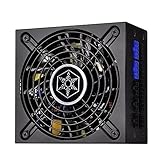
For a standard budget computer build—typically costing between $600 and $900—allocating $140 to $170 of your hard-earned cash to a premium power supply (PSU) like the MSI PRO A1000PL ($146.99) or the SilverStone SST-SX700-LPT-USA ($161.68) will starve your system of performance. That extra $60 to $80 premium over a reliable Bronze or Gold rated unit is much better spent upgrading your graphics card, purchasing a faster NVMe SSD, or buying a more capable processor, all of which yield immediate, tangible upgrades to your daily computing experience.
As an Amazon Associate we earn from qualifying purchases at no extra cost to you. Product prices and availability are accurate as of the date shown and are subject to change.
What You Actually Get
To understand why the premium is hard to justify on a budget, it helps to understand what the “80 Plus” certification actually measures. The certification grades how efficiently a power supply converts Alternating Current (AC) from your wall outlet into Direct Current (DC) used by your computer’s components. Any energy lost during this conversion is dissipated as waste heat.
An 80 Plus Gold power supply operates at roughly 90% efficiency under a typical 50% system load. An 80 Plus Platinum power supply steps this efficiency up to roughly 92% under the same load. This means if your budget PC requires 300 watts of power during a gaming session:
- A Gold-rated PSU will draw about 333 watts from your home wall outlet.
- A Platinum-rated PSU will draw about 326 watts from your wall outlet.
The real-world difference is a mere 7 watts. Even if you run your computer for four hours every single day, this microscopic energy saving translates to less than two dollars saved on your annual household electricity bill. It would take you more than a decade of continuous use to recoup the upfront price premium of a Platinum power supply through energy savings alone.
However, you do get more than just raw efficiency. Platinum power supplies are engineered with top-tier internal components. For example, the MSI PRO A1000PL PCIE5 utilizes server-grade capacitors and heavy-duty internal heatsinks to manage electrical current. It also features ATX 3.1 and PCIe 5.1 readiness, meaning it includes the updated 12V-2×6 power cables designed to handle modern, power-hungry graphics cards safely. You also get superior cable physics: instead of stiff, plastic-sleeved cables that are difficult to route behind your motherboard tray, premium units ship with flexible, embossed jacket cables that make cable management in tight cases remarkably easy.
With compact units like the SilverStone SST-SX700-LPT-USA, which measures a tiny 125 mm x 63.5 mm x 130 mm (SFX-L form factor) and weighs just over 3 pounds, you are paying for extreme engineering density. This unit crams 700 watts of highly efficient power and a silent 120mm cooling fan into a chassis that can fit in the palm of your hand. This is incredibly useful for high-end, living-room-friendly mini-ITX builds, but it is an unnecessary luxury for a standard budget mid-tower case.
Pros
- Whisper-Quiet Home Environment: Because Platinum power supplies waste very little energy as heat, they run incredibly cool. This allows manufacturers to program conservative fan curves. Many premium units feature a “zero-RPM” mode, meaning the fan does not spin at all during light web browsing or office work, keeping your home workspace dead silent.
- Exceptional Component Longevity: Built with premium Japanese capacitors rated for high temperatures, these units are designed to last. Manufacturers routinely back Platinum power supplies with robust warranties, ranging from 7 years (like the MSI PRO A1000PL) to 10 years.
- Easier Cable Management: High-end Platinum units are almost exclusively fully modular. You only plug in the exact cables your system needs, eliminating the clutter of unused wires. This improves airflow inside your computer case and makes the assembly process much less frustrating.
- Future-Proofing: A high-wattage Platinum power supply purchased today can easily survive multiple system upgrades, remaining a reliable anchor for your PC builds well into 2026 and beyond.
Cons
- High Upfront Cost: At prices ranging from $140 to over $170, these units eat up a massive percentage of a budget builder’s total funds.
- Zero Performance Gains: A Platinum power supply will not give you a single extra frame per second in your favorite games, nor will it make your computer boot up or render videos any faster.
- Severe Diminishing Financial Returns: The slight increase in electrical efficiency over a Gold-rated unit is too small to notice on your monthly utility bill, making the “savings” argument practically irrelevant for low-power budget builds.
- Overkill Specifications: Budget PCs rarely pull more than 300 to 400 watts under full load. Buying a 1000W Platinum unit means your system will run in an under-utilized state where the PSU cannot even reach its peak efficiency curve.
Who Should Buy It
You should buy a Platinum power supply if you are building a specialized, ultra-compact mini-ITX computer where space is at an absolute premium. In tiny home entertainment centers or small office cases, there is very little room for airflow. Under these cramped conditions, every single watt of heat prevented from entering the chassis is a victory. Users who demand an absolutely silent home office environment will also benefit from the zero-RPM fan modes and low thermal output of these premium units.
Who Should Skip It
You should skip the Platinum power supply if you are a standard budget builder assembling a PC in a traditional mid-tower or micro-ATX case. If your target budget is under $1,000, you are far better off purchasing a high-quality 80 Plus Gold or even 80 Plus Bronze power supply in the $60 to $90 price range. Reinvesting that saved $70 into a better graphics card or a larger SSD will result in a computer that feels significantly faster and more capable in your day-to-day life.
Cheaper Alternatives
If you decide to skip the premium price tag of a Platinum unit, there are excellent, highly reliable alternatives that will keep your budget build safe without breaking the bank.
| Option | Cost Range | Trade-off |
|---|---|---|
| 80+ Gold Fully Modular (650W – 750W) | $85 – $110 | Roughly 2% lower efficiency than Platinum; slightly stiffer cables; slightly louder fan profile under heavy gaming loads. |
| 80+ Gold Semi-Modular (550W – 650W) | $70 – $85 | Non-detachable main motherboard cables; fewer aesthetic customization options; slightly shorter warranties (usually 5 years). |
| 80+ Bronze Non-Modular (500W – 600W) | $45 – $65 | Lower efficiency (around 85%); all cables are permanently attached, leading to a messier build process and poorer airflow in small cases. |
FAQ
Is a Platinum power supply safer for my computer than a Gold one?
Not necessarily. The Platinum rating only measures electrical efficiency, not safety. While it is true that high-end Platinum units are made with premium components, a reputable 80 Plus Gold or Bronze power supply from a trusted brand includes the exact same vital electrical protections—such as Over-Voltage Protection (OVP), Under-Voltage Protection (UVP), and Short-Circuit Protection (SCP)—to keep your computer hardware safe from power surges.
Can I use a high-wattage Platinum power supply in a budget case?
Yes, but you must check the physical dimensions first. High-wattage units like the MSI PRO A1000PL have standard ATX dimensions (typically 150 mm wide and 86 mm tall) but can be slightly longer than standard units, measuring up to 160 mm or more in depth. Budget cases often have limited space underneath the power supply shroud, especially if there is a hard drive cage nearby. Always compare your case’s maximum PSU clearance depth with the specifications of the power supply before buying.
Why are compact Platinum power supplies like the SilverStone SX700-LPT so expensive?
The high cost is due to engineering density. Shrinking the internal electrical components to fit the tiny SFX-L form factor without sacrificing power delivery or thermal safety requires specialized, expensive manufacturing techniques. You are paying a premium for the miniaturization of the technology, which is essential for compact home theater PC cases but unnecessary for standard computer towers.
Will a Platinum power supply lower the ambient temperature of my room?
Technically yes, but the difference is virtually imperceptible. Because a Platinum power supply wastes slightly less electricity as heat compared to a Gold or Bronze unit, it expels less warm air into your room. However, because budget computers draw very little total power to begin with, the reduction in heat expelled into your room is too small to feel. Your graphics card and processor will still generate the vast majority of the heat in your workspace.


